
 Add us as a preferred source on Google
From being your digital buddy to your 24/7 organizer to the all-in-one collaboration booster for your team, Notion tries to do it all. It is a world of all-things-productivity rolled into one clean app that’s loved by corporate teams, self-growth enthusiasts, and wellness fanatics alike. However, that doesn’t mean that you cannot still look up the best Notion alternatives or perhaps, plan to build an app like Notion.
Productivity apps market is huge. From being valued at $11.23 billion in 2024, it is expected to reach $24.79 billion by 2033. Do apps like Notion contribute to this growth? Yes. Does this platform alone solve all the problems? Not necessarily. While it is one of the best solutions people have enjoyed over the years, Notion still doesn’t check all the boxes for every user. Some find it feature-heavy, others find it poor in speed and advanced functionality.
Simply put, one productivity app offers what others may not. A psychology student may not find in a productivity tool what a fiction author might. That said, exploring similar or more premium or just free apps like Notion is a matter of varying preferences, above all other reasons. On this note, continue reading to explore the top 20 such amazing alternatives and a complete guide for building the next big tool.
What is Notion and How Exactly does it work?
Notion is a famous all-in-one tool known for streamlining tasks and keeping productivity up. Launched in 2016, the app is essentially the blend of task management, notes, team collaboration, accessibility, and many other such amazing features in one unified platform. From being just an “organizer” of a tool, this app has become a go-to platform for startups, enterprises, students, content creators, and even those looking to bring their routine in order. The credit goes to the level of flexibility at which its interface interacts with the user, and at the same time, the customization element.
If you are juggling multiple tasks, there’s Notion for you to organize them all one by one. If you are planning calendars, there’s (again) Notion that can help you put all the items together. Even if you are simply jotting down ideas for a campaign, you can tap Notion open on your phone and note things, all using custom blocks. Here’s what makes everything even easier: You can drag tasks up and down, delete, and edit them whenever you want.
Now, what’s so extraordinary about Notion? The answer is its modular design approach. When you notice the interactions on the app, you will see how every page is just a blank paper where users write to-do lists, add tables, mark dates on calendars, and whatnot. The no-code format of this app lets users create their own virtual organizers where they not only write tasks but also edit them, assign tasks, comment on them, and sync them across devices. The versatility has inspired many mobile app developers and businesses to develop the best Notion alternatives.
Why Do Users Look for Notion Alternatives?
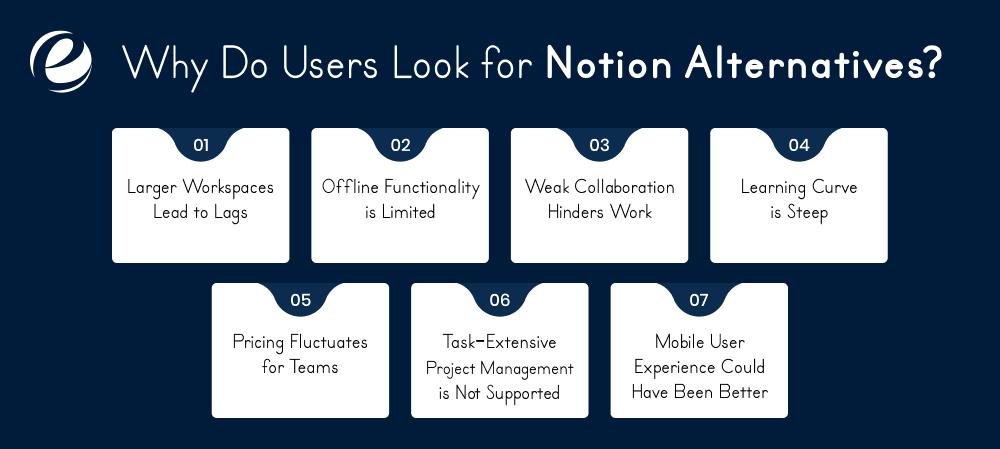
Notion is one of the best apps, but it may not be what some users call perfect. Here are the reasons why people look for top Notion alternatives:
Larger Workspaces Lead to Lags
As and when your data builds up, the app can start slowing down. This is highly likely in case of multiple images, linked views, and embedded content. Many users find it too sluggish to carry out fleet-footed work on a daily basis.
Offline Functionality is Limited
If you are looking for offline access, you might want to check out the top paid or even free apps like Notion. Here’s why: While the task management app giant does work offline, it does not offer sure-fire access. You may not want to count on it for seamless functionality in remote areas with limited or no internet access.
Weak Collaboration Hinders Work
Looking for collaboration as smooth as that on Coda or Google Docs? That’s not the case with Notion. The collaboration features are not as fluid as you need to share, assign, or edit files in teams. Any modifications made by your team members can require a bit of refreshing and may even lag.
Learning Curve is Steep
Users who are new to Notion may find it complicated at first. What to do? Where should I go next? What should I use for what? These are the confusions that overwhelm many users. If you want to add notes or organize to-dos with juggling blocks, Notion isn’t the ideal solution for you.
Pricing Fluctuates for Teams
Whether you are looking for free apps like Notion or are ready to pay a bit, there are several better options available. While the app’s free version does offer value to the users, it’s definitely a big no for many who want advanced functionality on the go.
Task-Extensive Project Management is Not Supported
The app has kanban boards and databases. However, it may not be ideal if you are looking to manage big projects with serious timelines, detailed tracking, and a lot of dependencies involved.
Mobile User Experience Could Have Been Better
Another major reason to explore best Notion alternatives is user experience. While it’s good on many levels, Notion’s user mobile experience has been a topic of discussion. It’s unintuitive and often ends up lagging.
Top Free Notion Alternatives

Not everyone needs all the bells and whistles a productivity tool offers, or the price tag of those shining upgrades! Whether you’re a freelancer or a student looking for powerful free apps like Notion, this list is for you.
| App Name | Key Features | Platform |
| Google Keep | Simple note-taking, labels, reminders, image support, Google integration. | Web, Android, iOS |
| Microsoft OneNote | Notebook-style organization, multimedia notes, handwriting support, cloud sync. | Windows, macOS, Android, iOS, Web |
| Zoho Notebook | Multimedia notes, notebook-style organization, cloud sync. | Windows, macOS, Android, iOS, Web |
| Joplin | Markdown notes, to-do lists, end-to-end encryption, sync via various services. | Windows, macOS, Linux, Android, iOS |
| Zettlr | Markdown editor, citation management, export to various formats, Zettelkasten method. | Windows, macOS, Linux |
| Simplenote | Lightweight note-taking, markdown support, sync across devices. | Windows, macOS, Linux, Android, iOS |
| Workflowy | Infinite nested lists, tagging, collaboration features. | Web, Windows, macOS, Android, iOS |
| Trello | Kanban boards, task management, collaboration tools. | Web, Windows, macOS, Android, iOS |
| Anytype | Local-first, privacy-focused, graph-based organization. | Windows, macOS, Linux, Android, iOS |
| Obsidian | Markdown-based, bidirectional linking, graph view, extensive plugin ecosystem. | Windows, macOS, Linux, Android, iOS |
Top Free + Paid Notion Alternatives
Looking for a serious upgrade or a more specialized tool than Notion? These premium alternatives offer advanced features like AI assistance, rich collaboration tools, beautiful UI/UX, or niche workflows for teams, project management, and content creation.
| App Name | Key Features | Platform | Pricing |
| Evernote | Rich text notes, web clipping, task management, calendar integration. | Windows, macOS, Android, iOS, Web | Free plan; Paid plans start from $14.99/month |
| Mem | AI-powered note organization, smart search. | Web, macOS, iOS | Paid plans start from $14.99/month |
| Tana | Flexible information organization, daily notes, graph view. | Web | Free plan; Paid plans start from $18/month |
| Coda | Documents with embedded tables, automation, integrations. | Web, Android, iOS | Free plan; Paid plans start from $10/doc maker/month |
| Nuclino | Collaborative documents, knowledge base. | Web, Windows, macOS, Android, iOS | Free plan; Paid plans from $6/user/month |
| ClickUp | Task management, docs, goals, time tracking, integrations. | Web, Windows, macOS, Android, iOS | Free plan; Paid plans start from $5/user/month |
| Craft | Beautiful documents, templates, collaboration tools. | macOS, iOS, Web | Free plan; Paid plans start from $10/month |
| Slite | Team documentation, notes, collaboration tools. | Web, Windows, macOS, Android, iOS | Free plan; Paid plans start from $6.67/user/month |
| NotePlan | Calendar-based notes, markdown support, task management. | macOS, iOS | Free trial; Paid plans start from $9.99/month |
| Obsidian Sync & Publish | Sync across devices, publish notes online, version history. | Windows, macOS, Linux, Android, iOS | Sync: $8/month; Publish: $16/month |
How to Find Top Notion Alternatives?

With so many feature-rich and even free apps like Notion available, it can be overwhelming for you to choose one. Here are some handy tips for you to find the right pick fast:
Consider the Purpose
When finding the best app like Notion, ask yourself: What am I expecting from this, a task manager or a note-taker? Or perhaps, you need a project planning system? Notion can do everything, but you may even find a solution that specializes in the feature you are looking for. Defining the purpose will speed up the best outcome for you.
Check for Customization
If you are looking for an app that offers as much comfort as Notion, customization is one of the primary factors that you would want to consider. Even if you are building an app like Notion, adding flexibility with custom templates is not a choice, but a must-do. As a user, you can test whether the UI of the apps you are considering offers reusable workflows and drag-and-drop functionality.
Look at the Budget
Another must-know tip is to check the price factor of the apps. Compare the apps based on both features available and pricing models. Are you looking for the best free apps like Notion? Or are you willing to pay some bucks in exchange for advanced-degree functionality? While you reflect on this, do check if the free tools have limitations like storage or integrations.
Look for Collaborative Capabilities
When working with a team, a Notion-like app can solve collaboration challenges for you. Look for a tool that perfectly supports collaboration. Check if it offers features like version history, editing, and comment sections. These are the must-haves for seamless use.
Check Cross-Platform Sync
Does the Notion alternative you are considering work seamlessly on mobile, web, and desktop, all of them? If yes, this may be your cue to shortlist it. If not, look for tools with syncing capabilities and updates across multiple platforms. This will ensure an uninterrupted workflow for you and your team.
Powerful Features to Consider to Choose or Build an App like Notion
Whether you are building an app like Notion or are comparing ones to choose the best alternatives, here are the features that can help with smart decision-making.
Block-Based Architecture
The iconic blocks are the elements that lie in the heart of Notion. From images to checklists to paragraphs to embedded files, everything on this platform is a block which you can add, copy, make a duplicate of, or move from one place to another. The app is based on modular structure that enables amazing customization, letting you design dashboards, pages, and more.
Custom Templates
One of the best features of Notion that has made many love the platform for daily use is its custom templates. You can add, save, use, and reuse your pages as templates. What’s the point? It minimizes the amount of effort that goes into starting things from scratch. Your weekly schedule, product roadmap, and even job application tracker, everything remains marked in one place.
Drag-and-Drop Interface
This is one of the core features of apps like Notion that you must add to your checklist. Whether you want to make content layouts or organize lists, the drag-and-drop option lets you manage work with ease. Here’s what happens: You shift blocks from one section to another, drag content into toggles, or even nest without columns.
Kanban Boards
Here’s another feature not to miss when looking for or building best Notion alternatives: The classic Kanban boards. You can add Kanban-style boards in any page and move tasks across custom columns easily. This makes organizing checklists super handy. Whether you want to add “Done” or “Due”, add timelines or assignees, do it all inside that relevant task itself. Not to mention, this feature is loved by teams and even individuals, making it an essential aspect of apps like Notion.
Page Nesting
Deeply nested pages are one of the core features of Notion. Pages within pages allow you to create knowledge bases, SOPs, or internal documentation, with a proper hierarchical system. This means that you can add and edit long-form content architectures, and not lose a sight of that. Collapsible menus and breadcrumbs make navigating long hierarchies manageable.
Collaboration
Notion offers no-fuss collaboration. It lets multiple members in your team edit the same content. The visual indicators on the page appear to show who is working on what corner of the page. That’s not all, the app also supports team communications, including mentions, page sharing, and comments. This is great for teams working remotely or in different time zones. If you are building Notion alternatives, this is a must-have feature to add to the roadmap.
Relational Databases
When building premium or free apps like Notion, here’s the note you must keep in mind: The famous productivity app is not just about flat content organization, it brings relational database systems in action. This lets users link a couple of databases, which leads to updates reflecting on one another. This would make an amazing feature for creating editorial calendars, or CRMs.
Multi-View Display
For many users worldwide, the best thing about Notion is its intuitive capabilities. The app displays the same information in many formats. You don’t want to view a content calendar in a table format? Check it as a Kanban board instead. Or perhaps, a calendar only? Your data doesn’t get lost in the crowd and you enjoy the ease of viewing information the way you want. The versatility of the app lets you change views whenever you want.
Permissions and Sharing
With granular permission settings, users can control who can view and edit a specific page. Whether you work in a team or not, this feature ensures that you are able to share the content with specific teams, or individuals. You can share the same through a web link. The amazing thing about this feature is that it offers role-based access options like editor or commentators, which ensures the level of control each member has, especially with sensitive data.
Offline Mode
Notion lets you access its features even without the internet, on both mobile and desktop apps. You can add, read, or write the content even in the poor network, ensuring zero disruption with work. This aspect of the app is worth considering as you find the best Notion alternatives or plan to build one. When the internet is back, all the changes you have made offline will sync automatically across devices.
Calendar and Timelines
If your routine involves the task of managing launch schedules or events or editorial calendars, then you’d know the magic of calendars and timelines right at your fingers. This feature has been one of the key drivers of Notion’s success. It lets you map each task and content across dates. The timeline view lets you track projects, give teams clarity on what needs to be completed below which date, and so much more.
To-Do Lists
Alright, this is one of the most straightforward features which is available on the premium and free apps like Notion. Task management is not just another checklist on this app. It lets you set, edit, or delete priorities, dates, reminders, and progress reports. You can group tasks under one big project, assign them to others, and set statuses accordingly. This is incredibly handy for enhancing team or individual productivity and ensuring timely deliverables.
Markdown Support
The Markdown feature in Notion is a formatting option that lets users italicize, bold, add links, create lists, and basically, use a range of features to manage content, using easy-going keyboard shortcuts. Loved by developers and writers alike, this is one of the topmost features to add in both paid and free apps like Notion. The best thing is that you can even paste Markdown from other platforms. The app automatically changes it into black format. This is hands-down great for those who love precision and efficiency.
Third-Party Integrations
The public API of the productivity app giant lets developers create custom workflows, connect the platform to broader tech stack, and automate actions. Whether you want to back up content to Google Drive or auto-create tasks from Slack messages, you can use the API to do it all.
How to Build an App Like Notion: Key Steps
Here are the steps that largely form the process of building a productivity app like Notion:
Define Vision
First things first, you must have a picture of how the future looks with your app in it. Define why you are building this platform and who will use it. Are you offering solutions to remote teams or students or content creators? What are the core challenges you are addressing through this project? Collaboration? Remote access? Create a detailed roadmap, figure out and list must-have and good-to-have features. This stage of the productivity app development process helps set the line between what you need to do and what not.
Design Architecture
Now map out the content. Here, the team must define how everything will be created, organized, linked, and presented. It is also the stage where you must define the core content units for ensuring flexibility. Outline the hierarchy, content structure, and permissions system early on to ensure a scalable, intuitive app later.
Build Wireframes
The next step is to create wireframes and prototypes to define the user experience. Here, the focus should be on how users will navigate the app, create or add something, edit it, and organize content in general. You may design inline toolbars, toggle menus, drag-and-drop menus, and layouts. The idea is to ensure that the interface is light, functional, engaging for the user.
Choose Tech Stack
Tech stack is supposed to power both core functionality and future scalability of your app. While frameworks like Vue.js and React work good for frontend, Node.js with PostgreSQL is ideal for backend. You may use WebSockets for syncing and AWS S3 for file storage.
Develop Features
This step is where the team starts building the essential features, like a block-based editor where users can add text, to-dos, media, and embeds. Add must-have features, like updates, nested page creation, user authentication, and permissions. Also, ensure integrations like basic search, tagging, and version history. The content should sync smoothly across devices, and everything should be structured using clean, modular components. The little details help enhance scalability in the long run.
Test for Everything
Testing is everything in the process, as it decides how close your product is to your vision and what needs to be revised. That said, check the app for performance across devices, screen sizes, and user roles. Test collaboration to ensure that it is smooth and lag-free. Check functions, permissions, and conflict resolution. Don’t forget to see how your app interacts with large datasets or if it acts snappy.
Launch and Maintain
It’s time to take your app to the launch stage. While you are at it, ensure a smooth feedback channel and track feature adoption with analytics tools. Monitor backend performance and continue refining the app, through and through. This phase is rather constant and essential for making your app a solution people stick to in the long run.
How Much Does It Cost to Develop Apps like Notion?

Productivity and task management app development costs are influenced by varying factors. While the type (and number) of features can take the cost up or down, post-launch processes, like upgrades and bug-fixing, add to the overall budget. Moreover, the user experience, tech stack, and the mobile app development company you partner with also determine the cost of developing an app like Notion significantly. Now let’s talk about estimates.
Building just a basic MVP, loaded with important features like page nesting, basic databases, and block-based editors, costs an average of between $30,000 and $55,000.
The cost will go up to $100,000 to $250,000 if you are investing in a scalable productivity app that’s packed with both essential and high-end features. These may include capabilities, cross-device sync, rich database views, API integrations, granular permissions, and offline mode.
In addition to that, the cost of building an app like Notification will also vary by the different stages involved in the development process. Here’s a rough breakdown
- Initial planning, analysis, and ideation costs somewhere between $5,000 and $9,000.
- Frontend and backend mobile app development have a major share in the budget, costing about $80,000 and even beyond.
- UI and UX design process costs around $8,000 to $20,000, depending on the level of prototyping involved.
- Then there are QA testing, sync, and DevOps. These are the aspects of the process that require a significant chunk of investment.
- To top everything, the platform you choose (Android + iOS + web) or simply one of them, can take your overall budget either significantly or down.
That said, it’s best to partner with a reliable mobile app development partner to gain clarity on the breakdown of costs for your development goals and vision.
Why Partner with EmizenTech To Build Best Notion Alternatives?

To build an app like Notion, you don’t just need good code but also a blend of domain expertise, the right tech stack, and scalable infrastructure. At Emizentech, a leading mobile app development company, we have infused years of experience into secure, solution-driven projects. Whether you want to build the next best alternative to Notion from scratch or refine an existing one, our dedicated team takes care of your requirements, ensuring cost-efficiency and timely delivery.
Our end-to-end custom app development services include:
- UI and UX prototyping
- Cross-platform mobile app development
- Collaboration sync
- Integrations that keep solutions connected without interruptions
We also provide post-app development services, which include bug fixes and maintenance, to help you stay aligned with evolving market trends. Whether your goal is to expand your business or simply offer a highly productive solution to a wide range of audiences, connect with us to create an effective roadmap.
Redefine Productivity with Best Apps like Notion!
With so many options available in the market, building productivity, note-taking, or free apps like Notion requires more than just knowing a list of features. It demands a deep understanding of the competitive market, the right tech stack, and the customer’s pain points. Investing in the right mobile app development partner helps you cover all these essentials, helping you build a scalable, profitable solution that truly caters to customers’ needs. Looking for a cost-effective, breakthrough project?

FAQs
Is there a better alternative to Notion?
Well, the answer depends on what you are looking for. While apps like ClickUp are great for task management, you may like Obsidian for its offline-first, markdown-based approach.
How long does it take to build an app like Notion?
While a basic app development can take about 3-5 months, building an advanced, feature-rich app like Notion requires 9-11 months. It’s best to share your requirements with the technology partner to define an efficient timeline for the project.
Why did Notion become so popular?
Minimal interface, all-in-one flexibility, and block-based editing system are just some of the reasons why Notion app became a favorite of many.




 +1 (989) 535-9295
 info@emizentech.com
 emizentech


