ERP with Integrated Supply Chain Management Development
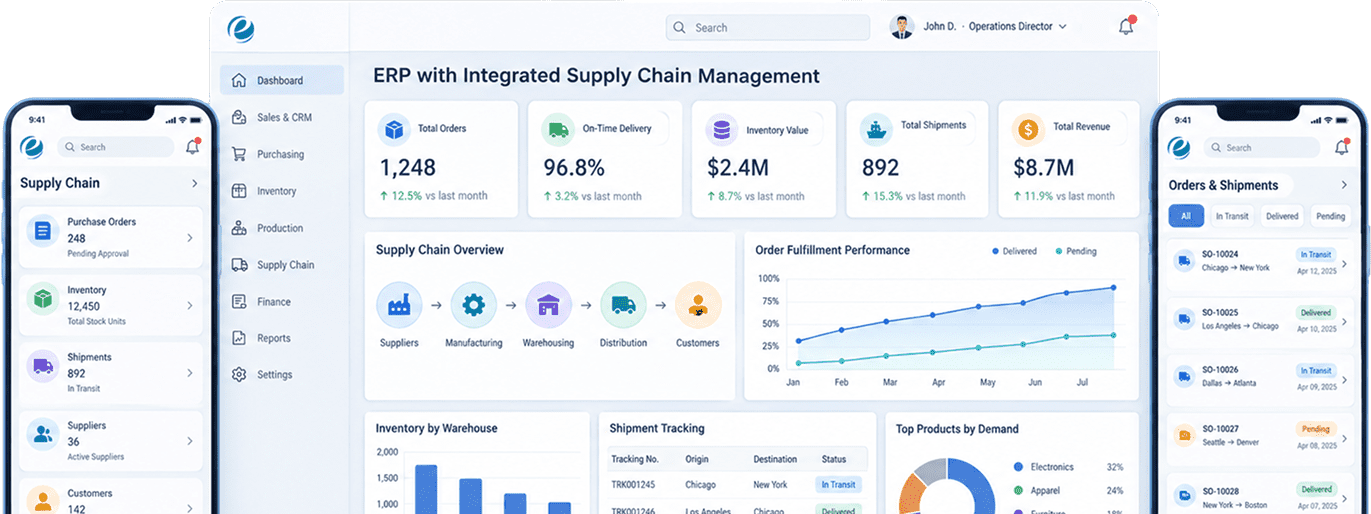
Emizen Tech built a custom ERP where buying, stock, production, and accounting all work from the same set of records. For the first time, the stock count on the warehouse floor and the inventory value in the books actually match.
Overview
A company that makes and ships its own products lives in two worlds. The factory tracks parts, materials, and schedules. The warehouse wants fast picks and on-time trucks. Finance wants one number: what is the stock worth today? These teams rarely share data.
Our client makes and distributes commercial HVAC parts across the US, with two factories, four warehouses, 9,000 products, 600 suppliers, and 1,200 business customers. They ran on an old accounting system posing as an ERP. One warehouse had its own barcode tool, purchasing ran on email, and demand planning lived in one buyer’s spreadsheet. When he went on vacation, reordering nearly stopped.
That’s where most ERP software development projects begin: the business has grown, but the software hasn’t.
The hardest rule was this: no stock moves without an accounting entry, and no entry exists without a real movement. Every receipt, pick, transfer, factory issue, and adjustment had to hit the ledger instantly, at the right cost, across all six locations. Break that link a few times a month, and month-end becomes detective work.
What we delivered:
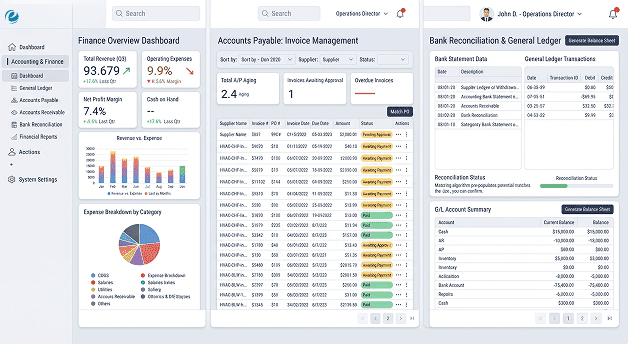
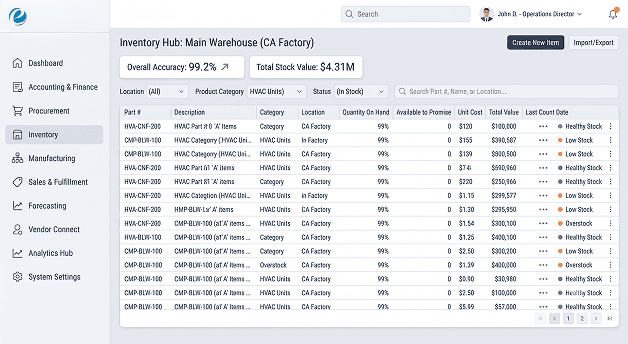
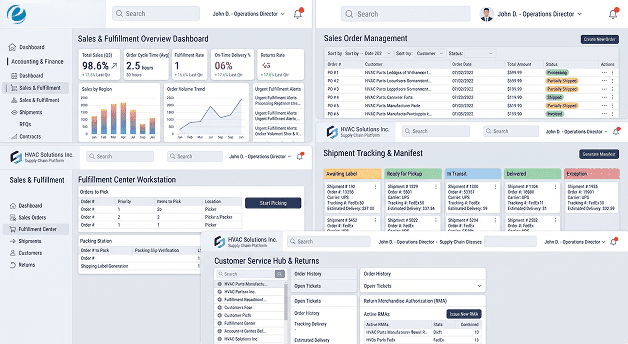
- A web-based ERP covering finance (general ledger, payables, receivables), purchasing, inventory, sales orders, and production
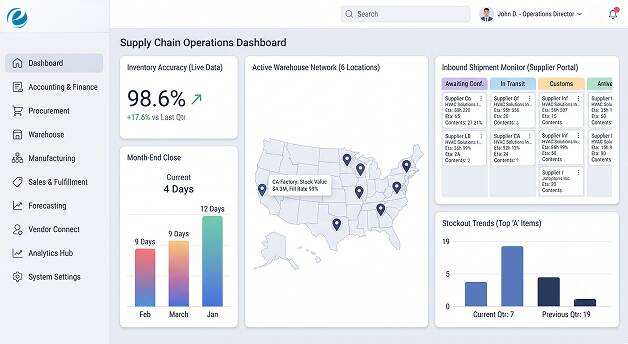
- Built-in supply chain modules for demand planning, reordering, warehouse
- management, transfers between locations, and inbound shipment tracking A React Native handheld app for receiving, putting stock away, picking, counting, and sending materials to the factory floor
- A supplier portal where vendors confirm orders, share ship dates, and send invoices
- A connection layer for EDI, banks, shipping rates, and the customer ordering channel
- An admin console and reports, with dashboards set up for each role
The Challenge
The warehouse trusted paper more than the system
Pickers worked from printed lists and updated the system at the end of their shift, if they remembered. By Friday, the numbers on screen and the stock on the shelf didn’t match. So people stopped trusting the screen, and the gap got even worse. To break that cycle, the scan had to become the actual transaction. Nothing moves in the building unless a handheld records it, and the app has to keep working in the Wi-Fi dead spots behind steel racks.
Purchasing ran on email and one person’s memory
Reorder points lived in one buyer’s head. Supplier confirmations lived in his inbox. The company somehow managed to run out of its best sellers and overstock slow items at the same time, which costs money both ways. That pushed us toward a reorder engine based on real sales history, plus a supplier portal so ship dates stopped showing up as email attachments nobody could find.
Finance took 12 working days to close the month
The warehouse had one inventory number. The books had another. Every month, finance matched them up by hand with a stack of correcting entries and a lot of late nights. Adding more checks wouldn’t help. The system itself had to change: a live inventory record that posts to accounting automatically, at the right cost, so matching the numbers becomes a quick check instead of a project.
The business couldn’t stop shipping to switch systems
There was no quiet season long enough to switch everything over in one weekend. Customers expected orders out every day, and the factories ran two shifts. So we had to go live one site at a time, run the old and new systems side by side, and keep a clean way to roll back each site if the numbers didn’t match.
Our Approach
Our main rule: get the inventory record right, and most of the ERP becomes reporting. Screens are easy to change later. A bad data design is something you pay for every single month.
The project took 24 weeks. The first three weeks were discovery. We mapped every way stock comes in, moves around, and leaves the business, and finance signed off on the accounting rule for each type of movement before anyone wrote real code. Then came ten two-week sprints, plus one final week for the last site switchover. We built the core inventory record, product list, units of measure, costing, and login first. Purchasing and the supplier portal came next, then warehouse management and the handheld app, then production, sales orders, and receivables. Demand planning, integrations, load testing, and the security review wrapped things up. We started going live in week 17 with the smallest warehouse. Each site ran alongside the old system for two weeks, with daily reports comparing both.
One team of 17 people built it. A project manager ran sprints and scope. A business analyst with a finance and costing background was, no exaggeration, the most important person on the team. A solutions architect kept the modules cleanly separated. Four Node.js developers split up inventory and costing, purchasing and supply chain, production, and integrations. Three React developers built the ERP web app and supplier portal, and two React Native developers built the handheld app. A data engineer handled the data move and the forecasting service. A UI/UX designer worked with us for the first six sprints, two QA engineers tested every sprint, and one DevOps engineer looked after the servers. The client’s CFO and head of operations both came to sprint reviews. That meant the usual finance-versus-warehouse arguments happened early, in the room, and not later in production.
Solution Delivered

One system, split into clear modules
On purpose. We could have broken this into a dozen microservices. We didn’t. Stock and accounting have to update together, at the same instant, and splitting them across separate services means money records that are “eventually” correct. No CFO wants to hear that. So the platform runs as one system with strict internal walls between finance, inventory, purchasing, production, sales, and planning. Modules talk to each other through defined connections, not shared tables, so any one of them can be pulled out later if the business outgrows it.

Every stock movement is also an accounting entry
Receipts, put-aways, picks, transfers, factory issues, finished goods, and adjustments are all saved as permanent records that can’t be edited. In the same PostgreSQL transaction, the system creates the matching accounting entry using the rules finance approved. Either both save or neither does. Stock on hand is calculated from these records and kept in a quick-lookup table so screens load fast.

Costing that finance can explain
Products made in the factory use a standard cost. Products bought from suppliers use a running average cost for each location. Price differences, production differences, and extra costs like freight and duties all post on their own. When auditors ask how a number was worked out, the answer is a report, not a spreadsheet.

No more selling the same stock twice
When a sales order is released, the system locks that product at that location while it reserves the stock. Two sales reps can’t promise the same last 40 units to two different customers. Sounds basic, right? It was happening every week in the old system.

The scan is the transaction
The handheld app, built by our React Native app development team, handles receiving against purchase orders, guided put-away, batch picking, transfers, cycle counts, and sending materials to production. It saves tasks on the device and holds scans when Wi-Fi drops between racks. Every scan carries a unique ID, so if the app retries, the stock still only moves once.

Reordering based on real demand, not gut feel
Every night, a Python forecasting service looks at three years of sales and predicts demand for each product at each location, taking seasons into account. The planning module turns that into safety stock, reorder points, and suggested purchase and transfer orders. Buyers now approve suggestions instead of building orders from scratch. We skipped the fancy black-box AI on purpose. If a buyer can’t see why the system wants 400 units, they’ll just ignore it.

Suppliers enter their own data
In the supplier portal, vendors confirm orders, update ship dates, send advance ship notices, and upload invoices. Bigger suppliers connect through EDI (850, 855, 856, 810) using an API-based gateway. Both routes land in the same purchasing records, and that’s the real point of supply chain management software that’s built in rather than stuck on the side. The receiving team knows what’s coming before the truck even pulls up.

Invoice matching runs on its own
Each supplier invoice is checked against the purchase order and what was actually received, with set limits for price and quantity differences. If everything lines up, it goes straight to payment scheduling. If not, it goes to accounts payable with the problem clearly marked.

Money needs two sign-offs
Supplier payment runs create standard ACH and ISO 20022 bank files, sent through the bank’s secure file connection. Every payment run needs two approvers. And the person who edits a supplier’s bank details can’t approve payments to that supplier. Customers pay invoices by card or ACH through a PCI-compliant payment processor. Card details never touch our servers.

Outside systems never slow down the floor
Messages going out, like shipment confirmations, EDI files, bank files, and customer emails, are only sent after the related transaction has fully saved. Background workers deliver them and retry if something fails. If a supplier’s EDI system goes down, the warehouse just keeps receiving.

Reports don’t get in the way
The platform runs on managed containers and a managed PostgreSQL database with point-in-time recovery, all set up with Terraform. Big reports run on a separate copy of the database, so a month-end inventory report never slows down someone’s scanner.
Four Modules Nobody Screenshots
Nobody puts these in a demo. They’re still the reason the system gets through a busy Monday and a month-end close in the same week.
The Unit of Measure Converter
Buy by the pallet, store by the case, sell by the piece. One supplier ships boxes of 12, another ships boxes of 10, and one customer orders by the foot. Every product has its own conversion table, and every transaction saves both what was entered and the base quantity. Boring work? Absolutely. It’s also behind most of the inventory errors we’ve ever had to hunt down in ERP systems.
Month-End Close and Period Locks
A close checklist with owners and due dates, plus a hard lock for each month and each module. Once March inventory is closed, nobody can post a late March receipt. The system moves it into the open month and adds a note to the audit log. Honestly, this one plain module did more for the four-day close than any dashboard.
The Cycle Count Scheduler
Products are sorted into A, B, and C groups based on value and how fast they move. A items get counted every month, B items every quarter, and C items twice a year. The scheduler sends a short daily count list to the handhelds. Counts are blind, so the counter doesn’t see the expected number. If the difference is too big, the system asks for a recount before any adjustment posts. The client hasn’t done a full shutdown stock count since.
The Integration Error Queue
Every failed EDI file, rejected bank file, or unmatched shipment notice lands here with the original data, the error, and a “try again” button. The operations team fixes the data and resends it themselves. The tech team only hears about it if the same error shows up twice.
Key Features

Live Inventory Record
Every stock movement is saved permanently and posted to accounting at the same moment, so stock and books can’t drift apart.

Multiple Costing Methods
Factory-made items use standard cost and bought items use a running average, with differences posted automatically.

Stock Reservations
The system locks a product while reserving it, so two orders can never claim the same units.

Handheld App That Works Offline
Tasks are saved on the device and scans are held until Wi-Fi returns, with unique IDs so nothing is counted twice.

Demand-Based Reordering
Nightly forecasts set safety stock and reorder points and suggest purchase and transfer orders.

Parts Lists and Production Orders
Multi-level parts lists, material issue by scan, and production cost differences posted automatically.

Supplier Portal and EDI
Order confirmations, ship notices, and invoices come in through the portal or EDI and land in the same records.

Automatic Three-Way Matching
Each invoice is checked against the purchase order and the receipt before it’s scheduled for payment.
Separation of Duties
Role rules block risky combinations, like editing a supplier’s bank details and also approving their payments.
Safe Outgoing Messages
Outside messages only go out after the transaction saves, with automatic retries and an error queue.
Results and Outcomes
4 days
Month-end close dropped from 12 working days to 4.
98.6%
Inventory accuracy rose from 81% to 98.6%, based on cycle counts.
63%
fewer Stockouts on top-selling A items fell 63% in the first two quarters.
$2.1M
Inventory value came down 18% (about $2.1M) with no drop in service.
86%
Supplier invoices matched and scheduled for payment without anyone touching them.
97.5%
Order fill rate went up from 91% to 97.5%.
The inventory and costing modules have 88% test coverage, plus tests that replay every stock movement and check the accounting entry it creates. The platform passed an outside security test and follows SOC 2-aligned controls, including separation of duties. A 45-day hypercare period covered all six site go-lives, with an on-call engineer and a four-hour response time.
Technology Stack


Backend
Node.js, NestJS, TypeScript, Python


Database
PostgreSQL, Redis


Auth
Keycloak, OpenID Connect

Payments
Stripe

APIs & Integrations
Orderful (EDI), EasyPost (shipping rates & labels), UPS, FedEx, Shopify, Swagger / OpenAPI


Mobile
React Native, Android, SQLite, Zebra (rugged handhelds & scanners)


Admin & Web
React, Next.js, Tailwind CSS

CI/CD
GitHub, GitHub Actions, Docker, Terraform, Jest


Deployment & Monitoring
AWS (ECS Fargate, RDS, S3), Sentry, Prometheus, Grafana
The Part People Underestimate
When people hear “ERP,” they picture a bunch of forms. A purchase order screen, a product screen, an invoice screen. Those took a small slice of the effort.
What we really built was an accounting system with a warehouse attached. And a warehouse with an accounting system attached. At the same time. Every scan on the floor is a money event. Every costing rule decides what shows up on the balance sheet. There’s a customer and supplier side hiding in there too. Special pricing for certain customers, contract terms, stock held at two large customers’ sites, and 600 suppliers with their own lead times and payment terms. All of it affects what the planning engine suggests and what finance records.
So why not just buy a ready-made ERP? The client looked hard at three of them. They’re good products, and for plenty of companies they’re the right choice. Here, they kept falling short in the same places. The client’s mix of making to stock, making to order, and keeping stock at customer sites needed heavy custom work from outside partners, and that kind of custom work tends to break when the software updates. Per-user pricing for around 180 factory and warehouse staff, most of them on handhelds, added up quickly. And the timelines they were quoted weren’t any shorter than a custom build.
Custom software development cost more at the start and needed more time from the client’s own team. In return, the client owns the data design, the accounting rules, and the plan for what comes next. When your profit depends on knowing exactly what your stock costs, that’s worth paying for.
What’s Queued Next
Phase 2 is already planned, and none of it needs a rebuild. The inventory record, accounting rules, and module setup were designed back in Sprint 1 with this list in mind.
Customer ordering portal
with customer-specific pricing and live stock levels at each location
Supplier scorecards
based on on-time delivery, order accuracy, and quality issues
Multiple companies and currencies
for a planned Canadian branch, including transactions between the two companies
Smarter stock balancing
across factories and warehouses together, not one site at a time
Factory floor data capture
from machine counters, so nobody types in production numbers by hand
Quality management for inspections
for inspections, holding bad batches, and supplier corrective actions
Conclusion
The client didn’t need more screens. They needed one set of records that the warehouse, the factories, purchasing, and finance all trusted, and a supply chain layer that runs on that data instead of one buyer’s memory.
If you’re building something similar (stock that has to match the books, several sites that can’t stop working, and suppliers who need to connect directly), you can hire dedicated developers from us who have already worked through these exact problems. We’re happy to talk through yours.
Frequently Asked Questions
Still Managing Inventory Across Spreadsheets and Systems?
Bring finance, inventory, purchasing, production, and supply chain onto one connected platform.
Schedule a Free Consultation

 Let’s build success Together