Transportation Management Software Development in 16 Weeks
Emizen Tech built one transportation management platform that connects dispatch, drivers, carriers, and billing through a single load record. Now a delivered load turns into an invoice the same day, not after a week of manual work.
Overview
From the outside, freight brokerage looks easy. A shipper has a load, you find a truck, the truck moves it, and everyone gets paid.
The real picture is messier. One load involves a shipper, a broker, a carrier, a driver, sometimes a lumper, and at least three documents that all need to match. Our client, an asset-light 3PL in the US Midwest, was moving about 1,500 loads a week with 350 active carriers. Their “system” was an old desktop TMS, a shared inbox, lots of spreadsheets, and a lot of phone calls. We see this often in logistics software development: the business outgrows its tools well before anyone says it out loud.
The hardest part was not dispatch. It was this: every stop had to be recorded with the correct time and location, even when the driver had no signal. Detention charges, late delivery penalties, and shipper disputes all depend on when a truck really arrived and left. If that time is wrong or missing, the company loses the money.
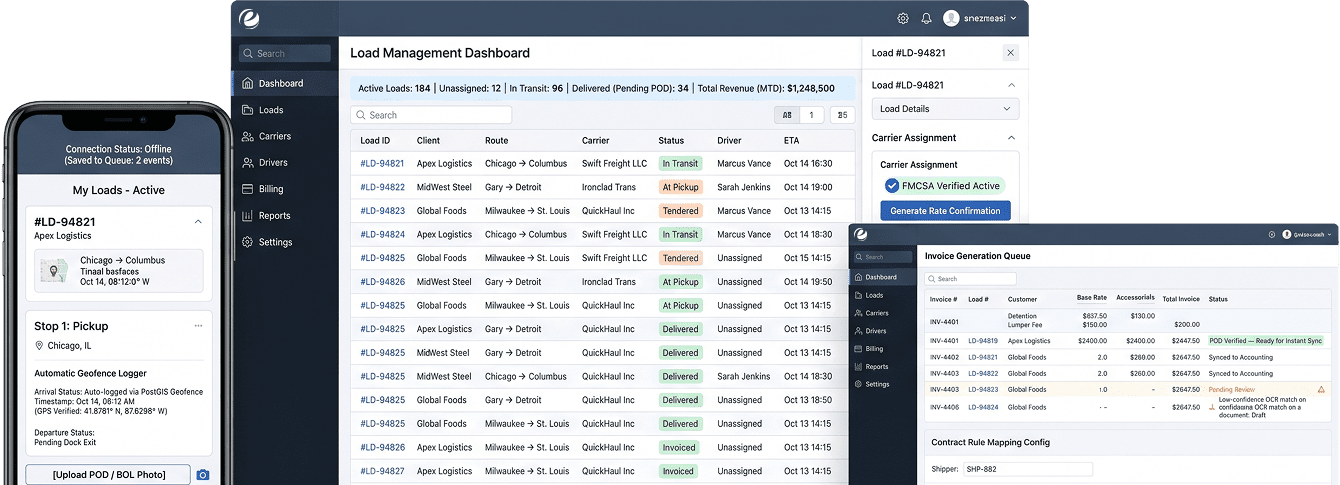
What we delivered:
- A web-based dispatch and operations console for the brokerage team
- A React Native driver app (iOS and Android) that works without internet
- A shipper portal for sending loads, tracking them, and getting documents
- A carrier portal for signing up, rate confirmations, and payment status
- A Node.js backend that handles load status, EDI, compliance checks, and billing
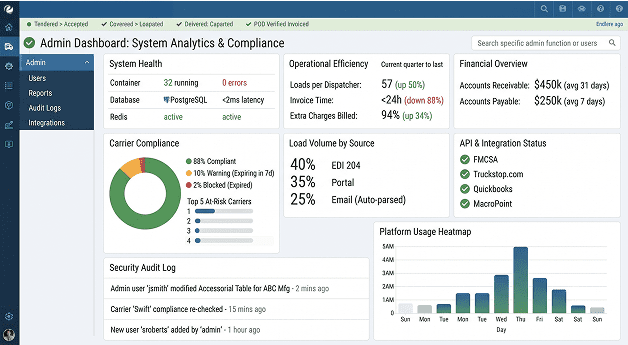
- An admin dashboard for rules, users, reports, and audit logs
The Challenge
Drivers don’t tap buttons at the dock
Drivers are tired, wearing gloves, and often busy arguing with a receiving clerk. On half of this client’s rural routes, they had one bar of signal or none. Their calls to dispatch came late or never came at all, so detention claims had no proof behind them. That led us to use geofences, which log arrival automatically, and a driver app that saves everything on the phone first and uploads it later. Typing things in by hand became the backup, not the main way.
Loads came in from everywhere, and nobody owned the final version
Some shippers sent EDI 204 files, others emailed PDFs, and a few just picked up the phone. Dispatchers typed everything in again by hand, and now and then the same load got booked twice with two different carriers. The fix was one central load record with clear status rules. No matter how a load comes in, it becomes one record, with one owner, in one status.
Double brokering and carrier fraud were a real risk
Carriers with expired authority, lapsed insurance, or stolen identities can take a load and vanish with it. Checking a carrier once at sign-up wasn’t enough. The checks had to run before every single assignment and stop the booking on their own if something was wrong. So we built FMCSA lookups and insurance tracking right into the booking process.
Billing was losing money without anyone noticing
Extra charges like detention, lumper fees, and truck-ordered-not-used often never got billed. Invoices went out 7 to 10 days after delivery while someone chased the signed POD. Customers were taking about 47 days to pay. A better invoice screen wouldn’t fix that. The real fix was to make billing happen automatically from what happened on the road, so a verified POD plus recorded stop times creates the invoice without anyone putting it together by hand.
Our Approach
Our main rule for this project: design the load first, build the screens second. TMS projects often go wrong when teams build the dispatch board first and figure out the data later. We did it the other way around.
The project took 16 weeks. The first two weeks were for discovery: mapping how a load moves, reviewing every integration, and talking to dispatchers, billing staff, and three drivers who joined calls from their trucks. Then came seven two-week sprints. We built the load engine, database, login system, and deployment pipeline first. Next came the dispatch console and offline driver app, then EDI and the shipper portal, then carrier compliance, and billing last. The final sprint covered load testing, a security review, user testing, and moving the old data over. We switched to the new system on a Sunday night, when freight volume is lowest, and kept the old system open in read-only mode for two weeks just in case.
One team of 13 people built it. A project manager handled sprints and scope, and a solutions architect worked closely on the first half. Three Node.js developers split the load engine, integrations, and billing. Two React developers built the dispatch console, portals, and admin dashboard, while two React Native developers built the driver app. A UI/UX designer worked with us for the first five sprints, two QA engineers (one manual, one automation) tested every sprint, and one DevOps engineer managed the servers and pipelines. On the client’s side, their VP of Operations joined every sprint review as product owner. That alone probably saved us three weeks of rework.
Solution Delivered

One load, one record, one set of rules.
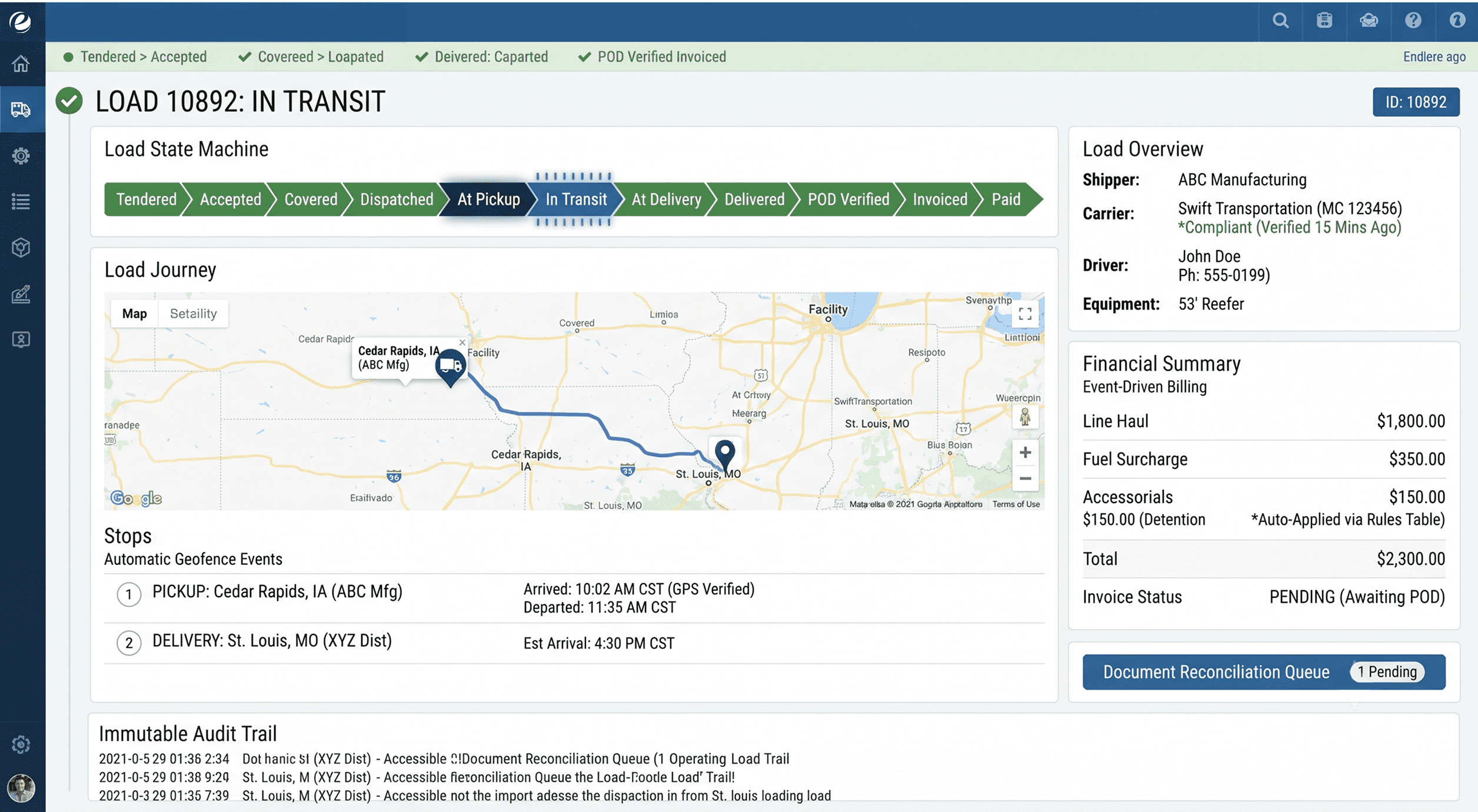
Every load moves through fixed steps: Tendered, Accepted, Covered, Dispatched, At Pickup, In Transit, At Delivery, Delivered, POD Verified, Invoiced, and Paid. The backend controls these steps, not the screen. You can’t bill a load without a verified POD, and you can’t send one to a carrier that failed a compliance check. All the rules live in one place.

Every event is saved and never changed
Each stop action, like arrival, departure, check-in, or document upload, is saved as a permanent record. Each record has the phone’s time, the server’s time, the GPS location, and how accurate that location was. The load’s current status comes from these records. When a shipper questions a detention charge, the billing team shows the full history, including when the truck entered and left the geofence. That usually settles it.

Working offline is normal, not rare
The driver app saves every event on the phone first, holds it in a queue, and uploads it when the signal comes back. Each event has its own unique ID, so even if a weak connection retries five times, the system still saves one arrival, not five. We tested this on real rural routes, not just by turning on airplane mode in the office.

Geofences do the tapping for drivers
Every pickup and delivery location has a virtual boundary around it, stored and checked with PostGIS. When the driver’s phone enters that boundary, the app records the arrival on its own. When it leaves, it records the departure. Drivers can confirm or fix the time, but they don’t have to do anything by default. Drivers started using the app much more once they realized they didn’t have to call dispatch anymore.

Every load gets cleaned up before anyone sees it
EDI 204 files come in through an API-based EDI gateway. Emailed loads go through a reader that pulls out the key details and flags anything it isn’t sure about for a person to check. Portal loads are already in the right format. All three end up in the same place, which checks for duplicates using the shipper’s reference number and pickup time. Double booking stopped because the system simply doesn’t allow it.

Compliance is checked before every assignment
When a dispatcher picks a carrier, the system checks their FMCSA operating authority, insurance expiry date, and any internal warning flags. If anything fails, the assignment is blocked and the dispatcher sees why. Every night, the system also rechecks all active carriers, so an expired policy is caught before the next load, not after a claim.

Payments done the simple, safe way
Shipper invoices are created from the load record and sent to the client’s accounting system. Shippers pay by card or ACH through a PCI-compliant payment processor. Carrier payments work the same way in reverse, with quick pay available for a set fee. Card details never touch our servers. Every money-related action is saved in an audit log that nobody can edit, not even admins.

Heavy work runs in the background
Rate confirmation PDFs, EDI 214 status updates, compliance checks, invoices, and notifications all run in background job queues using Redis. If a job fails, it tries again after a short wait. If it keeps failing, it goes to a separate list where the ops team can check it and run it again from the admin panel. Dispatchers never wait on an outside system when they click a button.

Servers the client can fully own
The platform runs on managed containers, a managed PostgreSQL database, file storage, and a CDN, all set up with Terraform by our DevOps team. If the client ever wants to host it themselves or switch cloud providers, the whole setup is written down as code, not stuck in someone’s head. Login works the same way: a self-hosted, open-source identity server with standard single sign-on, and no per-user fees that grow with every new carrier.
Three Modules Nobody Screenshots
You won’t see these in a sales demo. But they’re what keeps the system running smoothly on a busy Tuesday afternoon with 200 loads on the road.
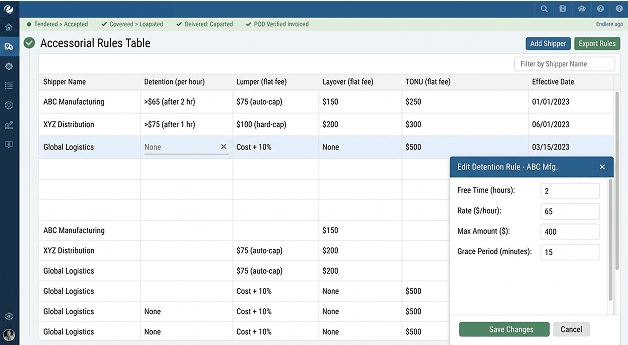
The Accessorial Rules Table
Every shipper contract handles detention differently. One pays $65 an hour after two free hours. Another pays after three hours, up to $400. A third doesn’t pay for detention at all but does pay for layovers.
We built a settings screen where the billing team can set these extra charge rules for each shipper, route, or facility, with start and end dates. The billing engine checks these rules against the stop records and calculates the charges on its own. When a contract changes, billing just updates one row. No need to ask the tech team.
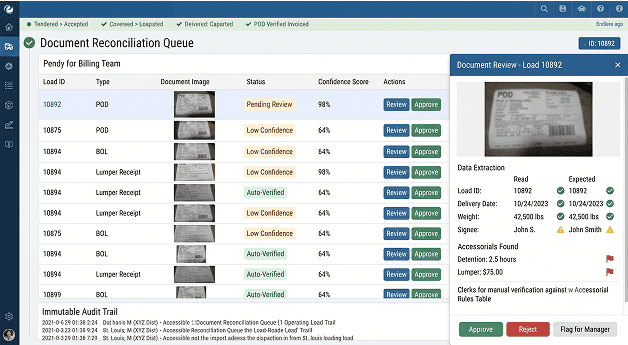
The Document Reconciliation Queue
Drivers take photos of BOLs and PODs in the app. Some photos are clear. Others are taken at night, at an angle, with a thumb in the shot.
Every document is scanned with OCR, matched against the load’s reference numbers, and placed in a list sorted by how confident the match is. Strong matches are approved automatically and unlock billing. Weak matches go to a billing clerk, who sees the photo, the details the system read, and the expected details side by side. Clerks stopped digging for paperwork and now only review the problem cases.
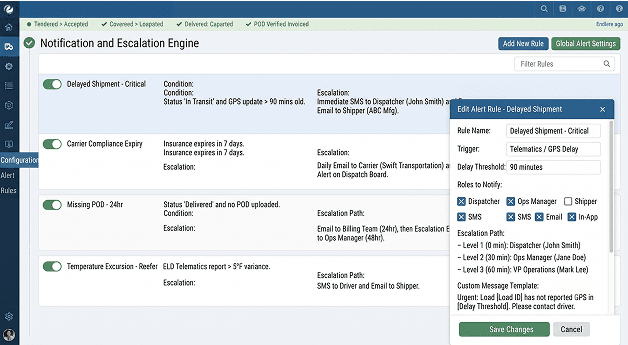
The Notification and Escalation Engine
Dispatchers don’t need an alert every time a status changes. They need to know when something is going wrong.
The alert system runs on rules: a truck that hasn’t checked in for 90 minutes, a delivery that’s going to miss its appointment, a carrier whose insurance runs out in 7 days, or a POD still missing 24 hours after delivery. Each rule decides how the alert is sent (in-app, email, or SMS), who gets it, and who gets it next if nobody responds. Shippers get their own set of updates, so they stop calling to ask where their freight is.
Key Features

Load State Machine
The backend controls every status change, so a screen bug can never put a load in the wrong status.

Offline-First Driver App
Data is saved on the phone first and uploaded later, with unique IDs so nothing gets saved twice.

Automatic Geofence Events
Virtual boundaries built with PostGIS record arrivals and departures without the driver doing anything.

Multi-Channel Load Intake
EDI 204 files, emails, and portal entries all become one clean load record with no duplicates.

Continuous Carrier Compliance
FMCSA authority and insurance are checked at every assignment and again every night for all active carriers.

Rate Confirmation Generation
Rate confirmation PDFs are created in the background and signed online in the carrier portal.

Event-Driven Billing
Invoices are created automatically once the POD is verified and extra charge rules are applied.

EDI Status Messaging
EDI 214 and 210 messages are created from load events and sent to shipper systems automatically.

Role-Based Access Control
Dispatchers, billing staff, shippers, carriers, and drivers each see only what their role allows, down to single fields.

Immutable Audit Trail
Every status change, payment action, and admin edit is saved permanently with who did it and when.
Results and Outcomes
<24 hours
Invoice time dropped from 7–10 days to under a day for 88% of loads.
94%
Extra charges billed went up from about 60% to 94% of eligible loads.
57 loads/day
Each dispatcher now handles 57 loads a day, up from 38, with no new hires.
31 days
Customers now pay in 31 days instead of 47, within two billing quarters.
The load and billing modules have 84% test coverage, and full end-to-end tests cover the web and driver apps. We tested the platform at 3× peak volume and ran an outside security test, fixing every high and medium issue before launch. SOC 2-aligned controls keep the client ready for certification. During 30 days of hypercare, only 2 small issues came up, and both were fixed the same day.
Technology Stack


Backend
Node.js, NestJS, TypeScript, Redis-backed job queues

Database
PostgreSQL with PostGIS, Redis (queues and caching)

Auth
Self-hosted open-source identity server (OIDC, SSO, role-based access control)

Payments & Accounting
PCI-compliant payment processor (card and ACH), accounting platform API sync

APIs & Integrations
API-based EDI gateway (204, 990, 214, 210), FMCSA carrier data, truck-specific routing and ETA API, ELD telematics APIs, cloud OCR for documents, SMS and email alerts


Mobile
React Native, SQLite-based offline storage, background location tracking

Web & Admin
React, Next.js

CI/CD
Git-based CI pipelines, Docker, Terraform, automatic tests on every code change


Deployment & Monitoring
Managed containers, managed PostgreSQL, file storage with CDN, error tracking, Prometheus-based dashboards
The Part People Underestimate
When people hear “transportation management software,” they imagine a map with little truck icons. That map took about a week to build.
The rest of the project was really about keeping data correct and consistent. At its heart, this platform is a ledger, like a record book for money. Every load is a deal between three or four parties, and every event on that load either creates, changes, or proves who owes what. Detention is money. A late POD is money. A carrier with expired insurance is a claim waiting to happen. The dispatch board is just the window people look through.
It’s also a customer and relationship problem. Shippers have contracts, locations, preferences, and billing terms. Carriers have routes, equipment, compliance records, and payment preferences. All of that shapes every choice a dispatcher makes.
So why not just buy a ready-made TMS? The client looked at several. Many of them are good products. But for this business, three things didn’t fit. Per-user pricing got expensive fast once carrier and shipper portal users were added. The extra charge rules the client had built up over ten years didn’t fit the standard templates, which meant workarounds, which meant spreadsheets again. And the offline driver app, which the whole billing process depended on, was either missing or needed a separate app from another vendor.
Custom software development services cost more at the start. But the client owns the code, the data, and the plan for what comes next. For a business that makes its money in the details of freight billing, that ownership mattered more than a faster start.
What’s Queued Next
Phase 2 is already planned. None of it needs a rebuild of what was delivered in the first 16 weeks. The event records, load status rules, and background integration setup were designed in Sprint 1 with this list in mind.
Load board integrations
to post uncovered loads and find available carriers automatically
Route-based rate suggestions
that use the platform’s own past pricing and transit data to recommend buy and sell rates
Shipper self-service quotes
with instant pricing on regular routes
Cross-border support
for Canada and Mexico, including multiple currencies and customs documents
Carrier scorecards
based on on-time performance, POD speed, and claim history
IFTA and fuel reporting
for the client’s small fleet of owned trucks
Conclusion
The client didn’t have a dispatch problem. They had a proof problem: events on the road weren’t being recorded reliably, so billing lost money, disputes dragged on, and fraud risk went unchecked.
If you’re building something similar (work shared between many parties, field users who go offline, and billing that depends on exact times), you can hire dedicated developers from us who have already solved these exact problems. We’re happy to talk through yours.

 Let’s build success Together