 Add us as a preferred source on Google
Today, we need an expense management app more than ever. Whether you are an individual trying to stay on top of your personal finances or a company looking to control business expenses, having the right tools to track and manage your spending is essential.
That’s where expense management apps come into play. The expense management app is a valuable tool for managing one’s finances. It allows users to manage their finances and make informed decisions on spending where to invest their money.
Did you know? The global expense management software market size was projected to grow from USD 7.64 billion in 2024 to USD 16.48 billion by 2032.
This explosive growth highlights the increasing demand for tools that simplify financial management for individuals and businesses alike. This, in turn, creates a surge in the demand for expense management apps among individuals, attracting entrepreneurs to invest in their development.
If you are someone who wants to build an expense management app, there is no better time than now. In this blog, we will explore the expense management app development process, the essential features, and the cost of developing an app.
So, without any further delay, let’s dive in!
What is the role of an expense management app?

Expense management apps are designed to help individuals and businesses to manage their financial expenditures. These apps are beneficial for both individuals and businesses, as they allow them to manage their finances efficiently. They streamline the process of budgeting, monitoring, tracking, and accounting and provide helpful insights into money management.
Moreover, the finance management app has features such as receipt scanning and expense categorization, which simplify the often tedious task of tracking daily expenses and promote better financial health and accountability.
For businesses, these apps act as invaluable tools that not only enhance operational efficiency but also provide financial transparency. With expense management, businesses can easily track employee expenses, automate reimbursement processes, and provide detailed reports that aid in budgeting and forecasting.
If you are planning to build an expense management app, you cater to both individuals and businesses alike to take control of their finances. This will lead to improved budgeting, reduced overspending, and enhanced financial planning.
But before you invest in this segment, let’s explore the market stats in the next section.
Why invest in expense management app development?

To understand the true potential of an expense management app, first, you need to explore the market insights and trends that reflect why investing in this niche is worthwhile.
Due to increased demand for automation and efficiency, companies are continuously seeking innovative ways to manage their expenses. Thanks to expense management app that not only helps reduce manual data entry but also improves accuracy.
A report states that 70% of businesses are expected to adopt expense management software by 2025, which will improve their financial visibility.
Moreover, with the rise of the gig economy and remote work, individuals need tools to track personal expenses and manage their finances. These apps provide valuable insights into spending patterns, helping individuals and businesses identify cost-saving opportunities and helping them make informed financial decisions.
The expense management software market has grown rapidly in recent years, and it is expected to grow about $10.82 billion in 2028 with a CAGR of 13.1%.
Investing in an expense management app is about more than just building software. it’s about offering a solution that streamlines expense tracking, enhances reporting, and empowers users with better financial clarity. So if you are ready to create successful expense management app, explore the essential features in the next section.
Top features of the expense management app

Creating an expense management app requires features that enhance user experience and provide seamless navigation for both users and businesses. We have created a list of essential features for the admin and user panel that you should consider when developing one.
| Admin panel | |
| Feature | Description |
| User management | This feature allows the admin to add, remove, or modify user accounts, managing access and permission effectively. |
| Receipt approval | With this feature, the admin can review uploaded receipts from users, approving or rejecting them based on accuracy and validity. |
| Expense monitoring | View and manage all user expenses, ensuring with company policies and budgets. |
| Integration management | With this feature admin can facilitate seamless integration with various accounting software and banking systems. |
| Budegt oversight | This feature allow admin to set and manage budgets for different departments within the organization. |
| Reporting and analytics | Admin can access reports and anaylze provide insights into organizational spending. |
| User activity tracking | This feature allow admin to monitor app usage and performance metrics to access user engagement & identify potential issues. |
| Role management | Assign roles and permissions to users, controlling access to specific features and data. |
| Compliance management | Ensure that all financial activities comply with relevant regulations and company policies. |
| Data security oversight | Implement data protection measures and ensure compliance with privacy regulations. |
| User Panel | |
| Feature | Description |
| User Registration | With this feature, users can easily register on the app and customize their profile information such as name, profile picture, and address. |
| Expense tracking | This feature allows users to easily input and categorize their expenses in real time so they can monitor their spending. |
| Receipt scanning | Capture images of receipts with OCR technology to extract relevant data automatically. |
| Budgeting tools | This feature helps users to set personal budgets for different categories and receive alerts when they exceed the budget limits. |
| Reporting and analytics | With this feature, users can generate personalized expense reports, providing insights into spending patterns and trends. |
| Multi-currency support | Tracking and managing expenses in various currencies, making it ideal for travelers and global users. |
| Integration with banking | Sync bank accounts and credit cards to automatically import transactions, reducing manual entry. |
| Mobile access | Access the app on mobile devices, allowing users to manage expenses anytime and anywhere. |
| Collaboration features | Share expenses for approval if part of a team or organization, streamlining reimbursement processes. |
Advanced features for the expense management app
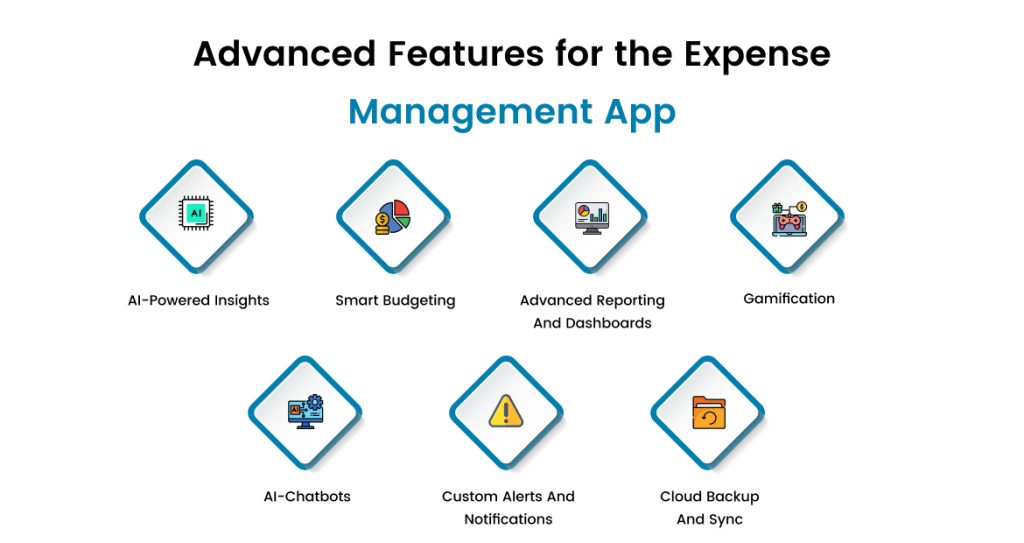
To provide users with a more engaging experience, integrate your mobile application with advanced features. Here is the list of advanced features, take a look.
1. AI-powered insights
With the integration of AI, users get personalized insights based on their spending patterns. AI can analyze historical data and provide users with cost-saving recommendations so they can adjust their budgets accordingly.
2. Smart budgeting
By offering smart budgeting tools helps users to adjust their budgets based on their spending habits and financial goals. Some of the best budgeting apps, like YNAB and PocketGaurd, offer dynamic budgeting tools that help users make informed financial decisions.
3. Advanced reporting and dashboards
Advanced reporting provides a complete overview of the business, unlike basic reports, as it provides users with real-time information. Moreover, customizable dashboards quickly display key financial metrics, trends, and visualizations, helping users assess their financial health and make data-driven decisions.
4. Gamification
This feature will encourage user engagement and accountability. It will reward users with points for staying within the budget and managing their expenses efficiently. This process will not only motivate users to manage their spending consciously but also promote better financial behavior.
5. AI-chatbots
AI chatbots can analyze all user data and offer suggestions based on that data. This includes tracking spending habits and providing insights into credit scores. Moreover, AI-based customer service chatbots imitate humans and solve users’ queries quickly and efficiently.
6. Custom alerts and notifications
Users can set personalized alerts for budget limits, upcoming bills or unusual spending patterns. This feature sends reminders or notifications to customers when they exceed their budget limits. It also sends notifications about financial reports, helping customers to pay their bills on time.
7. Multi-user collaboration
Integrating this feature supports multiple users working together on shared budgets or expenses with role-based access controls. It facilitates teamwork in managing finances, particularly for families or organizations.
8. Customizable categories
To build a successful fintech app, you need to integrate customizable category features that reflect user spending habits. Users can create a particular spending category and track overall finance, and they can make informed financial decisions.
9. Cloud backup and sync
With cloud backup, the user’s financial data is securely stored, which provides flexibility to access it from any device. If a user switches their device or faces any technical glitch, the app will automatically sync data without any loss of information.
Top 10 expense management apps

Now you have explore the advanced features, its time to explore top 10 expense management app we have created a list take a look.
| App Name | Approximate Downloads | Platforms | |
| Money Manager & Expenses | Over 10 million | Android | |
| AndroMoney | Over 1 million | Android | |
| 1Money | Over 1 million | Android, iOS | |
| EveryDollar | Over 1 million | iOS | |
| YNAB (You Need a Budget) | Over 1 million | iOS | |
| Expensify | Over 1 million | iOS | |
| Rocket Money | Over 1 million | iOS | |
| Wallet: Budget Expense Tracker | Over 5 million | Android | |
| Expenses: Spending Tracker | Data not specified | iOS | |
| Simplifi | Data not specified | iOS, Android |
Step-by-step development process of expense management app
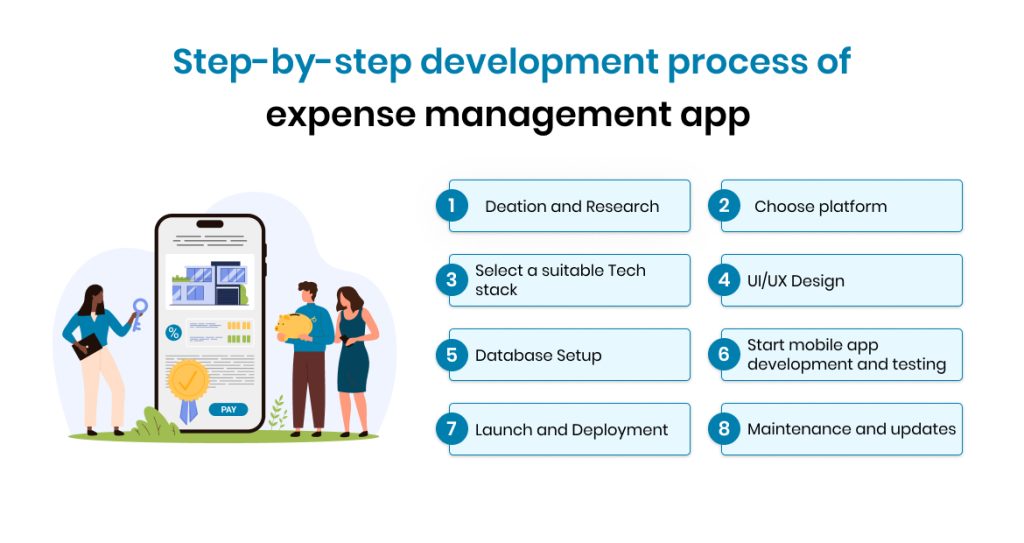
To build a successful expense management app, you need to follow the right strategy. Here is the step-by-step expense management app development process. Get right into it.
1. Ideation and research
The expense management app development process starts with defining the app’s core purpose. By doing thorough market research, you can identify market gaps and understand your target audience’s needs.
In this process, you get to know what competitors lack in their apps and solve those pain points with your app. Once you know your target audience and their needs, you can streamline the development process and create an app that solves users’ expense management issues.
2. Choose platform
Now, decide on the appropriate platform to build your mobile app. Whether to build for iOS, Android, or both. Native for iOS and Android, hybrid apps utilize react native or Flutter and for cross-platform app by using web-based approach.
Before you decide on the platform, consider factors like development cost, time and device compatibility, and performance to avoid any issues later in the development process.
3. Select a suitable Tech stack
Selecting the right set of tools and technology is crucial for creating a successful mobile app. Use frameworks like Flutter or React native for cross- platform development. And for native you can opt for Swift and Kotlin for Android.
For integrating API, you can go with REST or GraphQL, and for secure storing using data, go with Firebase and Google Cloud. Make sure you choose the tech stack according to your budget and scalability requirements.
4. UI/UX design
In this stage, start working on the user interface and user experience design focusing on creating an intuitive layout of the app by keeping the user experience in mind. The team of designers will create wireframes to outline the app’s layout and flow.
Develop prototypes to visualize the app’s functionality and gather feedback. By focusing on intuitive navigation, easy access to features, and visually appealing design, you can provide users with seamless navigation.
5. Database setup
Now, plan the database schema to effectively store user data, expenses, receipts, and other relevant information. Security measures to protect sensitive financial data, including encryption and secure access protocols, will also be implemented.
Use cloud databases like Firebase for ease of scaling and security. For more complex queries you can use relational database like MySQL. Lastly, ensure that the database must be able to handle an increasing number of users and transactions over time.
6. Start mobile app development and testing
After the database is set, the development process begins. The team of developers will start building the functionalities, such as user registration and login. Also, features like charts and graphs should be considered to help users visualize their financial data.
Connect frontend and backend components, ensuring seamless data flow. Once the development process is completed, conduct various tests on the app to identify and resolve any bugs or issues found during testing.
7. Launch and deployment
After completing the testing phase, prepare the app for submission to app stores such as Google Play and App Store, including creating promotional materials. Launch the app on the chosen platform and monitor for any immediate issues post-launch.
Additional tip: You can opt for MVP development to validate your app idea. Once you get satisfactory results, you can scale your app and include more customer-centric features.
8. Maintenance and updates
This is an ongoing process. Continously gather user feedback to identify areas for improvement. Release updates to fix bugs, enhance features, and ensure compatibility with new OS versions.
Moreover, stay updated with the industry norms, latest trends, and compliance guidelines to ensure your app’s relevance and security.
Tech stack required for an expense management app
Select the right set of tools and technologies to create a successful expense management app. We have created a list of essential tech stack required for creating finance management app.
| Component | Technology |
| Frontend | React, Angular, or Vue.js for web
Flutter or React Native for mobile cross-platform development. |
| Backend | Node.js, Django (Python), Ruby on Rails, or Spring Boot (Java). |
| Database | PostgreSQL, MySQL, MongoDB, or Firebase Realtime Database. |
| Authentication | Firebase Authentication, Auth0, or custom OAuth implementation. |
| Cloud Hosting | AWS (Elastic Beanstalk, Lambda), Google Cloud (App Engine), or Microsoft Azure. |
| APIs | REST or GraphQL |
| Storage | AWS S3, Google Cloud Storage, or Firebase Storage |
| Payment Integration | Stripe, PayPal, or Razorpay |
| Notifications | Firebase Cloud Messaging (FCM) for push notifications
Twilio for SMS. |
| Analytics | Google Analytics, Mixpanel
Amplitude for tracking user activity. |
| Security | HTTPS, JWT for token-based authentication
AES-256 encryption for sensitive data. |
| Testing | Jest, Mocha for unit tests
Selenium or Appium for end-to-end tests. |
| DevOps | Docker, Kubernetes, Jenkins, or GitHub Actions for CI/CD. |
| Version Control | GitHub, GitLab, or Bitbucket. |
| Project Management | Jira, Trello, or Asana |
How much does it cost to develop an expense management app?
The cost of developing an expense management app can range anywhere from $20,000 to $300,000 or more, depending on various factors. It’s not a one-size-fits-all deal, and here’s why:
1. Complexity of Features
If you’re going for a basic app with simple features like manual expense tracking, basic categorization, and budget setting, you’re looking at the lower end of the range around $20,000 to $50,000.
But if you want to go all out with advanced features like AI-powered analytics, bank integrations, receipt scanning with OCR, and real-time notifications, the costs can quickly climb to $100,000 or more.
2. Platforms You Want to Target
Developing for iOS, Android, and web adds to the cost. A single platform is cheaper, but going cross-platform will set you back more, especially if you want a seamless user experience.
3. Design & User Experience
A polished, user-friendly design with smooth animations can add a good chunk to the cost. You’re probably looking at $10,000 to $30,000 just for the design phase if you want something visually stunning and intuitive.
4. Development Team & Location
Where you hire your team makes a huge difference. Developers in the US or Europe may charge $100-$200/hour, while teams in India or Southeast Asia might offer similar quality for $30-$50/hour. This can significantly impact the overall budget.
5. Maintenance & Updates
Don’t forget launching the app isn’t the finish line. Regular updates, bug fixes, and adding new features will cost extra, typically around 20-30% of the development cost annually.
However, if you’re bootstrapping or just testing the waters, you can start with a Minimum Viable Product (MVP) for about $20,000 to $40,000. But for a full-fledged app with all the bells and whistles, you’re realistically looking at $100,000 to $300,000 or more.
6. Additional Tip
Invest in the features your users actually need, rather than trying to cram in everything. A well-executed app with fewer features can often outperform a bloated one.
How do you monetize an expense management app?
Monetizing an expense management app isn’t rocket science, but it does take some strategic planning. Here are some of the most popular ways you can make money from your app:
1. Freemium Model
This is the go-to approach for most apps. You offer a basic version of the app for free, but users can unlock premium features like advanced analytics, multi-currency support, or ad-free experiences by paying a subscription fee.
2. Subscription Plans
Charge users a monthly or annual subscription fee. You can have tiered pricing, like a basic plan for casual users and a pro plan for power users with features like bank integrations, family accounts, and real-time notifications.
3. One-Time Purchase
Instead of recurring payments, some apps charge a one-time fee to download and use the app.
4. In-app purchases
Offer extra features or tools that users can pay for as needed, like exporting reports in custom formats, premium themes, or AI-driven insights.
5. Ads and Partnerships
Show non-intrusive ads or partner with financial institutions to recommend their services. For example, you could partner with a budgeting service or investment platform and earn a commission for every referral.
6. Data Insights (Ethically)
If you have a large user base, anonymized data can be valuable for market research. But tread carefully on privacy matters, and this should be done transparently with user consent.
7. White Labeling
You can develop a version of your app for businesses or financial institutions to offer to their customers under their branding.
Mix and match these strategies. Start with a freemium model to build a user base, then add premium features and partnerships to scale. Whatever you choose, keep the user experience top-notch, happy users are paying users.
How can we help you with expense management app development?

Building an expense management app can feel like a big task due to market competitiveness and security and compliance risks. With the help of experienced development partners like EmizenTech, you can start your expense management app development journey with ease.
As a leading mobile app development company, we offer reliable banking finance software solution,s bringing your fintech app idea to life.
We provide fintech application development services that fit your unique goals, whether it’s for personal finance or corporate expense tracking.
Whether you want AI insights, receipt scanning, or multi-currency support, we focus on features that aren’t just trendy but genuinely useful for your users.
Speaking of best, no one wants a complicated app, and we design apps with simplicity in mind, ensuring your app looks aesthetically and is easy to use.
Whether you are an entrepreneur with a brilliant idea or a business looking to streamline operations, partner with us and turn your app idea into an app that stands out.
Conclusion
We live in a fast-paced world, and managing expenses effectively is more important than ever for individuals and businesses. Expense management apps have proven to be game-changers, offering smarter, more efficient ways to track spending, identify savings, and make informed financial decisions.
With the market for these apps growing rapidly, there has never been a better time to invest in developing one. This segment has the potential to unlock incredible opportunities for growth and innovation.
We hope that with this blog, you get the nitty-gritty of an expense management app, and you can start your app development journey without any setbacks.
If you have an idea, connect with us and create a feature-rich app that stands out in the market.
FAQs
How much time does it take to develop an expense management app?
The development time for an expense management app typically takes 3 to 6 months on average or more than a year, depending on the complexity of the app.
How much does it cost to create an expense management app?
The cost to develop an expense management app can range from $20,000 to $300,000 or more. Factors influencing the cost include the app’s complexity, platform (iOS, Android, or both), design requirements, and whether you hire freelancers, an agency, or have an in-house team.
What features should be included in the expense management app?
Here are some key feature you can include:
Expense tracking and categorization
Receipt scanning and OCR
Budgeting tools
Reporting and analytics
Multi-currency support
Integration with banking and payment systems
User collaboration features
Data security measures
Are expense-tracking apps safe?
Generally, expense-tracking apps can be safe if they implement strong security measures such as encryption, secure authentication, and regular updates. However, users should always choose reputable apps and be cautious about sharing sensitive financial information.
How do expense-tracking apps work?
Expense-tracking apps work by allowing users to input their expenses manually or automatically through integrations with bank accounts. Users can categorize expenses, set budgets and generate reports. The app stores data securly in a database and provides insights into spending habits through analytics and visualizations.



 +1 (989) 535-9295
 info@emizentech.com
 emizentech


