
 Add us as a preferred source on Google
 When it comes to managing specific tasks and keeping up with essential events can be challenging due to hectic life schedules. With technological advancement, there are many apps available in the market with built-in calendars designed to simplify our lives.
However, many of these apps fail to address the sole purpose, such as identifying the user’s needs or demographics that remain underserved. Often, they are overloaded with complex features, which makes them difficult to navigate.
Additionally, users struggle with syncing these calendars across different platforms or integrating them with other productive tools. Poor notification management can also result in missed important events.
This is why there is a continuous need for effective time management solutions that provide a seamless user experience and address potential challenges effectively. So, investing in calendar mobile app development unlocks a myriad of benefits, especially as remote work and flexible schedules become more common.
If you want to know how to develop a calendar mobile app, read the entire blog and gain insights on the calendar app development process, types, and how much it costs to build a calendar app. Let’s dive in!
What Is Calendar Mobile App Development?
Calendar mobile app development is the process of creating a user-friendly mobile application from scratch. The process involves market research, design, development, and deployment stages.
With so many in-built calendar apps available in the market, developing calendar mobile or web apps from scratch can be challenging. Therefore, the mobile app development process starts with thorough market research to identify the gaps in the market and understand user needs.
Then, developers and UI/UX designers focus on designing an intuitive interface that allows for easy navigation and quick access to essential features such as event scheduling, reminders, and task management.
Additionally, they incorporate the latest AI features like AI-driven suggestions, customizable views, and collaboration tools to enhance the overall user experience. After that, they will test the app to eliminate bugs or errors and refine the app according to the feedback.
If you are satisfied with the testing results, your calendar mobile application is being prepared for deployment. You should be ready with the marketing strategies and tactics to create buzz around your app.
So, this is all about the calendar mobile app development. Now, let’s move to the next section.
Why Should Businesses Invest In Developing A Calendar App?
The calendar app market size is USD 5.71 Billion in 2023 and is projected to reach USD 16.37 Billion by 2030, growing with a CAGR of 10.4% during the forecast period 2024-2030.
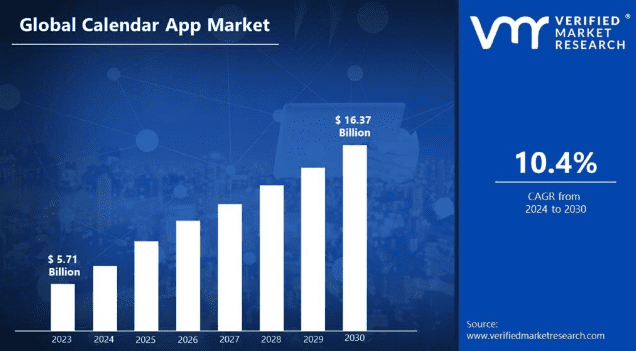
The increase in calendar app development is driven by AI integration and remote work. According to a report, the calendar app market is predicted to be more than triple by 2030. 70% of adults are said to be using digital calendars, and around 1 in 2 people access a digital calendar on their phone.
In another report, it is mentioned that when asked user about how they access their digital calendar, almost half 46.7% said they use a mobile calendar app. And 23.3% use a desktop calendar app, and the rest, 28.3%, use a paper calendar or journal and planner.
This data reflects on the prominent future of calendar apps and shows that investing in web or mobile app development could be a profitable venture for businesses.
Types Of Calendar Apps You Can Develop
There is a continuous need for effective time management solutions, especially as remote work and flexible schedules become more common. Therefore, creating a calendar app requires a deep understanding of user needs and market demands to thrive in this competitive market.
So before investing in this niche, explore some types to gain a better insight.
1. Personal Calendar App
Personal calendar apps are designed for individual users, focusing on user time management and allowing users to schedule appointments, set reminders, and track tasks.
When you create your own calendar app, incorporate features such as customizable views daily, weekly, or monthly layouts and integrate them with personal productivity tools.
2. Team Collaboration Calendar App
These kinds of apps facilitate teamwork by allowing multiple users to share calendars, schedule meetings, and manage group events. However, such existing apps have collaboration limitations, and difficulty in sharing calendars or scheduling events with others can hinder teamwork and planning.
If you are planning to create a team collaboration calendar app, implement features such as real-time updates, shared task lists, and integrated communication tools to enhance collaboration.
3. Event Scheduling App
Such apps are tailored to organize events such as conferences, workshops, or social gatherings, and this app helps users plan and manage all aspects of an event.
Features of these apps are RSVP tracking, agenda creation, and venue management, along with options for attendee communication.
4. Booking And Appointment Calendar App
These apps are ideal for businesses like salons, clinics, or consultancies, where clients can book appointments directly without any intermediary.
This app typically includes features like availability management, automated reminders, and payment processing to streamline the booking process.
5. Social Calendar App
Such an app focuses on social interactions, where users can plan and organize social events with friends and family. Developing social calendar apps
The features may include event invitations, group polls for scheduling, and integration with social media platforms to enhance user engagement and communication.
Benefits Of Calendar Mobile App Development
Businesses should invest in calendar application development as it possesses several benefits, such as enhanced time management, improved productivity, increased user engagement, and more.
Let’s explore some benefits given below:
1. Enhances time management
Businesses should make a calendar app as every business has unique needs. A well-designed calendar app can significantly improve time management. Calendars that can effectively schedule meetings and manage resources offer better perks if customized accordingly.
2. Improves productivity
With the task m management feature, the calendar app can streamline daily operations, reducing the time spent on administrative tasks. By automating scheduling and reminders, businesses can focus on their core responsibilities, leading to increased overall productivity.
3. Simplifies scheduling and planning
The automation feature in the calendar simplifies the scheduling of meetings, tasks, and appointments and will reduce the time spent on administrative work. Users can easily view availability and coordinate with others, making planning more efficient.
4. Enables real-time notifications and reminders
Real-time notifications and reminders help users to stay on track with their schedules. By receiving alerts for upcoming meetings or deadlines, individuals can manage their time and ensure they don’t miss important events to attend.
5. Increases user engagement
A calendar app that offers engaging features such as customizable themes, integration with other tools, and social sharing options can enhance user interaction. This engagement fosters a sense of ownership and encourages users to rely on the app for their scheduling needs.
6. Facilitates collaboration and coordination
The calendars app came with a collaboration feature that enables team members to share calendars. This makes coordinating and collaborating schedules effective. Businesses can implement real-time notifications in their calendar app so that team members can effectively communicate with each other and are on the same page.
Must-Have Features For Building A Successful Calendar App
Creating a successful calendar app requires more than just a basic scheduling tool. It demands a set of features that not only enhance user experience but enhance functionality at the same time. With so many apps available in the market, the right set of features is what makes your app unique. Let’s explore them down below.
1. Resource Management
Add all the right resources to your calendar and assign them quickly to the best booking time by making them dependent on each other. No matter how many employees or devices you have, you can use this unique feature to make all meetings run more smoothly.
2. Syncing Appointments
Appointments will be easier to track if your devices and web apps can work together. This is perfect for companies that have shared databases. This ensures that all team members have access to the latest information.
3. Sharing Schedules via Calendars
It helps companies align work activities without having to text, email, or call whenever a schedule changes. Team members can easily view each other’s availability and select a time that works for everyone involved.
4. Switch Between Calendars and Lists
You can switch between calendars and lists and bring events from another calendar app into your app. Sort tasks by their due dates and filter them in a list. There are some reasons why you might want to do this. For example, you might use Google Calendar but want to switch to your calendar app.
5. Contacts Availability
When planning an event, the online calendar helps determine who can come and when. Hosts can easily send event invitations with many dates and times to those who are invited. The application would quickly turn the replies into an event, so there would be no need to call, text, or email back and forth.
6. View Notifications
From new bookings and cancellations to new members in a meet, you can look at all activities important to users from the moment they start using the app. With notifications in one place, users can quickly assess their upcoming commitments and respond to any changes promptly.
7. Sync Your Calendar with Other Calendars (cross-platform Synchronization)
Cross-platform synchronization lets you sync your calendar with other calendars, like Google Calendars, iCal, Outlook, etc. Using advanced search; you can see your team’s work and deadlines and overlapping commitments. This will enhance the overall productivity and coordination.
8. Mark Vital Events
Highlighting important events is crucial for effective time management. By marking important events, users can easily see what days and weeks are important without missing a deadline. Keeping track of events you want to attend helps prioritize tasks and fosters better planning.
9. Collaborative Schedule/Support for Different Time Zones
Collaboration schedules and support for different time zones are essential for teams or resources that work in different time zones but are spread out. A “collaborative calendar” is another name for this feature.
10. Drag and Drop Events
The drag-and-drop functionality makes it easy to move events from one group to another without adding them manually. This intuitive feature enhances user experience by making calendar adjustments quick and efficient. Whether rescheduling meetings or reorganizing tasks, user can effortlessly save their time.
11. View Days, Weeks, and Months’ Schedules
The ability to view schedules in various formats, such as daily, weekly, or monthly, provides users with flexibility in how they organize their time. With this feature, users can seamlessly switch between different modes and focus on immediate tasks or plan for upcoming events.
12. Recurring Events
Scrums are often recurring events where clients want to find out what’s happening every day, week, or month. In these situations, online calendars help plan a meeting or event that happens more than once. This feature not only saves time but also ensures that everyone involved is aware of what’s happening on a consistent basis.
13. Event Scheduling
Sometimes, planning an event or activity is the hardest part of scheduling it. Some smart calendar apps have features for planning events that automatically pull information from the sentences you type. This smart meeting scheduler cuts down on the time it takes to plan an event and set a date and time.
14. Time Block
Time Block is an excellent example of a calendar app that can help you get more done. Plan when you will work on meaningful projects to finish them in these time blocks. It shows how businesses are doing, so no one should mess with them now.
15. Embedding and Sharing
Calendar apps with features for sharing and embedding make it easy to customize your schedule before you share it with the public. This functionality allows users to create tailored views of their calendars that highlight important events or deadlines while keeping other details private.
16. Importing and Exporting
Most calendar apps that let you import and export from other calendars also let you subscribe to specific calendars. Subscribe to a close coworker’s calendar so you can find out what they have coming up. Even events from calendars you subscribe to can be imported and exported. Just import the calendars you want as files, sit back, and you’ll start receiving alerts about their events.
How To Create A Calendar Mobile App?
To start calendar mobile app development, you need a strategic plan and considerations according to the complexity and types of your project. With these steps and the right approach, you can create a successful calendar mobile app. Take a look at the calendar app development process.
1. Define your app’s purpose and features
Start with brainstorming different ideas for developing a calendar mobile app. By defining the scope and requirements, one can ensure that the project’s scope and requirements are accurately defined and mapped.
This allows project managers to allocate the necessary labor and costs to complete the project. You must decide on the target platforms, such as the web, Android, iOS, etc.
2. Hire a team
The project should be initiated and planned by an adroit team. For this, you need to hire experienced developers who can handle project development and planning activities. This team should be led by a professional project manager, and you also need a skilled software architect and a few business analysts (BAs).
3. Decide the platform
To start with the mobile app development process, you need to decide on the platform first: native apps or cross-platform apps. Choose the right platform on which the app will be developed based on the target audience and market considerations. Here, you have the following options:
- Android
- iOS
- PWA
For native Android development, you will use either Java or Kotlin. On the other hand, Swift or Objective-C will be used for native iOS development.
4. Choose the right tech stack
Choosing the right tech stack is crucial for making a successful calendar application. Here is the tech stack you can choose for your mobile app development.
- Java: For native Android development, use this feature-rich and secure programming language.
- Back-end development with Node.js: You can use Node.js, a popular JavaScript-based runtime environment.
- MySQL or PostgreSQL: If you need an RDBMS, these open-source SQL databases are excellent choices (Relational Database Management System).
- MongoDB and Apache Cassandra: These are two open-source NoSQL databases that can help you build scalable and performant applications.
5. Design intuitive and user-friendly UI/UX
User interface design anticipates what users may need to do and ensures that the interface contains simple elements to access, understand, and use to facilitate those actions. UI combines aspects of interaction design, visual design, and information architecture. Make sure your team of designers should design the UI of the calendar app by keeping UX in mind.
6. MVP development
If you have budget constraints, you can choose the MVP approach. The MVP development method involves developing only the core functionalities to solve a specific problem and satisfy early adopters. With MVP, you can validate your app idea before investing in full-fledged mobile app development.
7. Develop backend and database structure
Once you are ready to create a full-fledged mobile app, start by developing a robust backend and database structure. Ask your team of backend developers to create a robust backend for your calendar application. This foundation is crucial for managing data effectively and ensuring the app runs smoothly.
8. Implement calendar functionalities (events, reminders, sync)
Next, integrate essential calendar features such as event creation, reminders, and synchronization with other platforms. These functionalities are vital for providing users with a seamless scheduling experience. This allows users to manage all their events in a single palace rather than juggling multiple apps.
9. Test the app for functionality and bugs
After completing the development process, the team of QA and developers perform various tests on the calendar app to check for functionality issues, bugs, and errors. They will perform functional testing to ensure the functionality of the app because Quality assurance is essential to ensure a smooth user experience and to build trust with your audience.
10. Launch and continuously update the app
Once testing is done, make sure your app is ready for launch. Post-launch, it is important to gather user feedback and continuously update the app by adding new features, improving the existing ones, and addressing any issues that arise.
How Much Does It Cost To Create A Calendar Mobile App?
When creating a mobile calendar app, the cost ranges from $20,000 to $2,00,000 or more, depending on various factors.
For instance, the app’s complexity, the features you want to include, and whether you’re building it for iOS, Android, or both can all impact the final cost.
Other factors, like the design of the app and the hourly rate of the development team you hire, can also influence the cost.
If you want to create a basic calendar app with essential functions, it would cost you less than an app with moderate features and functionality.
On the other hand, if you want a more advanced app with features like location-based reminders and social media integration, you might spend more. It entirely depends on your project requirements.
Let’s discuss the following factors that might affect the time and cost invested in the development process:
- Platform used to build the app
- Visual design customization
- App administration and backend infrastructure
- App maintenance cost
- Functions and features
- Structure of the app development team
- App development team location
And don’t forget about marketing, maintenance, and updates – those costs should be considered, too. Ultimately, creating a calendar app that’s successful and profitable will require careful planning and budgeting.
So, it is crucial to consult with an experienced mobile app development company before investing in this niche.
Building Blocks Of Calendar App Development
The following is a list of some helpful guidelines that can be used to design calendar apps that cater to your particular requirements in the most appropriate manner.
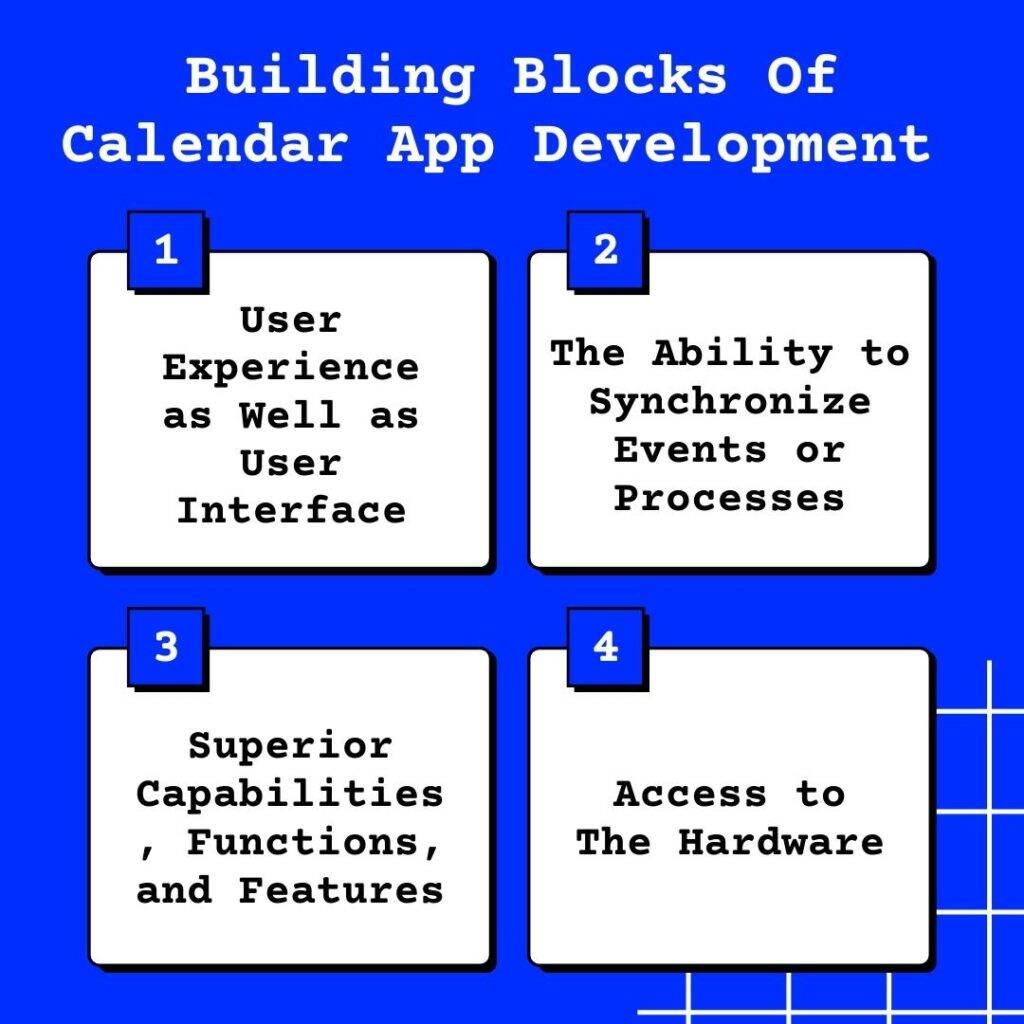
1. User Experience as Well as User Interface
When developing an app, whether it be a calendar app or another kind of app, the most crucial thing is to provide a compelling user interface and an interactive user experience. Leverage UI/UX design services. When the user first accesses the app, they should not experience any difficulties while moving through the app, and the user interface should be kept as simple as possible while yet being appealing. In the contemporary climate, the usage of simplistic forms and vivid colors has become increasingly prevalent. Consider the example of the Dribble app.
2. The Ability to Synchronize Events or Processes
A single program can be used by a user on numerous devices in today’s world, including a mobile phone, tablet, desktop computer, iPad, and so on. Therefore, it is essential to regularly synchronize the app’s data in order to ensure that the user does not experience any difficulties. It is also preferable if the data are synchronized with cloud services since this eliminates any possibility of the user accidentally deleting important information.
3. Superior Capabilities, Functions, and Features
It is necessary to incorporate sophisticated features and functionalities into your app if you want it to stand out from the crowd and go beyond the norm. You can make it more user-friendly by providing a color scheme for users to select, various modes of viewing, and the ability to add reminders from within the app., enabling users to participate in events through the app, etc.
4. Access to The Hardware
Utilize the hardware of the device in order to increase the safety of your application. The application may, for instance, make use of Apple’s 3D Touch or Force Touch. Additionally, geographical information can be included in the events if you so choose. Research and preparation are necessary steps in the process of developing a calendar app. The functionality of an app can be improved in a variety of different ways. Employing a mobile application development business that specializes in the field can help you create an app that is unique and innovative.
Industries That Benefit From In-App Calendar Integration
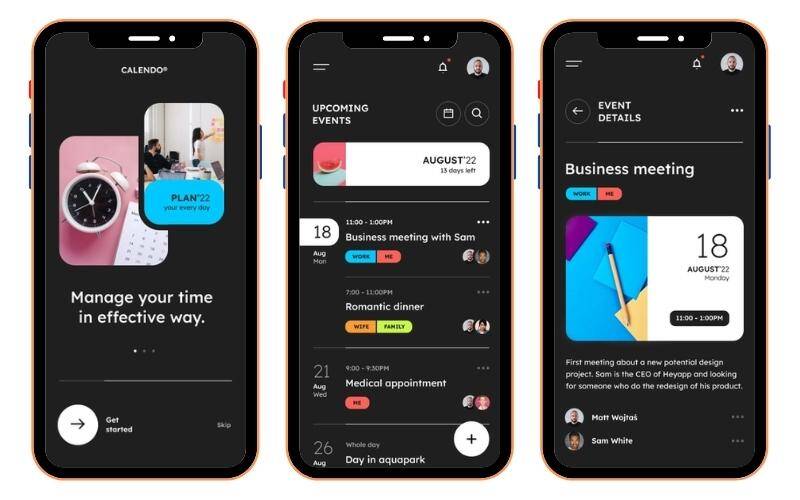
In-app calendar integration has emerged as a powerful tool that enhances productivity and improves communication with organizations. From healthcare to education and from event management to corporate management, every industry is leveraging calendar solutions to optimize its workflows. Take a look.
1. Education

The colossal scope of the industry has been engulfed by online education. Education platforms favored integrating calendars to make their services more practical and convenient, especially amid the COVID-19 pandemic. A built-in calendar enables users to arrange lectures, homework, Q&A sessions, and other activities in a sedulous way. The calendar within the application reminds users of all alerts and notifications. Whether it be a deadline for submitting an assignment or a test reminder, the planners will assist in accomplishing this duty as quickly as possible in a student’s hectic schedule, which necessitates clear and precise planning to achieve success. The flexibility, functionality, and adaptability of the calendar applications allow you to tailor its capabilities to your specific needs and requirements, which not only helps the planning process for the student but also improves the efficiency of the learning process.
2. Logistics

In the logistics business, calendars are used in many different ways, and they let you schedule shipping, order updates, and delivery. One app that has a calendar built right into it is Uber Freight. There are some exciting things about it. The shipper and the carrier can look at their past and future shipments. Also, it lets you choose the date and time for the deliveries. Also, the development of calendar apps in this area.
3. Healthcare

Healthcare is another field that has thought about using in-app calendars for different reasons. You can make an appointment with a doctor using the app’s calendar. Also, it reminds you when to take your medicine. You can also set up a training session for a particular day and track your physical activities to get the correct statistics. Real-time calendar sync with healthcare apps lets users make doctor’s appointments, plan when to take medicine, set reminders for regular checkups, etc. The user can also see if event invitations have been accepted, turned down, or moved. This simple appointment booking with reminders helps healthcare professionals stop people from not showing up or canceling at the last minute. In this way, the healthcare field has used the calendar in the app.
4. Transportation and Parking

Since I had trouble booking a cab, the transportation industry has given in-app integration much thought. But there could be a lot of customers like me who forced a business to add the feature. So, setting up a ride is no longer just a dream. Users can now set up a ride for a specific time and date. Also, when the ride is given to the driver, they would get a reminder. In a parking app, users can find a place to park by using the in-app calendar to book a date and time.
5. Travel

There are a lot of travel apps that have a calendar built right in. They show users the dates when they can book flights or hotels. Calendar apps have been built into many tourism and hospitality platforms. They can add times, businesses, and reminders for the most critical events and keep everyone in the family or group in the loop.
6. Platforms for Online Streaming

Users can watch live interviews, scheduled broadcasts, chat shows, and much more on online streaming platforms. People who use OTT services like Netflix or Amazon Prime must sign up for the premiere calendar so they don’t miss their favorite shows.
7. Social Media Platforms

People use social media platforms to talk to each other and book events in real life. Social media has a whole new dimension, including conferences, group meetings, seminars, and concerts. The user can be told when the event will happen through social media. Here, people can also plan occasions like birthdays, anniversaries, and other parties.
All the uses listed above clearly demonstrate that the calendar is more than just a way to find the date and time; it has become an integral part of our assiduous and diligent lives at every stage.
Essential Technology Stack For Developing A Calendar Application
It is essential to use the right tech stack to make your app successful. We have created a list of essential tech stacks that help you create a user-friendly calendar mobile application. Take a look.
1. APIs to Create a Calendar App
The calendar applications of both Google and Apple come with various available application programming interfaces (APIs). The tools needed will always be determined by the project’s specifics and the business’s needs. If you want to pick the right technology, it’s best to get expert advice.
2. Access to Google Calendar via the Google API
Google Calendar is the preferred tool for many people, and Google has provided extensive instructions to help you develop an Android calendar app. The Calendar API is compatible with both mobile and web apps, and the Google Calendar API lets users see, add, and modify upcoming events. The methodologies for incorporating libraries for various programming languages, such as Java, PHP (Hypertext Preprocessor), Ruby, JavaScript, etc., are also described in the documentation.
3. Apple EventKit
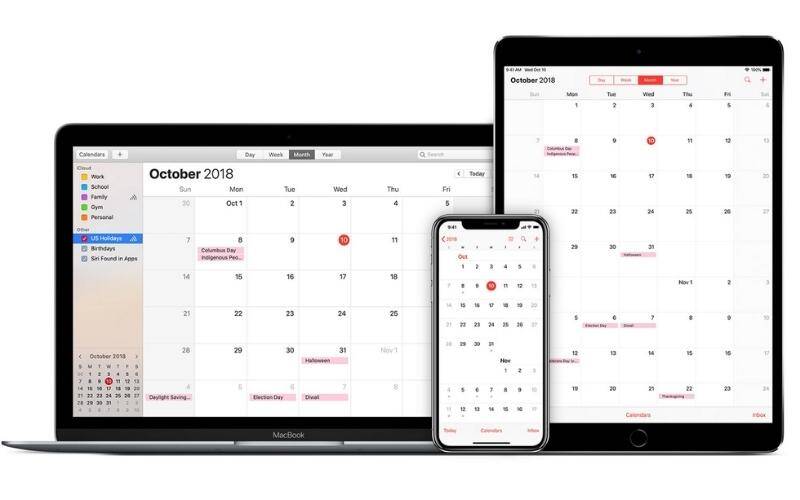
Apple provides various frameworks and APIs for building and integrating calendar apps. EventKit facilitates users’ access to calendar information. This facilitates the app’s event management by allowing users to quickly and easily create and modify events. Apple provides a variety of interfaces you may use to enhance your app.
It is possible to build a fantastic calendar app with any of the other accessible calendar APIs.
4. Other APIs
- The Nylas Cloud Calendar API includes time-management tools, including alarms and reminders. It also helps in syncing calendars with web apps and devices.
- The SuperSaaS API has features like online scheduling and the ability to send reminders.
- Future financial events can be accounted for with the help of the FX Calendar API.
- Calendarific API enables developers to add different public holidays to their projects.
5. Libraries to build a calendar app
| Libraries used for iOS-based calendar | Libraries Used for Android |
|---|---|
| FSCalendar | Cosmo Calendar |
| Calendarkit | Event Calendar |
| ClaendarLib | AgendaCalendarView |
| JTAppleCalendar | CustomizableCalendar |
| MBCalendarKit | SkyCalendarView |
| Libraries Used for Web Solutions | Calendar App MVP Features |
|---|---|
| Kendo UI | Calendar Interface |
| Calendarize | Address Book |
| iCalendar | Appointment creation with Attachments |
| jQuery UI | Reminders, Shared Scheduling Calendar by type |
| Webix | Integration with other platforms |
Convert Your App Idea Into Reality
Let’s Build A New App Together
How Can EmizenTech Help You Build Your Calendar Mobile App?
Emizentech is a leading mobile app development company that has successfully spearheaded numerous domestic and international mobile app development projects.
The company has developed various web and mobile applications, from business-to-consumer apps to complex enterprise-level mobile solutions that automate mission-critical business processes.
We have also developed software solutions for different domains, such as healthcare, education, finance, ecommerce, and more. Our skilled developers, designers, and strategists work collaboratively to ensure that each project not only meets but exceeds industry standards and client expectations.
At EmizenTech, we understand that every project is unique, and it’s important to stay ahead in a rapidly evolving digital landscape. This is why we leverage the latest technologies and industry best practices to create solutions that are not only functional but also innovative and user-centric.
Whether you are an entrepreneur or an established player seeking mobile app development services or want to integrate the latest tech into your existing system, we are committed to helping you achieve your goals.

Wrapping Up
Creating or integrating the calendar app is not a complex process. Still, it does take a lot of planning if you have a unique idea in your head and want to eliminate the challenges users face with existing calendar apps.
A good calendar app lets you give users a wide range of advanced features that make work more efficient in many areas. Without a doubt, the ability to schedule events is the most important thing to look for in a calendar app.
Meetings should be as easy to plan as possible, so you should use a smart calendar app to plan events and appointments in less time.
If you are someone who juggles many tasks and responsibilities at once, use a calendar app with features like embedding and sharing, cross-platform synchronization, team calendars, mobile access, and easy exporting and importing.
This is why the help from an experienced professional is always beneficial. Emizentech provides all these features to help business owners and entrepreneurs who need help staying organized and creating exceptional apps.
All you have to do is connect with us, and our experts will suggest you with the best solution that meets your project requirements.
Frequently Asked Questions
How long does it take to build a calendar mobile app?
Developing a calendar app would take around 4-6 months, depending on the complexity of the project. If you want to create a basic app with minimal features, the development time will be less than when developing complex apps.
How much will it cost to develop a calendar mobile app?
The cost to build a calendar mobile application is around $20,000-$20,000 or more, depending on your project requirements and needs. To get a more accurate quote, you must consult with an experienced mobile app development company before investing. To get a better understanding of the cost.
How to monetize a calendar app?
You can monetize a calendar app in many ways. The primary monetization strategy includes a subscription model ( offering premium features for a month or year for free), in-app purchases ( selling additional functionalities or features), advertising ( displaying ads within the app, and partnerships ( collaborating with other services for cross-promotion).
What technology stack is best for calendar app development?
The best tech stack for calendar apps typically involves front-end frameworks like React, Angular, and Vue. JS. For the back end, Node.js, Django, or Ruby on Rails are excellent for handling server-side logic. For data storage, use PostgreSQL or MySQL, and for cloud services such as AWS, Google Cloud, and Azure.
How do I ensure my calendar app offers a seamless user experience?
Here are some ways by which you can offer a seamless user experience.
A. Focusing on a clean and intuitive interface that allows easy navigation.
B. Collect user feedback and make improvements accordingly.
C. Conduct thorough testing, including usability and A/B testing.
D. Provide adequate 24/7 customer support.



 +1 (989) 535-9295
 info@emizentech.com
 emizentech


