
 Add us as a preferred source on Google
Technology is evolving fast, and businesses must keep up to stay competitive. Odoo ERP is a powerful tool that helps manage operations efficiently. With the launch of Odoo 18.0 and Odoo SaaS 18.1, now is the ideal time to upgrade with Odoo migration services.
Still using an older Odoo version? You could be missing out! The latest update brings faster performance, improved security, and new features to enhance business productivity. It also speeds up page loading and boosts SEO, giving your website better visibility. If your system feels outdated, an Odoo migration service provider can help ensure a smooth transition.
You might ask, “Is Odoo migration worth it?” Absolutely! Upgrading to the latest version provides better security, enhanced efficiency, and access to advanced tools. However, the Odoo data migration process requires careful execution to avoid data loss or downtime.
This guide will walk you through the benefits of Odoo migration, how the migration process works, and best practices for a seamless upgrade. Whether you’re looking for Odoo migration services or expert advice from a trusted provider, this guide has you covered.
So, let’s get started.
What Is Odoo Data Migration?

Odoo migration is the process of upgrading or moving from your current ERP system to a newer version of Odoo. This could be an old version of Odoo or a completely different system. During migration, your company’s data will be moved, and features will be customized to fit your needs. Third-party applications also get connected to ensure everything works well with the new system.
The main aim of Odoo migration is to improve the system’s performance, security, and to use the latest features. Businesses often need the help of Odoo migration service provider in USA to smoothly complete the migration process. It enhances efficiency and eventually revenue for the company. So, if you want to stay up-to-date, Odoo ERP migration is an important step.
Why Is Odoo Data Migration Important?

Migrating to the latest version of Odoo brings many improvements over older versions. There are several good reasons to invest in Odoo migration services. Below, we’ve listed the key benefits of Odoo data migration, which can help your business work more smoothly and efficiently.
1. Access To Improved Features and Functionality
Odoo constantly releases new versions with lots of exciting features. Upgrading to the latest version allows your business to use these new tools and improve your operations. With a smooth Odoo migration process, you’ll get access to better reporting, a more user-friendly experience, and powerful new modules that fit your business needs. It’s a great way to stay ahead with the best tools.
2. Boosts Business Performance
Odoo migration helps improve your business performance. The latest version of Odoo is faster, easier to use, and more efficient. It includes many updates that make your system work better, like quicker loading times for Odoo applications. These improvements allow your team to work faster, which can help your business run more smoothly and increase overall productivity.
3. Better Security and Bug Fixes
Odoo migration is also important because it brings new updates that improve your system’s performance, fix bugs, and enhance security. Upgrading gives you all the features which are required to run your business in an efficient way. It safeguards your data against security threats, speeds everything up, and maintains the reliability of your operations. Odoo database migration keeps you and your business equipped with the latest tools, best performance, and highest levels of protection.
4. Enhanced User-Friendly Interface
Odoo’s interface is easy to use and gets better with each new version. The design is simple and helps employees learn quickly, so they can work more efficiently. This makes it easier for everyone to use the system, increasing productivity and making the transition smoother. Odoo is the right solution for businesses who want to enable their teams to use technology in a way that makes their jobs simple.
5. Scalability for Future Growth
Scalability is an important reason to consider Odoo migration services. Odoo’s design lets businesses start with just the apps they need and add more as they grow. This implies the system is scalable enough to handle additional tasks, increased workload and functionalities as you grow your business. Odoo allows you to take advantage of this growth potential fully ensuring that your system evolves at the same pace as your business.
Understanding The Odoo Data Migration Process 2025

After discussing its benefits, it is time to shed light on Odoo migration process 2025 in this section. We’ll go over the main steps to follow to make sure your Odoo migration goes smoothly and is successful.
1. Analyse Your Current System
You must evaluate your current system before you begin with the Odoo migration process. No matter from which software you are migrating to Odoo or if you are upgrading to a new version of Odoo, need to have clarity on your current set up and its functionalities. Ask yourself questions like, which modules are you using? How much have you customized? What data needs to be moved, like customers or orders? Knowing this helps you spot any issues before starting the Odoo migration process.
2. Detailed Planning and Analysis
Successful Odoo ERP migration requires careful planning and analysis. Start by identifying important data, features, and workflows that need to be moved or changed. A detailed plan for every step will make the process smoother. Planning helps you understand what needs to be done and ensures everything is covered, so the migration goes as smoothly as possible without missing any key details.
3. Choose Migration Tools and Techniques
The tools you choose for Odoo data migration depend on how complex your data is and its size. Odoo offers several methods to import data, each with different levels of flexibility. Choosing the right tools is important because it streamlines the process ensuring all your data gets moved accurately and on time.
4. Data Mapping & Cleansing
Data mapping is the process of how each field of your current system corresponds to the fields in Odoo. This is important because Odoo’s database works differently. If you don’t map data correctly, it can cause errors. It’s also important to clean your data, removing any duplicates, especially for important records like customers, suppliers, and inventory. This ensures the system works well without issues.
5. Testing the Migration
Testing is a very important part of migration. Before moving all the data, test with a small amount first to find any problems early. First, carry out a small pilot migration with a focus on core processes like sales, inventory, and accounting. It also helps to verify if everything works well or not. Then ensure you have a backup strategy in place, if something goes wrong then return to the previous platform.
6. Data Migration
After testing the migration and fixing any problems, you can begin the full data migration. This should ideally be done when your business is not very busy otherwise it can cause disruption. Odoo data migration done at the right time helps make sure everything works well without causing any issues for your regular work.
7. Training and Rollout
After migrating the data, it’s important to train your staff on how to use the new version of Odoo. Each department, like accounting or sales, needs training specific to their tasks. For example, train the accounting team on how to manage financial data, and the sales team on handling orders. Teach them how to access and utilize the data that has been migrated to Odoo.
8. Post Migration Support
Once everything is set up, it’s time to go live with Odoo. But your work isn’t done yet. After the migration, make sure the system is working properly. Keep checking for any problems, fix bugs, and get feedback from users. Frequent updates ensure that everything runs smoothly and efficiently.
Key Challenges In Odoo Data Migration
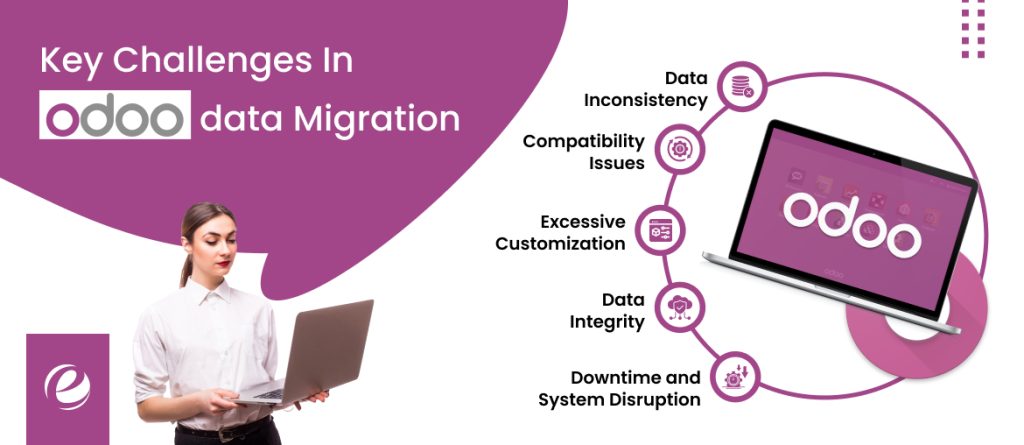
Odoo migration is not always easy and can come with challenges. These problems need to be solved to ensure a smooth process. Let’s explore some of the common challenges you may face during the Odoo migration process and how to address them.
1. Data Inconsistency
Data inconsistency happens when information from different systems doesn’t match or line up properly. This can cause mistakes or confusion in Odoo. It’s important to clean and fix the data before migrating it to avoid these problems. This helps make sure all the data fits well into Odoo’s system and works without issues.
2. Compatibility Issues
Older versions of Odoo or custom features may not work easily with the newer version. Some features may no longer be supported, which means they won’t work as they did before. In these cases, custom work may be needed to make everything function properly in the new version of Odoo.
3. Excessive Customization
If your Odoo system has many customized features, moving them to a new version can be tricky. These customizations might need extra testing to ensure they work correctly in the new system. It’s important to check that everything is set up properly after the migration to avoid problems.
4. Data Integrity
When transferring your company’s data, it’s important to make sure nothing gets lost or damaged. Moving data carefully is essential to keeping it safe and correct. This can be challenging, but it’s necessary to ensure that all the information stays intact during migration.
5. Downtime and System Disruption
If Odoo database migration is done without careful planning, it could cause the system to stop working for a while, affecting your business. You should do the migration when your business is least busy to avoid this. And even more, have a rollback plan ready in case of any issue and return to the previous system in no time. This helps avoid disruptions.
Best Practices To Follow For Successful Odoo Data Migration

By keeping a few things in mind and following the best practices, you can make sure your Odoo ERP migration is smooth and successful. So, what are the best practices to follow? Let’s explore them now!
1. Thorough Planning
Before starting the migration, take time to look at how your business works now. Find areas that need improvement and make a clear plan for the migration. The plan should include when things need to be done, what the goals are, and who will do each task. A good plan is important for success.
2. Data Audit and Cleanup
Before migrating your data, carefully check it for any old or incorrect information. Remove any unnecessary data and fix mistakes. This way, only the important and correct data gets moved to Odoo, making the process smoother and ensuring you don’t bring over any problems.
3. Gradual Implementation
Instead of migrating everything at once, try doing the migration in steps. This can help reduce problems and make it easier to manage. It lets you fix issues one by one and helps your team adjust to the new Odoo system without causing too many problems.
4. Testing and Validating
Before using the new version, it’s important to test and check for any problems. Make sure everything works correctly, like the modules, data, and how users use the system. Fixing any problems before starting will help make the change to the new version easier and smoother.
5. Custom Module Compatibility Check
Your custom modules might need changes to work with the new Odoo version. Checking and updating these modules will help them fit well with the new system. This way, you can avoid problems and make sure everything performs correctly after the migration.
Why Choose EmizenTech As Your Odoo Migration Service Provider in USA?

EmizenTech is the most trusted Odoo migration service provider in USA, that helps businesses to seamlessly migrate to Odoo. We offer complete Odoo migration & development services for different businesses & industry. Our certified Odoo professionals will help you at every step when migrating to the latest Odoo version. Our experts will make sure your Odoo migration goes smoothly, from planning to execution. They will help set up everything, train your team, and provide support.
Our commitment goes beyond migration. We serve you with end to end solutions to tackle all the challenges that you face during Odoo migration. Team at EmizenTech works closely with clients, involving them at every step. We follow a customer-centric approach to address any issue you may have and thus making the migration process smooth and successful.
If you are looking to hire Odoo migration services, get in touch with us today.
Conclusion
Migrating to Odoo goes beyond simply updating your system. This is a great opportunity to make your company more efficient and stay ahead in a market that’s changing fast. While Odoo migration can be complex, a strategic plan, along with the right expertise, ensures a smooth process. By utilizing Odoo’s built-in features, ensuring data accuracy, conducting thorough tests, and providing proper training to your team, you can fully use Odoo’s potential.
If businesses plan their Odoo migration well, they can improve how they work and perform better. It’s like making an investment that helps make everything run smoother and gives your business the flexibility to grow and succeed in the future.
FAQs
How to prepare for Odoo migration?
To prepare for Odoo migration, first analyze your current system and define clear goals. Understand your data, make a migration plan, and get help from an experienced Odoo team to ensure a smooth process.
Do I need to migrate all my data?
No, only essential and cleaned-up data should be migrated, excluding outdated or unnecessary information for a cleaner, more efficient migration.
How much time does Odoo migration take?
The length of time needed to migrate depends upon how complex your system is. A migration can take a few weeks for a simple one or up to a few months for a more complex migration process They help by improving the accessibility of data and decision-making.
Which Odoo version should I upgrade to?
It’s best to migrate to the latest stable version to enjoy the newest features, improvements, and security updates.




 +1 (989) 535-9295
 info@emizentech.com
 emizentech


