 Add us as a preferred source on Google
From an operational standpoint to short- and long-term goals, everything about the e-commerce space has reached a whole new dimension. In the midst of futuristic revolutions, businesses are approaching Shopware migration 5 to 6 to maximize the benefits of ongoing revolutions and boost scalability. With change happening at breakneck speed, migration from Shopware 5 to Shopware 6 acts less like an upgrade and more like a rebirth. It demands an all-rounder approach, encompassing redevelopments, for a successful outcome. But why migrate? How does Shopware 5 to 6 migration benefit the business? And most importantly, how to do it all? Continue reading to find all the answers.
What is Shopware 5?
Shopware 5 was an intuitive e-commerce platform known for its extensive plugin marketplaces, versatility, and user-friendly interface. It offered businesses of sizes the flexibility to operate ecommerce functions using a robust suite of tools and capabilities and had a monolithic structure that enabled customizations too. However, the former ecommerce platform had its limitations in terms of modern integrations and scalability. Due to the dramatic change in ecommerce technology, Shopware announced the end of life for Shopware 5 with all the security updates and official support ceasing by July 2024.
What is Shopware 6?
Shopware 6 is a future-ready ecommerce platform offering a surge in flexibility and improved scalability. The all-new platform is a bigger and better successor to Shopware 5 with API-first and headless commerce capacity. It enables smooth integrations with a wide range of front-end solutions while keeping up with back-end operations. With Vue.js and Symfony, Shopware 6 provides top-notch performance, a modular architecture, and enhanced customization, allowing businesses to fulfill different requirements.
What Does Migration Shopware 5 to 6 Means?

Migration from Shopware 5 to 6 refers to complete re-platforming required for businesses to operate in a new architecture, access new features, and enhance scalability. The migration process is not just a straightforward upgrade of the existing system. It encompasses rebuilding store functionalities, redesigning workflows, and reconfigured integrations. It also involves redevelopment of all the themes, custom components, and plugins of Shopware 5 in order to adapt to the modular structure of Shopware 6. The process, above everything, requires careful planning and is an opportunity for businesses to leverage next-gen technologies for creating lasting value.
Why Shopware 5 to 6 Migration Matters?
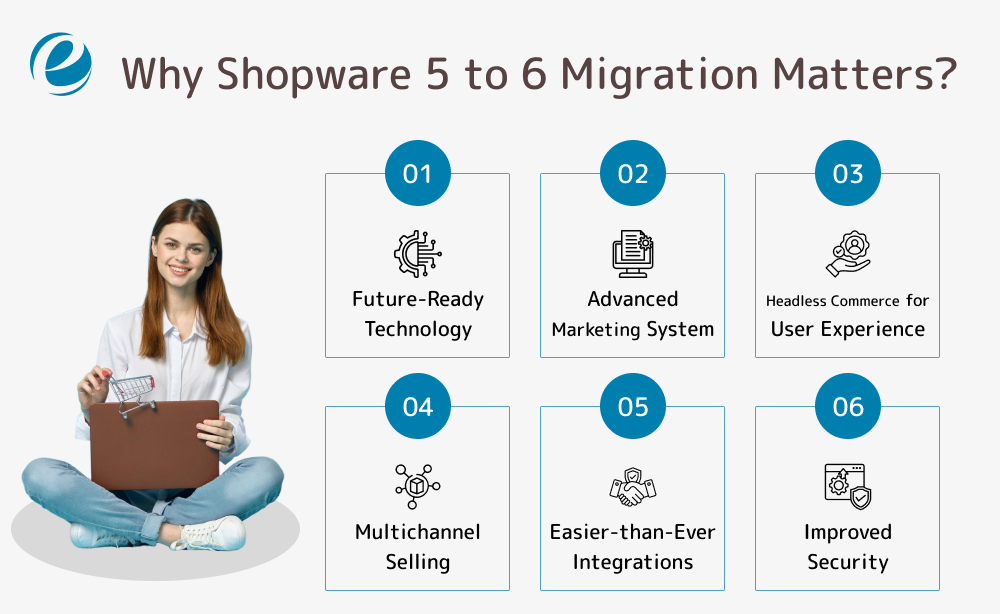
Shopware 5 to 6 migration is equivalent to the boost in the opportunities for growth in different areas. From your store’s performance to flexibility, this transition maximizes the value of operational efforts put in by the team. Here’s a quick roundup of the key benefits of Shopware migration 5 to 6 that make this change of wind a game-changer:
1. Future-Ready Technology
Technological upgrade and innovation are the straightforward benefits of Shopware 5 to 6 migration. The latter is built with a state-of-the-art technology stack, using an API-first route, Vue.js, and Symfony. As a result, you can expect your store to move towards long-term adaptability into a hassle-free integration environment for emerging technologies, like voice commerce, personalization, and more.
2. Advanced Marketing System
Shopware migration 5 to 6 is your access pass to more powerful SEO and automation tools and practices. These can enhance the overall visibility of your online store. URL structures, advanced site mapping, automated meta tags, and more such top-notch features contribute to improved search rankings. The elevated version of Rule Builder further allows you to launch personalized marketing campaigns and targeted promotions, which is a must to make the cut in today’s competition.
3. Headless Commerce for User Experience
Headless commerce gives you a chance to leverage remarkable flexibility for turning leads into loyal customers. With your storefront being independent of the back-end processes, you can integrate it with smart devices, social media platforms, and more in addition to mobile apps, all with breeze. In the end, it takes omnichannel practices a notch up, enhancing the accessibility of your business to a larger customer base.
4. Multichannel Selling
When migrating Shopware 5 to Shopware 6, global expansion is yet another advantage you can gain, all thanks to the multichannel selling. The new Shopware supports multi-store, multi-currency, and multi-language capabilities. The centralized commerce hub of Shopware 6 enables a consistent, seamless experience on all levels and platforms. So, if you plan to take your store to more and more demographics, it’d now be easier for you than before.
5. Easier-than-Ever Integrations
The Shopware migration 5 to 6 process brings an API-first structure, which ensures a smoother-than-ever integration of your store with third-party tools. So, be it CRM solutions or ERP setups, payment gateways or analytics platforms, consider everything integrated with absolute ease.
6. Improved Security
Security is a non-negotiable requirement for running a business, especially in today’s tech-first space where vulnerabilities are on the rise. Shopware 5 to 6 migration brings built-in security improvements like advanced user authentication, encrypted transactions, and GDPR compliance. These new standards are a step forward to ensuring protection from cyber threats while keeping up with industry regulations.
Step-by-Step Process for Shopware 5 to 6 Migration
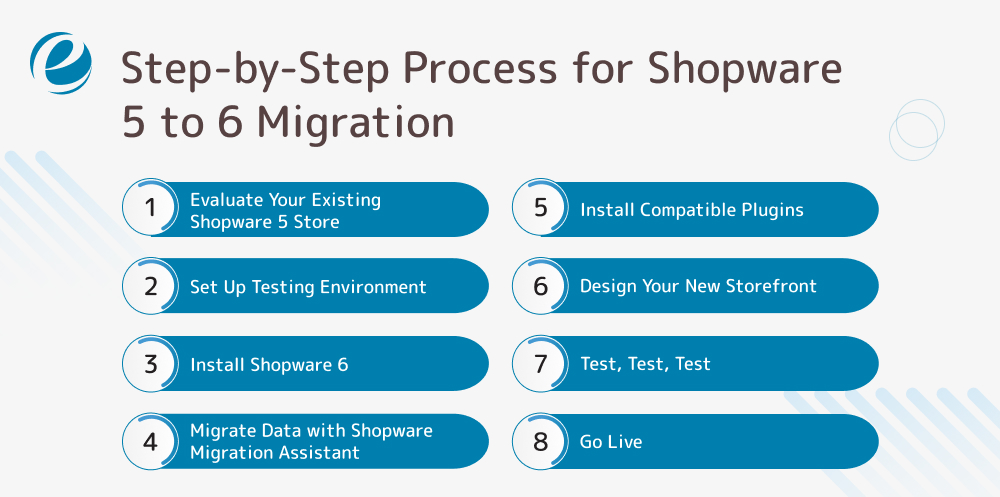
Migrating from Shopware 5 to 6 requires a structured roadmap in order to ensure a no-fuss transition. Careful planning and execution is essential to carry out migration practices without data loss and functionality challenges. Read below the steps for Shopware 5 to 6 migration and maximize the effectiveness of the transition.
#Step1. Evaluate Your Existing Shopware 5 Store
The process for Shopware migration 5 to 6 begins with the basics a.k.a. an all encompassing audit. Before you take things towards an upgrade, define the current status of your existing system. Conduct a complete assessment and look out for key aspects, such as:
- Product data
- Customer details and order history
- Custom themes and storefront designs
- Third-party extensions and plugins
- SEO settings and metadata
- Payment and shipping configurations
Gaining an understanding about all the above-mentioned factors helps you define priorities and plan for custom solutions.
#Step2. Set Up Testing Environment
Here’s an important tip: Don’t migrate your live store directly, set up a staging environment instead. Testing the system in a controlled environment allows you to monitor the migration process without risking the actual operations. This involves checking the performance of themes, extensions, and configuration and ensuring everything is up to the mark. This step is a must as it highlights the errors and challenges that might have not come to your notice earlier. And the final outcome: It minimizes the downtime, signaling that the transition is all set for a smooth launch.
#Step3. Install Shopware 6
After the staging environment is set, it is time to install Shopware 6 on your server. This step encompasses configuration of essential settings, including:
- Localization
- Database settings and connections
- Basic SEO configurations
- User roles and permissions
Once Shopware 6 is installed, it will operate as a platform to transfer all your Shopware 5 data to.
#Step4. Migrate Data with Shopware Migration Assistant
You need two important plugins for migrating data: a) Migration Connector in Shopware 5 for sharing data; b) Migration Assistant in Shopware 6 for facilitating smooth transfer.
Here are the quick steps for installing Migration Connector:
- Visit the Shopware 5 admin panel.
- Go to Plugin Manager.
- Search for Shopware Migration Connector.
- Install and activate it.
Follow the steps below to install Migration Assistant:
- Go to Settings in Shopware 6.
- Expand System and choose Plugins.
- Search for Shopware Migration Assistant.
- Install the same and follow the setup instructions that appear.
Establish connection between Shopware 5 and 6 using Migration Assistant to ensure error-free data transfer. Once the connection has been set up, migrate your data (including product details, categories, customer data, and history). While the transfer is in the works, keep an eye on the process to ensure data integrity.
#Step5. Install Compatible Plugins
The plugins of Shopware 5 won’t work well on Shopware 6. That said, you must install plugins and extensions that are compatible with the next update. Here is what you need to do:
- Explore and decide on alternative plugins for Shopware 6.
- Replace/rebuild custom extensions.
- Ensure compatibility with third-party integrations as well
Note, there are several Shopware 6 plugins available in the Shopware Store. Each offers enhanced performance tailored to the latest set of features.
#Step6. Design Your New Storefront
Shopware 6 requires Vue.js for front-end development. So, the old templates won’t do the job anyway. That said, you can redesign your storefront with Shopware 6 theme system. Alternatively, you can adapt your exuding design too.
#Step8. Test, Test, Test
Now that everything is set and you are ready to launch your all-new Shopware 6, here’s one last step: TEST. Conducting an extensive testing for configuration in the staging environment (Step #2) is non-negotiable. The test aims to check for functionalities, SEO, security, and performance across different devices. In case an error comes to the surface, you can do the fixings before fully launching Shopware 6.
#Step9. Go Live
From planning and plugins to design and testing, everything is done. You can now deploy Shopware 6, making it live. However, it is still crucial to monitor the performance metrics, errors logs, and customer feedback (especially for the first few weeks) to ensure a trouble-free experience.
How Emizentech Can Help You with Shopware 5 to 6 Migration?
Since every detail in the process requires separate work, Shopware migration 5 to 6 can seem overwhelming and technically complex at first. At Emizentech, a leading Shopware development company, we make this entire transition hassle-free for you with end-to-end solutions tailored to your unique business model. Here’s a glimpse of our Shopware migration services:
- Migration strategy: Our team conducts a three-sixty-degree review of your existing Shopware store and plans a custom migration model. This also involves minimal downtime and risk-free solutions.
- Data migration without any loss: We take transition seriously, meaning migration of products, customer and order details, custom themes, SEO settings, and more with loss of data.
- Performance optimization: SEO and performance are the key essentials for scalability. We help you make the most of these by optimizing the Shopware 6 store to improve load times and search rankings.
- Plugin and customization support: Our team helps you recreate custom plugins for Shopware 6, and develops unique functionalities for your business needs.
- Post-migration support and maintenance: Once the Shopware migration 5 to 6 has hit the road, we ensure nothing interrupts the flow of your all-new store by providing post-transition support. This involves bug fixes and technical assistance.
Ready to get an all-access pass to an unparalleled performance for your e-commerce business? Get in touch with us and let’s discuss the process.
Get Started with Shopware 5 to 6 Migration Today!

With a new technology or a concept occurring every now and then, e-commerce businesses must find innovative solutions to ensure long-term sustainability. Migrating from Shopware 5 to Shopware 6 is the first and the biggest step forward to that. From simplified panels and designs to improved rankings and customer experiences, there is a lot that awaits you at the successful launch of this transition. All it takes is end-to-end road-mapping and hiring the best experts to guide you every step of the way, and you will be good to go with Shopware 5 to 6 migration process. Don’t wait; now is your time to get started with re-platforming.
FAQ’s
Is Shopware 5 to 6 migration mandatory?
No, migrating from Shopware 5 to Shopware 6 is not mandatory. However, with the end of Shopware, the existing system will not support any new upgrades or features. That said, migration to Shopware 6 is necessary to unlock faster performance, improved security, and boost scalability.
Is Shopware easy to use?
Yes, Shopware has a user-friendly interface with drag-and-drop tools that make it easy to create and manage content pages.
Is shopware a CMS?
Shopware is an e-commerce platform that has built-in CMS features. It allows you to create, monitor, and maintain content pages.




 +1 (989) 535-9295
 info@emizentech.com
 emizentech


