
 Add us as a preferred source on Google
 When someone shops on an international e-commerce website or plans a foreign trip, the last thing they want is to deal with inaccurate currency exchange rates. That’s why currency converter apps are high in demand. People want reliable exchange rate outputs on the go and these tools deliver that right away.
The global currency converter apps market size is expected to reach $3.2 billion by 2033 at a notable CAGR of 9.5% between 2026 and 2033. So, if entering this market is on your checklist this year or later, continue reading this complete guide. From the must-have features and cost estimation to how to build a currency conversion app that reaches more and more user base, find everything as you scroll.
What is a Currency Converter App?
A currency converter app is a digital tool/app that lets you calculate the value of one currency against another, right in an instant. The tool leverages real-time or historical exchange rates to provide accurate information. Whether you are traveling to a foreign land, shopping online on an international platform, or analyzing current forex happenings, currency converter solutions act as your go-to guide to exact conversions in seconds.
Here’s the highlight about the best currency converter apps: They support and over 150 currencies. Not just that, these tools even let you catch up on cryptocurrencies. Moreover, you can get rate alerts, built-in calculators, offline access, and a lot more features depending on the solution. To cut it short, currency apps simplify money matters on the go, reducing the hassle of manual math work and eliminating the risk of outdated exchange charts.
Why Invest in Currency Converter App Development?
The global currency converter market is expected to expand at a CAGR of 9.5% between 2026 and 2033. By building a feature-rich tool, businesses can break into a growth accelerator while also offering a value addition.
Here are the five straightforward benefits of developing a currency conversion app:
Global Reach
Users, especially those traveling globally, need real-time access to exchange rates. By offering a dedicated currency conversion tool with real-time capabilities, you can seamlessly capture a market beyond the local confines. And as a final outcome, you will have more scope for user engagement, retention, and, of course, scalability.
Monetization
From a basic platform to a high-end tool, currency conversion solutions come bearing a strong scope for revenue. You can unlock profitability with a duo of basic and premium services, in-app ads, and more.
Competitive Edge
Today, cross-border trading, traveling, and online shopping are more prevalent than ever. Currency converter app development serves as an opportunity for you to come up with an innovative way to stand out from the crowd. From adding a diverse range of features to implementing advanced technologies, opting for a new route can help you gain an edge.
Must-Have Features of Currency Converter Apps
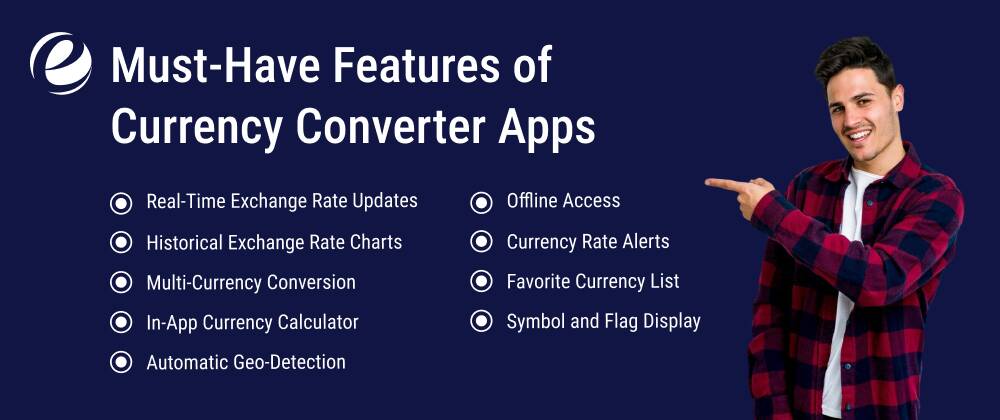
A currency conversion app is more than just your math buddy. This tool makes the process of converting a rate to another easier, offering a range of features. Here’s a roundup.
Real-Time Exchange Rate Updates
A core feature that you will find in all the best currency conversion tools is that they offer real-time values. This is essential for keeping conversions aligned with current market movements. Real-time updates are especially important for online shoppers, travelers, and forex traders, as they ensure accuracy and prevent miscalculations.
Historical Exchange Rate Charts
This is another basic yet amazing feature of top apps for currency conversion. The tools offer historical data via charts and graphs, allowing you to monitor different trends, analyze fluctuations, and make the next move accordingly. It’s crucial for finance enthusiasts, professionals, and traders who are looking for more than just numbers.
Multi-Currency Conversion
Switching between currencies can pose a hassle, and the right tool makes sure it doesn’t. A reliable app lets you convert more than just one currency in one go. So, you can access all the updates on a single screen, whether you are comparing USD to Yen or Euro to INR. It’s perfect for those using the platform for international business purposes. Not to mention, this feature is one of the hero features in every top currency converter app.
In-App Currency Calculator
Why open a calculator separately when you can use it right within the app? Modern currency conversion apps often have built-in calculation tools that allow you to add, multiply, or divide amounts before converting. Whether you are making cost comparisons or budgeting your next trip, this feature can save a good deal of time and energy.
Automatic Geo-Detection
A smart feature, geo-detection capabilities identify your location and set up the local currency of that region by default. Even the currency converter app’s free versions have this level of convenience. So, whether you are in Rome or Tokyo, consider the setting done automatically.
Offline Access
No Wi-Fi? No worries. A good currency exchange converter app will make sure the network doesn’t stop you from getting an insight, thanks to the offline access feature. It stores recent rates so that you can still check what’s happening when you are disconnected. This feature is handy for travelers, especially the ones navigating remote areas.
Currency Rate Alerts
One of the most important features of currency converter apps, conversion alerts ensure users set the desired exchange values and get the alerts as and when they are matched. This feature is useful for forex traders and budget-savvy travelers.
Favorite Currency List
Scrolling through hundreds of options can be overwhelming. The app allows you to pin the currencies you frequently use, or as many as you want to for future ease. This lets you access the go-to conversion even faster and more efficiently.
Symbol and Flag Display
This one’s a low-key engaging yet super important feature. Visual clarity adds to easier money management. That’s why it’s essential for currency conversion apps to display country flags and currency symbols along with every option. It eliminates the confusion between similarly named currencies and enhances user experience.

Advanced Features of Currency Converter Apps
How advanced can currency conversion apps get? Let’s find out with these top-notch features below.
Financial News Integration
Modern currency solutions are also packed with a punch of everyday news updates. This allows you to catch up on day-to-day events in the sector without switching to other portals. Be it a global economic update or an exchange-related headline, you will find everything on one platform.
Cryptocurrency Integration
From Ethereum to Bitcoin, modern currency conversion apps often include a range of cryptos in addition to traditional currencies. Implementing this feature is offering utility to both investors and early adopters who are getting started with the crypto landscape. It allows you to compare BTC to INR or ETH to USD just as easily as other common conversions.
Blockchain-Based Conversion Accuracy
Many advanced apps let you tap into the blockchain tech zone for tamper-proof, verified rates. This feature facilitates more security and transparency as you make a crypto transaction. Note, blockchain-enabled tools are setting the standard of digital currency exchanges high and are quite handy for those looking for more accurate flat rates.
AR and Voice Search
If you are planning to build the best currency converter app with the next-gen nuance, consider implementing this feature. Voice commands and augmented reality facilitate smart interactions with the tool. All you have to do is speak your query or scan a price tag, and that’s it, you will find the conversion right there.
Multi-Language Support
Multi-language capability ensures users can navigate the conversion options in their native tongue. It eliminates the language barrier and helps improve app usability across nations. Whether it is French, Mandarin, or Russian, language options expand the user base.
Auto-Update Widgets
What if a currency conversion app lets the user stay updated right from the home screen? It’d only enhance the experience. Widgets ensure that the user can track rates without opening the conversion app. It facilitates auto-refreshing, real-time tiles on both iOS and Android devices, simplifying things for users who track exchanges daily.
Transaction Fee Calculator
Global transactions can often surprise you with hidden charges. The best currency converter apps help you prevent this with tools that estimate markups, transaction fees, and taxes. Using this feature, you can get a transparent view of the cost before you pay. This is especially useful for small businesses and freelancers handling global clients.
Multi-Platform Sync
Here’s one of the best features to have in advanced currency converter apps: The option to switch devices without losing data, with cloud-based sync. From favourites to history to preferences, everything remains as it is whichever device you log into the app on.
Accessibility and Dark Mode
A mix of comfort and inclusivity, dark mode and screen-reader compatibility make currency converter tools more valuable for the users. These aspects of the tool enhance the usability and ensure that all types of people can access the functions, be it day or night.
Top Currency Converter Apps
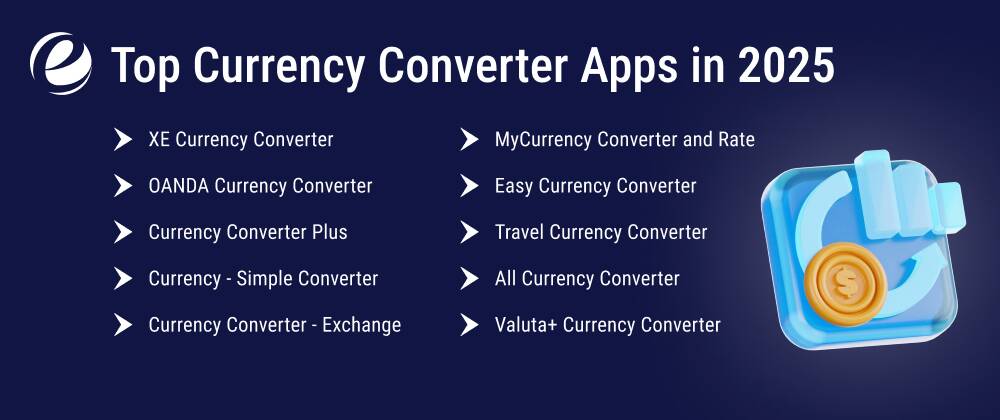
Before we explore the end-to-end process for developing currency converter apps, here’s a quick roundup of the top apps that are known for unique and user-friendly features:
| App Name | Top Features | Platform | Pricing |
| XE Currency Converter | 180+ currencies, live rates, alerts, charts, offline access, transfers | iOS, Android, Web | Free + in-app purchases |
| OANDA Currency Converter | Customizable lists, professional-grade tools, interbank rates | iOS, Android, Web | Free |
| Currency Converter Plus | Built-in calculator, location-based rates, clean UI | iOS, Android | Free, Pro Paid |
| Currency – Simple Converter | 160+ currencies, minimal UI, hourly updates, Offline mode | iOS, Android | Free |
| Currency Converter – Exchange | Updates every minute, metal price support, fast performance | Android | Free |
| MyCurrency Converter and Rate | 150+ currencies, dark mode, offline mode | iOS | Free + in-app purchases |
| Easy Currency Converter | Real-time and offline support, multi-currency view, crypto support | Android | Free + in-app purchases |
| Travel Currency Converter | Geo-detection, offline access | iOS, Android | Free |
| All Currency Converter | 160+ currencies, calculator, charts, stock tracker | Android | Free |
| Valuta+ Currency Converter | Custom rate editing, stores recent conversions | iOS | Free + premium version |
Steps to Build a Currency Converter App
Currency converter app development is all about crafting a financial tool that people can count on for real-time accuracy with an effortless user experience. From ideation and planning to deployment and updates, explore the crucial steps that form the foundation of best currency conversion apps.
Read the Market
First and foremost, you must understand what’s already out there in the market. Research top currency converter apps, check competitor offerings, and read user behavior and expectations. That’s not it; you should also analyze factors like
- What’s winning the attention and what’s not (types of features, design, and more).
- Global currency trends
- Role of technology
- Customer pain points
- Pricing (if any)
Diving deep into the market, understanding the competition, and spotting the gap will help you define your product uniquely, in a way that disrupts the space for good.
Get a Blueprint of Features
After you gain a solid understanding of the current picture of the currency conversion market, you can define a feature blueprint, encompassing everything that you’d like to offer. This may include multi-currency support, offline mode, live exchange tracking, voice-based search, and more. This stage helps you create the development roadmap, enabling more clarity on what you are about to launch.
Define Tech Stack
The next step is to decide on the most fitting blend of frontend, backend, and third-party APIs. This will ensure that the app functions smoothly even under heavy data requests. Consider going with Open Exchange Rates or Fixer or other such APIs to launch live rate updates. Opting for frameworks like React Native will help maintain cross-platform consistency. You may consult with your currency app development partner to define the right tech stack in order to make the product scalable and secure.
Design UI/UX
One of the best things about a currency conversion app is that it can present complex, overwhelming information, like financial trends, calculations, and exchange rates, in quite a clear and even interactive way. All you need to do is design the UI in a way that keeps navigation easy and speed fast. Do prioritize simplicity at every touchpoint of a user journey. Implement dark mode, an intuitive layout, and one-app conversions. After all, it is the small details that gain the user’s trust in the long run.
Implement Real-Time API Integration
Reliable currency APIs help bridge the gap between financial markets and app performance. These integrations ensure users get up-to-the-second updates on exchange rates for over 150 currencies. You may also want to count cryptocurrencies in. And here’s an important note: When choosing an API service, do pay attention to uptime reliability, data accuracy, and response speed, as these factors are non-negotiable.
Implement Security Protocols
Digital tools, especially the ones involving fintech features and personalization, require strong layers of security. From encrypted data transfers to secure authentication, ensuring everything is on the mark is crucial. Implement GDPR-compliant policies and two-factor authentication, as these are the elements that reinforce credibility.
Test and Launch
From ideation to integrations to security, everything is done. The next stage, and finally so, is where you test the app. This implies ensuring that the tool works at its ideal performance level and there’s synergy at every touchpoint. Test the app across different platforms (if any) and screens. Refine features as and if they lag behind before you unveil them.
Update and Maintain
Trends come and go. Thus, it is important to stay up-to-date and ensure your currency converter tool aligns with them. Even after the launch, conduct regular testing to check for and iron out bugs. Keep upgrading the app to new features. This practice is a long-term practice essential for user engagement and retention.

How Much Does It Cost to Build a Currency Converter App?
The cost of building an app depends mainly on the platform choice, geographic scope, features, and technologies, among various other factors. In that case of the basic functions and capabilities, the currency converter app development cost will be far less compared to a high-tech, full-fledged platform.
Here are the key factors determining the currency conversion app development budget:
- Multi-platform availability (Android, iOS, and web)
- API subscription fees
- Secure cloud hosting
- UI/UX design
- Features
- Customer support
- Maintenance and upgrades
If you are planning to create a single-platform currency app with a buffet of only the core features (such as conversion history, built-in calculator, and rate updates), the budget can range between $10,000 and $15,000. On the other hand, the same app with advanced features, such as offline storage, accessibility, live forex feeds, etc., will cost you around $30,000 and even more, depending on how advanced you want to make it.
And while these are core aspects to consider when budgeting the project, choosing the right currency converter app development partner can also make a big difference in the cost. That said, consult your technology partner, covering all the factors, to prepare a cost-efficient plan.
Revenue Models for Currency Conversion Apps

You can leverage currency converter app development to make money in many ways. Monetizing a currency app requires you to strategize in a way that adds value for the users without ruining the experience. The goal is to create a steady revenue flow while maintaining the practicality of the app.
Now let’s catch up on the list below to understand currency conversion app monetization practices.
Freemium
This revenue model implies that the user can access basic currency converter app features, like live rates and offline access, for free while using advanced versions in exchange for a fee. By paying the sum, they will be able to unlock premium plans and access multi-currency comparisons, ad-free usage, historical rate charts, and more with ease.
In-App Ads
You can enable advertisements on your app and monetize them per impression or click as another revenue model. Consider placing ads on non-essential screens like app settings or history, as it will ensure maximum user retention. Make sure to balance ad frequency and keep it lightweight and non-intrusive to avoid disruptions.
Subscription-Based Tools
Professional users dealing with forex trading and international business can unlock in-depth analytics, custom rate alerts, and live forex news by paying monthly fees. API access, trend forecasting, and other such high-value tools can be bundled into a subscription plan to generate steady revenue.
Affiliate Partnerships
Collaborations with forex brokers, travel platforms/agencies, money transfer platforms, and other such avenues can also help you monetize the app on an affiliate basis. This means that the app will earn commission as and when a user converts currencies and then get promoted to book flights or transfer money via a partner.
Why Choose EmizenTech For Currency Converter App Development?
At Emizentech, a leading fintech app development company, we deliver custom mobile and web currency app solutions tailored for both your business needs and customer expectations. Our app developers work out the most innovative and effective roadmap to help you build high-performance solutions.
Whether you are envisioning a basic currency converter tool or a high-end solution with an array of features, the team ensures that your app is scalable, user-centric, and, above all, rooted in precision.
Here is a quick roundup of what our end-to-end currency conversion app development services include:
- Custom app development
- API integrations
- User-first design
- Multiple robust security measures
- Wide range of features, basic and advanced
- Post-launch support and regular updates
Implementing the right tech stack and hassle-free integrations, we deliver a tool that solves the purpose of the user at the best speed. Our aim is not only to provide a technology-led solution but also to leverage custom mobile app development to make utility tools even more accessible.
Build a Secure, Scalable Currency Converter App
Over the years, currency converter solutions have emerged as a more capable, reliable tool for many things finance. This high-demand app can help you crack the code to success in the digital ecosystem.With the right selection of technology, monetization strategies, and features, you can launch a robust currency converter tool that people can count on. And investing in the right technology partner can help you manage the entire process efficiently, ensuring that the final product drives scalability and long-term growth.
FAQs
What is the purpose of a currency conversion app?
Currency conversion app allows you to calculate the value of a currency in another, enabling convenience in finding exchange rates as you travel, trade, or shop internationally.
How do I make a currency converter app?
To build a currency converter app, you must first define your target audience, the challenges you are addressing, and the features. Design a user-centric interface with seamless integrations and security protocols. Partnering with the best fintech app development company also plays a crucial role here.
Is the currency coverter app free?
Yes, many tools offer free currency conversion.
How long does it take to build a currency converter app?
A basic currency converter app development project can take up to a week, whereas an advanced tool may take over a week or more to conclude.




 +1 (989) 535-9295
 info@emizentech.com
 emizentech


