 Add us as a preferred source on Google
 Each and every customer matters – whether they are browsing or considering a purchase. That’s why it’s so important to provide them with a smooth experience at every turn, from entering your store to receiving the last bill.
When it comes to payment, invoicing plays a key role. But doing it manually? It’s often too slow, time consuming and won’t even have that professional look to it. This delay can affect how quickly you can receive payments and how customers view your business.
That’s why many businesses use invoice generator apps. These allow you to easily create, send, and track invoices in a whole lot of less time – without ever sacrificing that professional touch.
More and more companies are making the switch to e-invoicing. Indeed, the e-invoicing market is poised to expand from USD 12.47 billion in 2023 to USD 62.68 billion by the year 2031, indicating just how prevalent this trend has become.
With top invoice generating apps, you can:
- Create and customize invoices easily
- Send them out in a click or two
- Process payments via cards or digital means
- Have all transactions accounted for without having to do additional work
Now that you understand why it’s important, let’s walk through this easy guide to invoice generator app development and learn how to develop a professional invoicing app step by step.
What is an Invoice Generator App?
Apps to generate invoices is a practical solution designed to simplify the entire invoicing process. It allows you to generate invoices for the products or services that you offer, send them to customers, and even receive payments – all from one interface. You can consider it your virtual assistant for dealing with everyday invoicing tasks.
In a few instances, invoice apps even allow you to track time – so if you bill by the hour, you can easily convert your work hours into an invoice.
The best news is that these apps usually support businesses of any size. Whether you’re a solo freelancer or you have a small business, using top invoice generating apps keeps you streamlined and gets you paid faster without the hassle of filling out paperwork by hand.
Briefly, it reduces delays, avoids mistakes, and gives you more time to focus on your work instead of monitoring payments.
Why Do Businesses Need an Invoice Generator App?
Small businesses in 2025 require intelligent and reasonable machinery to remain in their prime. One tool that comes to mind is an invoice generator app. It does not just simplify billing – it makes workflow improved, minimizes error, and assists with a stronger relationship with customers and suppliers. Here’s why it is more important than ever.
1. Reduces Errors
When bills are created manually, there’s always a risk of entering the wrong amount, skipping a tax, or sending the invoice to the wrong customer. These mistakes can damage the trust you’ve built with your clients. The best invoice generator apps take care of all calculations for you, including taxes, totals, and discounts. With fewer errors, the billing process becomes smoother, and any small issue can be quickly corrected through proper settings in the app.
2. Increase in Sales
Providing specials such as discounts, combos, and seasonal packages may attract more customers and increase your income. With invoicing apps, inserting or modifying such specials is easily done whenever needed. You would not need to redo the invoice manually – both are automatically done by the app. It simplifies it for you to offer specials and bring in new shoppers without investing hours in billing.
3. Growing Customer Base
Rapid, timely billing makes an indelible mark on clients. Companies that are fast-acting and reactive in nature stand a better chance of gaining customers’ trust. A clean bill generator provides a professional image for your company. It assists you in sending bills promptly, following up on payments, and organizing records effectively. Customers perceive you as organized once they see it; hence, they’re inclined to return and bring in business for you.
4. Effective Communication with Customers and Suppliers
Knowing your customers and their likes and dislikes is vital. Keeping in touch with your vendors is important too. Large corporations have dedicated departments to take care of client and vendor contact, but smaller businesses can make up for lost time with invoice generator software. Invoicing software generally has the feature to insert notes, terms of payment, or messages on the invoice, which helps everyone stay in touch and have a more stable business relationship.
5. Scales with Your Business
As your business grows, dealing with more and more invoices can be a hassle. Manual processes consume more time and open the door to error. The best invoice generator app scales with you. It can process big numbers of invoices, use varying tax regulations, and accept varying payment options without holding you back. You won’t have to stress about needing to switch systems in the future – the app adapts to suit your needs as you expand.
Key Features of an Invoice Generator App
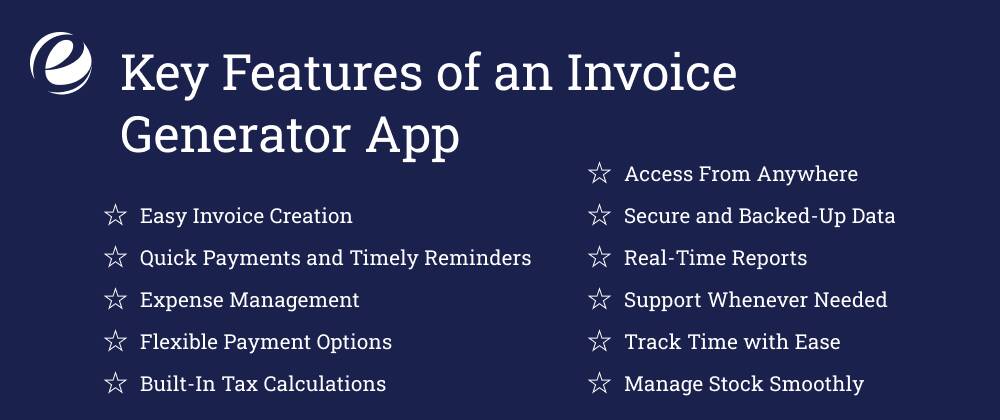
Now that you have a clear understanding of what an invoice generating app is and why it’s important for businesses, the next step is making it practical for everyday use. Below are some features that can make your app robust as well as easy to use.
1. Easy Invoice Creation
Your app should allow users to make professional invoices in minutes. Going through a selection of templates and customizing them with payment terms, logos, and contact information leads to invoices that are concise and branded.
2. Quick Payments and Timely Reminders
A quality invoice app should enable the customers to pay through different online payment mediums. This facilitates payment for businesses to be more convenient and quicker. It’s also wonderful if the application provides polite payment reminders automatically so that bills will not fall through the cracks.
3. Expense Management
Expense tracking is just as crucial as invoicing. An in-built expense tracker enables companies to keep up with what they are spending on resources, services, and other expenses. In the long run, this gives users an insight into how they spend and keeps them in control of their money.
4. Flexible Payment Options
All customers do not pay equally. Credit cards, bank transfers, or other forms of online payment, multiple choices make it convenient for all concerned – and the likelihood of quicker payment is enhanced.
5. Built-In Tax Calculations
Taxes are handled correctly in invoicing and are a very important feature. Your app will calculate the correct taxes automatically using local legislation or product categories. This avoids errors while keeping companies up to date with respect to their tax needs and without further stress.
6. Access From Anywhere
With mobile accessibility, users can send bills, authorize payments, or finish work on the go – whether at a client’s office or from home. It’s a small feature with a huge convenience factor.
7. Secure and Backed-Up Data
Business and customer data have to be secure. The app needs to protect all data from leaks or loss. Regular backups also mean that anything critical isn’t lost in case something does go wrong.
8. Real-Time Reports
Offering up-to-date financial reports that update in real time allows customers to see how their business is doing. With this information, users can make quick decisions whether that’s regarding cash flow, spend, or planning for the future.
9. Support Whenever Needed
There will be some queries from customers while they are operating the app. Quick and efficient customer support whether by chat, email, or calling – are very useful while the user needs help or faces a problem.
10. Track Time with Ease
For hourly rate billing firms, a time tracker is easy to utilize in that it can monitor the duration worked on a job or project. This will result in honest invoicing and aid in better management of time as a whole.
11. Manage Stock Smoothly
If a company handles physical products as well, the inventory management can be provided by the app. The feature keeps stock levels in check so that products don’t sell out or accumulate excessively.
Top 10 Invoice Generator Apps in 2025
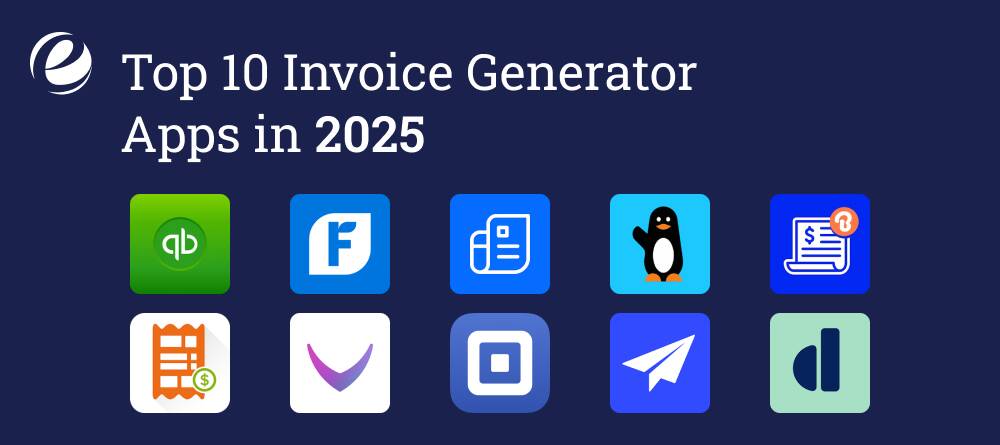
There are plenty of apps to generate invoices out there, so I’ve put together a helpful table showing some of the top invoice generating apps available today.
| App Name | Features | Pricing | Available Platforms | Ratings |
| QuickBooks Online |
| Simple Start: $30/month Essentials: $60/month Plus: $90/month Advanced: $200/month | Android, iOS, Web | 4.3 |
| FreshBooks |
| Lite: $7.60/month Plus: $13.20/month Premium: $24/month | Android, iOS, Web | 4.2 |
| Zoho Invoice |
| Standard: $15/month Professional: $39/month Premium: $79/month) | Android, iOS, Web | 4.6 |
| Wave |
| Free for invoicing and accounting Payroll: Starting at $20/month + $6/employee | Android, iOS, Web | 4.4 |
| Billdu – Invoice Maker |
| Lite: $7.99/month Standard: $14.99/month Premium: $27.99/month | Android, iOS, Web | 4.6 |
| Invoicera |
| Free plan Starter: $15/month Business: $49/month Infinite: $149/month | Android, iOS, Web | 4.1 |
| Bookipi – Billing Estimate |
| best free invoice generator app | Android, iOS | 4.8 |
| Square Invoices |
| Free invoice generator app Plus:$20/month | Android, iOS, Web | 4.0 |
| Invoice2go |
| Lite: $5.99/month Standard: $9.99/month Advanced: $23.99/month | Android, iOS, Web | 4.5 |
| Dubsado |
| Starter: $20/month Premier: $40/month | Android | |
How to Build an Invoice Generator App?

In building invoice generator software, the process doesn’t begin with coding. It starts much sooner – with discussions, ideas, and establishing well-defined goals. Prior to writing one line of code, a few basic questions must be asked that will set the whole process forward:
- What real issues will this invoice software solve?
- Who will be using it – just a few individuals or a large group?
- Is the workload level consistent all year round, or are there quiet and busy times?
With your black-and-white answers in hand now, you and your team can move forward more assuredly. Here’s what the development process normally goes like:
Step 1: Getting the Basics Right
This first step is about getting all of your ideas organized and planning ahead to decide what to do next. This is accomplished by taking the time to sit down with your staff to determine what should go into features, who the consumers are, and what the primary function of the billing software should be. Market research can assist you in learning what the other companies are doing and where your software can become innovative. Planning also determines how the software will assist with such things as one-time payments, recurring bills, or servicing multiple customers.
Step 2: Creating the Look and Feel
After setting the general plan, the next step is to create a visual design of what your billing system will look like. A simple and minimalistic interface allows users to use the software easily without getting confused. Visual designers create drafts such as wireframes or sketches to show what each part of the software will do. These designs are shown to some users to see how they react. Changes can then be made in the early stages, conserving time and effort in the long term.
The aim here is to create a layout that is both functional but professional and neat-looking. This is also the point where the overall look of the brand i.e., colors, font, and where exactly the logo should appear is determined.
Step 3: Writing the Code and Building the Software
Second is the phase of converting all the designs and plans into functional software. The programmers start developing the actual system by typing neat and effective code. If the invoice generator software is to be operated on mobile phones, computers, or both, the main aim is to ensure it runs smoothly and does not get slowed down. The development team employs suitable tools and coding processes to make the software fast, secure, and reliable.
They also cause the billing system to carry out simple operations such as creating an invoice, applying taxes, summing up, holding customer information, and communicating with other packages such as accounting software.
Step 4: Testing for Any Issues
Once the software is created, it must then be tested extensively. This is where all the buttons, links, and features are crammed in to ensure nothing goes wrong. The team tests the software on all devices and operating systems to be sure that it runs just as smoothly anywhere. Testing also catches some of the smallest things that can lead to errors or slowing things down.
The real user feedback becomes important at this stage. It helps the team correct things before releasing the software to everyone.
Step 5: Releasing and Maintaining the Software
After testing and being ready for use, it’s time to install it. That is, releasing it in app stores or the corporate website so the users can make use of it. But the job does not end here. Bug fixing, performance improvement, and keeping the software operational over the years with regular updates are the need of the hour.
Round-the-clock support is also an important issue. Anytime the users face any problems, they should be provided with support at the earliest. Being up to date about new technological advancements in billing rules or technology makes the software current and secure to use.
Tech Stack for Building an Invoice Generator App
A suitable tool and technologies are needed for invoice generator app development. These tools are the ones which give a hassle-free, safe, and accessible experience to business and clients alike. What is a minimalistic tech stack to use to build a top invoice generating app:
1. Frontend (User Interface)
It is what users see and utilize. It needs to be speedy, responsive, and simple.
- React.js or Vue.js – For building an agile and dynamic UI
- HTML, CSS, JavaScript – For the architecture in general, layout, and interactions
- Tailwind CSS or Bootstrap – For speedy styling of the app and making it responsive
2. Backend (Server-Side Logic)
The backend serves the underlying logic of the app, e.g., creation of invoices, storage of data, user account management.
- Node.js with Express – Lightweight for rapid development of backend services
- Python with Django – When you want more structure and integrated functionality
- Ruby on Rails – Ideal for rapid development of fully functional web applications
3. Database
All customer information, invoice information, and payment history are here.
- PostgreSQL or MySQL – For secure, structured data storage
- MongoDB – When you require a flexible, NoSQL database
4. Authentication
For safe user login and account security.
- Firebase Auth or Auth0 – Plug-and-play user login and security solutions
- JWT (JSON Web Tokens) – For secure session management
5. Invoice Templates and Invoice Generation
To convert invoice information into downloadable, printable reports.
- PDFKit or jsPDF – To generate PDF invoices from frontend or backend
- Handlebars.js – For creating good-looking invoice templates
6. Payment Gateway Integration
To enable customers to pay from the invoice itself.
- Stripe or PayPal SDK – For securely making online payments
- Razorpay – Best for Indian companies
7. Cloud & Hosting
To host your app and run it 24/7.
- AWS, Google Cloud, or Microsoft Azure – For cloud hosting and scaling
- Vercel or Netlify – For rapid frontend deployment
Cost to Build an Invoice Generator App

Invoice generator app development is not just needed to entail a brilliant idea, it’s also needed to entail some money involved. If you are a businessman or about to start such an app, you should know how much development would cost and to what level recharging expenses happen.
Before you set out to develop, it’s best to go through a professional mobile app development company. They’ll be able to walk you through where the funds are being spent and how best to spend your funds.
When you’re making a simple version of an invoice app, the rough price will be between $9,000 and $15,000. This kind of version would most likely include rudimentary invoicing functionality, client information, and payment tracking.
If you require something newer and more feature-rich, such as enhanced security, live reporting, or bespoke dashboards, the price can reach up to $26,000 or higher. The ultimate price is based on several significant factors — the tools employed, design complexity, the skill level of the development team, and the degree of support the app will require following installation.
Once it is live, your app would need periodic check-ups. Its maintenance is what keeps it up and running. Most developers actually recommend setting aside 15 to 20% of the total cost of building your app yearly for updates, bug fixes, and support.
So, if your app costs you $20,000 to create, you can figure on paying anywhere from $3,000 to $3,500 a year to upkeep it. And if you’re going to have periodic updates or new features, that figure will be slightly higher.
Let’s look at the below table for your better understanding:
| Application Structure | Estimated Cost | Development Time |
| Simple App | $9000-$15000 | 5-8 months |
| Moderate App | $14000-$20000 | 8-12 months |
| Complex App | $20000-$26000 | 12 months |
How Does an Invoice Generator App Make Money?
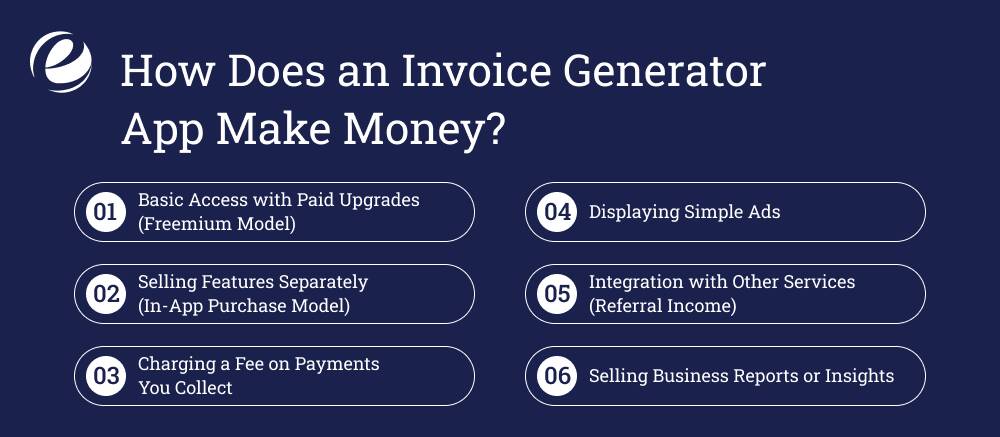
Invoice generator app development is a wise business decision, not just to enhance the billing process, but also as a way to earn a steady source of income. There are various methods through which such an app can earn money, depending on the way the app is developed and presented to users.
Here’s how you can make money from this kind of app:
1. Basic Access with Paid Upgrades (Freemium Model)
One of the most popular ways is providing a free limited version. This allows people to experiment with the application without cost. When they are comfortable, you can introduce advanced features at a price.
Some of the functionalities that can be made part of a paid option are:
- Invoice customization features
- Branded invoices with company logos
- Scheduling invoices on repeat
- Multicurrency functionality
- Tax calculation automatically
These enhancements can be offered as monthly or yearly packages based on the needs of the user.
2. Selling Features Separately (In-App Purchase Model)
Another source of revenue is by enabling the users to pay for individual tools within the app. Rather than charging a complete subscription, enable users to open features on an as-needed basis.
For instance:
- Purchasing extra invoice templates
- Removing “generated by” tags
- Purchasing storage or history
- Access to reporting tools
This approach provides customers with more freedom over how much they pay and allows you to reach a greater number of people.
3. Charging a Fee on Payments You Collect
If your application is engaged in online payments such as wallet payment or credit card payment gateways, then a small fee on each payment made by the customer using the app can be charged.
Either this can be deducted from the payment or be automatically added to the payment.
For instance, on a payment of $100, you can charge a fee of $1 or $2. This idea is ready to go if your app facilitates businesses getting paid quickly and easily.
4. Displaying Simple Ads
Ad placement is the way some apps make money. Although ads will not interrupt, showing useful, relevant ads (such as business tools or stationery service) can bring you a secondary income. You can also provide a paid version without ads for those who like less cluttered experiences.
5. Integration with Other Services (Referral Income)
Your app can be integrated with popular services like accounting software, tax preparation services, or inventory management software. When users subscribe to those services via your app, you can earn a referral fee.
It is a win-win partnership for you and your users. They receive helpful plug-ins, whereas you have a new source of revenue.
6. Selling Business Reports or Insights
If your app accumulates aggregate usage data (e.g., invoice frequency, payment delay, or peak billing hours), you can offer these insights to users as paid reports.
This is always best done in a way that protects the privacy of personal information, but it can be an attractive option for business users who would like to make more discerning financial choices.
Future Trends in Invoicing Software
Invoicing is evolving rapidly, and only for the better with each passing moment. From better security to smart automation, invoice generator apps are transforming to become mighty tools that enable companies to work smarter and quicker.
Take a sneak peek at what the future offers:
1. Smarter Suggestions Based on Your Activity
Future billing software will be able to learn about your billing routines and offer good advice. For instance, if your clients pay late, the system will recommend sending reminders a little earlier. The program will even remind you to send invoices or notify you if something is amiss with your billing.
2. Secure Payments Thanks to Latest Technology
New-generation security systems will play an even larger part. Suppose every transaction is sealed in a secure chain with complete visibility at every step. This would minimize the scope for any controversies and keep the records crystal clear for businesses and their customers.
3. Invoicing That Works on Its Own
In the future, intelligent devices may be able to do part of the work for you. For example, when something is restocked at your shop, your system can automatically generate and send the invoice without anyone needing to press a button.
4. Speak and Create an Invoice
Typing may become a thing of the past in the near future. With the on-a-daily-basis improving voice functions, you would have to simply command your device to say, “Create an invoice,” and it would do the rest for you. It could be time-saving in a big way for the always-on-the-move individuals.
5. Invoices Visible in Your Space
Picture holding a phone up against an item and viewing its price tag and invoice information on the screen in real-time. This kind of feature would provide immediate information to sellers or buyers, make communication easier, and expedite decision-making.
Why Partner with Emizentech for your Invoice Generator App Development?
Emizentech, a leading android app development company, collaborates with you to transform your invoicing app concept into a functional product that is stable, seamless to utilize, and designed to scale up with your company. From research to thorough planning and the ultimate invoice generator app development stage, we cover it all to ensure your app meets the business demands of today.
We believe in clean, easy-to-use interfaces, secure payment options, and robust data protection. Our specialists take care of every step from design and coding through testing, deployment, and regular updates so you can concentrate on your business and not worry about the nitty-gritty details. Contact us now and let’s create your app together.
Conclusion
You should now have a very clear understanding of what is needed in invoice generator app development. Having your own custom invoicing application, one of the best things about it is that it is merely a matter of accessing customer information wherever you happen to be – anywhere. It is far faster and simpler to send invoices or check for payment history.
Also, if you want to charge for the app, you can implement a cost model. For instance, you can offer some free invoices each month and then charge the users for additional ones as they need them. That way, new users get an opportunity to test out the app, and heavy users can obtain more as they progress.
FAQs
How will an online invoice generator assist with cash flow?
By automatically sending invoices and payment reminders, online invoice tools facilitate accelerated payments. This minimizes delays and gets your business paid on time, boosting overall cash flow.
Can online invoicing tools be easily implemented by small businesses?
Yes, certainly. Most invoicing software is inexpensive, and a few have free plans or free trials. Small businesses save money on the cost of manual billing and can devote that time and money to better uses.
How does an online invoice tool automate tasks?
These applications are able to handle recurring invoices, send due reminders, and even sync with your accounting software. This eliminates human intervention and the possibility of errors.
What should be the must-have features of a business invoicing tool?
While selecting an invoicing platform, these are the essentials: Easy-to-use interface Customizable invoice templates Embedded payment options Automated billing and reminders Cloud access to access anywhere, anytime API support for seamless integrations



 +1 (989) 535-9295
 info@emizentech.com
 emizentech


