
 Add us as a preferred source on Google
 Wearable app development in 2026 is not a niche conversation anymore. Smartwatches, fitness bands, medical monitors, and AR glasses. These devices are part of daily life for a lot of people, and the software running on them has quietly become serious business.
According to Yahoo Finance, the global wearable technology market is projected to surpass $185 billion by 2030. The number is impossible to ignore, and the apps powering these devices are a big part that drives a CAGR of 15% during 2026-2030.
What has shifted recently is the depth of what these apps can actually do. AI processing on the device itself, health sensors accurate enough for clinical decisions, and sync that works across platforms without the user thinking about it. User expectations have moved, and development teams have had to keep up.
In this blog, you will learn things that matter before building a wearable app in 2026. The process, the costs, the tech stack, the real challenges, and where the opportunities are for businesses willing to move on these issues properly.
What Is Wearable App Development? And How Does It Work?
Wearable app development is simply the process of building software for devices you wear, such as smartwatches, fitness bands, AR glasses, and health monitors. Nothing exotic about the concept. It simply brings computing closer to your body.
These apps connect the sensors on your wrist to things that actually matter. Your heart rate during a run. A stress alert before a meeting. Step counts at the end of a long day. All of that happens without you pulling out your phone.
Below, you will learn how this wearable app works:
The wearable collects raw data through its built-in sensors, things like accelerometers, heart rate monitors, and GPS chips. That data either gets processed right there on the device or pushed over Bluetooth to your phone. From there, the companion app takes over and syncs everything to the cloud for storage and more profound analysis.
Types of Wearable Devices You Can Build Apps For
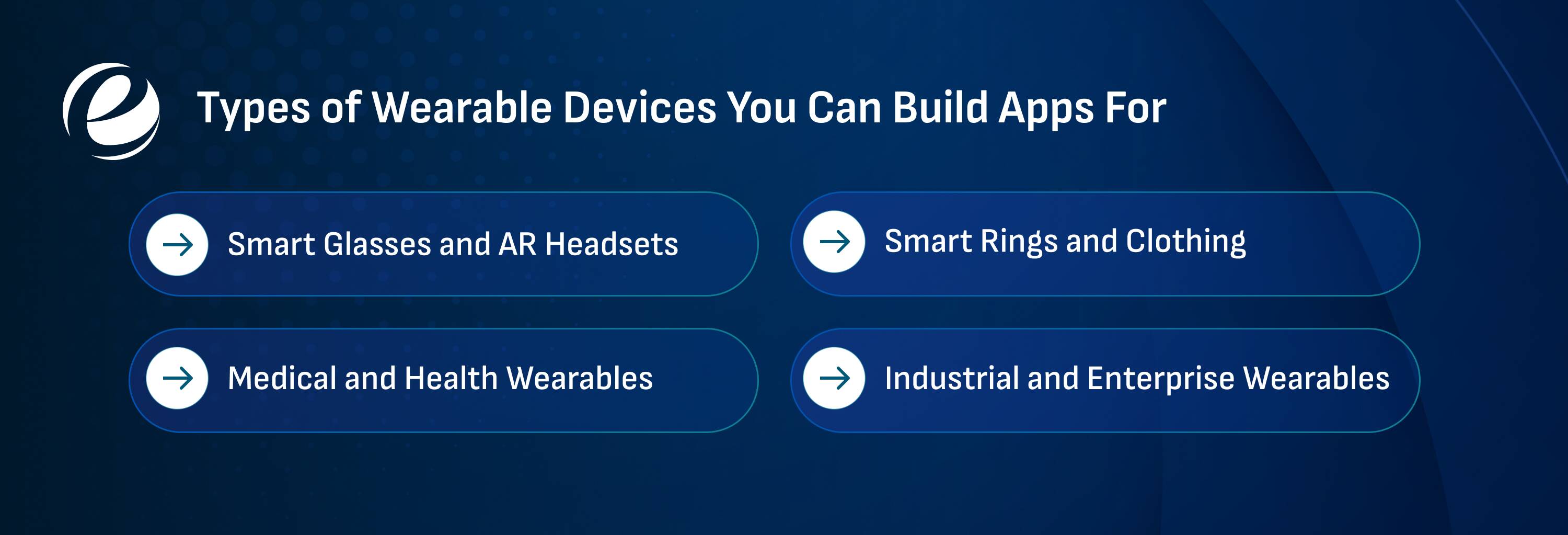
The popular wearable devices have mature ecosystems, solid developer tools, and millions of users already wearing them daily. These devices skip the flashy display and focus purely on health data, steps, sleep, calories, and heart rate. Here are some types of wearable devices:
Smart Glasses and AR Headsets
Devices like Meta Ray-Bans and various AR headsets sit in an interesting space where the display is literally your field of vision. Apps here deal with navigation overlays, real-time translations, and hands-free communication. The development is more complex, and the user base is smaller, but the potential is impossible to ignore.
Medical and Health Wearables
Continuous glucose monitors, ECG patches, and blood oxygen trackers are all examples of wearable health technology. These are not consumer toys. Apps built for medical wearables carry real responsibility because the data they handle directly affects health decisions. Accuracy matters more than anything else here.
Smart Rings and Clothing
The Oura Ring made smart rings mainstream. Brands like Hexoskin are embedding sensors directly into fabric. These devices are quieter about collecting data: no screen, no notifications, just passive tracking in the background. The apps built around them focus almost entirely on insights rather than interaction.
Industrial and Enterprise Wearables
Not everything is consumer-facing. Warehouse workers use smart glasses for inventory scanning. Surgeons use AR headsets for guided procedures. Field technicians wear devices that feed them real-time diagnostics. These apps prioritize function over everything else, and the stakes for getting them wrong are much higher.
Types of Wearable Apps by Industry Use Case
Healthcare receives the most attention, and honestly, this is for good reason. Apps here monitor chronic conditions, flag irregularities, and alert doctors before a patient even feels something is wrong. Some industries use wearables for many purposes that you will learn in the next sections:
Fitness and Sports
The wearables app in the fitness industry is designed as a personal trainer and psychological monitor. They track metrics such as steps, heart rate, calories, maximum heart rate, and sleep quality, which provide live coaching and personalized training plans.
Mental Health and Wellness
The wellness apps detect stress through heart rate and skin data before users even realize they are stressed. They provide guided breathing exercises, medication reminders, and mood tracking capabilities to boost the users’ health.
Retail and Payments
Wearables in this sector act as digital wallets that enable contactless payments directly from the wrist via services like Apple Pay. Also, the retailers use these apps to beam personalized in-store discounts and promotions directly to consumers.
Industrial and Field Work
A technician who can see live diagnostics overlaid on actual equipment works faster. The wearable apps provide hands-free access to instruction manuals, stream vital signs to detect worker fatigue, and use GPS to track employees in risky environments.
Defence and Public Safety
The apps are critical for situational awareness and tactical operation with sensitive information. First responders and military personnel wearables to monitor vitals and location under pressure. The builders have to focus on safety carefully.
Education and Training
AR and VR wearables create hands-on learning experiences without any real-world risks. This application helps in many industries, from medical students practicing virtual surgeries to engineers visualizing 3D architectural models.
Must-Have Features for Wearable App Development
Battery efficiency is non-negotiable. A wearable app that drains the device by noon will not survive in this high-tech market. Every background process, every sync cycle, needs to justify its existence in terms of power cost. Here are some crucial features for wearable app development that you should include:
Real-Time Data Sync
Sensor data needs to move fast and accurately. Whether it is a heart rate spike or a fall detection alert, delays undermine the whole point of the app. The sync architecture has to be tight from day one.
Glanceable UI Design
Nobody is reading paragraphs on a watch face. Information needs to land in under two seconds. One number, one color, and one action at most. If the screen requires interpretation, it is already failing.
Offline Functionality
Connectivity drops. It always does; you cannot help it. A well-built wearable app stores what it needs locally and syncs when the connection returns. Anything less, and you are building something that breaks the moment someone goes underground.
Health Sensor Integration
Accelerometers, heart rate monitors, SpO₂ sensors, and skin temperature. The app needs to read these cleanly and handle bad or missing data without crashing. Sensor data is messy in the real world.
Personalisation
Generic alerts and one-size-fits-all thresholds are lazy. Good wearable apps learn from individual patterns and adjust over time. A resting heart rate of 48 is normal for one person and alarming for another.
Cross-Device Compatibility
The app on the watch needs to communicate properly with the phone app, which in turn needs to communicate properly with the cloud. Gaps in that chain create data loss and frustrated users. Seamless handoff is not optional.
Security and Data Privacy
Health data is sensitive. Full stop. Encryption, clear consent flows, minimal data collection, and compliance with regulations like HIPAA or GDPR are not features to add later. They need to be included from the start.
Wearable App Development Tech Stack in 2026
The ecosystem for wearable app development emphasizes on-device AI integration, Bluetooth/BLE or wireless connectivity, and optimized cross-platform logic. Below, you will learn about the tech stack that most developers use in wearable apps:
| Layers | Apple Ecosystem | Android Ecosystem |
| OS and Hardware | watchOS 12, Apple Silicon and Taptic Engine | Wear OS 6 and Snapdragon Wear chips |
| Primary Languages | Swift 6 and Objective-C | Kotlin and Java |
| UI Framework | SwiftUI, UIKit, and WidgetKit | Jetpack Compose for Wear and Wear Widgets |
| Health API | HealthKit | Heath Connect (Google Fit) |
| AI and ML | Core ML and Vision framework | TensorFlow Lite Micro and Google ML kit |
| Data Sync and Backend | CloudKit, APNS, and BLE | Firebase, GraphQL APIs, and BLE |
| Security & Compliance | OAuth 2.0, AES-256 Encryption, HIPAA or GDPR | |
So, these are the tech stacks that are used in the wearable device app development to make the process smooth for the users. If you want a specific mood tracker app with wearables, then consider prioritizing biometric data.
Wearable App Development Process: Step-by-Step Guide

The wearable app development is not complicated in theory. In practice, it needs more upfront thinking than most mobile projects because the constraints are tighter and the margin for a bad experience is smaller. Below is a structured process that you can follow for app development for wearable devices:
Step 1: Define the Purpose
You have to get specific before touching any tools. “Health tracking” is not a purpose. Alerting runners when their heart rate exceeds a personal threshold. The narrower the use case, the better the app tends to turn out.
Step 2: Choose the Right Platform
There are platforms like Wear OS, watchOS, Tizen, and Fitbit OS, and each has its own SDK and user base. The choice usually follows the audience. Apple Watch and Android watch users expect different things, and that gap matters during development.
Step 3: Design for the Screen
A wearable screen is not a small phone screen. One action per screen, no scrolling if avoidable, and text that reads in under two seconds. Most teams underestimate how many design iterations the process actually takes.
Step 4: Build Core Features First
Start with the one thing the app must do well and get that right before adding anything else. Include the sensor integration, Bluetooth sync, and data processing. You must build a lean app that focuses on crucial glanceable interaction rather than complex workflows
Step 5: Connect the Companion App and Backend
Most wearable apps need a phone-side counterpart for configuration, history, and heavier processing. Beyond that, the backend needs to handle dropped connections gracefully. Wearables go offline constantly, so design around that reality from the start.
Step 6: Test in the Real World
Testing on a wrist in motion, with a low battery, and with a weak Bluetooth signal reveals insights that no emulator can provide. These are the real-world conditions and surface problems that controlled environments simply do not catch. This step takes longer than people expect, so take your proper time for in-depth testing.
Step 7: Launch, Monitor, and Improve
Each platform has its own review process, so read the submission guidelines before sending anything over. After launch, watch the crash reports, track usage patterns, and listen to feedback. Wearable apps need ongoing attention, especially when OS updates roll out, because what works today may not work after the next release.
Wearable App Development Cost in 2026: Full Breakdown
The cost of wearable app development is not fixed because the initial cost depends on the features, platform, and developers region. However, below is the average cost of building a wearable device
| App Complexity | Approximate cost | Timeline |
| Basic Wearable App | $20,000-$40,000 | 2 to 3 months |
| Mid-level Wearable App | $35,000-$70,000 | 3 to 5 months |
| Advanced Wearable App | $60,000-$120,000+ | 6 to 12+ months |
So, these are the general costs to develop a wearable app; rather than the above, there are some additional costs. The ongoing costs add 15 to 30% to your initial costs to maintain the app regularly.
Key Challenges in Wearable App Development (And How to Solve Them)
Wearable app development sounds exciting until you get stuck on a critical issue during the app development. The constraints accumulate quickly, and some of them surprise even experienced developers. Below are some of the common challenges you might face and their solutions to overcome:
Unclear Use Case
Most failed wearable apps were vague from day one. Know exactly what the app does, when, and why. Vague goals at the start mean expensive fixes later.
Fix: Define the what, when, and why before writing a single line of code.
Wrong Platform or API Selection
Choosing a platform because it is popular rather than because it fits the project is a common mistake. Pick based on what the app needs and where users already are.
Fix: Match the platform to your audience and the API to your actual feature requirements.
Designing for a Tiny Screen
Voice interaction helps a lot here because it reduces what needs to live on screen. If the app design needs more than a glance to understand, it needs a rethink.
Fix: Use app design best practices and one action per screen. When in doubt, use voice interaction instead.
Connectivity and Device Dependence
Most wearables depend heavily on a paired phone. When that connection drops, the experience drops with it. Build for offline first and handle disconnections without everything breaking down.
Fix: Store data locally and sync when the connection returns. Never assume stable Bluetooth.
Data Privacy and Security
Wearables collect deeply personal data such as users’ heart rate, sleep, and location. They are right to be cautious. The encryption and honest consent flows are what make people trust the product enough to keep using it.
Fix: Encrypt everything, collect only what you need, and make consent genuinely clear.
Battery Drain
The most common user complaint and, honestly, the most avoidable one. The hardware constraints, specifically tiny batteries and the need for the app to always be on, limit the wearable apps.
Fix: Cut unnecessary background tasks, batch your syncs, and question every polling interval.
So, these are the key considerations that you must focus on before you start wearable app development. It will help you to avoid delays and help you to make reliable apps for your audience.
AI in Wearable App Development: What’s Changed in 2026
AI models running directly on the device can now flag health irregularities before symptoms show up. Atrial fibrillation, blood oxygen drops, and early stress signals are all crucial health indicators. The AI in the healthcare wearables market is projected to reach $310.56 billion by 2033, growing at over 27.83% annually, according to Grand View Research.
On-device processing has replaced a lot of cloud dependency. However, Qualcomm and Apple are both shipping neural processing units (NPUs) inside wearable-grade chips to make this transformation possible. Also, the advanced ML algorithms synthesize continuous sensor streams to adapt to the tracked data.
Why Businesses Trust EmizenTech for Wearable App Development Solutions
Businesses choose EmizenTech for wearable mobile app development because the work is built with a layered architecture. The product features cross-platform compatibility and solutions that scale as it grows. Over 450 clients have worked with us across native and cross-platform projects, and that number reflects consistent delivery.
These are some of the reasons that businesses choose our #1 app development company:
Multi-Platform Expertise
Our team builds natively for watchOS and Wear OS. The experience is not patched together; instead, it is properly built for each platform, ensuring it feels right on every device.
Advanced Technology Integration
The solutions we build incorporate AI integration in analytics, data sync, and IoT connectivity. Whether it is a healthcare monitor or a smart home application, we build it to work reliably.
Long-Term Stability
Secure coding practices and flexible post-launch maintenance packages. We stay involved after the build because that is where a lot of development relationships quietly fall apart.
Our team works across healthcare, lifestyle, retail, travel, and manufacturing. If you are looking for a team that treats your project as a real product rather than a delivery ticket, that is exactly what we are here for.
Conclusion
Wearable technology is booming nowadays because it combines proactive health monitoring and smooth smartphone connectivity into every accessory, such as watches and glasses. This trend is one of the reasons businesses are likely interested in wearable app development to stand out in this competitive market with advanced innovations.
The question was never really whether wearables are worth building for. It was always about whether you moved early enough to make a difference. With the help of advanced built-in sensors, the devices are providing hands-free accessibility to the users. They can easily track their daily routines and health.
FAQs
What platforms should I target for the wearable app?
The platform that you will target dictates your technology stack. There are two primary platforms to target: watchOS for the Apple Watch and Wear OS for Android-based devices like the Pixel Watch and Samsung Galaxy Watch.
How do wearable apps handle battery optimization?
The wearable apps handle battery optimization by restricting background services, minimizing continuous data syncing, and using system-provided APIs to batch the processing tasks.
How much does it cost to develop a wearable app?
There is no fixed price to develop a wearable app because it depends on the complexity, target platform, and backend infrastructure. But the average cost ranges between $20,000 to $150,000 or more, as per the ongoing maintenance.
What are the top platforms for wearable apps?
The top platforms for wearable apps are Apple watchOS, Google Wear OS, Garmin Connect IQ, and Fitbit SDK, which you can choose for your wearable apps.



 +1 (989) 535-9295
 info@emizentech.com
 emizentech


