
 Add us as a preferred source on Google
 The factory floor has gone digital, and mobile is at the forefront. Walk into most modern plants today, and you’ll find supervisors checking production dashboards on tablets, technicians logging faults on phones, and quality teams running inspections without a clipboard in sight. That shift didn’t happen overnight, but it’s accelerating fast.
This is the reason why manufacturing mobile app development is getting popular among manufacturing businesses. Whether you’re a plant manager tracking OEE on the shop floor or a field technician documenting a defect mid-shift, the right app removes friction, reduces downtime, and delivers clean data to decision-makers.
This guide covers everything you need: use cases, must-have features, how development actually works, realistic cost ranges, and what to look for in a development partner.
What Is a Manufacturing Mobile App and Why Does Your Business Need One?
Most manufacturers already know they need to go digital. The question is usually where to start, and mobile is often the fastest path to visible results.
A manufacturing mobile app is a purpose-built application, deployed on phones or tablets, that connects workers, machines, and back-end systems in real time. It replaces paper processes, disconnected spreadsheets, and desktop-only software with on-the-go access to operational data that actually matters.
The manufacturing business case holds up. Adopting digital tools increases workforce productivity by 15% to 30%. For a mid-size manufacturer, that’s not a rounding error.
Unlike generic enterprise apps, manufacturing mobile app development requires integration with industrial systems like ERP, SCADA, MES, and IoT sensors. When it’s built properly, the app doesn’t just inform people; it becomes the operational nerve center for the entire facility.
Key Benefits of Mobile App Development for Manufacturing

The ROI from mobile app development for manufacturing tends to show up in three places: speed, accuracy, and reduced waste. Here’s where manufacturers consistently see the biggest gains.
- Real-time visibility: It means managers get live production data, not figures that are already two hours old by the time someone emails a report.
- Faster decisions: These apps use alerts and dashboards to surface problems at the moment they happen, not during the next shift handover.
- Less unplanned downtime: The companies that are using AI-powered process automation and quality control report an average 23% reduction in downtime.
- Better workforce efficiency: It comes from cutting manual data entry. However, the workers spend that time on tasks that actually add value to the business.
- Cleaner compliance records: The digital logs replace paper checklists, which makes regulatory audits significantly less painful for manual work.
- Scalability: A well-built app grows with the business, supporting new sites, new product lines, or new processes without a complete rebuild every two years.
Examples and Use Cases of Manufacturing Mobile Apps
There’s no single template for what a manufacturing app looks like; the right solution depends on where your operations are most broken or most manual. That said, a few categories recur across the industry.
Production Monitoring & Scheduling Apps
These apps give floor managers and shift supervisors a live view of production progress against targets. OEE tracking, order status, shift handover notes, and scheduling adjustments all happen on the device. When a line slows down or a target is at risk, the right person gets a notification quickly; no waiting for someone to update a spreadsheet.
Predictive Maintenance and Equipment Health Tracking
When the apps connect to IoT sensors, they monitor vibration, temperature, pressure, and runtime to flag anomalies before they become failures. Technicians get work orders on their devices, log service history, attach photos, and close tasks without leaving the machine. The reduction in unplanned downtime alone typically justifies the build cost within months.
Inventory and Warehouse Management Apps
Barcode scanning, RFID integration, and warehouse apps for live stock levels replace terminal-based workflows that slow people down. Workers can receive goods, log transfers, request replenishment, and cycle count from wherever they are in the facility. When ERP integration is done properly, inventory data stays accurate without manual reconciliation.
Quality Inspection and Defect Reporting Tools
Paper inspection sheets are slow, inconsistent, and impossible to analyze at scale. Quality apps replace them with structured digital forms, image capture, defect classification, and automatic escalation. Inspectors log nonconformances directly from the line and assign corrective actions on the spot. Root cause analysis that used to take days gets done faster.
Supply Chain Visibility and Vendor Management
This is a genuine content gap for many manufacturers; they have visibility inside the four walls but very little outside them. Apps that surface supplier delivery status, PO confirmations, and vendor scorecards give procurement and operations teams the information they need to respond before disruptions hit the floor.
If you want to build supplier-facing portals that integrate with your existing vendor management systems, you can consider custom software development services.
Worker Safety and Compliance Monitoring Apps
Permit-to-work workflows, toolbox talks, and PPE compliance checks can all be digitized and made far more reliable with a purpose-built safety app. Geo-fencing features can trigger alerts when workers enter hazardous zones. For regulated industries like chemical, food, or pharmaceutical, the audit trail these apps create is genuinely valuable.
Field Service and Customer Support Mobile Tools
For manufacturers with an aftermarket or service division, field service apps give technicians everything they need on a single device: job details, equipment history, parts availability, and remote support access. Customers get faster resolution times. Service managers get actual visibility into workloads and job status instead of chasing updates by phone.
Must-Have Features in a Manufacturing Mobile App
Building a manufacturing app without thinking through the feature set carefully is where projects go wrong. The core technical requirements here are much more demanding than those of most consumer or generic enterprise apps.
- IoT and sensor integration: The app must read machine data from PLCs, SCADA systems, and IoT gateways without meaningful latency. Slow data defeats the purpose.
- Offline functionality: The factory floors have coverage dead zones, so the app must cache data locally and sync when connectivity returns to the devices. It creates scalability for the users.
- Access control: The operators, supervisors, quality teams, and plant managers need different views and different permissions. However, the generic access for all can create confusion between them.
- Push notifications: The threshold breaches, equipment faults, and schedule changes need to reach the right person. They should receive these notifications quickly, not the next time they open the app.
- ERP/MES/WMS integration: There are some standalone apps that create data silos. For most manufacturers, integration with SAP, Oracle, or Microsoft Dynamics is a hard requirement, not a nice-to-have.
- Barcode and QR scanning: It is essential for inventory, asset tracking, and quality workflows. Gets used dozens of times a day on the floor.
- Analytics dashboards: Aggregated KPIs presented clearly help managers make better calls faster. Visuals matter more than raw tables.
- AI-powered features: AI-integrated mobile applications now make it practical to build anomaly detection, demand forecasting, and quality pattern recognition directly into the app without a separate analytics platform.
- Data security and encryption: Production volumes, proprietary processes, and supplier terms are sensitive data. Enterprise-grade encryption and proper authentication aren’t optional.
Step-by-Step Manufacturing Mobile App Development Process
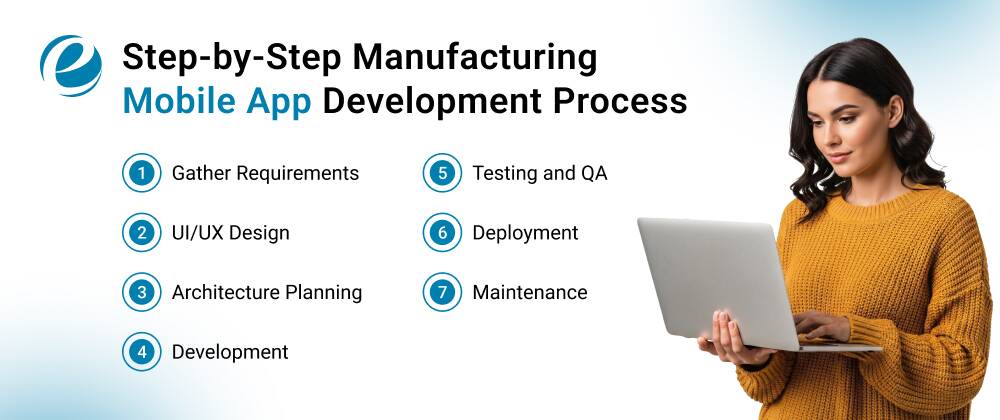
A well-run manufacturing mobile app development project follows a fairly consistent path. Rushing any of these stages tends to be expensive later.
- Gather Requirements: Define the use case, user roles, integration points, and things that are crucial for the app. You can also involve the workers; they will suggest needs that no one in the boardroom would think to mention.
- UI/UX Design: Industrial environments demand simple, vivid interfaces that are easy to read at a glance. However, the wireframes and prototypes need to be tested with real users before development starts.
- Architecture Planning: The technology stack, cloud setup, API strategy, and offline sync approach are the core decisions that you have to make because they impact the scalability and integration costs for years to come.
- Development: You should build the app in modular cycles that deliver working features repeatedly. However, stakeholders can provide meaningful feedback before the build is complete so that it helps to avoid scope surprises.
- Testing and QA: In this phase, you have to perform load testing, offline-mode testing, extreme-case simulation, and user consent testing on actual factory devices. Not on developer laptops.
- Deployment: Roll out to a pilot group first, gather honest feedback, then scale. Train workers with role-specific onboarding rather than a generic walkthrough.
- Maintenance: The app should evolve with the facility. Ongoing updates, new integrations, and feature additions are part of the plan, not unexpected extras.
Cost to Build a Mobile Manufacturing App
Manufacturing apps sit at the higher end of the cost range, largely because of the complexity of integrations and the reliability requirements. In the table below, you will learn about the general cost based on app complexity:
| App Complexity | Estimated Cost | Timeline |
| Basic MVP | $15,000-$30,000 | 1-3 months |
| Medium Complexity | $40,000-$150,000 | 3-6 months |
| High Complexity | $150,000-$300,000+ | 6-12+ months |
Pro Tip: Cross-platform development using Flutter or React Native can cut costs by 30–50% compared to building separate iOS and Android apps. That’s the recommended starting point for most mobile app development for manufacturing projects unless there’s a specific reason to go native.
Latest Trends Shaping Manufacturing Mobile App Development in 2026
The gap between what’s technically possible and what most manufacturers have deployed is still significant. These are the trends worth paying attention to right now.
AI at the edge
On-device AI is enabling real-time quality defect detection, predictive maintenance inference, and voice interfaces for workers who can’t look at a screen mid-task. With AI/ML consulting services, the manufacturers are getting clarity on where AI creates real operational value before committing to a build.
AR-assisted workflows
AR-powered apps can provide real-time visual instructions directly onto equipment that help technicians to perform complex assembly, maintenance, or repair tasks faster and with fewer errors. This is particularly useful in high-turnover environments where onboarding time is a constant pressure.
IIoT integration is deepening
More manufacturing apps are now connecting directly to machine-level data, which starts to create a genuine digital thread from sensor reading to decision to action.
Low-code for internal tools
Around 70–75% of new applications are expected to be built using low-code or no-code tools by 2026. But mission-critical apps, the ones that have to work reliably at scale, still need proper custom AI software development services with full integration and testing rigor.
Digital twin integration
This latest trend is moving from pilot to production for more manufacturers. Apps that sync with a digital twin let engineers simulate process changes virtually before touching the real line.
How to Choose the Right Manufacturing Mobile App Development Company?
Not every mobile agency understands what it actually means to build for a factory environment. The evaluation process matters here more than it does for most software decisions.
Key Criteria: Manufacturing Domain Experience, Tech Stack, Security Expertise
- Manufacturing Domain Experience: Search for a partner who understands OEE, MES, SCADA, and supply chain workflows at a genuine level, not one who has looked them up in preparation for your sales call.
- Tech Stack Alignment: Your app will need to talk to specific ERP or MES systems. Confirm the partner has done those integrations with real clients before, not in theory.
- Security Expertise: Partners should follow a secure development lifecycle that offers penetration testing and treat enterprise-grade authentication as a default, not an add-on.
Questions to Ask Before Signing a Development Contract
Start with these and pay attention to how comfortable the answers feel; vague responses to direct questions are a red flag in manufacturing mobile app development services just as they are in any other field.
- Can you share case studies from manufacturing clients with similar ERP or IoT integration requirements?
- How do you handle offline data sync in environments with unreliable connectivity?
- What is your process for testing UI/UX with actual floor workers rather than internal teams?
- How do you manage scope changes mid-project without the cost blowing up?
- What’s included in post-launch maintenance, and what gets billed separately?
- How do you protect proprietary production data and IP during the development process?
So, if you ask these questions of the company early, you will see whether they can meet your expectations.
Conclusion
Manufacturing mobile app development is no longer something you can put off until next year’s budget. It’s a direct lever for efficiency, safety, and staying competitive in an industry that is digitizing faster than most people realize.
The investment is real. The complexity is real. But the ROI is also real, and manufacturers who approach mobile app development for manufacturing with a clear use case, the right partner, and a genuine integration plan consistently see measurable returns within the first year.
If you’re not sure where to start, look for the single workflow that is most manual or most error-prone today. Build something that solves that problem properly, measure the results, and scale from there. That’s a more reliable path than trying to boil the ocean on day one.
FAQs
How much does it cost to develop a manufacturing mobile app?
The cost to develop a manufacturing mobile app can range from $50,000 and $250,000 or more. It depends on the scope and complexity because the manufacturing apps require backend systems for inventory, supply chain, and production tracking.
How long does it take to build a manufacturing app?
The approximate time to build a manufacturing app takes between 3 to 9 months, and it also depends on the complexity. A simple MVP can be built in 1 to 3 months, while a comprehensive custom enterprise app can take 9 to 18 months.
What is the best platform for manufacturing mobile apps — iOS or Android?
The best platform for manufacturing mobile apps, Android, is the most suitable platform because it supports a massive variety of rugged, specialized, and cost-effective industrial hardware.
Can a manufacturing app integrate with my existing ERP or SCADA system?
Yes, the modern manufacturing apps can integrate with your existing ERP and SCADA systems. This bridge unites floor-level controls with the enterprise planning software, minimizing manual data entry and enabling real-time adjustments to your production schedules.
Which technology is best for app development?
There is no single best technology, as the right choice depends on your budget, timeline, and goals. However, Flutter and Swift/Kotlin are the industry-leading standards.



 +1 (989) 535-9295
 info@emizentech.com
 emizentech


