
 Add us as a preferred source on Google
Managing a five-star restaurant or a modest retail store requires a variety of administrative, managerial, and marketing responsibilities. A point of sale (POS) software system helps you grow your company in the long run and manage daily operations.
POS systems, formerly considered expensive instruments only suitable for big organizations, have developed to accommodate companies of all shapes and sizes.
Projections show that the POS systems market will triple over the next several years due to its expansion. With approximately $2,489,471 million in transaction value, POS systems are transforming the payments sector. Shopify, Lightspeed, Square, and PayPal are popular POS system software. They are essential because they give organizations a productive means to handle transactions, keep track of data, and monitor cash flow.
In today’s competitive landscape, businesses increasingly turn to software development firms to develop POS software to meet their needs. This demand has fueled a burgeoning sector in POS software development, promising substantial career growth and significant revenue potential. In this article, we’ll guide you through the steps to build POS software, ensuring it meets all the requirements and sets you up for success. Join the POS revolution and take your business or career to new heights.
What is Point Of Sale (POS) Software?
Point of sale (POS) software allows POS hardware to complete transactions. It works as the backend for in-person transactions and processing credit card payments. Also, it helps calculate product prices with any taxes and fees and printing or emailing receipts.
Any tablet or smartphone can be turned into a point-of-sale system with the help of POS software. Thanks to its qualities like adaptability and effectiveness, point-of-sale (POS) software has become an essential tool for companies trying to improve customer service and streamline operations.
Key Statistics on the POS Software Market
In our fast-paced, technologically advanced world, POS software development plays a major role in transactions for both businesses and consumers. The most recent POS software market stats provide information on market growth.
- The Point of Sale (POS) Software Market was estimated at $9.4 billion in 2024. It is forecast to grow to $18.38 billion in 2031, at a rate of 8.75% from 2024 to 2031.
- The market for point of sale was estimated at $29.02 billion in 2023. The market will grow to $110.22 billion by 2032.
- The U.S. Point of Sale (POS) market was worth $4.97 billion in 2022. It is expected to increase to $13.49 billion in 2030, showing a CAGR of 13.3% over the projection period.
- The mobile POS market will be $5.63 trillion in 2027, with 1.9 billion users worldwide in 2026.
- It is estimated that the retail point of sale market is projected to increase to $34.4 billion by 2026. The growth forecast is a compound annual growth rate (CAGR) of 13.9%.
- POS hardware constitutes the biggest market, with forecasts suggesting it could hit $66.30 billion by 2025.
Why Are Businesses Interested in Developing POS Systems?
A Point of Sale (POS) system is not merely a tool for processing transactions; it’s a comprehensive solution that helps businesses streamline operations, enhance customer satisfaction, and gain valuable insights. If you want to stay ahead of the competition, investing in developing a custom POS software can be a game-changer for your business.
Benefits of Building a POS Software
1. Important Business Insights
A point-of-sale system gives users critical information such as inventory levels, sales figures, and past customer purchases. You may boost business growth and efficiency by making well-informed decisions with the help of customizable reports and analytics.
2. Streamlined Workflow
Developing a POS system can automate and integrate critical procedures to enable data access, quicker customer rotation, and faster checkout times. It lowers human error and guarantees timely supplies by improving back-office administration and precise inventory tracking.
3. Enhanced Customer Loyalty
Use your POS system’s customer database, CRM, or loyalty programs to provide individualized services, memberships, and discounts. Knowing and meeting your client’s requirements is the key to building customer relationships and increasing client loyalty.
4. Employee Satisfaction
A POS system establishes employee profiles with login credentials, system access, and incentive schemes to manage your workforce efficiently. A contented workforce drives employee motivation and productivity, improving business performance.
5. Competitive Advantage
Personalized point-of-sale software development improves your particular business procedures, boosting customer loyalty, employee retention, and cash flow. You may lose out on these crucial advantages. Therefore, the expense of not having a custom point-of-sale system can be substantial. Make a POS system purchase to be competitive and successful in your field.
Types Of POS Systems
Each type of POS system offers unique features and benefits that can be highly useful for organizations seeking customized solutions. These systems differ based on operational needs, budget, and customer preferences. Some types of POS systems are:
1. Mobile Point Of Sales (mPOS)

The mPOS system is integrated into mobile devices like smartphones, tablets, or other related gadgets. Mobile POS is set up so that devices such as card readers and barcode scanners can easily and quickly integrate into the system. This type of POS system seamlessly manages inventory, monitors sales, and does a lot more.
Suggested Application: Whether you’re a street vendor, a farmer’s market seller, or a vendor at fairs and events, a POS system simplifies your transactions and management. It’s also invaluable for freelance or contract workers, contracted professional services, and music merchandise vendors, offering seamless payment processing and inventory tracking. Mobile service providers, daycare operators, limo services, and lawn care businesses can all benefit from the convenience and efficiency of a POS system, ensuring smooth operations and satisfied customers.
2. Cloud-Based Point Of Sales (Cloud POS)

This type of POS runs on a cloud system and is maintained by utilizing data centers offered by the POS vendors. This can be integrated easily into existing frameworks and functions smoothly. Cloud-based POS systems work well for all businesses owing to the features offered by them.
Suggested Application: Cloud-based POS offers specialized solutions to the unique requirements of restaurants, golf shops, retailers, omnichannel businesses, e-commerce platforms, occasional use scenarios, and quick-service restaurants. With its customizable features, seamless integrations, and dedicated support, CloudPOS empowers businesses to streamline operations, enhance customer experiences, and drive growth. Choose CloudPOS for a POS system that adapts to your business needs and helps you succeed in today’s competitive landscape.
3. Terminal POS

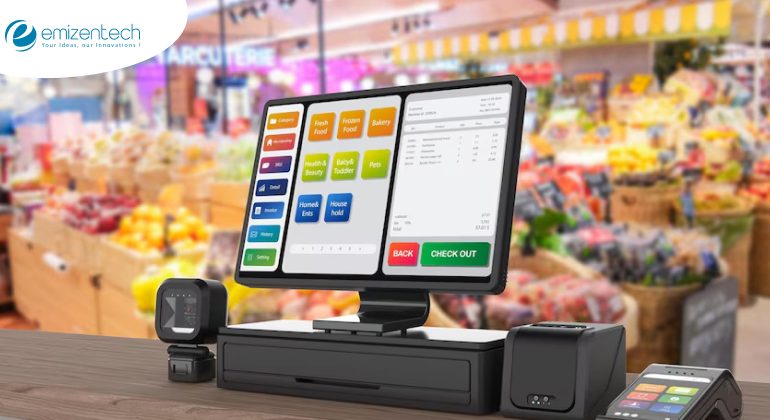
This type of POS is used in stores & outlets, such as grocery stores, restaurants, and other similar stores. They offer pioneering services that help deal with issues in the industry. Terminal POS system maintains certain standards, which can be integrated easily into any framework. At the same time, they are even cheaper and economical.
Suggested Application: A POS system is perfect for full-service restaurants, busy retailers, grocery stores, and boutiques. It streamlines operations and boosts efficiency for antique stores, book or magazine shops, salons, spas, and electronic stores. Upgrade your business with a POS system and experience seamless transaction processing, better inventory management, and enhanced customer satisfaction. Make your operations smoother and more efficient with a POS system!
4. Tablet POS System
Looking for a cost-effective way to upgrade your point-of-sale (POS) system? iPad and Android POS solutions are gaining popularity because they don’t need a big upfront investment. You can often use a tablet you already own. Some services are free with credit card processing, while others have a small monthly fee but let you pick your card processor. Plus, tablet POS systems work with add-ons like barcode readers, cash drawers, and tablet stands. Whether you need a basic setup or something more advanced for inventory and employee management, there’s a solution for you.
Suggested Application: Mobile vendors, quick-service restaurants, coffee shops, or gift shops can streamline operations and enhance customer satisfaction using this system. Small retail stores, professional services, pizzerias, juice bars, sandwich shops, and ice cream parlors can all benefit from the POS system’s convenience and efficiency. It also fits art galleries, small theaters, and salons, providing seamless transaction processing and improved management. Upgrade your business operations with a POS system and see the difference it makes!
5. Self-service kiosk POS
Kiosk POS systems are designed for specific tasks. For instance, they can help customers buy movie tickets or handle parking payments. You can also use them in big stores for customers to check prices and see what’s in stock. They’re handy for things like checking in at the doctor’s office or applying for jobs. Sometimes, mobile apps do similar jobs, like checking in or finding products.
Suggested Application: This system is ideal for ticket sales, transportation passes, and patient check-ins. It’s also perfect for grocers, product lookups, HR management, and parking services. Enhance your efficiency and streamline operations with a POS system, providing seamless transactions and exceptional service in every aspect of your business!
6. Multichannel POS Systems
A multichannel POS system is super useful if you sell stuff in different places, online and offline. It combines all your sales from your website, social media, and stores. This way, you won’t run out of things to sell because everything’s tracked in one system, and your stock levels are updated everywhere at once.
Suggested Application: Whether you’re a brick-and-mortar store with an online presence, an e-commerce company venturing into physical spaces, or an online seller hosting pop-up events, a POS system is your key to seamless operations. Manage both online and offline sales effortlessly, expand your reach, and provide a consistent customer experience across all channels.
7. Open-Source POS Systems
Open-source POS systems give you the flexibility to customize your software to fit your exact needs, but the expertise of software engineers needed for customization often comes with a high price tag. This cost can be a significant consideration, especially for small businesses or startups with limited budgets. However, for larger enterprises with unique POS requirements, the investment in open-source solutions may be justified by the ability to create a highly customized and efficient system.
Suggested Application: A POS system is a game-changer for large or enterprise-sized businesses. It streamlines operations, improves efficiency, and provides valuable insights to help you scale and succeed. Upgrade to a POS system and unlock the full potential of your enterprise!

How Does POS Work?
POS systems are like modern cash registers but more innovative and more versatile. They calculate purchase amounts, handle sales tax, process payments, and keep track of transactions—all while offering much more.
Here’s how it works:
1. POS Hardware
POS hardware includes devices like card readers for in-person sales, countertop terminals for brick-and-mortar shops, and customer displays for order transparency, kitchen displays for efficient restaurant operations, and self-ordering kiosks for customer empowerment. These devices streamline your operations and enhance customer experience.
2. POS Software
You have two main options: on-premises POS software installed on your terminal and cloud-based POS software accessible from anywhere. On-premises software suits small businesses with one terminal, while cloud-based systems sync data across terminals and devices, offering flexibility and accessibility. Popular providers like Clover, Square, Toast, and Shopify offer robust solutions to your business needs.
How To Build Your Own POS System?
POS software development demands thorough planning and knowledge of the essential elements. Here’s a quick start guide to get you going:
1. Specify What You Need
Determine the precise features and capabilities that your point-of-sale system requires. Consider elements such as payment methods, customer administration, inventory control, reporting and analytics, transaction processing, and system interface with other programs, such as accounting software.
2. Select Your Technology Stack
Make sure your point-of-sale software has the proper hardware and software. This covers card readers, barcode scanners, receipt printers, POS software, and POS terminals or devices. Choose between an on-premises or cloud-based system for scalability and remote access.
3. Create Point-of-Sale (POS) Software
If you need assistance with custom POS software development, collaborate with skilled software developers to construct a user-friendly interface. Ensure your software comprises strong transaction processing powers, safe payment processing, inventory management, and reporting tools. Besides, it should hold the caliber to integrate with external services such as accounting platforms and payment gateways.
4. Integrate Payment Processing
Select reliable payment processors and include your point-of-sale system with them. To safeguard client payment information, ensure security requirements like PCI DSS are followed.
5. Test and Improve
To find and address any flaws or problems, your POS system should undergo a complete testing process. Examine the device’s and operating system’s compatibility, security, performance, and usability. Get beta users’ opinions, then make changes to the system in response to their suggestions.
6. Collaborations
Building a POS system requires technical expertise, cooperation with hardware and software vendors, and adherence to industry standards and regulations. Consider partnering with experienced developers or a POS software development company to streamline the development process and ensure a successful implementation.
Must-have Features and Functionalities of POS Systems
POS systems are versatile tools that cater to various industries, each with its unique needs. Here are some generic features and functionalities commonly found in POS systems:
1. Inventory Management and Control:
- Barcode scanning for efficient inventory tracking
- Product categorization for organized stock management
- E-commerce integration for seamless online sales
2. Payment Management & Accounting:
- Cash management and PCI compliance for secure transactions
- Receipt module and card payment integration for streamlined payments
- Commission and discount management for sales incentives
3. Reporting and Analytics:
- Demand forecasting and sales reports for informed decision-making
- Export to different file formats and integration with accounting systems
- Tax and VAT reporting for financial compliance
4. Team Productivity Tracking & Employee Management:
- User accounts with access control permissions
- Timesheets and roster management for efficient staff scheduling
- Training mode for employee onboarding and skill development
5. Customer Management:
- Customer profiles and history for personalized service
- Loyalty program management and gift card integration for customer retention
- Dietary and nutrition preferences management for experiences
6. Additional POS Capabilities:
- Table management and delivery management for restaurants
- Handheld ordering and online ordering for convenience
- Reservations and waitlist management for efficient customer service
- Kitchen and menu management for food establishments
- Mobile access and multi-location support for scalability

Pricing Model For POS System
In the case of a Point-of-Sale system, there are mainly two basic criteria for purchase, such as:
1. One-Time Full Payment
This payment method is not so much in use, as the business is required to pay a huge sum initially, and the cost involved here is much more. However, this way of purchasing is quite profitable and useful in the long run.
2. Pay Per Month
Though quite popular & trendy, in the long run, in this model, one must pay more. There are two options: 1) pay-per-use and 2) pay-per-registration. Here, the actual costs are determined with a combination of features & stores.
Other than this, there are chances of additional costs in the form of:
- Charges to integrate additional functionalities.
- The cost of hardware/software might differ from organization to organization.
- Base price may differ from vendor to vendor for customer services. However, there are a few companies that may not charge anything, even for free training or live chat.
What Do Businesses Look for When Buying/Developing A POS System?
In today’s fast-evolving business environment, a Point of Sale (POS) system is more than just a tool for processing transactions. It’s a solution that drives efficiency, enhances customer experience, and fuels business growth.
Here’s a detailed look at what businesses seek in a POS system:
1. Comfort
Companies value a point-of-sale system that is simple for their employees to use. A user-friendly interface with clear instructions and simple navigation is necessary to ensure effective operations. By reducing learning, businesses can save time on training and concentrate more on expanding their company.
2. Effective Stock Management
Companies need to avoid inventory problems like overstocking or stockouts. Inventory level tracking is made possible by a robust point-of-sale system that uses product classification, barcode scanning, and stock alerts. Businesses can maintain organization, maximize inventory, and make well-informed decisions regarding purchases and restocking.
3. Sales Monitoring
Businesses must have thorough analytics and sales tracking for their best-selling items, sales trends, and consumer purchasing patterns. They can find growth opportunities, modify pricing tactics, and efficiently arrange promotions by creating thorough sales records. This data-driven strategy improves judgment and propels profitable company ventures.
4. Payment Flexibility
Develop point-of-sale systems supporting various payment methods, including credit/debit cards, smartphones, and contactless payments. Offering various payment options to consumers improves their convenience and satisfaction, boosting sales and loyalty.
5. Order Billing
Efficient order billing is a must for a smooth checkout experience. POS systems instantly generate detailed and accurate bills and receipts, streamlining the customers’ payment process. Integration with accounting software further simplifies financial management, ensuring accurate recording and reporting of transactions.
6. Return Management
A streamlined return management process is essential for efficiently handling returns, refunds, and exchanges. POS systems with clear return policies and easy procedures enable businesses to manage returns seamlessly while maintaining accurate inventory records. This enhances customer satisfaction and builds a good name in the industry.
7. CRM Capabilities
Customer relationship management features in POS systems help businesses build strong customer relationships. Storing customer data, purchase history, and preferences allows businesses to personalize marketing efforts, implement loyalty programs, and offer targeted promotions. These CRM capabilities develop customer engagement and loyalty, driving repeat business.
8. Loyalty Programs
Integrated loyalty programs within POS systems push customers to return and make repeat purchases. Businesses can encourage customer engagement and increase loyalty by offering rewards, discounts, and points-based systems. It strengthens the company’s and its customers’ bond, leading to long-term relationships and higher customer retention rates.
9. Comprehensive Reporting
With POS systems’ extensive and configurable reporting capabilities, businesses may obtain critical insights into their sales, inventory, profitability, and trends. The generation of reports in various formats allows firms to analyze better and identify areas for development, streamline data analysis, and reach well-informed strategic decisions that support growth.
10. Security
Data security is the top priority for organizations when selecting a point-of-sale system. They look for systems that meet industry standards like PCI DSS and have robust security features like encryption, secure payment processing, and user access controls. Safeguarding customer information and controlling data breaches is essential to maintaining integrity and confidence in business operations.
Things To Keep In Mind Before Developing A POS Application
A good and functional Point of Sale (POS) application depends on considering several important factors. The following are the crucial factors to bear in mind during POS software development:
1. Understanding Business Needs and Goals
To start, thoroughly analyze the competition, the market, and your client’s particular needs. This knowledge aids in forming the POS system to fit the target market’s desired requirements and align with corporate objectives.
2. Types of POS Systems
There are different types of POS systems, each suitable for specific business setups. Choose a system that is ideal for businesses on the move, providing portability and minimal inventory management.
3. Components of a POS System
A well-rounded POS system comprises hardware, software, and functional logic. Choosing the right hardware components, like cash registers, barcode scanners, and printers, is crucial. Developing user-friendly software interfaces and coding functionalities for sales processing, inventory management, and reporting ensures an efficient system.
4. Deployment and Maintenance
A POS system’s efficacy depends on its proper deployment and continuous maintenance. Guarantee a seamless implementation procedure and offer all-encompassing assistance to tackle any problems and upgrades, guaranteeing the system functions flawlessly and fulfills changing business requirements.
5. Essential Things to Think About
Set a competitive price for the system that provides value without sacrificing quality. To improve user experience, make the user interface intuitive and simple to use. Put strong security measures in place to protect private information and connect with other systems for smooth functioning. Finally, scalability should be considered when designing the system to allow for future expansion and modifications to business needs.
Technology Stack For Point Of Sale Software Application Development

| Application and Data | Utilities | DevOps | Business Tools |
|---|---|---|---|
|
|
|
|
How Much Does It Cost To Develop A Point Of Sale Software System?
One has to keep various factors in mind for the development of a POS system. Various factors like
- App development platform
- Number of basic & advanced features
- 3rd party API & Platform integrations
- Development team region
- Timeline to complete
However, to give an idea, the development of a POS system usually costs between $40000-$50000 with basic functionalities; however, to get a POS system with advanced features and compatibility with mobile, it is certain to cost somewhere between $65000-$90000.
How Can EmizenTech Help You With The POS System?
At EmizenTech, a leading software development company, we specialize in POS system development and integration, offering software development services to enhance your business operations.
Our expertise lies in perfectly integrating POS systems with various e-commerce platforms. These include such as Shopify, Magento, Adobe Commerce, Shopware, and more.
We can also integrate POS functionalities directly into your e-commerce store, ensuring a smooth and efficient sales process for your online customers. Additionally, we can incorporate POS capabilities into your e-commerce mobile app, providing a seamless omnichannel experience for your users.
For your offline outlet business, we can develop a complete POS system that includes software for both PC and mobile devices. This allows you to manage your operations from anywhere, ensuring flexibility and convenience. Our POS software solutions are designed to blend well with your hardware, providing a comprehensive and efficient POS experience.
As a trusted POS software development company and e-commerce solutions provider, we are committed to delivering high-quality, customized POS solutions that meet your business needs.
Let EmizenTech empower your business with advanced POS capabilities for enhanced efficiency and growth.
Conclusion
Developing Point of Sale (POS) software requires careful planning, efficient coding, and rigorous testing. This complete guide has provided insights into the essential steps involved, including defining requirements, designing the user interface, integrating payment gateways, and implementing security measures. To ensure a successful POS software development project, consider partnering with Emizentech, a trusted software development company known for its expertise in building robust POS solutions. Contact us today to transform your business operations with cutting-edge POS software.
FAQs
Why should businesses build a custom POS system?
Building custom POS software can save you money, give you full control over features, and let you customize it for your specific business needs.
What are the key features of a POS system?
Common features include sales tracking, inventory management, receipt printing, barcode scanning, and customer management.
Which technologies are used to build POS software?
Software developers can use programming languages such as Python, JavaScript or Java, and frameworks like React (for front-end) or Node.js/Django (for back-end). A database like MySQL or MongoDB is also needed.
What are the essential parts of the POS system?
A standard POS system consists of hardware, including a computer, tablet, receipt printer, barcode scanner, credit card reader, and cash drawer.
What is the time frame to create the POS software?
The development time for the POS system will vary. A simple POS software could require a couple of months to develop, whereas a more complicated system with numerous features and integrations could require a full year.
What payment method can POS software accept?
POS software can accept credit cards, debit cards, mobile payments, contactless payments, gift cards, and cash transactions.



 +1 (989) 535-9295
 info@emizentech.com
 emizentech


