 Add us as a preferred source on Google
Are you aware of this question, “What is galaxy wearable app?” If you are not, then this blog will help you out. Well, the Galaxy Wearable app brings a new experience to Samsung devices through its upgraded functionality, which transforms the existing operations of the app.
According to Fortune Business Insights, the wearable technology market, which currently exists at a value of $96.44 billion will reach $231.43 billion by 2034, according to a market forecast that shows an annual growth rate of 11.60% driven by AI technology, which includes the Galaxy Wearable app and device management for improved control systems. The application demonstrates its ability to establish direct connections with watches while users search for information about “how to set up and customize my Galaxy wearable device.
The guide provides information about “what is galaxy wearable app?”, setup processes, and features of the app that you can use to create your own project that develops wearable devices like watches, buds, rings & bands.
Core Insights of this Blog
- The Galaxy Wearable App transforms your Samsung watch into a smart health coach through its AI-powered features and device management control system.
- The answer to “how do I set up and customize my Galaxy wearable device?” requires three steps, which include downloading the app and pairing the device through Bluetooth, updating the system, and customizing the watch faces.
- The app uses AI to sync notifications, track fitness, and control volume, enabling users to enjoy a complete experience.
- Developers can create custom applications similar to Galaxy wearable devices by using Wear OS, Kotlin, and Android Studio for “wearable devices app development.”
- The exploding market requires companies to create innovative wearables, which leads us to examine the best AI app development company for next-generation technology development.
What is Galaxy Wearable App?
The Galaxy Wearable app serves as Samsung’s official application, which supports all Galaxy Watches, Buds, and other wearables. The system operates this app together with Device Management to establish a continuous connection between devices while enabling updates and automated features. You can easily pair your devices and customize their settings while monitoring your health from your smartphone.
How to Set Up & Customize Your Device?
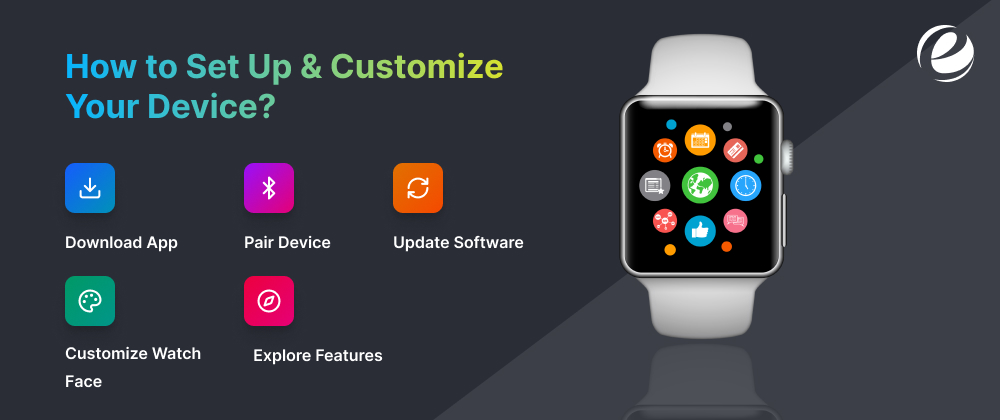
The Galaxy Wearable app and Device Management make it easy to set up your device. The answer to “How do I set up and customize my device?” matching these steps will enable users to complete the pairing process.
Download App
Users need to download the Galaxy Wearable app from Google Play because it enables them to establish device connection through the app and device management sync.
Pair Device
Bluetooth needs to be activated before the user can open the application and choose their Watches, Buds, Rings & Bands, which establishes a connection that delivers immediate notifications.
Update Software
The application enables users to check for firmware updates that guarantee they possess the most recent Galaxy Wearable App and Device Management system enhancements.
Customize Watch Look
The application allows users to search for watch designs that they can modify by changing colors and adding health data displays to their personalized designs.
Explore Features
Users must connect to the wearable app development services in order to gain access to advanced customization options that include habit tracking capabilities.
Can You Build a Custom Wearable App?
Yes, we can create a custom application that functions like Galaxy wearable devices by using Wear OS together with Samsung development tools. The Galaxy Wearable App and Device Management should be used as a foundation for building wearable apps.
Choose Platform
Choose a platform such as Wear OS 5 or Tizen that supports the Galaxy Wearable app and device management features for Android devices.
Set Up SDK
The SDK setup process requires you to download Android Studio, which enables you to create applications that simulate this app and device management functions.
Code Core Features
Develop the main application functions through Jetpack Compose, which will create the user interface while implementing health tracking sensors for wearable device applications.
Test on Emulator
The Galaxy Watch simulation will enable you to observe how users interact with the Galaxy Wearable app and Device Management.
Publish to Store
You need to submit your custom wearable app to Google Play or the Galaxy Store after completing quality assurance testing.
Essential Technical Requirements for Wearable App Builders
Developers need specific tools and skills to create custom wearable applications similar to the Galaxy Wearable app. This checklist ensures you have all the essential components required for efficient wearable device app development and seamless app connectivity. Start with these essentials to avoid common pitfalls.
Developer Checklist:
| Requirement | Details |
| SDK & IDE | Android Studio (Hedgehog+), Wear OS 5 SDK |
| Languages | Kotlin/Java, Jetpack Compose |
| Hardware | Galaxy Watch 7/Ultra for testing, API 34+ |
| APIs | Wearable API, Health Services (Google Fit) |
| Store Prep | Galaxy Store Seller Office account |
Conclusion: The Future of Wearable Tech
The Galaxy Wearable app provides a fresh system to control devices, which operates through its Device Management. The system enables users to navigate from a basic understanding of the Galaxy Wearable app to complete setup and customization of their device.
Developers now have access to Wear OS tools, which enable them to create custom applications that function like the Galaxy wearable devices. You can start your journey into mobile app development or choose to work with a well-known app development company to build innovative products.
Wearable technology is moving from basic to advanced in 2026 because now it functions as a primary control center, although in upcoming years, it will offer simple access with high-level user customization solutions.
(The next big leap in wearables? AI-powered neural interfaces and AR contact lenses by 2030 will help users to read biometrics, display holograms, and predict health-related concerns before symptoms appear.)
FAQs
Is the Galaxy Wearable app on iOS?
The Galaxy Wearable App functions exclusively on Android devices that provide optimal performance for Samsung phone users through their app and device management system. iOS users need third-party apps for basic pairing.
Why does Galaxy Wearable need so many permissions?
The Galaxy Wearable application requires multiple permissions because it needs to access notifications, health information, and location data to support its tracking and device synchronization functions, according to its app development requirements.
Do I need the Galaxy Wearable app on my phone?
Yes, the Galaxy Wearable application must be used to set up. Users can personalize and control the features of Samsung Galaxy smartwatches and earbuds with the help of their mobile phones.
What are the uses of wearable apps?
Wearable apps provide multiple functions to users because they enable fitness tracking notifications and allow users to create custom applications for Galaxy wearable devices.




 +1 (989) 535-9295
 info@emizentech.com
 emizentech


