14 Branches, Three Tools That Didn’t Talk, and One CRM to Replace Them
A sales, quoting and field service platform for a commercial HVAC company with 14 branches. Our CRM software development team designed it, built it, and wired it into everything else they run.
Overview
Our client does commercial HVAC: installs, preventive maintenance contracts, emergency repairs. Fourteen branches across the Midwest. Roughly 60 people in sales and estimating, about 220 technicians, a dispatch desk in every branch. The business was doing fine. The software holding it together, less so.
Sales used an off-the-shelf CRM that half the team had quietly stopped updating. Quotes got built in Excel and emailed out as PDFs. Contracts, work orders and tech schedules lived in a separate field service app, and billing happened in the ERP. So that’s three systems, three versions of every customer, and people re-typing the same addresses every single week. Nobody liked it.
They were clear they didn’t want one more subscription on the pile. They wanted something that matched how a services company actually makes money. Win the install, turn it into a maintenance contract, then keep that contract renewing for as long as you can. That was the brief they brought us for custom CRM development, and here’s what we shipped: a web CRM for sales and ops, a mobile app for technicians, and an integration layer that keeps the ERP and accounting honest.
The Challenge
Four problems. Pretty much every decision we made later traces back to one of them.
Same customer, three records, none of them matching
A facility manager might be a contact in the CRM, a “site” in the field service tool and a bill-to account in the ERP. Different spellings. Sometimes different addresses. If anyone asked what a customer was worth across installs and service combined, someone had to export three files and lose an afternoon to VLOOKUP.
Quoting was slow, and nobody knew how slow
A commercial HVAC quote isn’t a one-liner. Equipment, labour, permits, margin, optional maintenance tiers. Estimators did all of it in spreadsheets, emailed managers for sign-off, then re-keyed the approved version into the ERP by hand. Quotes went out late. Pricing drifted from branch to branch. And if you wanted to know who approved a 12% discount last March? Good luck.
Maintenance contracts renewed by memory
This one hurt the most. Service agreements are where the margin is, and renewals were tracked in a shared calendar. Sales had no idea which contracts were about to lapse, which sites had open complaints, or which customers were already talking to a competitor. Contracts didn’t really get cancelled. They just quietly didn’t renew.
Technicians were the best source of sales leads, with no way to log them
A tech standing next to a 15-year-old rooftop unit knows a replacement is coming, probably within the year. But there was nowhere to put that. So it stayed on the roof. Those were easily the warmest leads the company had, and almost none of them got a phone call.
Our Approach
We started with the customer record. Everything else came after.
Before anyone opened Figma, we spent two weeks walking one real account through its whole life: lead, site survey, quote, install, contract, service calls, renewal. That became the rule for the rest of the build. Every module reads from and writes to one account model, and if a feature wanted its own private copy of customer data, we went back and redesigned the feature. (That happened more than once. It’s irritating at the time and saves you months later.)
After that, two-week sprints. UI/UX design came first, covering every sales, dispatch and technician screen, alongside the data model and a migration plan. Then the core CRM and quote builder. Then field service and the mobile app. Then ERP integration, migration, hardening, and a rollout that went branch by branch instead of everyone at once.
Instead of a fixed-scope contract, the client decided to hire CRM developers from us as a dedicated squad. Ten people: a PM, a business analyst, a designer, two Node.js developers on the backend, two React developers on the web app, a React Native developer for mobile, plus QA and DevOps. Frankly, we’d nudge most CRM clients toward this setup. Requirements always shift once users see their own data in the system (always), and a dedicated team just absorbs that without the change-request back-and-forth. If you’re staffing something similar, our guide on how to hire a CRM developer is worth ten minutes.
One more early call: integration got treated as its own module with its own backlog, not a script someone writes in the final sprint. More on why below.
Solution Delivered

One account, and everyone works off it.
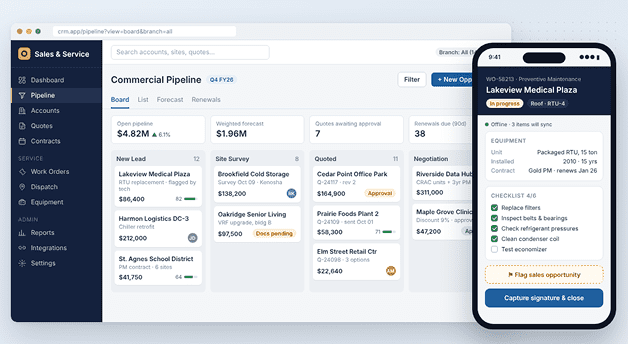
Accounts, sites, contacts, equipment, quotes, contracts, work orders, invoices. All of it hangs off a single customer record. A rep opens an account and sees open quotes, installed units with age and warranty, active contracts, the last five service visits and anything unpaid. Dispatch sees that same screen. So does finance. That alone killed a surprising number of internal email threads.

Goodbye, quoting spreadsheets.
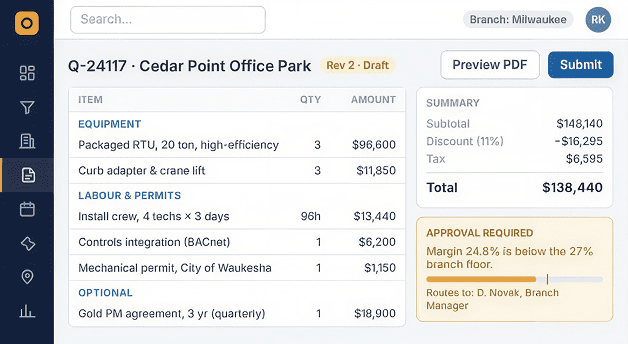
Estimators now build quotes from an equipment and labour catalogue that syncs from the ERP. Branch pricing rules and margin floors are enforced by the system, not by someone remembering them. Go past your discount limit and the quote routes itself to the right manager, with the history logged. Once the customer says yes, it turns into a job and an ERP sales order in one click. Nobody types it in twice.

Renewals that show up on their own.
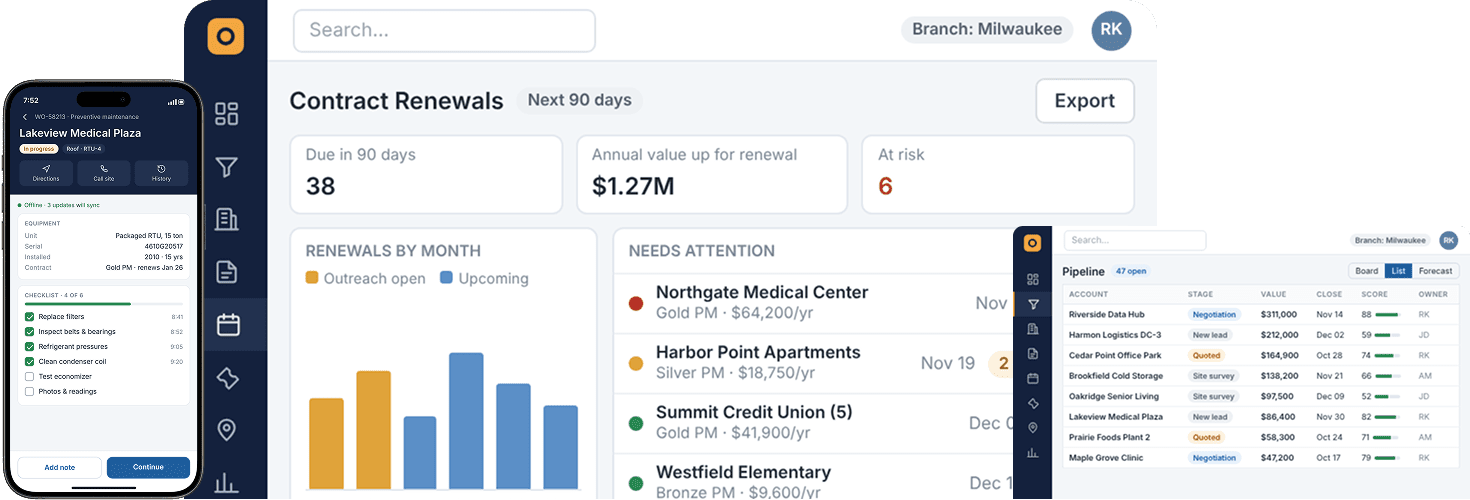
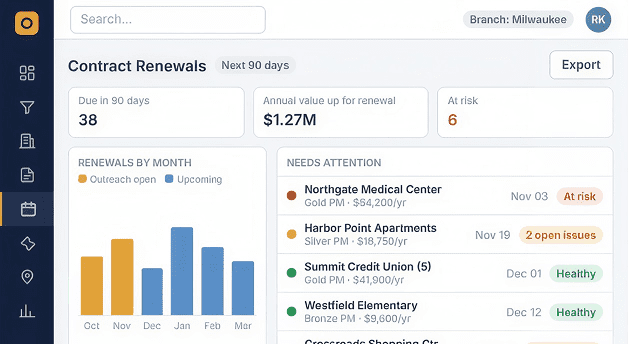
Every maintenance agreement knows its term, visit schedule and end date. Ninety days out, the CRM opens a renewal opportunity, hands it to the account owner and attaches a quick health check: visits done, open issues, average response time. Small thing. But reps stopped walking into renewal calls blind.

Field service inside the CRM, not next to it.
PM visits get created automatically from each contract’s schedule. Dispatchers drag work orders onto a board filtered by skill, branch and who’s actually free that day. Techs get the job, site history and equipment details on their phone, take photos and readings, grab a signature, and close it out before they’re back down the ladder.

Leads straight from the field.
The tech app has a “Flag opportunity” button. Spot a tired compressor, take two photos, type a line of notes. Under a minute. It lands in the CRM as a lead on the right account and goes to whoever owns it. Of everything we built, this is the one their leadership team mentions first, every time.

Lead scoring, minus the AI theatre.
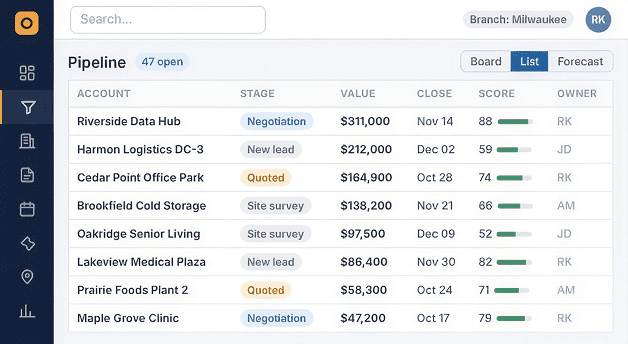
We trained a scoring model on the client’s own history (quotes, wins, losses, service data) and it ranks open leads and renewals by how likely they are to close. Reps see it as a sorted list in their pipeline. That’s all. No chatbot bolted on for a press release, just a sensible bit of AI integration that tells people where their next hour is best spent.

Integration built like a product.
A separate integration service syncs customers, items, sales orders and invoices with the ERP and accounting system. Jobs get queued and retried, and a reconciliation dashboard flags mismatches before finance trips over them at month-end. The same layer handles email and calendar, call logging and e-signatures. We think about ERP software development the same way: the systems on either side will change, so the agreement between them needs to be written down.

Migration, done properly.
We moved every customer, site and equipment record out of the old CRM, the field service tool and years of spreadsheets. Not glamorous work. Dedupe rules, address clean-up, and a manual review queue for the matches we weren’t confident about. The payoff was that on go-live day there was one record per customer. Not three.

Permissions that match the org chart.
Reps see their accounts. Branch managers see their branch, regional leads see their region, and finance can edit billing fields nobody else can touch. Any change to pricing, discounts or contract terms gets logged with who did it and when.
Three Modules Nobody Screenshots
None of these make it into the demo video. All of them decide whether the client can run the thing without ringing us.
A reconciliation dashboard for the integration layer
Every sync between the CRM and the ERP gets logged: payload, status, retry count. Anything that fails or doesn’t match lands in a queue where an ops admin can fix it and push it again. So when the two systems disagree, someone knows within minutes. Not at month-end close, which, in our experience, is usually when this stuff gets found.
Admin-configurable workflows
Approval limits, pipeline stages, renewal lead times, notification rules. All editable from an admin panel, nothing hard-coded. When a new branch opened partway through the project, the client’s own admin set it up in an afternoon and we didn’t have to touch it. A CRM that needs a developer every time the process changes will slowly drift away from the process. Then people go back to spreadsheets.
Offline mode for technicians
Plant rooms and rooftops are where phone signal goes to die. So the tech app caches the day’s jobs, site history and forms, holds photos, readings and signatures in a queue, and syncs when the signal comes back. Conflicts get sorted out on the server. Skip this and field adoption falls off a cliff. We’ve watched it happen elsewhere.
Key Features

Unified 360° customer record
Accounts, sites, equipment, quotes, contracts and invoices on one screen.

Rules-based quote builder
Synced catalogue, branch pricing, margin floors and approval routing.

One-click quote to order
Accepted quotes become jobs and ERP sales orders with no re-keying.

Automated contract renewals
Renewal opportunities open 90 days out with an account health summary.

Drag-and-drop dispatch board
Assign work orders by skill, branch and technician availability.

Mobile field service app
Jobs, site history, photos, readings and signatures, online or offline.

Technician lead capture
Field observations become routed sales leads in under a minute.

AI lead and renewal scoring
Pipeline ranked by likelihood to close, trained on the client’s own data.

Two-way ERP and accounting sync
Queued, retryable integration with a reconciliation dashboard.

Role-based access and audit trail
Field-level permissions and a full change log on pricing and contracts.
Results and Outcomes
3 → 1
Old CRM, field service tool and quoting spreadsheets replaced by one platform.
1 record
One customer record shared by sales, dispatch, technicians and finance.
90 days
Head start on every contract renewal, opened automatically by the CRM.
2 apps
A web CRM for sales and ops, plus an offline-ready mobile app for the field.
Beyond the tiles: technician-flagged opportunities now land straight in the sales pipeline, duplicate customer records were cleared out before go-live, and quoting, sync and renewals shipped with automated test coverage through our software testing and QA team. Nothing P1 was open at launch, and a hypercare period came with the handover.
Technology Stack


Backend
Node.js with NestJS, modular service architecture



Database
PostgreSQL with Prisma ORM, Redis for caching and queues


Web CRM
React, TypeScript, Material-UI
Mobile app
React Native, offline storage with background sync


Integration layer
Queue-based sync service (BullMQ), REST and webhook connectors

Search
Elasticsearch for account, site and equipment lookup


AI / ML
Python scoring service (scikit-learn) exposed via internal API


Auth
SSO via OAuth 2.0 / SAML, JWT with refresh rotation, RBAC


Testing / CI
Jest, Supertest, Detox, GitHub Actions


Infrastructure
AWS (ECS, RDS, S3), Docker, Terraform


Monitoring
Sentry, CloudWatch alerting
Why Custom CRM, and Not Another Licence
Worth being upfront about this one, since nearly every client in this spot asks.
They’d already tried bending an off-the-shelf CRM to fit. It was fine for contacts and deals. What it couldn’t handle, not without a lot of duct tape, was the shape of a services business. One account, many sites, equipment at each site, every unit tied to a contract with its own visit schedule and renewal date. Each workaround meant another custom object, another sync script, another manual step. And each one broke a little more often than the last.
That’s where custom CRM development pays for itself: your core object isn’t a deal, and most of your revenue shows up after the sale closes. If you’re stuck on build vs buy, our custom CRM development cost breakdown is a more honest place to start than a vendor’s pricing page. And to be fair to the platforms, sometimes they are the right call. When they are, we do Salesforce integration and Odoo implementations too.
What’s Queued Next
We left room on purpose. Next on the client’s list: a self-service portal where customers can book visits and check their service history, IoT feeds from connected HVAC units that open predictive maintenance work orders on their own, an AI agent that turns site survey notes into a draft quote, and more data analytics on branch-level profitability. None of it needs rework. The account and equipment model was built with this in mind back in sprint one.
Conclusion
Our client already knew HVAC better than anyone in their region. What they were missing was a CRM that understood their business even half as well as they did.
One dedicated team and a branch-by-branch rollout later, every branch runs sales, quoting, service and renewals off the same customer record. If we had to say why it worked, it comes down to three things. We designed around the account lifecycle, not the sales pipeline. We treated integration and migration as real products. And we put the technician inside the sales process instead of leaving them outside it.
If your business looks a lot like this (recurring contracts, people in the field, a CRM that only sees half the customer), you can hire dedicated developers from us the same way they did. One squad, discovery through hypercare, no hand-offs.
Does your CRM only see half your customer?
Let’s talk through what it would take to fix that.
Schedule a Free Consultation

 Let’s build success Together