
 Add us as a preferred source on Google
 Struggling to pick between building your own CRM or buying one off the shelf? You’re not alone. The global CRM market is projected to grow from USD 72.83 billion in 2026 to USD 118.83 billion by 2032 at a CAGR of 8.4% (Research and Markets). Such expansion suggests that companies are steadily investing in customer relationship management systems. Still, the question in the “custom CRM vs off the shelf CRM” debate is way more hands-on. Like, which option fits your work cadence, your budget limits, and your longer-term goals.
Custom CRM and Off the Shelf CRM in a Nutshell
Picking a CRM isn’t just about the price tags. It’s also about how the system blends into your day-to-day operations. Before deciding between a custom CRM vs off the shelf CRM, it’s important to understand what each option offers, where it excels, and how it performs in real-world business scenarios.
What is a Custom CRM?
A custom CRM is built fresh to mirror your exact business processes, not the other way around. It tracks leads through your own sales stages, automates industry-focused follow-ups, and pulls data from the tools you already use, the same ones. This fit only shows up with custom CRM development, where developers set up each module around what you actually need, so there’s less guesswork involved in trying to force a generic tool to do things it wasn’t built for in the first place.
What is an Off the Shelf CRM?
An off the shelf CRM is ready-made software that a company can subscribe to and start using right away, without much work on their side. In other words, it is already built, so there is no heavy development involved. These are some of the popular off the shelf CRM platforms that businesses often lean on: Salesforce, HubSpot, and Zoho. Each one tends to include pre-built modules for sales, marketing, and support, so teams can get rolling faster and not sit around waiting for a custom setup.
It tends to be a reliable choice for teams that want a quick setup and the typical features. Without all that heavy personalization. They’re especially convenient when your day-to-day processes are fairly standard and don’t need too many deep changes.
Custom CRM vs Off the Shelf CRM: What’s the Core Difference?
The core difference comes down to fit versus speed, really. With off the shelf CRMs, you get fast deployment, like much straight out of the box, but a custom build gives you that tighter grip on features and the whole workflow. Before you compare them side by side, here’s a quick look at how they differ on what actually matters most:

Setup time
Off-the-shelf CRMs are ready to use within days, while custom CRM work takes weeks up to months to build, test, and push live.
Cost structure
A custom CRM generally asks for more money at the start, whereas off-the-shelf options tend to sit on affordable recurring subscription plans.
Flexibility
Custom systems get shaped fully around your daily process, on the other hand off-the-shelf tools tend to stick with pre-set configuration options.
Scalability
A custom CRM is designed to expand as your business expands, but off-the-shelf plans often come with upgrades that can get expensive each time you scale.
Integrations
Off-the-shelf CRMs typically include ready-made connections, yet a custom CRM can be made to link with any tool you’re already using.
User interface
Custom CRMs provide an interface that shows how your team works every day, while off-the-shelf platforms give every user the same standard layout regardless of role.
Data migration
Custom CRMs let you plan and control data migration internally at your own pace, whereas off-the-shelf tools depend entirely on the vendor’s built-in migration process.
Vendor lock-in
With a custom CRM, you can plan and run the data migration on your own internal schedule, whereas the off-the-shelf tools lean fully on the vendor’s pricing changes and product roadmap.
AI and automation
Custom CRMs build automation that fits your actual business logic and rulebook, while off-the-shelf platforms restrict you to whatever AI tooling the vendor has already built.
Maintenance
Custom CRMs demand a dedicated support crew or developer for continuing upkeep, but off-the-shelf CRMs take the responsibility for updates, fixes and maintenance from their side
Data ownership
A custom CRM gives your company full ownership and more control over data, while off-the-shelf platforms keep your information on shared vendor infrastructure and servers.
Total cost of ownership
Custom CRMs can be more expensive at the beginning, but they often come out cheaper later. Off-the-shelf CRMs might stay easier early on, yet they tend to climb as you scale
Quick Comparison Table
| Aspect | Custom CRM | Off-the-Shelf CRM |
| Setup time | Longer (weeks to months) | Fast (days to weeks) |
| Upfront cost | Higher initial investment | Lower, subscription-based |
| Long-term cost | Depends on scale; no per-user fees | Grows with more users or add-ons |
| Flexibility | Fully tailored to workflow | Limited to available settings |
| Customization depth | Unlimited, built module by module | Restricted to vendor-allowed settings |
| Workflow design | Mirrors your exact business process | You adapt your process to fit the tool |
| Scalability | Built to grow with the business | May need plan upgrades |
| Integrations | Custom-built as needed | Pre-built, limited to vendor ecosystem |
| User interface | Designed around your team’s usage | Standard layout for all users |
| Data migration | Planned and controlled internally | It depends on vendor’s migration tools |
| Vendor lock-in | None, business owns the system | Tied to vendor’s pricing and roadmap |
| AI and automation | Built for specific business logic | Limited to vendor’s built-in features |
| Maintenance | Requires dedicated support | Handled by the vendor |
| Data ownership | Full control | Shared with vendor infrastructure |
| Total cost of ownership | Higher upfront, lower over time | Lower upfront, rises with scale |
Most businesses looking into CRM development company often begin by comparing the short-term ease against long-term ownership and control.
Decision Framework: When to Build vs Buy
Choosing between building or buying a CRM depends on your budget and the size of your team. Along with how unique your sales or service process is. If you get this decision right early, it can save time and money later. So it’s worth splitting it into clear, practical factors to consider before making a final call.
Team size and complexity
For small teams with typical sales cycles, an off the shelf CRM works fine, with no extra fuss. Because their day-to-day processes rarely call for heavy modification or added development work.
Budget flexibility
If you can swing the budget upfront, a custom build can end up cheaper later by avoiding recurring subscription fees. That stacks up quite a lot over multiple years of continued use.
Process uniqueness
Companies whose workflows don’t line up with common sales models may need a custom system so things run smoothly. Rather than trying to make their process bend to rigid pre-built software structures.
Integration needs
If you rely on multiple internal tools, it’s worth comparing what custom CRM development would cost against the integration expenses to figure out the smarter route for your particular technology setup.
Growth timeline
For organizations scaling quickly, it matters whether ready-made plans can stay in step. Or if a customized system brings more long-term stability and flexibility.
When Should You Switch From Off-the-Shelf to Custom CRM?
A lot of businesses begin with an off the shelf CRM and then slowly outgrow it over time. But figuring out when to move on and the right moment can help you save money and avoid those workflow bottlenecks later. In particular, when the teams get bigger and the processes become more layered and a bit more demanding.
Rising subscription costs
When per-user fees and extra add-ons keep climbing, it can turn out cheaper in the long term to build your own approach, rather than paying those endless monthly recurring charges.
Feature limitations
If you’re constantly finding and working on missing features or doing little workarounds all day. That’s your clear sign the platform no longer matches what you need, and it starts holding your team back in practice.
Data silos
When your CRM can’t properly sync with the other tools you already use. A custom setup lets everything connect more smoothly, with straightforward integrations across your whole tech stack, without extra workarounds.
Complex reporting needs
If your business requires detailed, specific reports, standard dashboards often feel too rigid. Like locked boxes, especially when you’re watching unique performance metrics.
Scaling challenges
If growth turns into constant plan upgrades, then looking at custom CRM development tends to be the more sustainable path. Because it can evolve with your business rather than limiting it.
The Hybrid CRM Approach Many Businesses Overlook
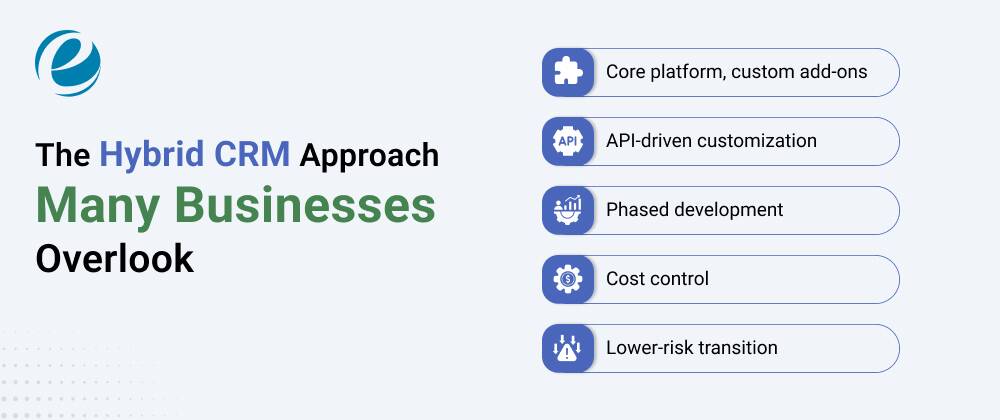
Not every business needs to pick a strict side. A hybrid approach blends pre-made CRM tools with custom modules created around clear business gaps. It gives companies a bit more control without the entire cost and complexity of starting fully from zero.
Core platform, custom add-ons
Most organizations stay on a base platform like Salesforce or Zoho. But they add custom modules for their more specific requirements. That way, they keep costs under control and still get flexibility, while not messing up the existing workflows too much.
API-driven customization
With open APIs, teams can extend an off the shelf CRM without doing a full rebuild. It saves time and money, and it still closes the smaller functionality gaps.
Phased development
Often, companies begin with CRM software development for one small custom feature. After that, they expand step by step as needs grow and as the budget allows more investment later.
Cost control
Hybrid setups help avoid the full price tag of a completely custom build. But they still handle specific functional pain that off-the-shelf tools can’t handle well.
Lower-risk transition
This approach lets businesses try custom features first before committing to a larger custom CRM vs off-the-shelf decision. It also reduces that upfront pressure on a single investment, even if plans change midstream.
Conclusion
Choosing between a custom CRM and an off the shelf CRM isn’t about which one is better overall. More like which one fits your business size, budget, and the overall workflow complexity.
Off-the-shelf tools tend to do well with standard processes and a faster setup. But custom builds work better when you have specific requirements and a longer-term growth plan.
For a lot of teams, looking at custom CRM development cost while also considering a hybrid approach is a balanced path forward.
FAQs
How long does it take to build a custom CRM compared to setting up an off-the-shelf CRM?
You can get off-the-shelf CRMs up and running in days. Meanwhile, custom CRM building tends to take a few months, depending on how many features you need and how complex things are.
Is a custom CRM worth it for small businesses?
Some small businesses do fine without one if their workflows are straightforward. But if the process is unique, then there’s often real value, like long-term savings and extra flexibility.
Which is better for data security and compliance: custom or off-the-shelf?
With custom CRMs, you get more control over your data security. Whereas off-the-shelf CRMs lean on the vendor to handle compliance guidelines and certifications.
Do custom CRMs require an in-house development team to maintain?
Not always. Few organizations depend on outside development partners for the custom CRM work and then for ongoing support too. Instead of keeping everything in-house.



 +1 (989) 535-9295
 info@emizentech.com
 emizentech


