
 Add us as a preferred source on Google
 In today’s world, great customer service is the secret to a successful business. That’s where Salesforce Service Cloud steps in. It’s the world’s no.1 customer service platform and is used by businesses of all sizes to make customers happy, simplify tasks, and boost productivity. But getting started with Salesforce Service Cloud isn’t always easy. It takes careful planning and the right steps to set it up properly and see results.
When done right, Salesforce Service Cloud can completely change how you handle customer service. Service Cloud helps businesses run more smoothly, makes customers happier, and increases profits. With 71% of support leaders planning to use automation to make their teams more efficient, Service Cloud is a great choice. It makes tasks easier and offers customers a more personal experience.
You will be amazed to know that the Salesforce Service Cloud offers tons of features that can be customised to fit what your business needs. This flexibility is great, but it can be confusing if you’re new to it. That’s why having a clear plan for Salesforce Service Cloud implementation is so important.
In this blog, we’ll walk you through a complete guide to Salesforce Service Cloud implementation.
What Is a Service Cloud in Salesforce?

Salesforce Service Cloud is a powerful tool designed to make customer service better and easier for businesses. It’s part of the Salesforce family and comes with innovative features to help manage customer issues, speed up service, and keep everything organized. With Salesforce Service Cloud, businesses can automate tasks, solve problems faster, and keep customers happy as well as satisfied.
Think of it as your customer service assistant, available 24/7 to lend a hand. It helps businesses improve how they interact with customers while keeping everything running smoothly behind the scenes. It’s built on the reliable Salesforce platform, so you get access to great features that work for businesses of any size.
Benefits Of Salesforce Service Cloud Implementation

In today’s world, staying connected with your valuable customers at all times is super important to offer them great sales and customer service. In this section, we will discuss the key benefits of salesforce service cloud implementation and see how it can make a big difference.
1. Better Customer Service
Salesforce Service Cloud supports customer service teams in offering quick, customized support. Agents can swiftly and precisely address problems with consumer information readily available. This not only makes customers happier but also builds trust, making them more likely to return for positive experiences in the future.
2. Boosted Agent Efficiency
To help agents spend more time assisting customers and less time doing monotonous, repetitive work, Service Cloud has built-in smart tools. By streamlining workflows and automating processes, agents can handle more customer queries in less time while maintaining high-quality service, making their workday more productive and stress-free.
3. Useful Data Insights
Salesforce Service Cloud’s dashboards give a clear view of how the team is doing and what customers are up to. These real-time reports show what’s working and what needs improvement. Businesses can use this information to set goals, change their plans, and make smarter decisions for long-term success.
4. Multichannel Support
Customers contact businesses through various platforms like social media, email, or chat. Service Cloud connects all these channels, allowing customer service reps to respond quickly and easily across all platforms. This makes sure your support is always available and consistent, no matter how or where customers reach out.
5. Smarter Decision-Making
Service Cloud gives detailed reports and performance metrics, making it easier for businesses to understand their team’s strengths and weaknesses. This data guides better decisions and helps improve customer service strategies, ensuring your team keeps getting better over time.
6. Scalability and Flexibility
Salesforce Service Cloud is super flexible and grows with your business. Whether you’re just starting out or already have a big company, it can change to meet your needs. It’s a great tool for any business that wants to get better at helping customers and keep improving as you grow.
Features Of Salesforce Service Cloud

Salesforce Service Cloud greatly helps businesses to improve customer service and provide great support. Let’s check out Salesforce Service Cloud features and see how it helps make customer experiences better.
| Features | Description |
| Agent Lightning Console | Offers an easy-to-use screen for agents to solve customer problems quickly and accurately. |
| Knowledge Base Tools | Centralizes information so that customer service representatives can find answers fast, speeding up help for customers. |
| Omnichannel Support | Assists businesses in helping customers over email, chat, phone, or social media for a seamless experience. |
| Case Handling | Lets agents manage, track, and solve customer issues efficiently from start to finish. |
| Automation With AI and Chatbots | Uses AI tools to handle basic questions, freeing up the customer support team to solve tougher problems. |
| Custom Insights | Create custom reports to see how customer service is doing and find areas to improve. |
| Telephony Integration | Combines phone systems into one platform, so agents handle calls directly in Salesforce. |
| Mobile Features | Allows agents to assist customers anytime, anywhere using their mobile devices. |
| Live Chat Help | Offers real-time chat for customers to get quick and personal assistance from customer representatives. |
| Analytics and Reporting | Provides data and reports to improve customer interactions and identify better ways to assist. |
| Field Service Management | Gives field workers tools to schedule, plan routes, and handle tasks easily. |
| Service Cloud Console | A hub that gives agents a complete view of customer details, making support faster and smoother. |
How To implement Salesforce Service Cloud?
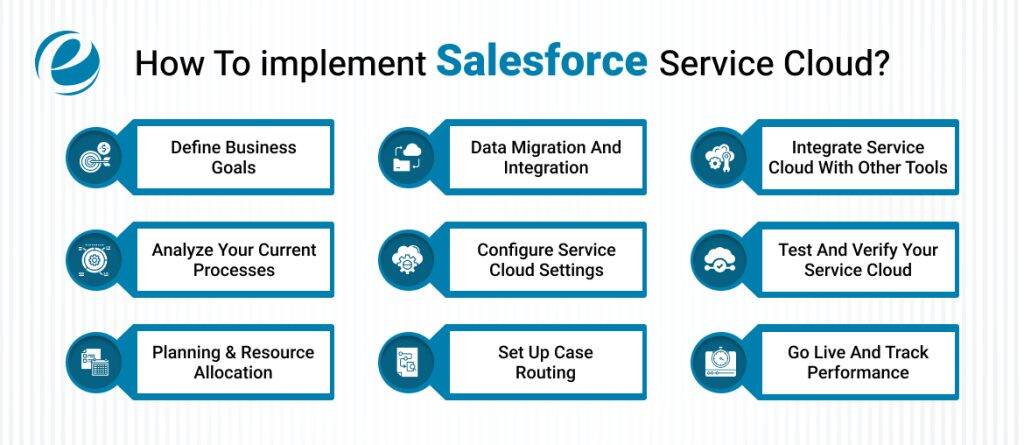
If you’re planning to use Salesforce Service Cloud, it’s important to know the steps needed to set it up and use it well. Below are the key steps to follow for successful Salesforce Service Cloud implementation. Let’s have a look:
1. Define Business Goals
Before using Salesforce Service Cloud, take time to set clear business goals. Ask yourself, “What do you want to improve?” Maybe you want to reply to customer questions faster or make your team work smarter.
Start by looking at the problems your customer service team faces right now. After identifying the issues, you should set specific targets to enhance customer satisfaction levels, the response times, and the issue resolutions.
2. Analyze Your Current Processes
Map out the steps of how your customer service currently works. Write down the steps for how cases are handled, how they get assigned to the right people, and what happens if extra help is needed. This will help you understand how things are working.
For example, if agents have trouble finding customer details or order history, it could slow down problem-solving. When setting up Salesforce Service Cloud, make sure to organize it in a way that allows the customer service team to quickly access customer data, case history, and helpful articles all in one place. This makes solving problems faster and more efficient.
3. Planning & Resource Allocation
Make a clear plan for your Salesforce Service Cloud implementation that shows what needs to be done and when. Include a timeline with important steps, or milestones, to keep everything on track. Also, figure out what resources you’ll need, like tools, software, or extra team members.
Assign clear tasks to each team member so everyone knows what they need to do. This helps everyone stay focused and avoids confusion. Having clear roles and responsibilities makes sure everything moves smoothly and on track.
4. Data Migration and Integration
When moving your data to Salesforce Service Cloud, it’s important to start with clean, organized data. Take the time to sort and map your data so the process runs smoothly. Next, make sure Salesforce Service Cloud is connected to the other systems you use, like your CRM or ERP. This way, agents can easily find everything they need in one spot, helping them work faster and giving customers a better experience.
5. Configure Service Cloud Settings
After figuring out your needs and how things are currently working, it’s time to set up Salesforce Service Cloud. Begin by setting up user profiles, roles, and permissions, so everyone gets access to what they need. This helps make sure everyone knows what they can do within the system.
Next, customize the case fields, layouts, and record types to match your business processes and the tasks you want to automate. You’ll also need to set up tools like email-to-case and web-to-case, which make it easy to create cases and speed up resolutions.
6. Set Up Case Routing
In order to utilize Salesforce Service Cloud, you need to configure the routing rules which ensure that the cases are forwarded to the correct agents. It can be based on the location of the case, the product type, or which customer group it belongs to. You’ll also need to automate case assignment, so customer issues are handled quickly.
Create escalation rules to automatically manage urgent cases and alert managers when cases go past certain limits, making sure high-priority issues are resolved quickly and service goals are met. Using macros and quick actions, agents can complete repetitive tasks more quickly. This makes their work faster and helps them respond to customers in less time.
7. Integrate Service Cloud with Other Tools
To make the most of Salesforce Service Cloud, connect it with other Salesforce tools like Sales Cloud. This lets you view all customer interactions in one place. You can also connect Service Cloud to your existing CRM or ticketing system to keep everything in sync.
You can integrate with third-party tools like email, chat, or social media platforms, making it easier to manage everything in one spot. Use the Salesforce AppExchange to find ready-made integrations and add-ons that fit your business needs and help you customize your setup.
8. Test and Verify Your Service Cloud
Before launching Salesforce Service Cloud, test all its features to make sure everything works properly. Conduct user acceptance testing (UAT) to get feedback from end-users and find any problems that need fixing.
Also, verify that data migration is done correctly and that all systems are properly integrated to ensure data is accurate and flows smoothly. Testing and validation are essential steps to avoid issues after going live, and guarantees a successful implementation.
9. Go Live and Track Performance
Before going live, make a clear plan. Get ready for data migration, the switch-over, and have support set up. Once you’re live, use Salesforce dashboards to see how things are going. Listen to feedback from agents and customers to spot areas that need fixing.
Keep making changes to your Service Cloud setup to make sure everything works smoothly. This will help you provide great service and keep your customers happy.
Why Choose EmizenTech For Salesforce Service Cloud Implementation?

EmizenTech is a trusted Salesforce development company that helps businesses successfully use Salesforce Service Cloud. Our team makes sure your company gets the full benefit of this technology, enhancing customer service and increasing positive reviews. We specialize in offering Salesforce consulting and development services. We make sure everything works perfectly with your systems and helps you adjust as your business changes and grows.
With our skills, expertise, and knowledge of Salesforce, we help businesses leverage the full power of Service Cloud. Working with EmizenTech means the implementation process isn’t just about technology, it’s a smart step toward helping you deliver better service to your valuable customers.
Conclusion
Salesforce Service Cloud is a very powerful tool that helps businesses or enterprises of all sizes and industries grow by using modern technology. It removes repetitive tasks and solves recurring problems, making customer service faster and more efficient. This tool improves a company’s brand value by focusing on personal customer interactions, quick issue solving, and better availability.
With the right setup, smart strategies, and proper training, businesses can use Salesforce Service Cloud to its fullest potential. It helps boost customer happiness and makes service teams more productive. Choosing Salesforce Service Cloud isn’t just about getting new software; it’s about gaining an advantage by putting customers first. This smart investment helps businesses provide excellent service and achieve steady, long-term growth.
FAQs
What’s the difference between Salesforce and Service Cloud?
Salesforce is a customer relationship management platform that helps businesses manage customer information and interactions. Salesforce Service Cloud is a part of Salesforce designed for customer service. It has tools like case management, knowledge sharing, and chat support to help businesses offer quicker and better service.
Can Salesforce Service Cloud grow with my business?
Yes! Salesforce Service Cloud is made to grow with your business. It works for small businesses and big companies, adjusting to your needs as your customer base increases. It’s flexible, so it can easily scale to meet the demands of your growing business.
Can Service Cloud integrate with my current CRM system?
Yes, Salesforce Service Cloud can work with your current CRM system. It helps you synchronise your customer data, making support simpler and more organized.
How long does it take to set up Salesforce Service Cloud?
Setting up Salesforce Service Cloud depends on your business size and what you need. It can take a few weeks or even a few months to finish. Don’t worry, our team will help you to make sure everything works well.




 +1 (989) 535-9295
 info@emizentech.com
 emizentech


