
 Add us as a preferred source on Google
As businesses grow, they handle more money and data, making their accounting needs increasingly complex and detailed. Keeping track of income, expenses, and taxes manually or using spreadsheets is no longer sufficient, especially in fast-paced industries such as restaurants, healthcare, and transportation. That’s where accounting software like QuickBooks comes in.
For many years, QuickBooks has been a trusted tool for small and medium-sized businesses. It helps users save time, manage money more easily, and stay organized. QuickBooks offers a range of valuable features, including invoicing, payroll, bank connection, and detailed financial reports. Many business owners appreciate the simplicity of using it, even if they don’t have an accounting background.
However, while QuickBooks is an excellent option, it is not without its flaws. Some users find it too expensive, particularly when they need additional features or more user accounts. Others say customer support can be slow or unhelpful when problems arise. As a result, more businesses are exploring alternative apps, such as QuickBooks.
Today, many alternatives are affordable, simple to use, and just as powerful. In this guide, we’ve reviewed some of the best QuickBooks alternatives. These tools are budget-friendly, simple to use, and excellent for managing your business finances. If you’re searching for an easier way to handle accounting, keep reading to find the perfect solution for you.
Market Statistics for Accounting software, Like QuickBooks
In today’s digital world, accounting software is key to managing business finances. Investing in such tools is a smart move for any company. To illustrate the significance of this market, the following key statistics highlight the popularity of accounting software, such as QuickBooks, and its widespread adoption today.
- The accounting software market was valued at $16.9 billion in 2023. It is expected to grow to $36.1 billion by 2032, with a compound annual growth rate (CAGR) of 8.8% during the forecast period from 2025 to 2032.
- In the United States, small to medium-sized businesses (SMBs) and small to medium-sized enterprises (SMEs) using accounting software accounted for a market size of $999.42 million in 2024. The market is expected to reach $1,539.94 million by 2031, growing at 6.14% from 2024 to 2031.
- Estimates indicate that QuickBooks will have approximately 6.5 million customers by 2025, accounting for about 70% of its total customer base.
- Revenue from the Small Business and Self-Employed segment, which includes QuickBooks products, accounts for approximately 56% of Intuit’s total revenue, projected to reach $8 billion by 2025.c
- The three most popular regions using QuickBooks for accounting are the United States: 67,727 users (85.51%). Canada: 4,432 users (5.60%), United Kingdom: 3,216 users (4.06%).
What is QuickBooks, and why is it so popular?

QuickBooks is a renowned accounting software that is used by small businesses. It helps business owners track cash flow, issue invoices, pay bills, manage inventory, and prepare tax returns. There are two types of QuickBooks: online and desktop. The online version lets you work from anywhere with an internet connection. You can easily install the desktop version on your computer and use it offline.
Many people like QuickBooks because it’s simple to use and offers powerful tools. It can make reports, show how much money your business is making, and help you plan for the future. QuickBooks offers various plans, allowing you to select the one that best suits your business needs. New users can also try it for free for 30 days. This advantage makes it a good choice for people starting a new business. Due to its versatility, reliability, and user-friendliness, millions of companies worldwide utilize QuickBooks. It’s trusted by bookkeepers, accountants, and business owners alike to keep their financial records organized and up to date.
Why Look for QuickBooks Alternatives?
If you are beginning your own small-scale business, QuickBooks will meet all your accounting needs. In fact, it offers billing and accounting features that enable you to track income and expenses, as well as support tax preparation. However, in the long term, you may require more sophisticated accounting software.
In this section, we will examine the most compelling reasons to consider accounting software alternatives to QuickBooks.
1. High Costs for Growing Businesses
QuickBooks becomes expensive as a business expands and requires additional features or more users. Add-on costs, such as payroll and advanced reporting, can quickly add up. For small or new enterprises with tight budgets, the pricing model may not be sustainable, prompting the need for more economical alternatives with comparable or superior features.
2. Possibility of Manipulation
QuickBooks is easy to use, allowing you to correct mistakes in your accounting quickly. However, this ease of use has its drawbacks. Accidental changes are possible, and if someone with malicious intentions gets access, they could easily alter your company’s financial records. While correcting errors can be straightforward, it also exposes your company to potential risks.
3. Limited Customization Options
QuickBooks offers standard templates and reporting tools; however, businesses with specific industry needs may find these tools to be limiting. Creating invoices, workflows, or reports that aren’t built-in typically requires assistance from a third party or integration. Other apps, such as QuickBooks, often provide greater flexibility, enabling businesses to meet their specific accounting and operational needs more efficiently.
4. Performance Issues with Large Data
As your business and data grow, QuickBooks, particularly the desktop version, can become slower or more sluggish. Such behavior can lead to inefficiencies, errors, and frustration with essential accounting tasks. Scalable or cloud-based alternatives are typically more capable of handling large transaction volumes efficiently, making them a better fit for businesses that are growing.
5. Limited Multi-User Support
QuickBooks can present challenges when multiple users need access, particularly with the desktop version. Managing roles, access permissions, and collaboration can be a challenging task. Larger companies or teams with remote employees often seek solutions with stronger multi-user capabilities and better cloud integration for smoother collaboration and secure user management.
6. Lack of Industry-Specific Features
While QuickBooks is a general-purpose tool suitable for many industries, it may lack the specific features required by sectors like nonprofits, construction, or e-commerce. Organizations that require tools such as grant tracking, job costing, or inventory forecasting could benefit from industry-specific solutions that provide these capabilities from the outset.
7. Customer Support Focuses on Peer-to-Peer assistance.
QuickBooks relies heavily on community forums and its knowledge base for support rather than offering continuous live assistance. While peer-to-peer help can be valuable, users often find the resources insufficient or not directly applicable. For businesses that need quick, professional support, this model may fall short, making alternatives with stronger customer service more appealing.
Key Features to Look for in QuickBooks Alternatives
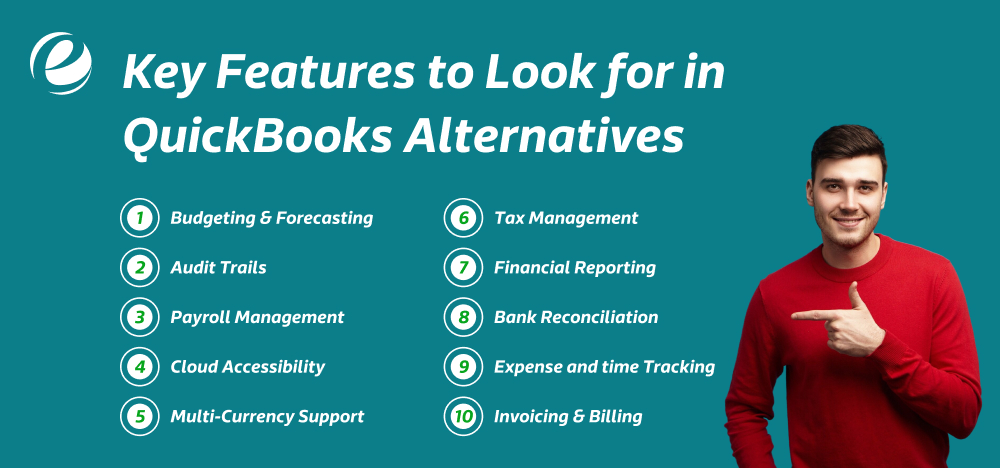
Accounting software, such as QuickBooks, offers various capabilities that simplify business financial management. It streamlines procedures, enhances accuracy, and provides valuable information to make better decisions. When exploring alternatives to QuickBooks, please ensure they encompass all the features detailed in this section.
1. Budgeting & Forecasting
This function allows you to set spending limits and forecast future expenses and income. It helps in making better financial decisions. With a clear understanding of what’s ahead, firms can prepare for slow periods or unexpected costs and avoid overspending. It provides a clearer picture of financial health and long-term goals.
2. Easy Reporting
This feature delivers clear, easy-to-understand financial reports and dashboard visualizations. Users don’t need to be accountants to comprehend the data. Reports offer quick insight into expenses, income, profit, and other key metrics. They are ideal for presentations and sharing financial information with partners, stakeholders, or other interested parties.
3. Payroll Management
This system calculates employee wages, tracks benefits, and efficiently manages tax deductions and other employee-related expenses. It ensures accurate and timely payment of employees. It also generates tax forms and reports for compliance, making payroll management straightforward without the need for a separate system or manual calculations.
4. Multi-Currency Support
If the business serves international clients, this feature is critical. It automatically converts currencies according to the current exchange rates, allowing you to invoice and receive payments in the client’s local currency without manual calculations. This simplifies international transactions and enhances the accuracy of financial records.
5. Tax Management
This feature of apps like QuickBooks calculates taxes on income and expenses in accordance with current tax regulations. It helps businesses to stay compliant and avoid penalties. The software also generates tax returns and supports tax filing, thereby reducing the stress of tax season by keeping all necessary information organized and readily available.
6. Financial Reporting
This tool facilitates the creation of essential documents, including profit and loss statements, detailed balance sheets, and cash flow statements. These reports offer valuable insights into your business’s financial performance. Clear and easy-to-read data empowers owners to make better-informed decisions, track growth, and plan for the future with confidence.
7. Bank Reconciliation
Bank reconciliation lets you match your bank’s transaction records with your accounting balance sheet. It helps uncover errors, missing entries, and potential fraud. Regular reconciliation ensures your financial data remains accurate and reliable, making month-end closing smoother and faster.
8. Expense Tracking
This feature monitors and categorizes business expenses. It allows you to attach receipts, classify spending, and track where your money goes. The tool facilitates more effective budgeting and identifies opportunities to reduce costs. It’s also useful for tax preparation and analyzing cash flow trends over time.
9. Invoicing & Billing
This function enables users to create professional invoices for clients. It automates payment reminders, tracks due dates, and confirms receipt of payments. It reduces manual work and accelerates the payment process, enabling businesses to receive payments faster and maintain a healthy cash flow.
Top 10 Apps, like QuickBooks, in 2025
Although QuickBooks is popular, it may not be the best solution for everyone. Below are the top 10 alternatives to accounting software, such as QuickBooks, that you should consider.
1. FreshBooks
FreshBooks is cloud-based financial software explicitly designed for small business entrepreneurs. It features a user-friendly interface, making it easy to handle invoices, track time, and integrate with other programs. FreshBooks offers essential features, including cost tracking, financial reporting, and double-entry accounting.
Additionally, it offers an affordable pricing structure ideal for those new to business or freelancers. The team can access the program from anywhere in the world, making it a great alternative for remote workers. FreshBooks is an excellent, cost-effective option compared to QuickBooks for small businesses with basic accounting needs.
2. Xero
Xero is a cloud-based accounting software that is simple to use and offers robust capabilities. It allows you to manage your company’s finances, generate invoices, and create financial reports with ease. Xero instantly syncs banking transactions and integrates with various other business tools.
This software is ideal for small to medium-sized businesses that require a straightforward accounting system with the ease of use found in QuickBooks. It includes features such as inventory and payroll tracking, but offers a more user-friendly and less confusing application. You can access your data anytime, anywhere, on any device.
3. Zoho Books
Zoho Books is part of the Zoho suite, offering cloud-based accounting solutions that integrate seamlessly with Zoho CRM. It’s an excellent choice for small businesses, offering features like invoicing, accounts payable, time tracking, and bank reconciliation.
Zoho Books is also very affordable, making it a fantastic alternative to QuickBooks. It is particularly beneficial for businesses handling international transactions, as it enables multi-currency invoicing and payments. While you’ll need to pay for both Zoho CRM and Zoho Books, the combined options make it an excellent choice for expanding businesses.
4. Wave Accounting
Wave Accounting is a free accounting software ideal for entrepreneurs, freelancers, or small businesses with limited budgets. It includes essential functions like invoicing, expense tracking, and basic accounting.
You only pay for additional services, such as payroll or credit card processing, when you need them. Wave is easy to learn and integrates with other platforms, such as Etsy, for businesses selling online. While it lacks advanced features like project or time tracking, it is a solid choice for small businesses that need free, basic accounting software.
5. One-Up
OneUp is a simple and effective accounting software, similar to QuickBooks, explicitly designed for small retail businesses. Its focus is on tracking sales, managing inventory, and creating invoices without the complexity of larger accounting tools. OneUp is a mobile-first system, meaning it’s optimized for mobile devices and tablets, allowing you to manage your business finances on the go.
It’s an excellent option for small business owners who need to concentrate on inventory and sales without the additional features offered by other accounting software. The simple interface of One Up makes it an efficient tool for daily tasks.
6. Patriot Accounting
Patriot Accounting provides affordable and user-friendly accounting software for small to medium-sized businesses. It includes essential features such as invoicing, bank reconciliation, and 1099 preparation. The software also works with CPA firms to offer professional assistance when needed.
Its intuitive interface allows you to manage finances without complicated configurations or a steep learning curve. A free trial is available, so you can try the program before committing. If you’re looking for affordable, straightforward software to meet your basic accounting needs, Patriot Accounting is an excellent choice for small businesses.
7. Oracle NetSuite
Oracle NetSuite is a robust cloud-based accounting system designed for large businesses and enterprises. It comes with advanced financial management tools, including forecasting, reporting, and planning. NetSuite enables multiple users to access data simultaneously, making it ideal for teams.
Highly adaptable to your business needs, NetSuite helps streamline workflows and processes to drive efficiency and productivity. However, it’s pricier than QuickBooks, making it more suitable for businesses with larger budgets. If your company requires high-end accounting tools, Oracle NetSuite is a top choice for scaling your operations.
8. Sage Accounting
Sage Accounting is cloud-based software designed for small to mid-sized companies. It covers features for invoicing, expense tracking, and project management. Sage offers advanced tools for fraud detection and cost calculation.
While it offers more features than QuickBooks, it is also more expensive, especially for larger teams. Pricing depends on the number of users, which can make it a costly option quickly. Sage is a fantastic alternative for small businesses that need robust accounting software, focusing on financial oversight, security, and project management, although it comes with a higher price tag.
9. Plooto
Plooto is a one-stop software designed to simplify accounts receivable and accounts payable processes. Although it’s not an all-inclusive accounting system, Plooto integrates well with existing accounting software, such as QuickBooks. It streamlines workflows, enabling companies to pay suppliers faster and manage incoming payments more efficiently.
Plooto is also compatible with online checks and pre-authorized debits, facilitating more efficient financial transactions. If you’re looking to streamline payments and enhance cash flow management, Plooto is an excellent addition to your accounting software, helping you manage business transactions easily.
10. ZarMoney
ZarMoney is a low-cost, feature-rich accounting program suitable for small businesses and beginners alike. It comes with tools for managing the accounts, tracking expenses, and reconciling bank accounts. ZarMoney is compatible with ACH payment processing. This enables companies to process payments directly into their accounts and then integrate them with their accounting records.
It’s simple to use and includes tutorials to assist novice users. ZarMoney can also provide tax advice and help you stay compliant with the law. By offering a free trial, you can evaluate the software risk-free and determine if it’s a good fit for your company’s needs.

Comparison Table For QuickBooks Alternatives
There are several reasons why you should consider a QuickBooks alternative. With many options and features available, there’s plenty to choose from.
| Software | Key Features | Pros | Cons | Pricing |
| QuickBooks | Invoicing, payroll, bank reconciliation, and reporting | Popular, feature-rich, reliable | Expensive, complex setup | Starts at $25/month |
| FreshBooks | Invoicing, time tracking, and integrations | Easy to use, remote access | Limited advanced features | Starts at $19/month |
| Xero | Invoicing, bank sync, payroll, and inventory tracking | User-friendly, mobile access | Can get expensive | $15 to $78/month |
| Zoho Books | Multi-currency, invoicing, accounts payable | Affordable, suitable for growth | Paid CRM needed, limited payroll | Free to $240/month |
| Wave Accounting | Invoicing, expense tracking, and basic accounting | Free, easy to use | No advanced features | Free (Pro plan: $16/month) |
| One Up | Sales tracking, inventory management, invoicing | Mobile-first, simple to use | Limited features for large teams | $9 to $19/month |
| Patriot Accounting | Invoicing, bank reconciliation, and 1099 preparation | Easy setup, affordable | Lacks advanced tools | $20 to $30/month |
| Oracle NetSuite | Reporting, forecasting, ERP, and team access | Scalable, customizable | Expensive, complex setup | Starts at $999/month |
| Sage Accounting | Invoicing, expense tracking, and project management | Robust fraud detection | Expensive, pricing increases | $595 to $1,610/year |
| Plooto | Accounts payable/receivable, payment automation | Streamlines payments, easy setup | Not a complete accounting solution | $9 to $499/month |
| ZarMoney | Expense tracking, bank reconciliation, ACH payments | Affordable, easy to use | Limited features for larger firms | $15 to $350/month |
How to Choose the Right Accounting Software for Your Business?
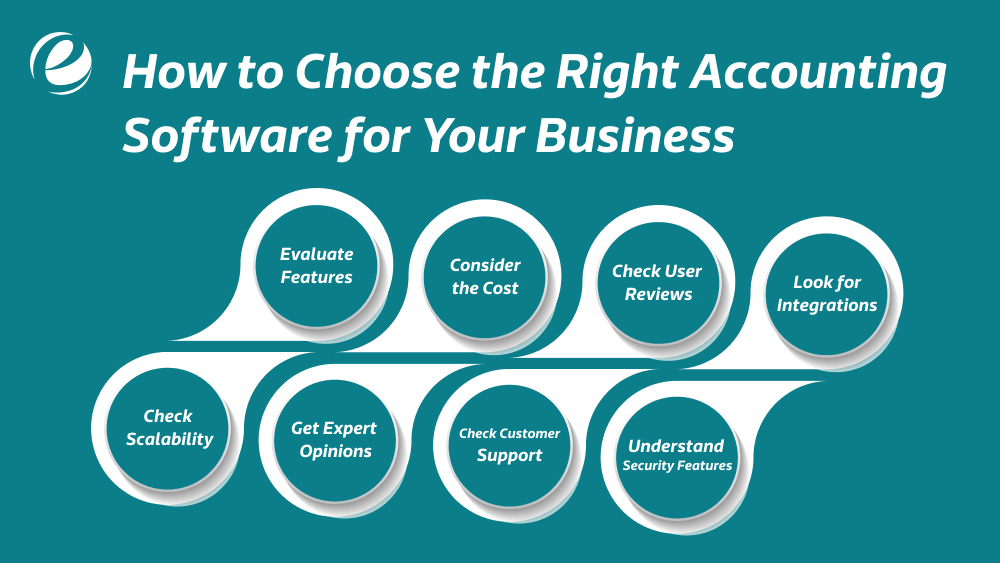
You may decide that QuickBooks is the right solution for your small business, or you may feel that a QuickBooks alternative is a better fit for your needs. In either case, it’s essential to make an inventory of your needs. Look for software that meets your specific accounting requirements. Here are some helpful tips to help you select the best accounting software, like QuickBooks, for your business.
1. Evaluate Features
Not all accounting programs have the same features. Many are ideal for tracking invoices and payments (accounts payable and receivable), while others support payroll, inventory management, or time tracking. Before making a decision, please consider creating a list of your business needs. Compare the software’s capabilities to determine if it offers the specific functions necessary to help you manage your accounting needs efficiently.
2. Consider the Costs
While free software sounds great, many lack essential features. Paid alternatives usually offer additional features that can be beneficial. Please consider your budget and evaluate the prices in relation to the features provided. Avoid paying too much for features you don’t need, but don’t skimp on practical tools that can help you save money. Be sure to choose a product that offers value for the price.
3. Check User Reviews
Real user reviews can provide valuable insights. Visit trusted websites like G2, Capterra, or Trustpilot to see what people are saying about the product. Look for the most common pros and cons. A high average rating (above 3.5 stars) generally indicates that the software works well for most users. Reviews offer a more honest perspective than advertisements alone.
4. Look for integrations.
The software that you are using for your accounting should work with the other software that you are already using, such as the payroll system, online stores, and CRMs, as well as payment apps. An integration that is well-integrated requires less manual effort and results in fewer errors. It keeps things in order, saving you time and energy, while also making the process easier across various business platforms.
5. Check Scalability
As your business grows, it is essential to ensure that your accounting software remains operational. Cloud-based accounting software enables you to access your information anytime, from anywhere, and typically offers greater flexibility in storage. In contrast to older software that is compatible only with a single computer, modern solutions expand as you do. Pick software that will not hinder the growth of your company in the future.
6. Get Expert Opinions
In addition to user reviews, consider what the experts have to say. Experts evaluate software based on factors such as user-friendliness, key features, performance, and overall value. Their recommendations are based on their experience and extensive test results, which will help you make a more informed decision when selecting accounting software.
7. Check Customer Support
Good customer service could save you hassle and time when troubles arise. Find software that assists via live chat, telephone, or email. There is also software that offers 24/7 support, along with a comprehensive knowledge base that includes frequently asked questions and detailed guides. A reliable support system enables you to resolve problems and keep your business running efficiently and quickly.
8. Understand Security Features
Accounting software stores critical financial details. Ensure it has secure features, such as security, encryption, and regular backups. Cloud applications should also comply with the privacy regulations and standards. Protecting your information from loss or theft by hackers is as crucial as properly managing your finances.
How to Build Custom Accounting Software Like QuickBooks?
Making high-performance accounting software requires thorough planning, market research, and then execution. Here are the essential steps to take when choosing accounting software, such as TypeBooks, that meets your firm’s specific needs.
1. Choose the type of software.
Decide on the type of accounting software you want to build. Some are specifically designed for small businesses, while others are for larger companies or freelancers. Each type has distinct features and benefits. Select the option that best aligns with your company’s goals and the needs of your users.
Such knowledge will ensure that your software addresses your specific issues. Whether it’s for accounting, invoicing, or payroll, understanding your users’ needs is crucial for creating practical and successful software, such as QuickBooks.
2. Research and planning.
Before starting development, do some background research and planning. Analyze your competitors, understand your market, and outline the features that will make your application unique. Please consider your timeline, budget, and technological requirements.
Hiring an experienced development team or outsourcing the task can be beneficial. Having a clear plan in place before development begins will help save time and money in the long run. Planning can also avoid surprises and ensure a smoother development process.
3. Prototype
Start by creating a prototype version of your software. The prototype should include your core features and design. Prototypes allow you to test your idea, demonstrate it to users, and gather feedback quickly.
It helps identify issues and make improvements before committing to full-scale development. It’s easier and less expensive to resolve problems at this stage. This process keeps your design team, developers, and customers aligned, ensuring that the final product meets initial expectations.
4. Design an app interface.
The UX/UI should be user-friendly and straightforward to navigate, even for users with varying technical abilities. Create wireframes and mockups to represent how the screens will appear visually. Use clear fonts, colors, and layouts that align with your branding.
A sleek and appealing design makes the software more enjoyable and easier to use. Ensure that your design is accessible to all users, including those with limitations or disabilities.
5. Development
Your software is currently under construction. Developers write code to create the features, tools, and functionalities. Choose where you want to host your software: web-based, cloud-based, or on-premises.
Cloud hosting is ideal for small businesses, as it eliminates the need for additional hardware and backend structure. Web hosting offers flexibility, while on-premises hosting provides more control but can be pricier. Ensure that your backend is solid and the software operates smoothly. Quality is just as important as speed.
6. Software Launch
Once your accounting software, such as QuickBooks, has been thoroughly tested and any bugs have been fixed, it’s ready to go live. Start with a test version to collect user feedback. The feedback will help you identify any issues that may have been overlooked. Monitor how users interact with the software and be prepared to resolve any issues promptly.
A successful launch includes well-planned marketing, clear guidelines, and support for new users. The launch is just the start; it sets the foundation for your software’s success and market reception.
7. Maintenance and Support
Your work continues after the software is launched. Maintain the software’s stability by deploying periodic updates and bug fixes to ensure optimal performance and stability. Help your customers with any issues or queries. Stay informed about new technologies and developments to ensure your software remains competitive and up-to-date.
Listen to users and iterate on it. Regular maintenance fosters trust and satisfaction among users, ensuring the long-term success of your software. Continued support and updates to your software are as critical as your initial design.
Why Choose EmizenTech for Custom Accounting Software Development?
EmizenTech is a trusted Mobile application and software development company with years of experience in creating high-quality, custom-designed software to meet the specific needs of businesses. With decades of expertise, we serve clients across a wide range of industries, ensuring that every solution we develop is reliable, secure, and flexible.
Our talented team of developers utilizes the latest technologies and employs agile development methods to ensure rapid delivery and performance. We focus on user-friendly design, reporting, and integration with other systems to support efficient financial management. Whether you’re a startup or a large enterprise, we provide comprehensive end-to-end assistance to simplify the accounting process and support informed decision-making.
Contact us today to discuss your software development requirements.
Conclusion
Custom accounting software, such as QuickBooks, is a vital part of any company’s toolkit, playing a significant role in enhancing financial efficiency and accuracy. It helps automate financial processes, reduce manual errors, and streamline workflows, saving time and effort. Choosing the right accounting software is a crucial decision, as it must align with the specific needs of your industry and personal preferences.
Although QuickBooks is a widely used option, there are other apps, similar to QuickBooks, that offer excellent features, including user-friendly mobile app development services that enable you to manage your finances from anywhere. By carefully evaluating these alternatives, you can select software that effectively supports your goals. By investing in a solution to your unique needs, you’ll gain greater control over your finances and support the long-term success of your organization.
FAQs
Which are the best QuickBooks alternative options?
There are several alternatives to QuickBooks for managing finances, including Gusto, FreshBooks, Zoho, and Oracle NetSuite. Each option comes with its strengths and benefits, so it is essential to consider your specific accounting requirements when selecting one.
What is the cost of developing software like QuickBooks?
Costs vary depending on factors such as the technology stack, features, development timeline, and team size. A robust system with cloud capabilities and AI features may cost over $300,000, while a simpler version typically ranges from $50,000 to $150,000.
Please provide the typical timeframe for developing accounting software similar to QuickBooks.
Developing accounting software, such as QuickBooks, can take between 6 and 12 months. Advanced features, such as tax tools and multi-currency support, may extend the timeline. Testing and updates also add time to the process.
What is the best technology stack for a developer's backend accounting software?
An ideal technology stack includes React or Angular for the front-end, Node.js, Python, or Java for the backend, MongoDB or PostgreSQL for databases, and AWS or Azure for cloud hosting. Blockchain technology is also gaining popularity for secure transactions, complemented by AI development analytics for enhanced insights.




 +1 (989) 535-9295
 info@emizentech.com
 emizentech


