
 Add us as a preferred source on Google
Ask any small business owner why they lost a customer, and they will usually blame the product, the price, or the competition. Rarely do they blame the follow-up email that never got sent, or the sticky note with a callback reminder that got buried under a stack of invoices.
That is the real story behind most churn. A customer goes quiet because nobody circled back within a week. A support call takes ten extra minutes because the staff is digging through old email threads instead of pulling up a clean history and trying to remember what was promised last time. Somewhere in that chaos, it quietly costs small businesses more revenue than most owners realize and nobody notices until the numbers come in short.
Kixie found that sales reps spend just 40% of their week actually selling. The rest disappears into manual data entry, meetings, and admin work. Meanwhile, 71% of small businesses now use CRM software, and those that do are 86% more likely to hit their sales targets than those that do not.
A CRM for small businesses stores contact data, tracks your pipeline, logs every conversation, and automates the repetitive parts of your workflow, all from one platform. This guide covers the features that matter, how the top platforms stack up, what they cost, and how to roll one out without losing your team along the way.
What is a CRM for Small Business?
A CRM for small businesses is software that organizes your contacts, leads, pipeline, and customer conversations into one place. Instead of hunting through spreadsheets and old email threads, your team works off a single, shared view of every interaction.
The benefits of using a CRM system for small businesses tend to show up in the same handful of ways:
- Centralizes Data: No digging through six spreadsheets for what a client bought last year. It’s all in one searchable place.
- Improves Collaboration: Sales, marketing, and support see the same timeline, so nobody double-emails a lead.
- Automates Tasks: Follow-ups, reminders, data entry, the CRM handles it, freeing your team for work that needs a human.
- Forecasts Sales: Visual pipelines show where deals stall and give a realistic read on future revenue.
- Improves Service: It remembers purchase history and preferences, so service feels personal, and that’s what keeps people coming back.
- Drives Decisions: Built-in dashboards show, in real time, how your team and campaigns are actually performing.
Key Features Every Small Business CRM Must Have
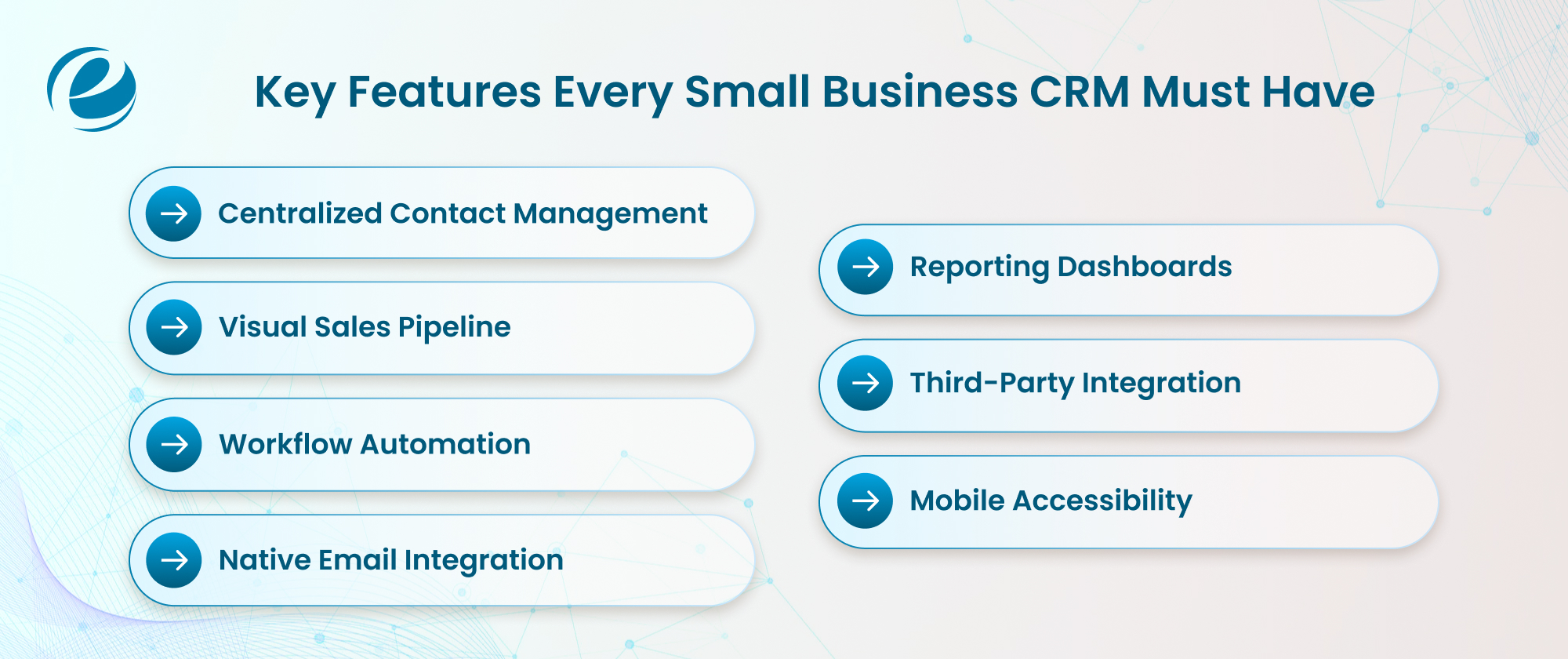
Your business doesn’t need the most complex platform on the market. It needs one that fits how your team actually works, and that distinction matters more than people think. Fewer than 40% of companies ever see CRM adoption climb above 90%, usually because the feature list got picked for a demo instead of daily use.
A few features consistently earn their keep:
- Centralized contact management: One searchable database for data, logs, and history
- Visual sales pipeline: Drag and drop tracking to forecast revenue at a glance
- Workflow automation: Follow-up triggers and task assignments that remove manual entry
- Native email integration: Two-way sync with Google Workspace or Outlook
- Reporting dashboards: Real-time numbers on conversion rates and pipeline velocity
- Third-party integration: Clean connections to your accounting and marketing tools
- Mobile access: Full functionality for field updates, not a stripped-down app
Top CRM for Small Businesses
Some of you might have a thought: how does a CRM work?, or how to choose the right CRM for your business? The best CRM software for your small business is quite subjective. What works for others might not be ideal for you, so choosing the right CRM platform should depend on your business priorities, growth velocity, and technical budget. Here is the operational breakdown of the top market contenders that might work for you:
HubSpot CRM
This is a highly rated CRM for small businesses, built to bring sales and marketing efforts onto a single platform as the business grows. The free entry tier covers basic contact management, and the paid tiers unlock advanced automation for both sales pipelines and marketing campaigns, depending on your customer data, team size, and tech stack.
- Price Range: $0 to $4,700/month
- Pros: The free tier is actually usable long-term, not just a trial ruse for small teams. Marketing and sales tools live in one platform, so you are not stitching two systems together.
- Cons: Pricing scales with your contact count, not just your seats, so a growing list can spike the bill fast. Advanced automation and reporting sit behind the pricier tiers.
Creatio
Best for process-driven teams who need intelligent automation. Its AI-native architecture and advanced no-code design let you build custom workflows and apps without writing a single line of code, and leading companies provide dedicated Creatio development services for teams looking to customize or extend the platform.
- Price Range: $40 to $75/user/month
- Pros: The no-code workflow builder lets non-developers automate genuinely complex processes. AI capabilities come built into every tier instead of costing extra.
- Cons: A $ 10,000-per-year minimum commitment puts it out of reach for very small teams. Add-on modules and AI token packs can make the final bill hard to predict.
Salesforce CRM
Tailored for Salesforce development teams that prioritize maximum scalability and profound customization. It requires dedicated admin setup but offers infinite growth potential.
- Price Range: $0 to $100/user/month
- Pros: The AppExchange marketplace means almost any integration you need already exists. Customization is close to limitless once you have the resources to use it.
- Cons: Costs climb quickly the moment you move past the entry tier or add users. Getting real value out of it usually means hiring a dedicated admin or consultant.
Zoho CRM
The optimal CRM for startups and teams on a tight budget. This tool offers comprehensive analytics, custom dashboards, and workflow rules at a fraction of the cost of legacy systems, which is only part of what makes Zoho CRM a strong fit for growing businesses.
- Price Range: Free to $50/user/month
- Pros: Pricing stays reasonable even as you move up tiers, which is rare for this level of feature depth. Analytics and dashboards punch above their price point.
- Cons: The interface feels a step behind newer competitors. Some of the more useful automation is locked behind higher-priced plans.
Odoo CRM
It is an all-in-one open-source business application suite; if you self-host, the core CRM module is completely free. Odoo is the most suitable CRM tool if you need to connect your customer data directly to inventory or accounting modules later. Many marketplaces’ Odoo development teams handle everything from module configuration to full-scale customizations.
- Price Range: Free to $61.10/user/month
- Pros: The self-hosted core module costs nothing, which is hard to beat. It connects natively to inventory, accounting, and other Odoo apps as your business grows.
- Cons: Self-hosting puts setup, uptime, and security on your responsibility. Costs add up fast once you start layering on additional Odoo apps.
Microsoft Dynamics 365
This startup CRM tool is built specifically for teams that are deeply embedded in the Microsoft ecosystem. It pairs natively with Teams, Outlook, and Azure to sync and automate enterprise-grade data tracking.
- Price Range: $0 to $105/user/month, paid yearly
- Pros: Integration with Teams, Outlook, and Azure is deep and genuinely useful if you already run on Microsoft. Reporting and automation are enterprise-grade out of the box.
- Cons: The entry price runs higher than most small business alternatives. The learning curve is steeper, especially for teams new to Microsoft’s business tools.
Suite CRM
It is a completely free, open-source alternative to costly commercial software that gives your business absolute data ownership and server control but requires internal IT skills to maintain securely.
- Price Range: Free to £50/month
- Pros: The core platform is genuinely free with no per-user licensing fees. Full control over your data means no vendor lock-in.
- Cons: You need real internal IT skill to install, configure, and secure it properly. Support leans on community forums rather than a dedicated help desk.
Sugar AI
SugarAI (formerly SugarCRM) focuses on automated data collection and predictive sales intelligence, analyzing in-depth historical trends to accurately score active leads, though high entry-level licensing costs limit adoption by small teams.
- Price Range: $59 to $135/user/month
- Pros: Predictive lead scoring genuinely helps a sales team prioritize who to call first. Historical trend analysis is more sophisticated than most CRMs at this price range.
- Cons: Entry-level licensing runs high compared to competitors like Zoho or LACRM. Setup and configuration take longer than simpler platforms.
Custom-Built CRM Systems
Build using no-code database platforms (such as Airtable or PostgreSQL) and verify that the CRM aligns with your precise workflow. However, you sacrifice out-of-the-box features like call logging, automatic email tracking, and mobile apps, which can create a long-term issue with maintenance and support.
- Price Range: Free to $20+/user/month
- Pros: The tool matches your exact workflow instead of forcing you to adapt to someone else’s. No recurring per-user licensing fees once it is built.
- Cons: You lose out-of-the-box features like call logging and mobile apps unless you build them yourself. Ongoing maintenance and support fall entirely on your team or developer.
Less Annoying CRM
Often called LACRM, this platform is primarily built specifically for small businesses and solo entrepreneurs. It is designed to be highly accessible, with a streamlined interface that replaces complex systems, mainly focusing on calendar syncing, task tracking, contact management, and lead pipelines.
- Price Range: $15/user/month
- Pros: Pricing is flat and simple, one price per user, no confusing tiers to decode. The interface is genuinely easy for non-technical teams to pick up.
- Cons: Automation and customization are limited compared to bigger platforms. It is not built to grow into enterprise-level complexity if your needs scale up.
Note: CRM pricing is subject to periodic updates by vendors; check the provider’s official pricing page for the most current rates.
Off-the-Shelf vs. Custom CRM for Small Business: Which Is Right for You?
Choosing the right CRM is a critical decision for scaling your business. Off-the-shelf CRMs provide rapid, cost-effective deployment for standard workflows, whereas custom systems require high initial investment but offer limitless flexibility and zero recurring per-user fees.
Choose an off-the-shelf CRM if you need same-day setup, tight budgets, and standard pipeline features. Opt for a custom CRM if your workflows are uniquely complex, data security is highly regulated, or you want to eliminate recurring software subscriptions.
If budget, security, or flexibility is the deciding factor for you, our custom CRM vs. off-the-shelf comparison can help you land on the right choice.
How Much Does a Small Business CRM Cost?
Small business CRM software generally costs $10 to $50 per user per month for entry to mid-tier plans. Most small teams land between $100 and $500 a month for the core package once you factor in a few seats, though team size, tier, and data volume move that number.
Pricing usually falls into three structures:
- Per-user pricing ($12 to $100/month) suits small, stable teams, but a hiring surge can inflate your bill overnight.
- Per-contact pricing ($49 to $299/month) fits high-volume email marketing, though you pay to host dead leads alongside active ones.
- Flat-rate pricing ($97 to $299/month for unlimited users) suits fast-growing teams, but the feature set is usually thinner than per-user platforms offer.
- There is also a fourth approach, custom development agencies like EmizenTech build a CRM from scratch, so you pay once instead of renewing a license every year, and a growing team never charges another fee.
Before committing to a subscription, our custom CRM development cost guide breaks down what a one-time CRM build actually costs versus a lifetime of license fees.
How to Successfully Choose and Implement a CRM in Your Small Business (5-Step Framework)
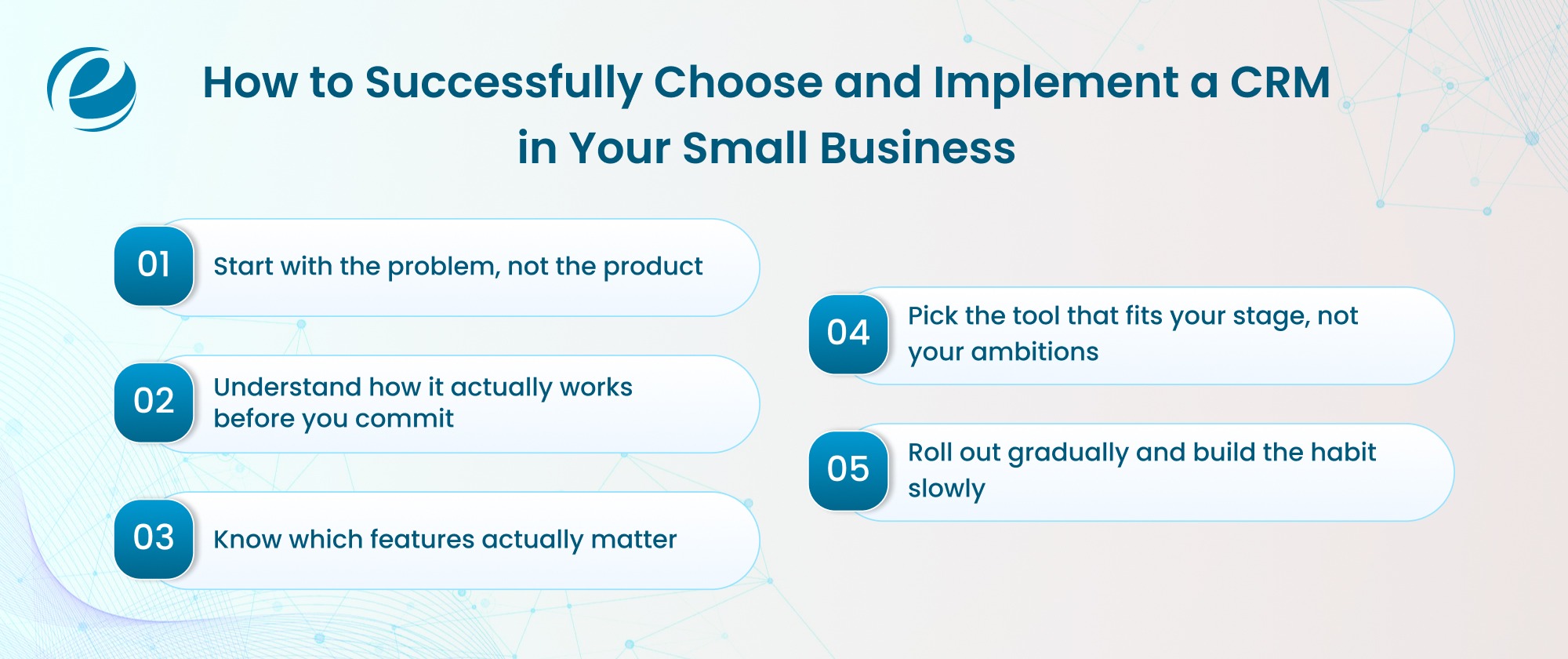
Most small businesses buy CRM software and expect results overnight. When adoption stalls, they blame the tool. It is rarely the tool. Almost always, it is the process. Steps one through four are groundwork. Step five is the actual rollout, and skipping the groundwork is why so many rollouts collapse.
Step 1: Get Clear on What You Actually Need
What is breaking in your current workflow, leads going cold, follow-ups missed, data scattered across spreadsheets and inboxes? Once you know the answer, how to choose the right CRM for your business becomes a sharper question. Talk to the people who handle customers daily; their input shapes the brief better than any vendor demo. If the scope still feels unclear, a CRM development company can help define it first.
Step 2: Understand How a CRM Works Before You Commit
Picture a sales rep opening their laptop Monday morning. Instead of checking three apps and old email threads, they see one screen, every interaction logged, every follow-up scheduled. That shared source of truth looks nothing alike for a four-person startup versus a forty-person sales team. Map your current process first; that map becomes your blueprint, because most implementations that stop working hit the same handful of problems.
Step 3: Know the Features That Actually Matter
This depends on your workflow, not a vendor’s marketing page. Across small teams, the ones that consistently earn their place are fast contact and deal tracking, email and task automation, a pipeline view showing where every deal stands, and integrations with tools you already use. Skip that last part and you find out the hard way, weeks in, when the CRM refuses to talk to the accounting or email tool your team already lives in.
Step 4: Pick the Right Tool for Your Stage
The most popular CRM for small business is not always the right one for you. For startups, lean CRM tools for small business win nearly every time, and the best CRM for startups matches your current stage, not your five-year plan. Run a real trial and let the people using it daily drive the decision, their reaction tells you more than any review site. If CRM software for startups still feels too limited, you can hire CRM developers to build something tailored from scratch.
Step 5: Roll Out Gradually
Full rollouts on day one rarely survive contact with reality, so start with one team or one process, watch what breaks, fix it, then expand. Assign a CRM owner before launch, someone who owns the configuration and tracks adoption, because without one point of accountability, things drift fast, and this one costs more than it looks; 37% of CRM users report revenue loss tied to poor data.
Clean data migration matters more than most teams expect; move contacts and deals over accurately, or the team loses trust before the first week is out. Set benchmarks for the first ninety days, pipeline visibility, follow-up rate, lead response time, so the numbers hold the tool accountable.
Training is not an event. It is a habit. A CRM tool for small business earns its place only when the team reaches for it instinctively, and that takes repetition, not one onboarding session.
Why Businesses Partner with Emizentech for CRM Solutions
Emizentech is a global software development company that has built CRM solutions since 2013, with over 1,200 projects delivered across 30 industries. The team handles the full lifecycle, discovery, custom builds, integrations with Salesforce, Odoo, and Creatio, and legacy migrations.
Before writing any code, our team of dedicated developers maps your workflows, and defines exact requirements, so the final CRM is built around how you actually work, not a generic template.
A few reasons businesses choose Emizentech:
- 12+ years of dedicated CRM development experience
- 4.9 rating on Clutch, 5.0 rating on GoodFirms and other manny to also
- Full lifecycle support, from discovery through post-launch
Our portfolio and case studies document real-world CRM implementations across industries. To start a project consultation.
Conclusion
The right CRM for small business does not need to be the most expensive or feature-packed option on the market. It needs to solve what your team struggles with: scattered data, missed follow-ups, and no clear view of the pipeline.
Start by identifying what is breaking in your current process, then match the tool to your real workflow instead of your five-year plan. Roll out gradually, track adoption and let the data guide what comes next.
If off-the-shelf platforms do not fit, a custom-built CRM gives you full control without ongoing per-user fees, and EmizenTech’s team can handle everything from planning through post-launch support. Treat the CRM as a long-term operational shift, not a one-time purchase. Start simple, stay consistent, and build as you grow.
FAQs
Is a CRM worth it for a small business?
Yes, if missed follow-ups or scattered data are costing you deals. Even a basic CRM pays for itself quickly by keeping your pipeline organized and your team accountable.
How much does a CRM for small business cost?
Most small businesses pay $10 to $50 per user per month. Total monthly spend typically runs $100 to $500, depending on team size. Free tiers exist, but real automation usually needs a paid plan.
How long does it take to set up a CRM?
Simple cloud-based CRMs go live the same day. Platforms like Salesforce or Creatio with custom configurations take two to eight weeks. The bigger variable is migration and training, not the setup itself.
Can I switch CRMs later without losing my data?
Yes. Most CRMs let you export contacts, deal history, and notes as CSV files before switching. Data loss usually comes from poor planning, not the migration. Clean your records before exporting and verify the import.



 +1 (989) 535-9295
 info@emizentech.com
 emizentech


