 Add us as a preferred source on Google
Technologies like AI and CRM aren’t just buzzwords; they are full-fledged solutions that automate manual tasks. Instead of relying on old habits like manual paperwork or maintaining large files, you need AI-powered CRM. AI in CRM goes well beyond automation. It helps teams make data-driven decisions by analyzing customer behavior and spotting patterns. It uses generative AI to draft personalized emails in seconds and predictive lead scoring to show sales teams which prospects to prioritize.
The market is moving in this direction. According to Fortune Business Insights, integrating AI and machine learning (ML) into CRM systems is speeding up automation across customer service, sales, and marketing.
In this guide, you’ll learn how AI in a CRM system works, the benefits it brings, and how to overcome the roadblocks that can get in the way of adoption.
What is AI in CRM?
AI in CRM means integrating machine learning, natural language processing (NLP), and generative AI into CRM software so that the system can analyze data, make predictions, and take recommended actions with minimal human effort. You can divide it into three broad categories, which are as follows:
- Predictive AI: (AI → Recommendation)
Human → Decision + Action
- Generative AI: (AI →Content/Answer)
Human → Review + Action
- Agentic AI: (AI → Reasoning + Execution)
Human → Supervision + Exception handling
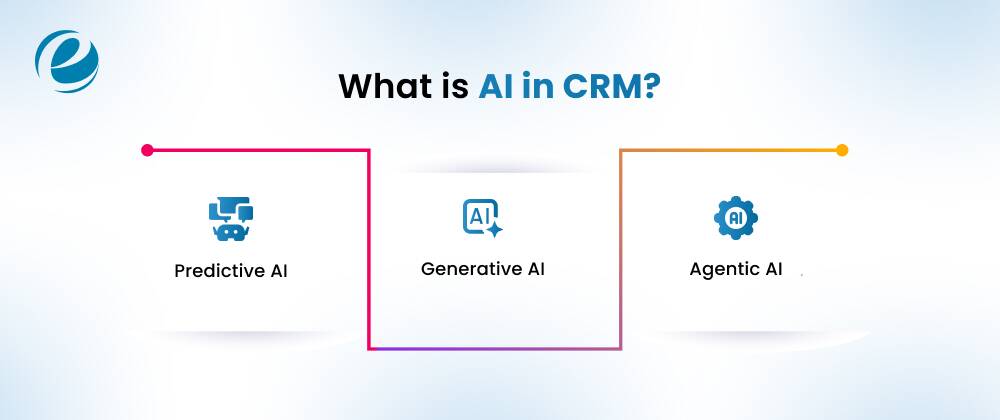
Predictive AI
Predictive AI fundamentally depends on data and uses machine learning and statistical analysis to identify patterns, analyze behavior, and anticipate future outcomes. Here, the AI generates a prediction or recommendation, and humans decide and act on it.
Generative AI
Generative AI is also called gen AI. It is used to create authentic and original content, be it in the form of text, images, software code, video, or audio, as a response to a user’s prompt or query. To talk about, it operates in three phases:
- Training: Developing a foundation model that acts as a base for several gen AI applications.
- Tuning: Customizing the foundation model for a particular gen AI application.
- Generating, evaluating, and returning: Evaluating the gen AI application’s output and constantly improving its quality and accuracy.
In simple terms, the AI produces content in response to a prompt; a human reviews it and acts on it.
Agentic AI
Agentic AI refers to artificial intelligence systems that help achieve a specific goal with minimal supervision. In this model, AI handles reasoning and execution; humans supervise and handle exceptions.
Key Benefits of Using AI in CRM
AI in CRM offers several key benefits, which are as follows:
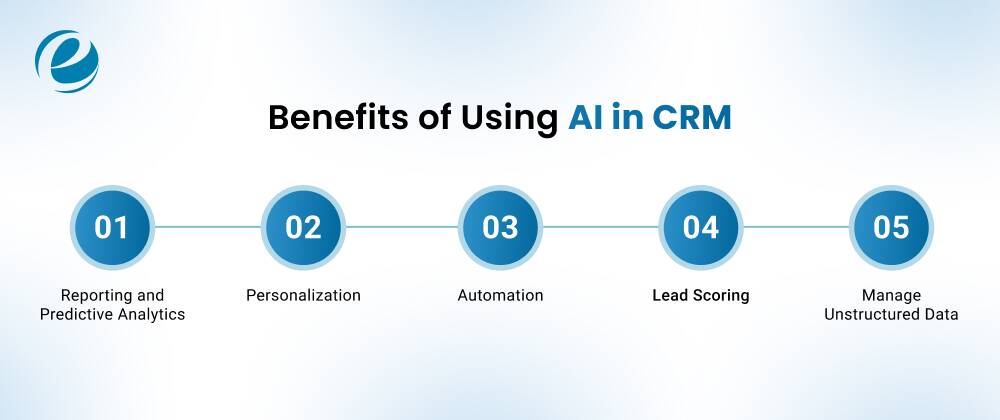
Improved Reporting and Predictive Analytics
AI CRM solutions have data analytics capabilities that evaluate historical data and customer patterns. This helps organizations gain insights, forecast sales more accurately, and decide which demographics to target.
Enhanced Personalization
By providing personalized experiences, AI can convert more prospects into active buyers. AI can evaluate customer data through updates and algorithms and suggest products or services based on individual needs.
Faster Support through Automation
AI and automation tools differ but complement each other. AI-powered automation tools like chatbots and virtual assistants handle routine inquiries and provide round-the-clock customer support. By automating these interactions, they can reduce response times and let employees focus on more complex tasks.
Better Lead Scoring and Prioritization
AI-based lead scoring helps organizations prioritize leads more effectively and assess how likely a prospect is to convert. Factors that increase sales and support upselling include demographics and behavior analysis, helping sales representatives target leads most likely to convert.
Manage Unstructured Data Smartly
CRM systems handle enormous amounts of data, including unstructured and complex enterprise data from multiple communication channels. This is where AI in CRM comes in. Tools such as NLP (natural language processing) and ML (machine learning) organize and sort data in a structured way that would otherwise remain untapped.
High-Impact Real-World Use Cases of AI in CRM
Here are AI use cases in CRM across the customer lifecycle.
Sales Acceleration & Pipeline Velocity
- Predictive lead and opportunity scoring: Representatives can focus on the deals most likely to close.
- Next-best-action recommendations: The CRM suggests whether to call, email, send a proposal, or loop in a manager, based on similar past deals.
- Conversation intelligence: AI transcribes and analyzes sales calls, surfaces objections, and highlights coaching moments.
- Automated follow-ups and email drafting: Generative AI writes context-aware messages using the account’s history.
- Deal risk alerts: Stalled deals, single-threaded relationships, and missed follow-ups get flagged automatically.
- Forecasting: Pipeline-level predictions that account for seasonality and rep-level conversion patterns.
Intelligent Marketing & Hyper-Personalization
- Dynamic segmentation: Audiences update in real time based on behavior instead of static lists.
- Send-time and channel optimization: AI picks when and where each contact is most likely to engage.
- Content generation and testing: Draft subject lines, ad copy, and landing page variants, then let the system test them.
- Personalized product and content recommendations: Based on browsing, purchase, and engagement history.
- Attribution and campaign insights: Identify which touchpoints contribute to pipeline, not just last clicks.
Customer Service & Autonomous Support
- AI chatbots and virtual agents: Resolve common questions such as order status, password resets, and policy lookups without human involvement.
- Smart ticket routing and prioritization: Tickets go to the right agent or team based on topic, urgency, and sentiment.
- Agent assist: Suggests answers and pulls relevant knowledge base articles during live conversations.
- Automatic summaries: Condense long ticket threads into a few lines for handoffs.
- Sentiment analysis: Detects frustration or churn risk across calls, chats, and surveys.
Industry-Specific Applications
eCommerce
- Abandoned cart recovery with personalized offers
- Product recommendations from purchase and browsing history
- Predicting repeat purchase timing and customer lifetime value
Fintech
- Lead qualification for loans, cards, and wealth products
- Behavioral triggers for cross-sell and upsell
- Support automation with compliance-aware responses and churn signals from usage patterns
Real Estate
- Ranking buyer and seller leads by intent
- Matching properties to client preferences automatically
- Automated follow-up sequences after showings and inquiries
Healthcare
- Appointment reminders and no-show prediction
- Patient engagement and follow-up personalization
- Classifying inbound inquiries
For healthcare and fintech especially, data privacy and regulatory compliance (HIPAA, GDPR, PCI DSS, or local equivalents) must shape your AI design from day one. Never push sensitive data into a third-party model without a clear data-handling agreement.
Top 5 AI CRM Tools in 2026
As AI-powered CRM becomes more popular and more businesses adopt it, the key is to understand the top AI CRM tools, how they differ, and how to choose the best solution for your business needs. To do that, review the comparison table below, compare the platforms, and make an informed decision.
| Platform + AI Tool | Category | AI Focus |
| Salesforce (Platform)+ Agentforce (AI Tool) | CRM Platform | AI agents and workflow automation |
| HubSpot (Platform) + Breeze (AI Tool) | CRM or customer platform | AI-assisted marketing service and sales |
| Zoho CRM (Platform)+ Zia (AI Tool) | CRM Platform | Prediction, automation, and AI assistants |
| Dynamics 365 (Platform)+ Copilot (AI Tool) | CRM or business platform | AI agents, sales and service intelligence |
| Attio (Platform with built-in AI capabilities also known as Ask Attio) | AI- native CRM platform | Research agents and revenue workflows |
Salesforce
Salesforce is among the top enterprise CRM platforms in 2026 because it’s not just a system for recording information; it has evolved into an autonomous, agentic platform with its own AI tool called Agentforce. Highlighting the role of AI in CRM, it’s:
- Best For: Enterprise scaling, security, and deep native automation
- Key Advantage: Seamless multi-agent orchestration supported by enterprise trust
- Major Drawback: Setup is extremely difficult, takes most of your time, and has complex pricing
HubSpot
Besides competing with Salesforce Agentforce AI tool, HubSpot’s Breeze AI tool is the most accessible and native AI CRM tool available. HubSpot is the preferred choice for businesses looking for an AI CRM platform as it’s easy to use, has a centralized data architecture, and facilitates quick deployment. Talking about the role of Breeze AI in HubSpot CRM systems, it’s:
- Best For: Startups and small to medium-sized businesses
- Key Advantage: Faster deployments and is user-friendly
- Major Drawback: Inefficient when it comes to handling complex and custom enterprise workflows
Zoho CRM
Zoho CRM is one of the best platforms to consider in 2026 because it is cost-efficient and packed with deep customization power. Its AI assistant, Zia, is included in Enterprise and Ultimate editions at no extra cost. Talking about its best usage features and pitfalls:
- Best For: Small to medium businesses with strict budgets
- Key Advantage: Facilitates native connection across the Zoho ecosystem and agentic workflows
- Major Drawback: Migration and integration can be difficult if you are considering importing large data sets with an external third-party software
Read More: Zoho vs Salesforce
Dynamics 365
Microsoft’s Dynamics 365 is among the best enterprise CRM platforms for organizations already using Microsoft’s ecosystem. In that case, Microsoft’s Dataverse combines customer data with financial and operational records. Copilot AI is the best ecosystem-wide productivity AI for organizations using Microsoft 365. It’s
- Best For: Consolidating CRM and ERP data into one unified cloud platform
- Key Advantage: Native Microsoft integration with Teams, Outlook, and Azure
- Major Drawback: Implementation is risky and complicated
Attio
Attio is a modern and top CRM platform that replaces rigid, legacy-based schemas with a flexible, Notion-style data model. Its AI, Ask Attio, is among the best AI CRM tools for reasoning across real-time, multi-source data. It is ideal, or you can say:
- Best for: Product-led growth companies
- Key Advantage: Offers absolute data model flexibility
- Major Drawback: Limited native marketing automation
Commercial Platforms vs. Custom AI CRM Development
If you are also unsure whether to choose a commercial CRM platform or custom AI CRM development, review each CRM feature list and evaluate your business processes, data, and growth plans to make a concrete decision. For your ease, here is a comparison between both approaches:
| Factors to Consider | Commercial Platform | Custom AI CRM |
| Launch | Can be launched in days or weeks | Launch is based on scope, can take around 3-9 months |
| Upfront Cost | Low, subscription-based | High, mostly because of design and development |
| Cost at Scale | Increases with every user, add-ons, and AI tier | Initial spend is costly; afterward, it’s hosting and maintenance charges |
| Workflow | You need to adapt to the tool or platform’s process | The platform is designed around your business process |
| AI Capabilities | Limited or restricted to what the vendor offers | Models are built around your use cases and are trained on your data |
| Integrations | Pre-built connectors that come with limits | Built according to your tech stack and also includes legacy systems |
| Data Control | Data control is according to vendor terms and hosting | Full control over hosting and access, and how data is processed |
| Compliance | Responsibility is shared, and you are dependent on vendor certifications | Built around your regulatory requirements: HIPAA, GDPR, and PCI DSS |
| Ownership | The vendor owns the platform, code, and IP; you license it | You own the code and IP |
How to Use AI in CRM: Step-by-Step Implementation Guide
If you have made up your mind to use CRM with AI, then follow these steps:
Step 1: Fix your goals: Set goals that will help you analyze and achieve the outcomes you want after integrating AI into CRM systems. For example, your goal could be to help your teams focus on high-priority deals, shorten the sales cycle, and automate sales processes. Setting goals creates a foundation for choosing the right AI solutions to achieve them.
Step 2: Implementing AI in CRM: Implementing AI in CRM means using built-in tools, customizing your approach, or using an integration platform to integrate AI successfully.
Step 3: Employee Training: Train your employees in the skills they need to get the most from CRM AI features. You can do this by holding training sessions or creating reference documentation.
Step 4: Run Pilot Tests: Slowly introduce AI into your sales processes so employees feel comfortable using and adopting it. Deploy in fragments instead of a full solution, since a full rollout can introduce inaccuracies.
Read More: CRM Implementation Costs
AI in CRM: Overcoming Roadblocks
Poor Data Quality
Challenge: AI is highly data-driven and produces results based on its inputs. Feeding it incomplete or inaccurate data will produce incorrect or unreliable outputs. According to Salesforce’s State of IT: AI and App Development Report, 86% of IT leaders acknowledged that AI is only as good as its data.
Solution: To prevent poor data quality from becoming a major issue, conduct an in-depth data audit by analyzing key data sources that influence your AI output. By following the steps mentioned below, you can address the challenge:
- Step 1: Identify key sources and check for missing fields, duplicates, outdated records, and inconsistent formats.
- Step 2: Help your team understand key fields, such as lifecycle stages, lead sources, and opportunity stages. This ensures everyone uses them consistently.
- Step 3: Fix inaccuracies by filling gaps, removing duplicates, and updating details and old records in the CRM.
- Step 4: Set required fields and controlled drop-downs so that incomplete or inconsistent data cannot be saved
- Step 5: Assign a dedicated person or CRM manager to improve data quality and review data regularly so it stays clean.
Low User Adoption or Change Resistance
Challenge: As humans, we prefer comfort rather than changing our approaches for better results. In tech environments, you cannot avoid being agile in how you adopt and implement new technologies. There are several organizations that deploy future-proof technologies like AI sometimes into existing systems and sometimes outside the systems. But without adequate training, your teams’ output will suffer, and they may struggle to understand how predictions are generated. This may cause your project to fail.
Solution: Here’s how you can solve this problem:
- Step 1: Select one clear use case, for example, prioritizing leads that fit your ideal customer profile, and embed AI directly into the process instead of launching several features all at once.
- Step 2: After testing the use case, share what it looked like before and how it will help after implementation.
- Step 3: Upskill your team. Run training sessions to teach your team how to use AI in CRM. You can also provide self-paced modules so they can learn about AI on their own time.
- Step 4: This is a starting point; from here, you can monitor adoption metrics and review them in team meetings, making AI part of performance conversations.
Governance, Compliance, and Privacy Risks
Challenge: If your organization operates in a highly regulated industry, it needs an extra layer of care. Examples include healthcare, fintech, government, and education centers. AI depends on data that may include customers’ personal information, service history, and behavioral data. Without clear rules on who can access what, how data is used, and how outputs are reviewed, your risk exposure increases.
Solution: Here is how you can address this situation:
- Step 1: Finalize the data that your AI features can access and segregate it by sensitivity.
- Step 2: Update AI usage policies to clarify what can and can’t be used within the organization.
- Step 3: Set a review process for AI-generated outputs in high-risk areas, such as automated customer service.
- Step 4: Involve your legal and support teams early so they can help shape the initial guardrails instead of patching issues afterward.
- Step 5: Document the steps above and maintain an audit trail to help you answer future questions about how models are configured and monitored.
How EmizenTech Delivers Custom AI CRM Solutions?
Every entrepreneur wants to integrate CRM software solutions into their business but doesn’t know how. Sometimes vendors mislead them, charge extra, and later make even basic features inaccessible; without support, organizations and internal teams suffer. It doubles their work instead of streamlining it.
In these situations, partner with a credible vendor that understands your business ecosystem, has relevant experience, and employs certified professionals. EmizenTech meets these criteria and is a renowned software development and tech consulting company with 13 years of industry experience, serving clients globally.
Talking about delivering custom AI CRM solutions, they follow a guided approach:
Step 1: Discovery and Process Mapping: Instead of jumping straight into technology, they start by understanding your sales, marketing, and support workflows.
Step 2: Data Assessment: After discovery and process mapping, they evaluate data quality, structure, and potential gaps to plan cleanup and ensure risk-free CRM data migration.
Step 3: Solution Design: They recommend a custom, hybrid, or platform-based approach.
Step 4: Development and Integrations: They build and integrate modules like predictive scoring, chatbots, and analytics dashboards with your existing tools. Their CRM software development services cover the full cycle.
Step 5: Testing, Security, and Compliance: They validate model performance, secure data flows, and ensure compliance with industry-aligned regulations.
Step 6: Launch, Train, and Optimize: They deploy the CRM solution, train employees to use the technology (CRM and AI), and optimize systems as soon as they identify errors or bugs.
If your CRM is part of a broader web presence or content platform, their CMS development services can help connect the two.
Conclusion
AI in CRM is a competitive advantage that can help your organization scale faster, improve team efficiency, and free up time to focus on crucial decisions. In this blog, you learned how AI-powered CRM works and why it can be a smart investment. This blog also highlights the differences between predictive AI, agentic AI, and generative AI. Also, among the top 5 AI CRM tools, which one should you choose? Partner with a reliable CRM development company that will help you decide what to implement.
FAQs
1. What is AI in CRM?
Ans:
- AI in CRM means leveraging branches of AI such as :
Machine learning - Generative AI
- Natural language processing
within your CRM systems or software to automate daily routine tasks, predict outcomes, and generate more personalized customer interactions.
2. What are the best AI CRM tools?
Ans: The best AI CRM tools are as follows:
- Salesforce
- HubSpot
- Microsoft Dynamics 365
- Zoho CRM
- Attio
3. Is customer data safe when using AI in CRM?
Ans: It depends. If you’re using a commercial CRM, the vendor controls the data under their terms. For custom, the data safety is in your hands since you have access to the code. For complete data safety, review where your data is processed, for what purposes, whether it is used to train third-party AI models, and what access controls exist.


 +1 (989) 535-9295
 info@emizentech.com
 emizentech


