
 Add us as a preferred source on Google
 Picking a CRM is one of those decisions that looks simple until you’re actually in it. Every business runs sales a little differently; support looks different depending on who you ask. Without an actual CRM requirements checklist written down somewhere, most companies end up paying for a bunch of features nobody touches while the thing they actually needed never made the cut.
First, who should help build the list and how detailed it needs to be. Then ten signs you’re actually ready for a CRM, and twelve requirements worth weighing. After that comes the practical stuff: ranking your must-haves, running demos around your real workflows, and scoring vendors side by side. You will also learn when building something custom makes more sense than buying off the shelf.
What is a CRM Requirements Checklist?
Basically, it’s a written-out list of everything you need your CRM to do, handle, or connect to before you commit to buying anything. Functional stuff, technical limits, budget, the weird workflow your ops team insists on keeping all of it goes in there.
Why Every Business Needs One
Most businesses learn this the hard way. Customer info ends up in someone’s inbox, another person’s spreadsheet, and a sticky note nobody can find. A CRM fixes that. Follow-ups stop slipping, everyone sees the same history, and you can tell which leads actually turn into sales.
Who Should Be Involved in Creating It
This isn’t a solo project, and honestly it shouldn’t be. Sales managers care about pipeline stages. Support wants to know their ticketing tool won’t break. IT is thinking about compliance and who has access to what. Marketing’s got its own agenda too: segmentation, campaign tracking, all that.
How Detailed Should the Checklist Be?
There’s a balance here. “We want better reporting” tells nobody anything useful. On the flip side, spelling out exact field formats can knock good platforms out of the running over things that don’t actually matter. Try writing requirements around outcomes instead of something like “needs to spit out a weekly pipeline report without someone manually pulling numbers” rather than dictating exactly how the vendor has to build it.
10 Signs Your Business Needs a CRM
Before you build out a whole CRM requirements checklist, it’s worth checking whether you’re even at the point where a CRM makes sense. Here are ten signs that usually mean yes.
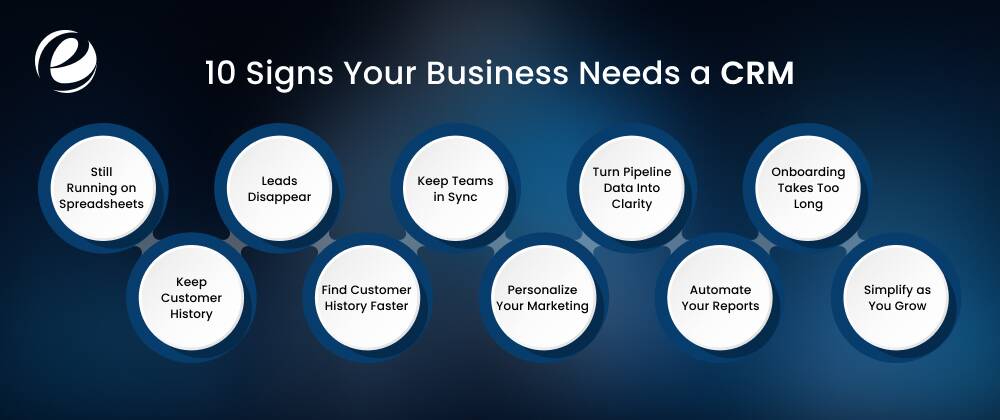
Still Running on Spreadsheets
Look, spreadsheets are fine until they’re not. And for most businesses, that tipping point comes faster than you’d think. Someone updates a cell, someone else overwrites it an hour later, and now nobody actually knows which version is real. Sticky notes are worse. A CRM won’t solve everything, but at least it won’t lose your customer’s phone number because of gravity.
Leads Disappear
You meant to follow up. You really did. But three other things came up that day, and by the time you remembered, the lead had gone cold or worse, signed with someone else. This isn’t a discipline problem; it’s a memory problem, and humans are bad at remembering things nobody’s reminding them about. A CRM nudges you before the lead goes cold, which sounds small until you calculate how much a single lost deal actually costs.
Keep Teams in Sync
Sales promises a discount. Support has no idea. Marketing emails the customer who just complained about a billing error. It’s not that your team is careless; it’s that everyone’s working off different information. Customers notice this immediately, even if they don’t say it out loud. It just feels disjointed. A shared record fixes most of it overnight.
Turn Pipeline Data Into Clarity
If someone asked you right now how much revenue is realistically sitting in your pipeline, could you answer without opening five tabs and doing mental math? Most business owners can’t. And guessing isn’t a strategy; it’s just hoping you’re right. A CRM actually shows you where deals are stuck, what’s likely to close, and what’s just sitting there collecting dust.
Onboarding Takes Too Long
Ever watch a new employee spend their first three weeks just trying to figure out who’s who and what happened with which account? It’s painful to watch, honestly, and it’s rarely their fault. If customer history lives in someone’s inbox or their head, you’re basically forcing every new hire to relearn the business from scratch. A CRM hands them the context on day one instead of week five.
Keep Customer History
This one stings. An employee leaves, and suddenly nobody remembers that a client prefers phone calls over email, or that there was a pricing exception three years ago that everyone just forgot to write down. That knowledge shouldn’t belong to one person; it should belong to the company. Otherwise, you’re rebuilding trust with customers every time there’s turnover.
Find Customer History Faster
Raise your hand if you’ve ever spent twenty minutes searching your inbox trying to find “that one email from March.” Yeah. Email was never built to be a customer record system, and treating it like one means important context gets buried, forwarded badly, or lost entirely when someone changes roles. A CRM keeps the whole conversation calls, emails, notes in one place.
Personalize Your Marketing
If your idea of marketing segmentation is “send it to everyone,” you’re probably annoying half your list and boring the other half. People respond to messages that feel relevant to them, not mass emails that could’ve been written for literally anyone. A CRM lets you actually group customers by what they care about, which, unsurprisingly, tends to work better.
Automate Your Reports
Manually pulling numbers, cross-checking spreadsheets, building a chart from scratch sound familiar? That’s hours you’ll never get back, spent on something a CRM does in a few clicks. Not exaggerating much here. Time spent formatting a report is time not spent actually acting on what the report says.
Simplify as You Grow
This is the one people underestimate the most. What felt manageable early on a few spreadsheets, some sticky notes, a decent memory falls apart fast once you’re juggling hundreds of relationships instead of a couple dozen. Growth exposes every shortcut you took early on.
What Problems Should Your CRM Solve?
A CRM requirements checklist only means something if it’s built around actual problems, not a generic feature list pulled from some vendor’s homepage. Start with what’s genuinely broken.
Sales and Pipeline Visibility
Inconsistent pipeline tracking is one of the most common complaints out there. A CRM fixes it by putting deal stages, follow-ups, and win/loss reasons all in one place so forecasting stops being a guessing game.
Customer Data Fragmentation
If your customer records live in five different systems, data consolidation needs to be near the top of your CRM system requirements checklist. This matters even more if you’re already juggling several marketing, billing, and support tools that don’t talk to each other.
Reporting and Decision-Making Gaps
If leadership can’t get a straight answer on how many deals closed this month without waiting a day or two, that’s reason enough on its own to invest in a CRM.
Customer Service and Follow-Up Delays
Slow responses don’t just annoy people; they cost you renewals and referrals, quietly, over time. If your support team is digging through old email threads trying to piece together a customer’s history, write that down as a specific problem, with a specific fix in mind: unified case history, automated ticket routing, whatever actually solves it.
12 CRM Requirements Every Business Should Consider
There are a few specific things worth evaluating against what your business actually needs. These fall under the broader umbrella of CRM functional requirements that most growing companies share, whether they realize it or not.
Core Functional Requirements
Contact and account management: one place for every customer and company record, not five.
Lead and deal tracking: a pipeline you can actually see, not one you have to reconstruct from memory.
Task and activity management: reminders and follow-up scheduling that doesn’t rely on someone’s memory.
Email integration syncs both ways with Gmail or Outlook, no manual logging.
Reporting and dashboards: numbers you can pull in real time, not next Tuesday.
Workflow automation: assignments, follow-ups, and status changes that happen without a human clicking through them.
Technical and Integration Requirements
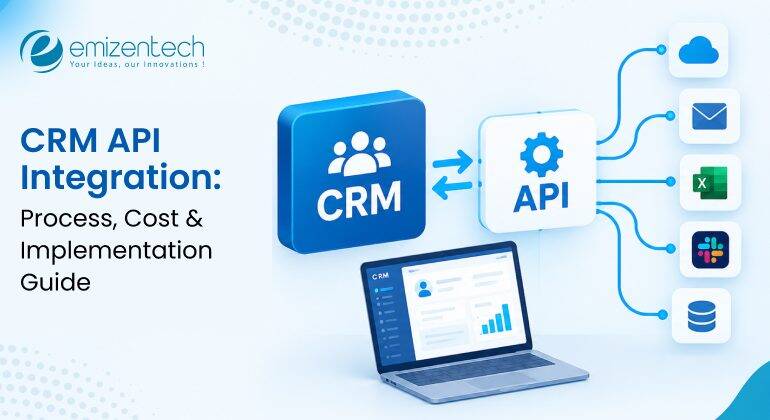
Third-party integrations play nice with your accounting, marketing, and support stack.
Mobile accessibility works for reps who aren’t sitting at a desk all day.
Data security and compliance: encryption, access controls, and whatever regulations apply to your industry.
Scalability won’t fall apart when you add twenty more users next year.
Customization bends to fit your workflow instead of forcing you into someone else’s.
Support and training resources: decent documentation and a vendor who actually answers the phone.
Which CRM Requirements Should You Prioritize First?
Not everything on your list carries the same weight, and pretending it does just slows you down. Prioritizing keeps the team from getting hung up on nice-to-haves while the actual gaps sit there unaddressed.

Must-Have vs. Nice-to-Have Features
Split your list into two columns. Must-haves are the stuff your team literally can’t operate without: contact management, pipeline tracking, email sync. Nice-to-haves are things like AI lead scoring or fancy industry templates genuinely useful, sure, but not the difference between working and not working.
Aligning Requirements with Business Goals
Every item on your CRM selection checklist should trace back to something measurable: shorter sales cycles, better retention, faster support turnaround. If a feature doesn’t move one of those needles, it probably doesn’t deserve to be near the top.
Budget and Timeline Constraints
Even a well-thought-out CRM selection checklist has to bump up against reality eventually: budget and how fast you actually need this live. A platform that checks every box on paper but takes six months to roll out might not be the right call if you need results this quarter. Weigh implementation speed and total cost against feature fit before you lock anything in.
How to Evaluate a CRM Against Your Requirements
Going ahead: Once the checklist’s done, it’s time to actually test platforms against it, not just sit through a polished demo and call it a day. That is why evaluating your CRM is a must, and it can be done simply with these three steps.
Running Structured Demos
Ask vendors to walk through the actual workflows from your list, not their canned pitch. Bring a real scenario a lead moving from first contact to closed deal and have them show you, live, how it plays out in their system. It’s amazing how much this filters out.
Checking References and Reviews
Talk to real customers, ideally ones in your industry or around your size. Case studies are fine, but a candid reference call tends to surface things that never show up in a demo: support response times, how the platform holds up once you’re actually at scale using it day to day.
Scoring and Comparing Vendors
Build a simple scoring sheet; rate each vendor one to five on every item from your CRM features checklist. Turns what could be a gut-feeling decision into something you can actually defend to stakeholders. Also worth glancing at how different types of CRM software line up with what you’re evaluating, since not every platform is built to do the same job.
From CRM Requirements to Implementation: How EmizenTech Can Help
Even a really thorough CRM requirements checklist is just the start. Actually turning that list into something that works day-to-day is where a lot of companies get stuck, especially when off-the-shelf tools don’t quite line up with their CRM functional requirements. That’s usually where it makes sense to bring in a CRM development company. Instead of bending your business around whatever a generic tool allows, a dev partner builds around the requirements you’ve already documented: custom modules, deeper integrations, workflows specific to how you actually operate.
If you’ve outgrown the basic tools, especially relevant for smaller teams weighing their options around CRM for small business, it might be worth looking into bringing in dedicated help. You can hire CRM developers to build something mapped directly to your checklist, so nothing on your priority list gets quietly dropped during implementation.
Final Verdict
To sum this up, a properly documented CRM requirements checklist is honestly the single biggest thing you can do before choosing or building a CRM. It forces clarity on what’s actually broken, what matters, and how you’ll know it worked. Skipping it is probably the number one reason these projects end up disappointing everyone six months in.
Work through each part of this: the warning signs, the functional needs, the prioritizing, the vendor evaluation. Whether you land on something off-the-shelf or go custom, having this written down means your final call is based on what your business needs, not on whoever gave the best demo.
Frequently Asked Questions
What are the essential requirements of a CRM?
Contact and account management, lead and deal tracking, email integration, dashboards, and workflow automation that's the baseline. These make up most CRM functional requirements no matter what industry you're in.
How do I identify the right CRM requirements for my business?
Start with what's actually broken today: bad pipeline visibility, scattered data, reports that take forever. Pull in sales, marketing, support, and IT so the checklist reflects everyone's reality, not just whoever's driving the decision.
What features should a business look for in a CRM?
Beyond the basics: mobile access, integrations, customization, room to grow. A decent CRM features checklist should also factor in security, how easy it is to use day-to-day, and whether the vendor's support is any good.
What are the technical requirements for CRM software?
Encryption, role-based access, an API you can actually build against, hosting options, and compliance with whatever regulations apply to you. All of that falls under your overall CRM system requirements.
Should I choose an off-the-shelf CRM or build a custom CRM?
It depends on how closely your checklist matches what's already out there. If a standard platform covers most of it, go that route; it's faster and usually cheaper. But if your workflows are unusual or you need integrations nobody's built yet.


 +1 (989) 535-9295
 info@emizentech.com
 emizentech


