
 Add us as a preferred source on Google
 The global CRM software market hit $128 billion in 2024, growing 13.4% year over year, according to Gartner. That kind of spending tells you something. Companies aren’t buying CRM software because it’s trendy. They’re buying it because customer relationships have become too complex to manage in spreadsheets and inboxes.
So what is CRM software, exactly? CRM (Customer Relationship Management) software is a system that stores every customer interaction, sales activity, marketing contact, and support conversation in one place. Think of it as a single source of truth that gives your teams a complete, 360-degree view of every customer. If you want the full foundational picture, this guide on What Is CRM & CRM Software? covers it in depth.
The real question isn’t if your business needs a CRM. It’s about selecting the CRM that matches how you sell, market, and support your customers. Pick the wrong one, and you’ll pay for features nobody uses. Understanding the different types of CRM is the first step before you can choose with confidence. This guide breaks down every category so you can choose with confidence.
Types of CRM Software
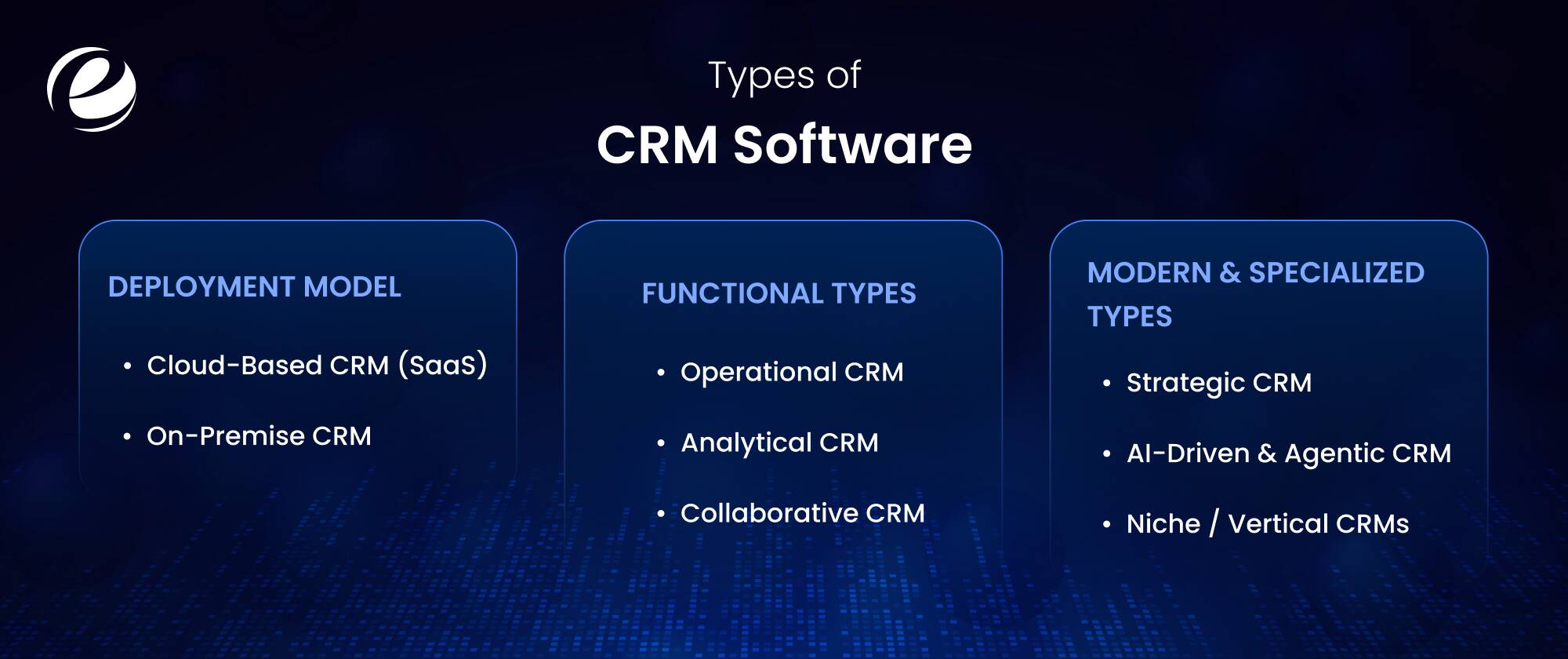
CRM isn’t just one type of software with a few minor differences between options. It actually breaks down in different ways: where the system is hosted, what job it does for your team every day, and how specialized it gets for your specific industry or AI requirements. If you miss the point on any one of these, there’s a good chance the CRM will sit there, rarely used, a year from now. Here’s a simple breakdown of each part.
Functional Types
Functional CRM types are classified by what the system is required to do. Each of the categories serves a different business purpose, whether it’s automating customer interactions or analyzing data and improving collaboration across teams.
| CRM Type | Primary Purpose | Key Features | Best For |
| Operational CRM | Automating customer-facing processes | Sales, marketing, and service automation | Teams that want efficiency |
| Analytical CRM | Making sense of customer data | Reporting, forecasting, segmentation | Data-driven organizations |
| Collaborative CRM | Connecting teams around the customer | Shared records, omnichannel communication | Companies with more than one department |
Operational CRM
Operational CRM automates the day-to-day processes that touch customers directly. It covers three areas: sales automation, meaning lead management, opportunity tracking, and pipeline visibility; marketing automation, covering email campaigns, segmentation, and campaign automation; and service automation, which handles ticketing, chatbots, and support workflows.
If sales representatives are burning half their day on data entry, or leads keep falling down because a follow-up only ever lives in someone’s memory, this is the category to fix it. Operational CRM suits growing businesses managing a high volume of customer interactions, which is exactly why it’s the most common starting point for small and mid-sized companies.
Analytical CRM
Analytical CRM answers a different question. Not “how do we manage customers” but “what is our customer data actually telling us?” These systems rely on data mining, reporting dashboards, customer segmentation, and sales forecasting rather than day-to-day task automation.
It can show which customer segments generate the highest lifetime value, which deals are actually expected to close this quarter instead of just sitting in the waiting list, and where turnover risk is quietly building before anyone notices. Enterprises and data-driven teams benefit most from this type, but it only works when the underlying data is clean and connected.
Collaborative CRM
Collaborative CRM exists to fix a simple problem: different teams end up with different versions of the same customer. Sales knows one story, support knows another, and marketing has a third. Customers notice this disconnect every time they have to repeat themselves at a new point of contact.
A collaborative CRM gives sales, marketing, support, and even external partners a shared customer database with a full omnichannel communication history. Everyone sees the same thread, the same documents, and the same context. For companies where multiple teams touch the same accounts, this type delivers a pretty immediate improvement in how the customer experience actually feels from the outside.
Deployment Model
Where a CRM actually lives changes cost, control, and speed more than most buyers expect going in. There are two main options here, and each one works better for different kinds of businesses.
Cloud-Based CRM (SaaS)
Cloud CRM lives on the vendor’s servers and runs through a browser, which is why it’s become the default choice for most businesses starting out. The appeal is easy to see once you compare it to the alternative: low entry cost, fast deployment, updates that happen automatically instead of eating an IT weekend, and access from anywhere a laptop can open. Salesforce, HubSpot, and Microsoft Dynamics 365 all run this way, and if you’re curious about how the underlying delivery models actually differ, this breakdown of Salesforce’s cloud service models walks through where CRM fits inside the broader SaaS, IaaS, and PaaS stack.
On-Premise CRM
On-premise CRM works the opposite way. It runs on servers your company owns, so you control the data, the security policies, and when upgrades happen, instead of waiting on a vendor’s schedule. However, that control has a price. It’s pricier to set up, needs IT staff to maintain it, and takes longer before your team can actually start using it. Still, it makes sense for large enterprises and heavily regulated industries like banking or defense, where data residency rules usually rule out third-party hosting altogether.
Modern & Specialized Types
Functional type covers what a CRM does today. This part covers where the market is actually heading, and skipping it means judging a CRM against a picture of the industry that’s already a few years outdated.
Strategic CRM
Strategic CRM puts long-term relationships above short-term transactions. It depends on loyalty programs, personalization, and customer lifetime value analysis rather than quarterly wins. Enterprises with long customer relationships, subscription businesses especially, prefer to treat this less as a feature list and more as a principle established in how the whole platform gets used.
AI-Driven & Agentic CRM
This is where the industry is moving fastest. Gartner’s own analysis ties CRM market growth directly to companies building better customer data foundations for AI adoption in the first place. Modern AI in CRM covers predictive sales forecasting, automated lead scoring, sentiment analysis, and AI agents that can draft emails or handle support tickets without a human touching them first. One honest limitation worth saying out loud: AI recommendations are only as good as the data behind them, so connected customer profiles have to come before any of these features actually work. Businesses exploring this route usually bring in AI integration services to wire AI into what’s already running, then depend on AI consulting to figure out where it genuinely adds value versus where it’s just noise pretending to be innovation.
Niche / Vertical CRMs
More businesses are quietly walking away from horizontal platforms in favor of CRMs built specifically for their vertical, and it’s easy to see why once you look at the gaps. Healthcare CRMs are built around patient privacy rules a generic platform was never designed for. Real estate CRMs track listings alongside contacts in a way that doesn’t map to a typical sales pipeline at all. The automotive space makes a particularly relevant case study too; dealerships need customer lifecycle tracking, service scheduling, and dealer network management that a horizontal CRM usually struggles to handle well, which is why this overview of software used across the automotive industry is worth a look before defaulting to a general-purpose platform. If your industry runs on workflows this specific, a vertical CRM tends to outperform a generic one almost immediately.
B2B vs. B2C CRM Types: What’s the Difference?
The distinction between B2B and B2C matters more than most comparisons let on, because who you sell to changes which CRM features matter. A CRM built for enterprise deals feels bloated to an e-commerce brand, and a consumer-focused CRM collapses under a six-month sales cycle. Here’s how the two differ.
B2B CRM is built for long sales cycles with multiple decision-makers. The core features are account management, pipeline tracking, and sales forecasting, because a single deal might involve ten stakeholders over eight months. A manufacturing CRM is a good example of this in practice, built around dealer relationships and distributor networks rather than one end buyer making a quick decision. B2C CRM is built for volume and speed instead. Thousands of customers, short buying cycles, and heavy dependence on personalization, marketing automation, and segmentation to make each of those customers feel individually understood.
Match the CRM’s data model to your customer journey. B2B teams need account organizational structures. B2C teams need behavioral segmentation at scale. Very few platforms do both equally well.
All-in-One vs. Custom CRM: When One Type Isn’t Enough
After exploring the different types of CRM, you may have noticed your business requires pieces of several types at once. Sales automation, analytics, and cross-team collaboration. That realization usually leads to one of two paths, and both are valid.
All-in-one platforms like Salesforce bundle operational, analytical, collaborative, and strategic capabilities into a single system. You get fast implementation, fixed pricing, and functionality that is already there, but you pay more in licensing fees as you add users and modules. It’s worth understanding how much Salesforce costs before assuming the all-in-one route is cheaper.
A custom CRM makes sense when your workflows don’t fit any packaged product or when you’re paying for a large platform while using 20% of it. You get complete flexibility, business-specific processes, and tighter CRM system integration with your ERP, ecommerce, and accounting tools. Many of the teams also land in the middle: extending a platform they already own with custom apps, and these custom app ideas for Salesforce show what that hybrid approach looks like in practice.
How to Choose the Right Type of CRM for Your Business

There are many kinds of CRM software. Knowing their names is not enough to select the right one. To choose well, you just need to ask a few simple questions, one after another. Here’s how to do it.
Identify your primary goal
Need automation? Start with operational CRM. Drowning in data you can’t use? Analytical. Teams working in isolation? Collaborative. Your biggest pain point picks your starting category.
Evaluate integration
A CRM that can’t talk to your ERP, marketing tools, e-commerce platform, or accounting software creates a new silo instead of removing one. CRM system integration capability should be a key requirement, not an exception.
Check scalability
The CRM should handle 3x your current users, customers, and data volume without a painful migration. Switching CRMs mid-growth is expensive and frustrating.
Pick your deployment model
Cloud for speed and low cost, on-premise for regulatory control, and custom for specific workflows. Budget realistically for each, including the hidden costs of training and adoption.
One honest opinion: Most businesses have too many features and minimal adoption. The best CRM is one that your team will actually use every day.
How EmizenTech Helps Businesses Choose and Build the Right CRM
Sometimes the framework above still leaves you between two options or points toward a build that requires real engineering power. That’s where a development partner becomes essential, and it’s the work EmizenTech does every day for businesses across industries.
EmizenTech offers CRM consulting to map your requirements to the right types of CRM, custom CRM development for businesses whose workflows demand it, and CRM integration and migration services that connect your CRM to the rest of your system without data loss. Teams that need to move fast can also hire dedicated CRM developers who work as an extension of their in-house team, from initial architecture through post-launch support.
Conclusion
The types of CRM aren’t academic categories. They’re a map of what your business actually needs: operational CRM for automation, analytical CRM for insight, collaborative CRM for alignment, and strategic CRM for long-term customer value. Layer on deployment choices, AI capabilities, and industry-specific requirements, and the “which CRM” question becomes much easier to answer than it first appears. Some industries just need something built for them. Automotive is a good example; dealerships deal with tasks, customer journeys, and day-to-day issues that a generic CRM was never designed to handle, which is where automotive industry solutions come in. Start with your biggest customer-facing problem, pick the CRM type that solves it, and make sure the platform can grow with you. And if your workflows don’t fit any box on the checklist, building the right CRM is a smaller leap than most businesses assume.
FAQs
What are the 3 types of CRM?
The three traditional types of CRM are operational (automates sales, marketing, and service), analytical (analyzes customer data for insights), and collaborative (shares customer information across teams). Many modern frameworks add strategic CRM as a fourth category focused on long-term relationships.
Which type of CRM is best for small businesses?
Operational CRM is most helpful to small businesses generally. It’s for lead management, sales automation, and customer tracking - the most pressing needs when a team is small, and every lead counts.
What's the difference between operational and analytical CRM?
It automates and manages processes that deal with customers. This is operational CRM. Support tickets, sales pipelines. Analytical CRM looks at processes creating data to understand buying patterns, forecasting revenue, and making decisions. One does the work; the other one explains it.
Is Salesforce an operational or analytical CRM?
Salesforce is an all-in-one platform, so it's both. It combines operational, analytical, collaborative, and strategic CRM capabilities in a single system, plus AI features through Einstein, which is why it serves such a wide range of business sizes.
Can a business use more than one type of CRM?
Yes, and most growing businesses eventually do. Modern platforms bundle multiple CRM types into one system, and custom-built CRMs can combine exactly the operational, analytical, and collaborative features a specific business needs.


 +1 (989) 535-9295
 info@emizentech.com
 emizentech


