
 Add us as a preferred source on Google
 Most businesses don’t run on one system. They run on ten. Sales lives in the CRM; finance lives in whatever accounting tool the bookkeeper picked three years ago; marketing has its own platform; support has another. Nobody planned it this way; it just happened, one tool at a time, and now someone on the ops team is manually copying customer data between four different logins every Monday morning. CRM API integration is the fix for that. It lets the CRM talk to everything else automatically, so the data moves on its own instead of riding along in someone’s spreadsheet.
Consider this blog as your guide to what CRM API integration actually is, how it works under the hood, what it tends to cost, and what the build process looks like in practice. It’s meant for the people who have to make the call: founders, IT managers, ops leads, before they commit budget to a project like this. Whether that ends up being an in-house build or hiring someone external, the goal here is to walk through the process, the systems worth connecting, and realistic numbers for what to expect to spend.
What Is CRM API Integration and How Does It Work?
CRM API integration is just the CRM and some other piece of software agreeing to send data back and forth through an API, instead of a human typing it in twice. That’s really the whole idea. Two systems, one connection, no more manual re-entry. The easiest way to picture what is CRM API integration is to think of the API as a courier running between two buildings. Someone fills out a form on the website, and that courier carries the info straight into the CRM as a new lead, no export file, no copy-paste. A rep changes a deal’s stage, and the same courier can carry that update over to a marketing tool or the accounting system within seconds, sometimes less.
Most of this runs on REST APIs, using the standard HTTP verbs, GET, POST, PUT, DELETE, to pull, create, update, or wipe records. A handful of older systems are still stuck on SOAP, and some newer platforms have started offering GraphQL for teams that want more control over exactly what data comes back. Doesn’t really matter which protocol is underneath; the point is the same either way: stop typing the same thing twice, cut down on mistakes, and make sure every connected tool is looking at the same version of the truth.
A working setup needs authentication, usually API keys or OAuth tokens, clearly defined endpoints so everyone agrees on what data is fair game, and either webhooks or scheduled polling to keep things in sync. One thing worth knowing before diving into what is CRM API integration: it can go one way or both ways. One-way sync just pushes data into the CRM and stops there. Bidirectional is trickier; both systems can update each other, which sounds great until two systems try to change the same record at once. Someone has to decide which system wins that argument, and that rule has to be written down clearly, or things get messy fast.
What Systems Can You Connect With a CRM API?
CRM API integration isn’t a one-and-done, connect-to-one-thing kind of deal. Most businesses end up wiring their CRM into a whole cluster of tools across sales, marketing, finance, and ops. The usual suspects:
- Email marketing platforms like Mailchimp, Klaviyo, and HubSpot Marketing, so lead data and campaign activity sync straight into the CRM.
- Accounting and ERP software, such as QuickBooks, Xero, NetSuite, and SAP, keeping invoices and payment records aligned with customer accounts.
- E-commerce platforms such as Shopify, WooCommerce, and Magento, feeding order history and buying patterns into customer profiles.
- Support and helpdesk tools like Zendesk, Freshdesk, and Intercom, so a rep can see support tickets right next to sales history.
- Communication tools like Slack, Teams, and calendar apps, for notifications and scheduling.
- Payment gateways like Stripe and PayPal, to track transactions and subscription status without leaving the CRM.
- Ad and marketing automation platforms, Google Ads, Meta Ads Manager, to see which campaigns actually produce good leads.
- Data warehouses and BI tools, Snowflake, BigQuery, Power BI, for the reporting people who want deeper cuts of the data.
CRM API Integration Process: Step-by-Step
Every solid CRM API integration project follows roughly the same sequence. Skip a step, or rush one, and it usually costs more later in rework than it would have taken to just do it right the first time.
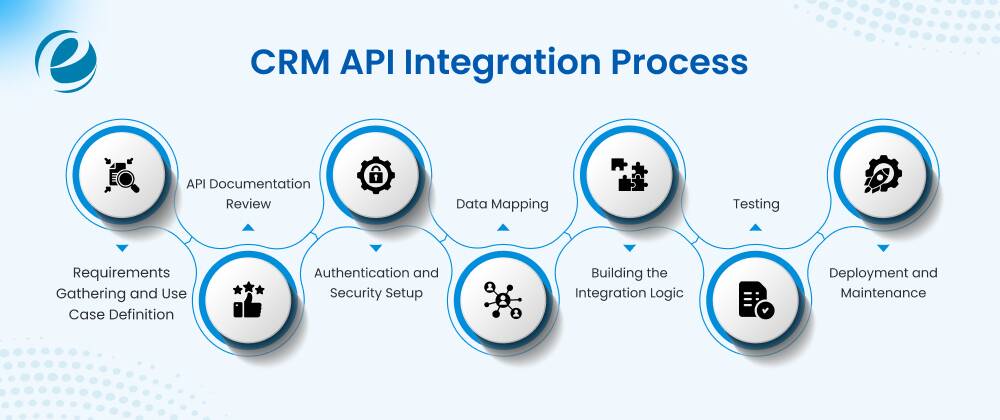
Requirements Gathering and Use Case Definition
Before anyone writes a line of code, someone has to figure out what data actually needs to move, which direction it goes, and how often. This is also where the team decides what actually matters: lead capture, order syncing, ticket visibility, whatever the real priority is.
API Documentation Review
Developers dig into the docs for both systems: endpoints, rate limits, auth methods, data formats. This is usually where you find out whether a ready-made connector already exists or whether this is going to be a custom build.
Authentication and Security Setup
API keys or get configured so the two systems can talk securely, with encryption and access controls layered in to keep customer data protected.
Data Mapping
Fields in one system get matched to fields in the other. Sounds simple, but this is where a lot of projects trip up: a “Company Name” field in the CRM has to line up exactly with whatever the accounting platform calls that same thing, or data starts landing in the wrong place.
Building the Integration Logic
This is the actual code, the part that sends, receives, transforms, and validates data, plus error handling so the whole thing doesn’t quietly break the moment one system goes down for five minutes.
Testing
Everything gets run through a sandbox with sample data first. Records need to sync correctly, duplicates need to not happen, and weird edge cases, like a partial update, need to behave the way they’re supposed to.
Deployment and Maintenance
Once testing checks out, it goes live. Real data starts flowing between the two systems.APIs don’t stay still. Vendors push updates, endpoints change, and without ongoing monitoring, a connection can quietly break, and nobody notices for weeks. Regular maintenance is what keeps it working as both platforms evolve.
Related Blog: CRM Workflow Automation
Where CRM API Integration Delivers the Most Value
This isn’t valuable just because it’s technically neat. It solves real, expensive problems that no amount of manual effort fixes at scale.
Eliminating Duplicate Data Entry
When sales, support, and finance each keep their own separate records, someone’s stuck re-typing the same info into three places. Automated syncing kills that job entirely, and frees people up for work that actually matters.
Reducing Lead Response Time
A lead sitting in an export file waiting to be manually imported can go stale in hours. An automated connection gets it into the CRM in seconds, and faster follow-up tends to mean better conversion, plain and simple.
Improving Forecasting Accuracy
Forecasts built on stale numbers are basically guesses. Keeping deal data synced with financial systems in real time means leadership is working off numbers they can actually trust.
Preventing Revenue Leakage
Disconnected billing and CRM systems are how renewals slip through the cracks or a failed payment goes unnoticed for a month. A synced connection keeps that visible right inside the CRM.
Reducing Support Resolution Time
A support agent who can see a customer’s full purchase and communication history without switching tabs closes tickets faster, with fewer “let me check and get back to you” moments.
Enabling Accurate Customer Segmentation
Campaigns built on a stale CRM export end up targeting the wrong people. Fresh, synced data means marketing is actually talking to who they think they’re talking to.
Related Blog: Open Source CRM: Best Platforms, Costs and Features
Custom CRM API Integration vs Third-Party Integration Tools
Custom CRM API integration and third-party tools both get you to the same place, a connected CRM, but they get you there in pretty different ways.
Custom integration means a developer writes code that talks directly to the CRM’s API. You get full control over what data moves, how it gets transformed, and when it syncs. This is the right call when your workflows are genuinely unusual, when you’re linking five or six systems with messy dependencies between them, or when the off-the-shelf tools just don’t touch the CRM features you actually need.
Third-party tools like Zapier, Make, or Workato hand you pre-built connectors and a drag-and-drop setup. Most people can wire up a basic sync between, say, HubSpot and Slack in an afternoon, no developer needed. The tradeoff is flexibility. You’re limited to whatever triggers and actions the platform already supports, and if your situation falls outside that box, you’re stuck.
| Factor | Custom Integration | Third-Party Tools |
| Upfront Cost | $3,000 to $25,000+ | $0 to $50/month to start |
| Time to Launch | 4 to 12 weeks | Hours to a few days |
| Flexibility | Full control over logic and data flow | Limited to platform’s pre-built actions |
| Technical Skill Needed | Developer required | Little to none |
| Scalability | Built for complex, high-volume needs | Can get pricey or clunky at scale |
| Maintenance | Falls on you or your dev team | Handled by the platform |
| Suitable For | Complex, unique, or high-stakes workflows | Simple syncs, quick wins, smaller teams |
How Much Does CRM API Integration Cost?
Cost swings a lot depending on complexity, how many systems are involved, and whether this is custom work or something built on pre-existing connectors. How many systems are being connected, one-way versus bidirectional, how old and poorly documented the legacy systems are, data volume and compliance requirements. For your better understanding, let’s understand this with a carefully curated phase-wise development table.
Here is a carefully curated phase-wise development for API integration cost.
| Development Phase | Key Aspects | Estimated Development Duration | Estimated Cost in US$ |
| Discovery & Requirement Analysis | Talking through goals, picking the CRM, mapping out what data needs to move where | 1 to 2 weeks | $500 to $1,500 |
| API Research & Architecture Planning | Reading through docs, checking auth requirements and rate limits, sketching the architecture | 1 to 2 weeks | $800 to $2,000 |
| UI/UX Design | Building out dashboards or screens so your team can actually see what’s syncing | 1 to 3 weeks | $1,000 to $3,000 |
| Core API Integration Development | Writing the code that connects everything, syncs contacts and deals, handles login/auth | 3 to 6 weeks | $3,000 to $10,000 |
| Data Migration & Synchronization | Pulling old records in, setting up sync schedules, cleaning up duplicates that inevitably show up | 2 to 4 weeks | $1,500 to $5,000 |
| Testing & Quality Assurance | Making sure it actually works under real conditions, checking for security holes, catching data mismatches | 1 to 3 weeks | $1,000 to $3,000 |
| Deployment & Go-Live | Pushing to production, keeping an eye on it those first few days, fixing whatever breaks | 1 week | $500 to $1,500 |
| Post-Launch Support & Maintenance | Bug fixes, API changes on the CRM’s end, general upkeep | Ongoing, monthly | $300 to $1,500/month |
It is important to note that prices are subject to change and could vary based on integration difficulties.
Related Blog: CRM Implementation Cost in 2026
CRM API Integration Architecture: Key Components Explained
One of the most crucial aspects is understanding the key components of CRM integration. Knowing what’s actually inside a well-built connection makes it a lot easier to ask the right questions during planning, instead of finding out about a gap after launch. A solid setup usually has these pieces.
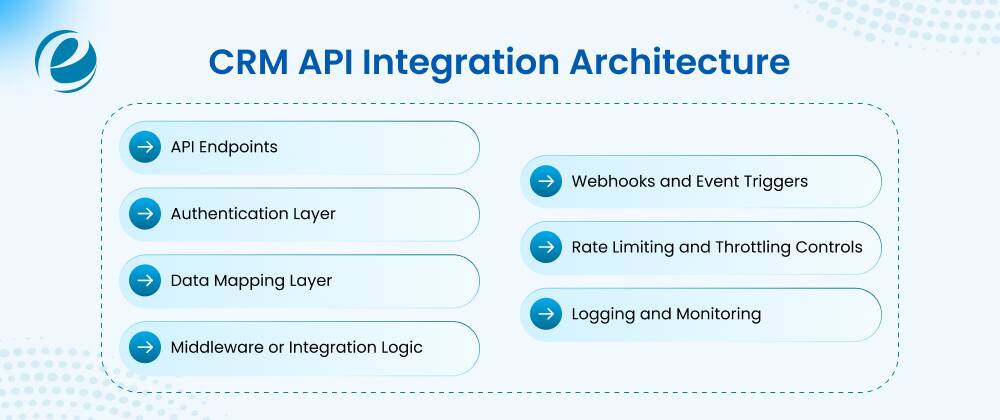
API Endpoints
The specific URLs where data gets requested or sent, each one tied to a record type: contacts, deals, invoices, tickets.
Authentication Layer
Most modern setups run on OAuth 2.0 for token-based auth, though some older platforms still use static API keys. Either way, this is what keeps unauthorized systems out.
Data Mapping Layer
Handles the translation between how one system names a field and how the other one names the same thing, plus differences in data types and formatting.
Middleware or Integration Logic
The actual code or platform doing the transforming, validating, and routing, and handling retries when something fails partway through.
Webhooks and Event Triggers
Instead of constantly polling to check for changes, most setups now use webhooks, an instant nudge the moment something relevant happens: a new lead, an updated deal.
Rate Limiting and Throttling Controls
APIs cap how many requests you can make in a given window. A well-built connection respects that ceiling instead of getting throttled or blocked outright.
Logging and Monitoring
Keeps a record of every exchange and flags failures early, which matters a lot more than it sounds like until something breaks at 2 am and nobody notices until Monday.
EmizenTech’s Approach to Custom CRM API Integration
EmizenTech treats this as a business problem first, code second. Instead of reaching for whatever generic connector is closest, the team starts by actually understanding how a client works, what’s breaking, and where they’re trying to grow before recommending anything. That starts with discovery, figuring out exactly which systems need to talk to each other and what the business actually needs out of it: faster lead response, cleaner financial reporting, support that isn’t flying blind. From there, the developers weigh a fully custom build against a hybrid approach that mixes in some pre-built pieces, whichever gets to the right balance of cost, speed, and something that’ll still be working in two years.
Our CRM development team has hands-on time across the major CRM platforms, which means they’ve already run into most of the weird quirks, the rate-limit surprises, and the data-structure inconsistencies before a client ever hits them. That experience carries over into broader third-party API integration work too: payment gateways, ERPs, marketing platforms, not just CRM-to-CRM. Security and scalability aren’t treated as extras tacked on at the end. Authentication, error handling, monitoring- all of it gets built in from day one, so growth doesn’t turn into an exposure problem later. Testing runs against real-world scenarios, not just tidy sample data, because that’s where the actual edge cases hide.
Final Verdict
To sum this up, CRM API integration has basically become table stakes for any business running more than one piece of software, which by now is nearly everyone. What actually makes sense depends on how complex the systems are, how much data is moving, and how central this connection is to daily work. Simple needs are usually fine with a pre-built connector. Anything with real complexity, legacy systems, or tight security demands is going to be worth more as a custom build over the long run.
Planning beats speed here, every time. A project that starts with a clear sense of requirements, solid architecture, and a realistic budget almost always ends up cheaper and less painful than one that got rushed into production without a real plan. The discovery phase deserves just as much attention as the actual build, because most of the failures that show up later trace right back to something that got skipped early on.
Frequently Asked Questions
What is CRM API integration?
CRM API integration connects a CRM to other software through an API, so data like contacts, deals, and orders sync automatically instead of getting typed in twice.
How to use API integration?
It works by authenticating the two systems, mapping the matching fields, and setting rules for how and when data gets sent, received, and updated between them.
How much does CRM API integration cost?
Anywhere from around $5,000 for a simple custom project up to $50,000 or more for complex, bidirectional setups, and enterprise builds can climb past $100,000.
How to integrate multiple CRM systems with a single API?
Usually through middleware that standardizes the data format and routes it through each system's own API, so everything syncs through one central layer instead of a tangle of separate connections.
How to integrate company data into CRM using API?
Map the source fields to the matching CRM fields, authenticate the connection, then set up automated transfer through the API's endpoints so the data flows in without manual entry.


 +1 (989) 535-9295
 info@emizentech.com
 emizentech


