 Add us as a preferred source on Google
 Test automation has gone through a real shift over the past few years. And there is always debate between Playwright vs Selenium.
Where Selenium held the market for nearly two decades, Playwright has overtaken it in adoption, mainly because of how each tool interacts with the browser internally. Selenium routes every command through a WebDriver relay; Playwright connects directly over a persistent protocol, which cuts out the overhead that used to cause most flaky tests.
That architectural difference is the reason newer teams default to Playwright, while Selenium still holds ground in multi-language enterprise suites. This guide shows where each framework excels, so you can choose the one that fits your stack.
Architectural Comparison: Direct Browser Protocol vs. WebDriver
The core of any playwright vs selenium debate comes down to how each tool actually communicates with the browser. One decision, made years ago by two different engineering teams, explains almost every speed and stability gap you’ll read about further down.
Selenium’s WebDriver & BiDi Protocol
Selenium was built on the W3C WebDriver standard, which routes every command through a browser driver executable using HTTP requests. That extra hop is reliable, and it’s been battle-tested for two decades. But it’s also slower, since each click or assertion has to serialize into an HTTP call, get picked up by the driver, and translate into a native browser action.
Selenium 4 introduced WebDriver BiDi, a bidirectional protocol that narrows this gap by letting the browser push events back to the test script instead of forcing constant polling. It’s a real upgrade, and BiDi support is still being developed in 2026, but it’s layered on top of the original driver-based architecture.
Playwright’s Direct Browser Control
Playwright, built by former Puppeteer engineers at Microsoft, skips the driver executable. It connects to Chromium, Firefox, and WebKit through each browser’s own native automation protocol over a single persistent WebSocket connection.
No HTTP round-trip for every action, which is basically why Playwright feels faster the moment you start writing tests in it. That same connection also gives Playwright built-in access to network interception, browser contexts, and multiple tabs.
So basically Selenium spins up a fresh browser session, complete with its driver process, for every parallel thread and is slow to bootstrap at scale. Playwright instead creates lightweight contexts inside one browser instance, so parallel tests share a single process without touching each other’s cookies or storage.
That’s not a small thing for CI pipelines running hundreds of tests per commit, and it’s worth reviewing your software testing strategy before locking in either architecture.
Playwright vs. Selenium: Feature Comparison Matrix
Before picking a side, this table will help you to see the two frameworks side by side. Here’s how they stack up across the metrics that actually affect day-to-day testing work.
| Feature | Playwright | Selenium |
| Architecture | Direct browser protocol (WebSocket) | WebDriver HTTP relay and emerging BiDi |
| Avg. Action Speed | Faster; near-zero polling overhead | Slower; driver round-trip per action |
| Auto-Waiting | Built-in, smart element-ready waits | Manual waits or third-party wrappers |
| Supported Languages | JavaScript, TypeScript, Python, Java, .NET | Java, Python, C#, Ruby, JavaScript, PHP, Kotlin |
| Browser Engines | Chromium, Firefox, WebKit | Chromium, Firefox, Safari, Edge, and IE |
| Mobile Testing | Web views only, no native Appium support | Native iOS/Android via Appium integration |
| Isolated Contexts | Native, lightweight browser contexts | Requires separate driver sessions |
| Debugging Tools | Trace Viewer, Codegen, Inspector | Selenium IDE, third-party reporting tools |
So, with the help of this table, you may have understood the difference between playwright vs selenium, but the main contrast lies in how they communicate with the browser.
Deep-Dive Performance Benchmarks
Performance benchmarking is the systematic process of measuring and comparing a system’s metrics. A Selenium vs Playwright performance comparison under real CI load is what actually matters here.
Execution Speed & Resource Efficiency
Playwright’s tests generally finish faster, mostly because the architecture removes an entire communication layer. A 500-test suite that took 40 minutes on a Selenium Grid can often run in well under half that time once it’s rebuilt around Playwright’s context model, since it reuses browser contexts. Selenium Grid setups also need dedicated nodes for parallel sessions, which shows up as a real line item on a cloud bill.
Test Flakiness & Wait Strategies
Selenium requires testers to write explicit or implicit waits by hand, and getting that logic wrong is the single most common cause of intermittent failures, especially on pages with animations or lazy-loaded content. Playwright’s auto-waiting checks that an element is visible, stable, and actionable before touching it; no extra code is required, and it retries assertions until they pass or time out.
Debugging & Developer Experience (DX)
Playwright ships with a built-in Trace Viewer that records DOM snapshots, network calls, and console logs for every run, so a failure can be replayed step-by-step without rerunning anything. Selenium developers usually stitch this together themselves with screenshots and third-party reporting tools.
Language & Ecosystem Compatibility
Selenium’s biggest structural advantage is simple: language breadth. It supports Java, Python, C#, Ruby, JavaScript, PHP, and Kotlin bindings, which is exactly why it’s still the default in enterprises with mixed-language QA teams or older Ruby and PHP codebases. Playwright covers JavaScript, TypeScript, Python, Java, and .NET well enough for most modern web teams, but it leaves a few older stacks unsupported.
A few other things worth knowing:
- Community depth: Selenium’s twenty-year history means nearly every CI platform and cloud grid provider has first-class support built in, plus a list of Stack Overflow answers for edge cases.
- Tooling maturity: Playwright’s ecosystem is younger but moves fast with official GitHub Actions integrations, built-in reporters, and native visual regression testing without a third-party plugin.
- Talent pool: If your team is scaling and needs specialists across these stacks, it’s often faster to hire web developers with framework-specific QA experience than to retrain an existing team completely.
So, in simple words Selenium wins on the sheer volume of existing tooling and Playwright wins on how much of that tooling now ships built-in instead of bolted on.
The Financial ROI: The Selenium Maintenance Tax vs. Playwright Efficiency
Most Selenium vs Playwright debates get framed as a features question, but the real cost isn’t the license; both frameworks are free and open source. The manual wait logic, driver version mismatches, and grid infrastructure upkeep all add up to what QA leads now call “the Selenium maintenance tax”; hours spent keeping a suite green instead of expanding coverage.
Here’s a rough way to think about it:
- A mid-sized team running 300 end-to-end tests a week can easily lose five hours weekly to flaky reruns and delayed debugging.
- That’s roughly 250 hours a year spent maintaining tests instead of writing new ones or shipping features.
- Playwright’s auto-waiting and built-in parallelization cut a large chunk of that overhead, which is part of why the wider automation testing market is projected to more than double by the early 2030s.
According to a 2026 market analysis from TestDino, Playwright now sits around at 45% adoption among QA professionals against Selenium’s 22%, with weekly npm downloads up over 3,000% in five years. Comparing the cost of an outsourcing software development company against your own migration hours is usually the fastest way to get a real number.
When to Choose Which Framework Fits
Every discussion of the Playwright vs Selenium pros and cons depends on your team’s existing stack, not just benchmark numbers on a page. Here’s the practical breakdown.
Choose Playwright If:
- You’re starting a greenfield project with no legacy test debt.
- Your team already works in TypeScript, Python, or Java.
- You need fast, parallel CI/CD runs without managing Grid infrastructure.
- Test flakiness has been a recurring pain point.
- You want built-in tracing and debugging without extra tooling.
Choose Selenium If:
- Your suite is already large, mature, and stable in Selenium.
- You need Ruby or PHP language bindings.
- You require native mobile app testing through Appium.
- Your organization has strict legacy browser support requirements.
- You have deep in-house Selenium expertise already in place.
Native mobile is worth flagging on its own, since it’s the one area where Playwright simply can’t compete yet. If your product spans both web and native apps, it’s worth understanding the different types of mobile application testing before committing to one framework for everything.
Migration Playbook: Moving from Selenium to Playwright
Migrating an entire regression suite overnight is rarely realistic. Most successful Playwright to Selenium transitions follow a phased approach instead.
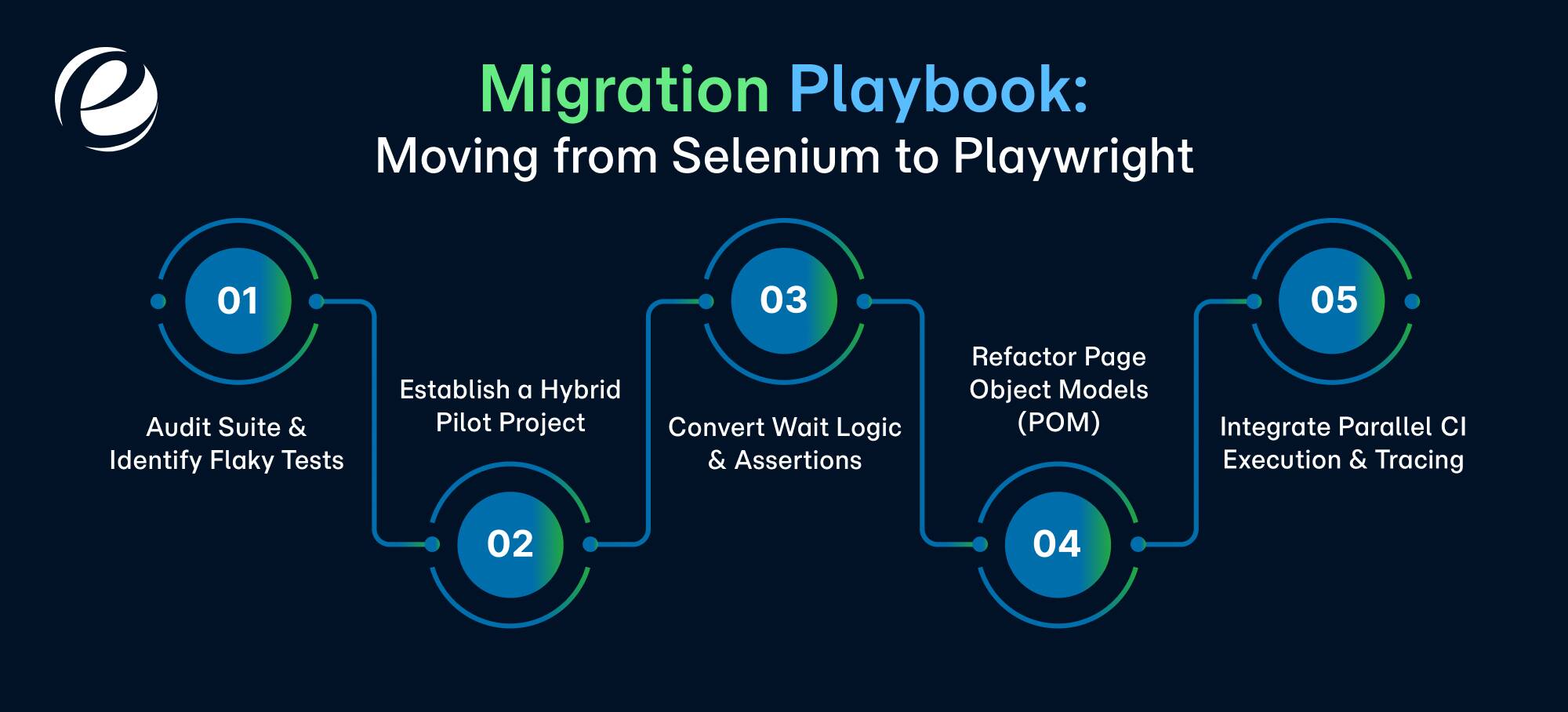
- Audit Suite & Identify Flaky Tests: Tag every test that fails intermittently over a two- to four-week window. These usually have the worst manual wait logic and deliver the biggest win once rewritten, so prioritize them first.
- Establish a Hybrid Pilot Project: Run Playwright alongside your existing Selenium suite on one low-risk module, rather than a full cutover. This surfaces integration issues early and gives the team hands-on time with the new API.
- Convert Wait Logic & Assertions: Replace explicit waits and custom polling with Playwright’s auto-waiting assertions. This one step resolves most legacy flakiness and is usually the fastest way to win over skeptical stakeholders.
- Refactor Page Object Models (POM): Your existing POM structure doesn’t need to go in the trash. Most teams port the same pattern over, swapping Selenium’s locators for Playwright’s locator API.
- Integrate Parallel CI Execution & Tracing: Wire in Playwright’s native parallelization and Trace Viewer so failures are debuggable without local reproduction. This is usually where teams retire Selenium Grid for good and where the ROI becomes obvious to leadership.
A migration like this touches architecture, tooling, and team skill sets all at once, which is exactly the kind of project where bringing in a dedicated app development team for the transition period shortens the timeline considerably.
How Emizentech Accelerates Test Automation & QA Engineering?
Choosing between Playwright and Selenium is honestly only half the equation. Execution is where most in-house teams lose time, not the decision itself. Emizentech’s QA engineers work across both frameworks daily, so we can audit an existing Selenium suite, map out a realistic migration path, and build Playwright coverage without stalling your release schedule.
Most of the internal back-and-forth teams have around Playwright vs Selenium doesn’t come from unclear technical answers; it comes from nobody having the bandwidth to actually run the migration alongside regular feature work.
That’s usually where we plug in:
- Auditing existing Selenium suites and flagging the highest-value tests to migrate first.
- Building out Playwright test coverage in parallel with your team’s own sprint cycles.
- Supporting the full range of testing your product needs, mobile included, not just browser-based checks.
- Scaling QA capacity up or down through staff augmentation instead of a lengthy hiring cycle.
Whether you need a short-term specialist or a full QA function alongside a broader software development services engagement, our teams plug in at whatever stage your automation strategy already sits at.
Conclusion
There’s no universal winner in the Playwright vs Selenium conversation, only the right fit for your codebase and team. Playwright’s direct browser architecture makes it the stronger choice for most new web projects, particularly for teams already working in TypeScript or Python who want less flaky, faster CI pipelines.
Selenium still earns its place in organizations running legacy multi-language suites, Ruby or PHP stacks, or native mobile testing through Appium. The smartest move for most teams isn’t picking a side permanently; it’s auditing your current suite and migrating carefully instead of all at once.
FAQs
Is Playwright replacing Selenium?
Playwright is winning most new projects and has overtaken Selenium in overall adoption as of 2026, but Selenium still dominates legacy suites, multi-language teams, and native mobile testing via Appium.
Which is faster: Playwright or Selenium?
Playwright is generally faster than Selenium. Its direct browser protocol skips the WebDriver HTTP relay Selenium relies on, reducing per-action overhead and improving execution speed, especially in large parallel test suites.
Can Playwright test native mobile applications?
No, not natively. Playwright can test mobile web views inside a browser context, but true native iOS and Android app testing still requires Appium, which is why Selenium retains an edge here.
Does Playwright support Java and Python?
Yes. Playwright officially supports Java and Python alongside JavaScript, TypeScript, and .NET, making it viable for most teams outside of Ruby and PHP-based organizations.





 +1 (989) 535-9295
 info@emizentech.com
 emizentech


