Supply Chain Management Software: An End-to-End Overview with Illustrative Features

Supply chain management software connects the planning, sourcing, production, and delivery stages of a supply chain into one system, so teams can work from the same data. It replaces manual tracking with live updates on inventory, orders, and shipments. Businesses use it to lower operational costs, increase end-to-end visibility, automate repetitive work, and keep products moving without stockouts.
With 12+ years of experience in supply chain software development and logistics software development, Emizentech works with manufacturing, distribution, and retail companies to build and integrate SCM software either as a custom platform or connecting an off-the-shelf system to the business. This guide explains the supply chain workflow, illustrates 38 software features, and connects them to industry needs, platform options, implementation steps, and costs.
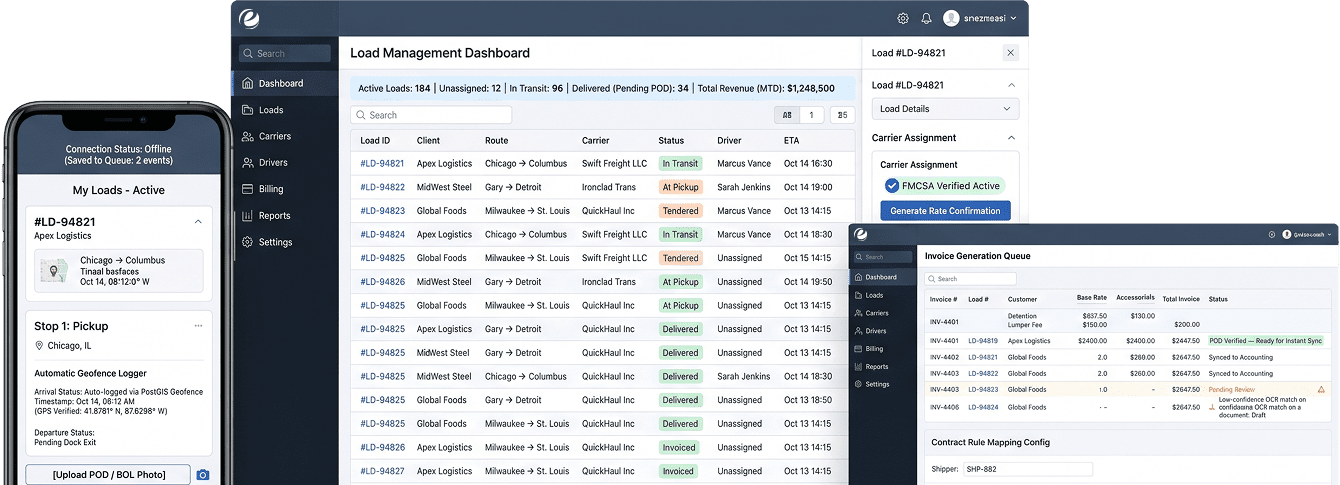
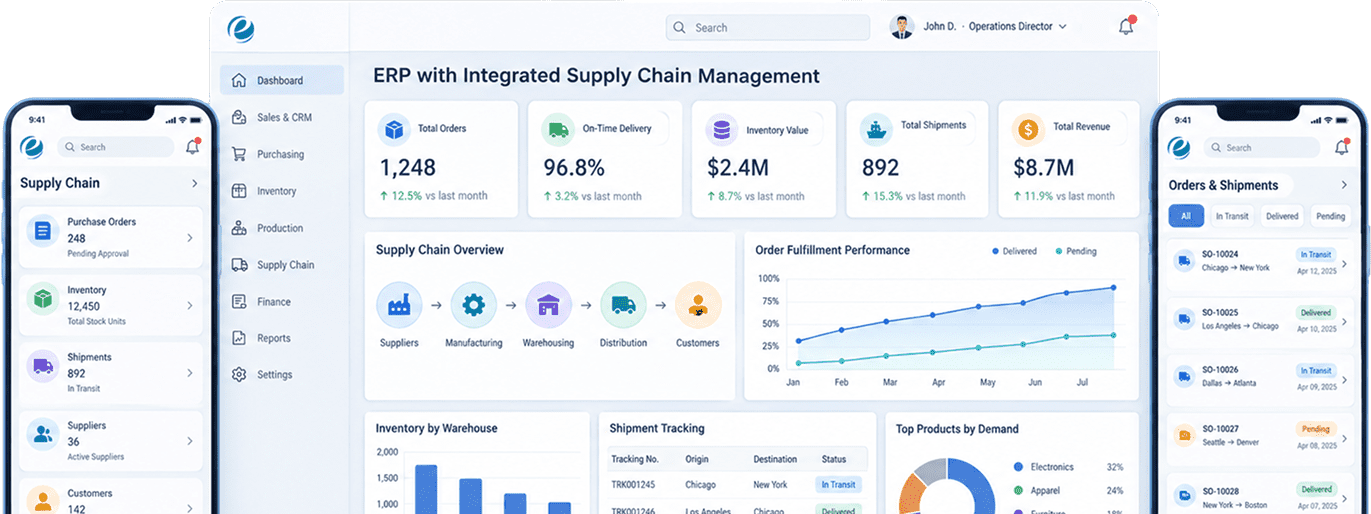
The feature screens are illustrative Emizentech interface mockups with fictional data. They show proposed capabilities rather than a live product. Existing third-party examples retain their source attribution.

Benefits of Supply Chain Management Software

Businesses invest in SCM software because the return shows up in a few specific areas. The size of that return depends on how many manual processes the business used before adopting the software. Common benefits apply across manufacturing, trading, construction, retail, automotive, healthcare, food, and distribution.
Lower Operating Cost

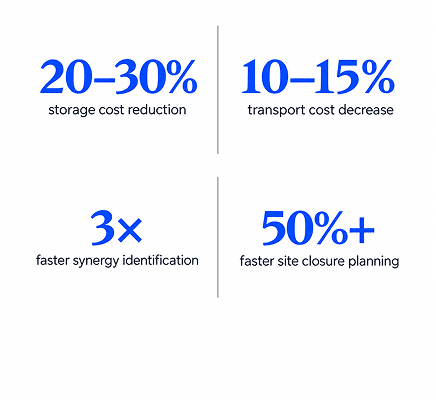
AI-enabled distribution operations see inventory reductions of 20 to 30%, transport cost decreases of 10-15%, and logistics cost cuts of 5 to 20%. Even without full AI adoption, better visibility alone reduces carrying costs and reduces emergency freight spend.

Lower Operating Cost
Source: McKinsey

Improved Forecast Accuracy

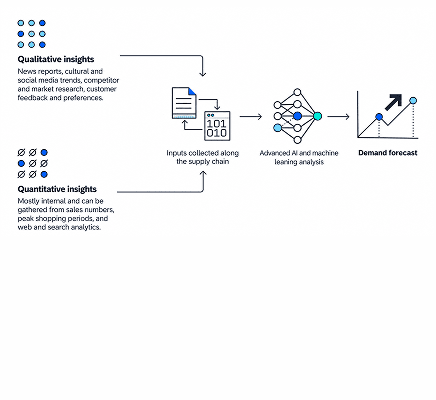
Demand forecasting software minimizes the gap between what a company expects to sell and what it actually sells. SCM software uses historical data and predictive analytics to forecast customer demand very accurately. This lowers both stockouts and overstocking.

Improved Forecast Accuracy
Source: SAP

Resilience Against Disruption

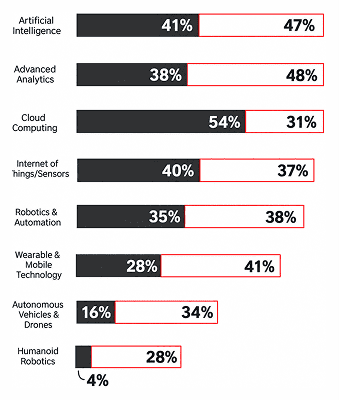
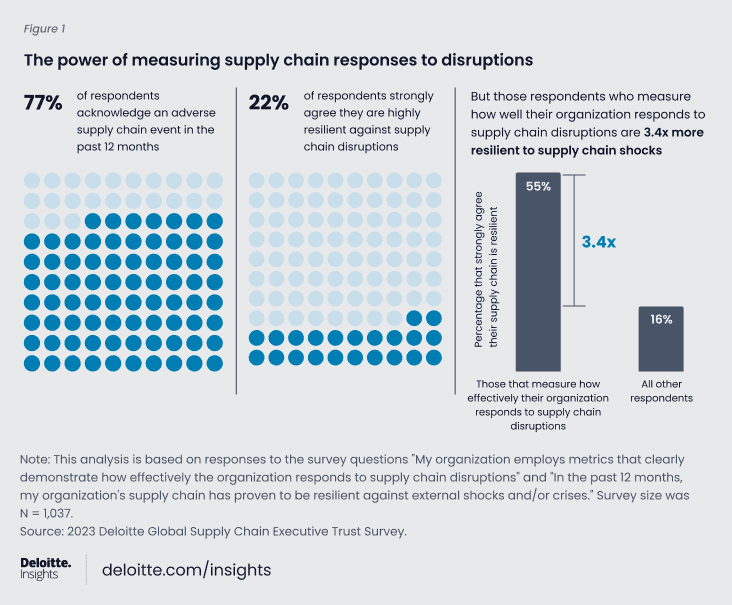
Organizations that are using artificial intelligence in supply chain operations increased from 30 to 41% in a single year, with resilience against disruption cited as one of the motivations driving investment. This shows the same trend driving SCM software forward, since these platforms increasingly build in AI features.

Resilience Against Disruption

Real-Time Visibility

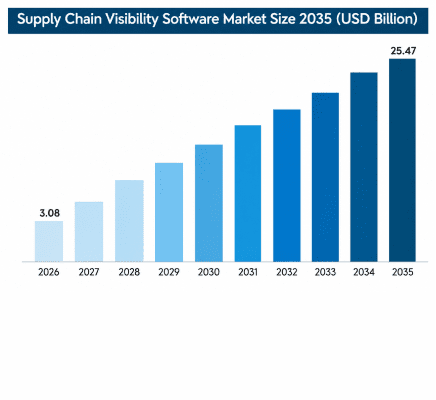
SCM software provides clear, real-time visibility into data. This way, businesses can track the progress of procurement, inventory, orders, and shipments as they change, instead of waiting on end-of-week reports. The worldwide supply chain visibility market is forecasted to hit $25.47 billion by 2035 with a CAGR of 26.45%.

Source: Business Research Insights

Better Inventory Control

SCM software improves inventory control, so businesses know what stock is available, what is running low, and what needs reordering. When you integrate inventory management software into a larger SCM or ERP platform, it changes a business from predicting what will happen to planning for the future using data. To keep inventory accurate and easy to find, 83% of warehouse workers agree their company needs better inventory management tools.

Better Demand Planning

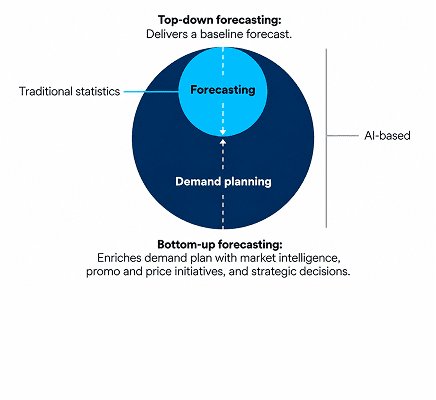
Modern SCM platforms improve demand planning by using AI, machine learning, and real-time data to drastically reduce forecast errors and balance inventory levels. Companies can plan demand, purchasing, and manufacturing based on expected customer demand. 70% of large businesses will adopt AI-based forecasting to forecast future demand by 2030.

Better Demand Planning
Source: Gartner

Note: “The value of AI-based forecasting includes improved strategic decision-making, faster responses to market changes, and enhanced collaboration workflows,” said Jan Snoeckx, Director Analyst in Gartner's Supply Chain practice.

Reduced Manual Errors and Improved Collaboration

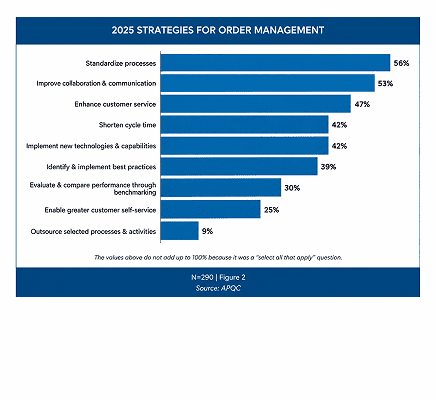
Supply chain management software reduces manual errors through automation of purchase orders, stock movements, approvals, invoicing, and order processing. For instance, almost 53% of supply chain companies say one of the best ways to improve order management is to make it easier for people to collaborate and communicate. Most delays happen when sales, supply chain, finance, and customer service all hand off work to each other.

Reduced Manual Errors and Improved Collaboration
Source: APQC

Scalability

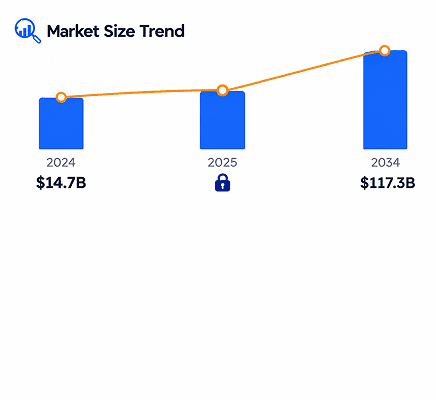
SCM software provides scalability because the company can handle more suppliers, customers, warehouses, products, and orders without increasing manual work at the same rate. As per Global Market Insights, the worldwide warehouse robotics market was worth $14.7 billion in 2024 and is forecast to reach $117.3 billion by 2034. Robots and automation can minimize labor minutes per order by approximately 60%, letting facilities absorb volume growth without a proportional headcount increase.

Scalability
Source: Global Market Insights

Better Compliance and Traceability

SCM software provides better compliance and traceability, especially in industries like food, pharmaceuticals, manufacturing, and healthcare. Under the FDA's Food Traceability Rule (FSMA 204), covered food businesses must capture defined traceability data at key points in the supply chain and produce those records to the FDA within 24 hours of a request. 24 hours is the maximum time to produce traceability records to the FDA.

Source: ABI Research

Improved Supplier Management

A supply chain management system improves supplier management through better tracking of vendors, pricing, purchase orders, lead times, and performance. It improves data-driven performance scorecards and tracks external factors like financial stability, geopolitical shifts, and compliance requirements to avoid disruptions.

Faster Order Fulfillment

By implementing SCM software into your system, your supply chain business can fulfill orders faster by connecting sales orders with inventory, warehouse, logistics, and delivery processes.

Reduced Stockouts and Overstocking

SCM software uses real-time visibility, predictive analytics, and automated workflows to balance inventory levels that help businesses eliminate costly stockouts and overstocking. It helps avoid lost sales as well as excess inventory

Improved Warehouse Efficiency

SCM software and an integrated warehouse management system improve warehouse efficiency by automating daily tasks, providing real-time inventory tracking, and optimizing storage space. It also improves receiving, picking, packing, stock movement, and dispatch management.

Faster Decision Making

It improves faster decision-making because management has real-time information instead of depending on manual spreadsheets. According to an IBM report, 64% of Chief Supply Chain Officers say Gen AI is fully adapting their workflows, largely by speeding up decisions that used to wait on static reports.

Manage your entire supply chain with one all-in-one solution

Supply Chain Management Software: Market Statistics

AI in Supply Chain Management Market Statistics

AI is the biggest driver of change in supply chain software today. It comes in three main forms: simple AI assistants that automate single tasks, AI assistants that provide recommendations for a person to approve, and agentic AI that can execute multi-step processes with limited supervision, like adjusting inventory in warehouses. The adoption rates may vary sharply between large enterprises and smaller manufacturers with fewer technical resources. Here are the market statistics for AI in supply chain management.

78% of supply chain leaders intend to achieve a moderate level of supply chain autonomy by 2027. 7 out of 10 expect AI and GenAI to transform the supply chain workforce.

- KPMG

By 2030, 50% of enterprises using SCM software will have adopted agentic AI features, up from 5% in 2025

- Gartner.

24% of those surveyed think AI is transformational, and 48% think it has a major or greater disruptive effect. This is a 25% increase since 2025

- Businesswire

72% of supply chain organizations are deploying generative AI.

- Gartner

Deploying Generative AI
Source: Gartner

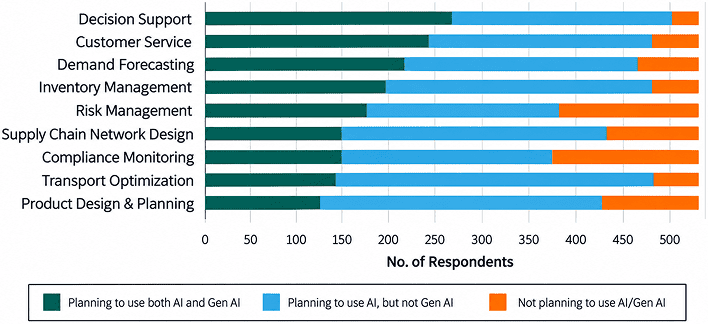
94% of supply chain professionals plan to deploy AI or generative AI for decision support within two years. Around 76% see potential for autonomous AI agents in supplier management.

- ABI Research

ABI Research

How Does Supply Chain Management Software Work?

Most SCM platforms are organized around five stages that show how physical goods actually move through a business. Knowing every stage clarifies what a platform needs to do.

Plan

The software predicts demand and sets inventory and production targets by using sales history, seasonal trends, and open orders to estimate what is required and when.

Source

The system manages purchase orders, tracks supplier performance, and identifies delays before they affect production.

Make

For manufacturers, supply chain software schedules production runs, tracks material consumed, and monitors output against plan.

Deliver

The software now manages warehousing, order fulfillment, and transportation so finished goods reach the customer on time.

Return

The software processes returns, exchanges, and repairs and feeds that data back into planning so forecasts improve over time.

Warehouse Management System Demo for End-to-End Warehouse Operations

We have prepared a demo video that walks through a WMS from login to reporting, showing how teams receive goods, assign storage locations, track inventory, allocate and pick orders, and process returns in one system.

Core Features of Supply Chain Management Software

The following 38 features cover the operational journey from planning and sourcing to delivery and returns. Finance, governance, and integration tools support the entire workflow. Each feature has a dedicated Emizentech mockup and its original capability list. All interface records, business names, dates, metrics, and workflows shown in the mockups are illustrative.

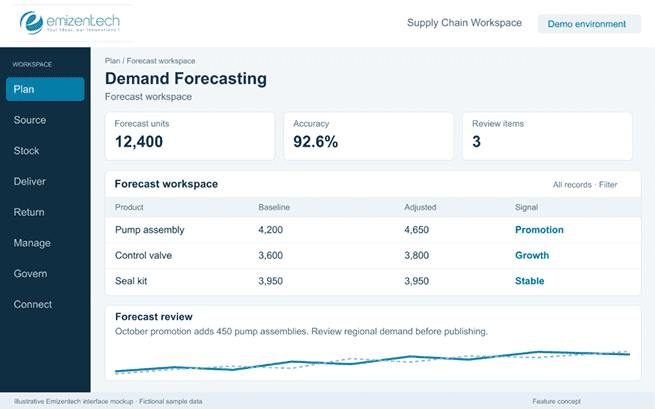
Demand Forecasting

The demand forecasting feature allows you to use past sales data to estimate what customers will buy next. It helps planners avoid two common problems like stock shortages and overstocking.

Key capabilities:

  • Forecasts built from historical sales data.
  • Trend and seasonality detection.
  • Forecasts by product, category, region, or channel.
  • Adjustments for promotions, launches, and one-off events.
  • Forecast accuracy reports to check how close the numbers were.
Demand Forecasting

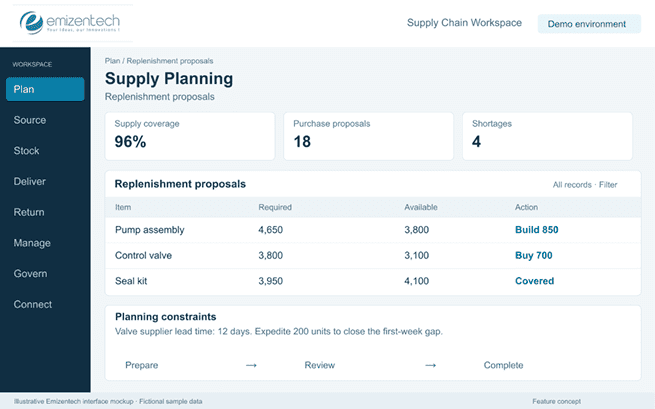
Supply Planning

With this feature, supply planning turns the demand forecast into an action plan. It shows what to purchase, manufacture, or move and when, so stock is ready before customers ask for it.

Key capabilities:

  • Purchase plans based on forecasted demand.
  • Production plans that match expected orders.
  • Replenishment suggestions for each location.
  • Planning around supplier lead times and capacity.
  • What-if scenarios for demand spikes or supply delays.
Supply Planning

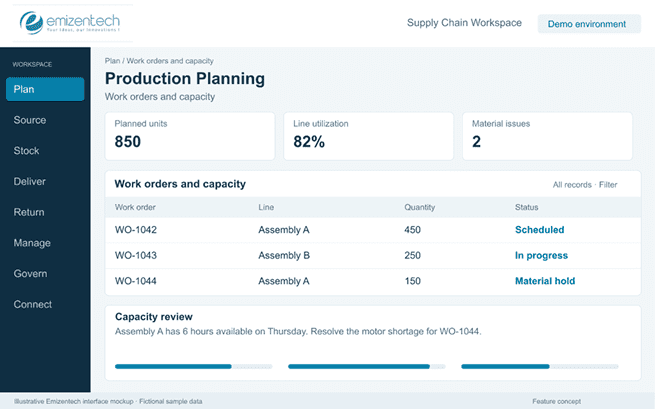
Production/Manufacturing Planning

This feature helps manufacturers plan what to build, with which materials, and on which line. It connects the shop floor with purchasing and inventory so that production does not stop for missing parts.

Key capabilities:

  • Bill of materials with multi-level structures.
  • Work orders with status tracking.
  • Material requirements planning (MRP).
  • Production schedules by line, shift, or machine.
  • Capacity planning to avoid overloading resources.
Production/Manufacturing Planning

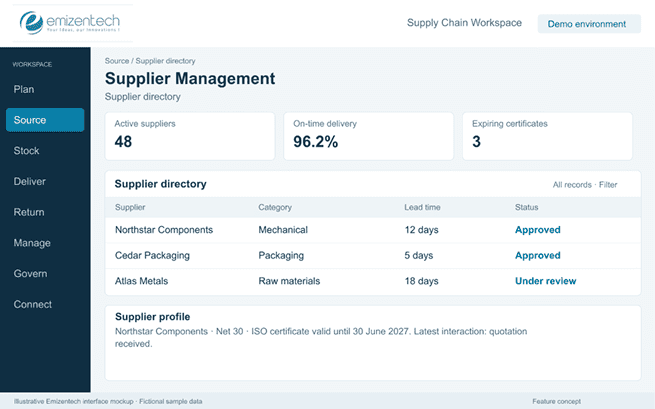
Supplier Management

This feature keeps all supplier information in one place. Buyers can see who they work with, what they charge, and how reliably each supplier delivers.

Key capabilities:

  • Supplier profiles with contact, certifications, and payment terms.
  • Price lists and contract terms stored against each supplier.
  • Lead time tracking by supplier and by time.
  • Performance history covering delivery, quality, and pricing.
  • Communication logs for emails, calls, and notes.
Supplier Management

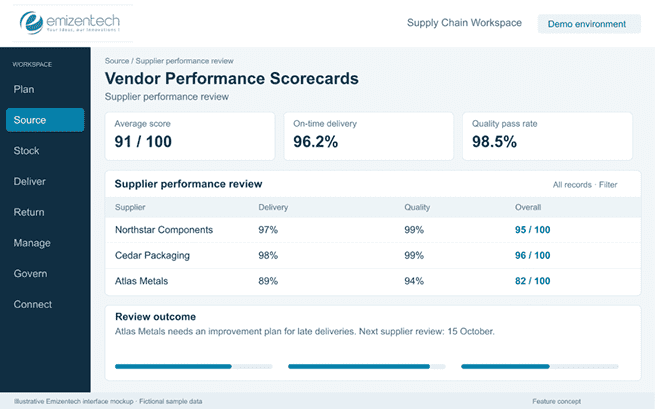
Vendor Performance Scorecards

The vendor scorecards feature rates suppliers on what matters most. They give buyers facts to work with when reviewing contracts or choosing between vendors.

Key capabilities:

  • Delivery accuracy and on-time rate.
  • Quality scores based on inspections and returns.
  • Pricing comparison over time.
  • Responsiveness to queries and issues.
  • Overall score with periodic review reports
Vendor Performance Scorecards

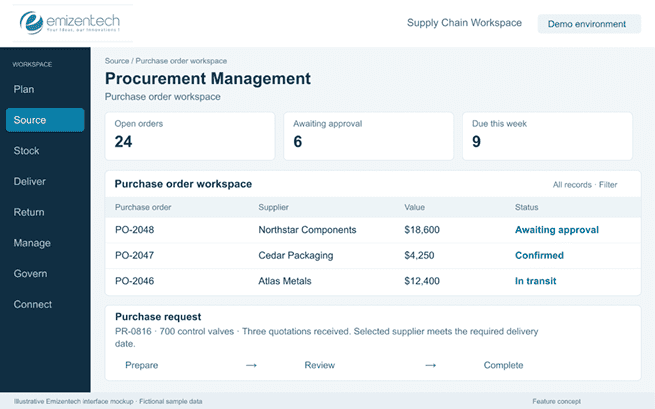
Procurement Management

This feature covers the full buying process, from the first request to the final purchase order. It removes the need for repetitive emails and spreadsheets and gives buyers a clear record of every purchase.

Key capabilities:

  • Purchase requests raised by any department.
  • Request for quotation (RFQ) sent to multiple suppliers at once.
  • Purchase order creation, tracking, and amendment.
  • Multi-level approvals before an order goes out.
  • Side-by-side supplier comparison on price, terms, and delivery time.
Procurement Management

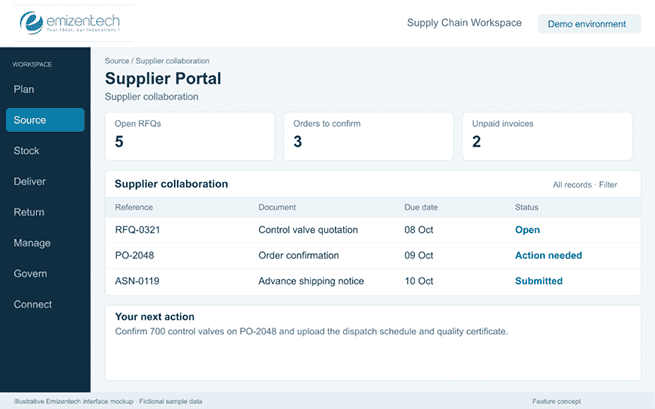
Supplier Portal

The supplier portal feature gives suppliers direct access to the parts of the system they need. It minimizes emails and calls, and it keeps both sides working from the same information.

Key capabilities:

  • Quotation submission against open RFQs.
  • Purchase order viewing and confirmation.
  • Invoice upload and payment status.
  • Delivery updates and advance shipping notices.
  • Document sharing for certificates and compliance records.
Supplier Portal

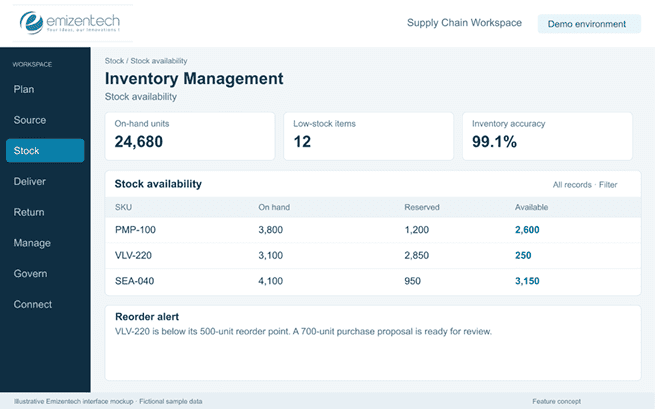
Inventory Management

This inventory management feature helps track stock levels in every warehouse, store, and distribution center a company operates. It signals when stock is low, overstocked, or needs to shift to meet demand.

Key capabilities:

  • Real-time stock visibility in different locations.
  • Automated reorder points and safety stock calculations.
  • Batch and serial number tracking.
  • Barcode and radio frequency identification scanning.
  • Cycle counting and audit support
Inventory Management

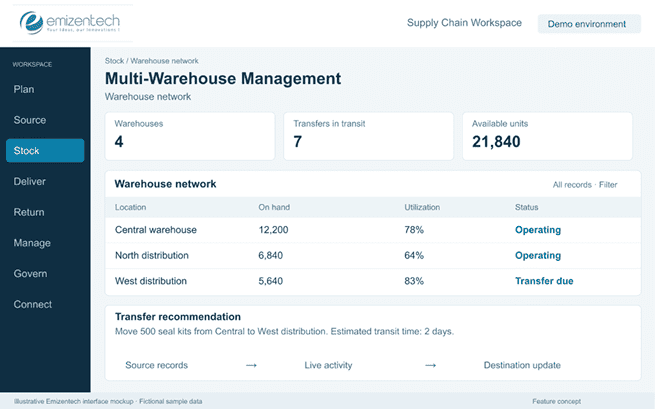
Multi-Warehouse Management

This feature allows a company to manage stock in multiple locations from a single system. It shows where stock is stored and helps move it to where it is needed.

Key capabilities:

  • Stock visibility by warehouse.
  • Inter-warehouse transfers with in-transit facility.
  • Location-based reorder rules.
  • Older fulfillment from the nearest or best-stocked site.
  • Consolidated reports in all warehouses.
Multi-Warehouse Management

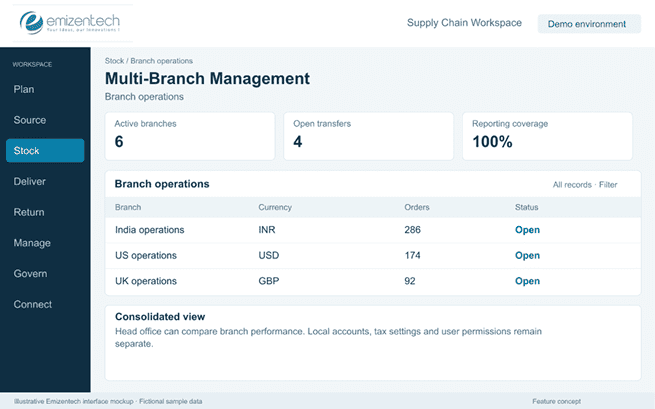
Multi-Branch Management

This feature is built for businesses that run more than one entity or branch. The head office gets a full picture, while each branch still works with its own data and rules.

Key capabilities:

  • Central management of multiple companies and branches.
  • Separate accounts, currencies, and tax settings per entity.
  • Inter-company transactions and transfers.
  • Branch-level permissions and settings.
  • Consolidated reporting for head office.
Multi-Branch Management

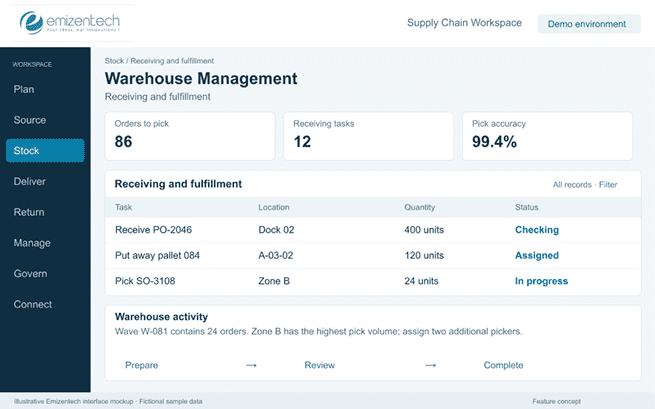
Warehouse Management

The warehouse management feature controls what happens inside the warehouse. It tells workers where to place goods, where to find them, and how to get orders out the door faster.

Key capabilities:

  • Goods received are checked against purchase orders.
  • Put-away rules based on item size, type, and turnover.
  • Choose lists and paths that cut walking time.
  • Packing stations with scan-based verification.
  • Bin and location management with dispatch tracking
Warehouse Management

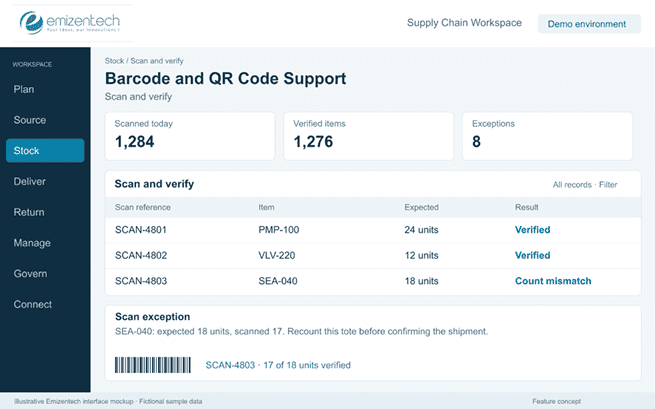
Barcode/QR Code Support

The barcode and QR code support feature replaces manual data entry with quick scans. This reduces mistakes and speeds up daily warehouse work.

Key capabilities:

  • Scanning at receiving confirms incoming goods.
  • Scan-based picking and packing.
  • Stock counting with handheld scanners or phones.
  • Shipment processing and label printing.
  • Support for 1D barcodes and QR codes.
Barcode/QR Code Support

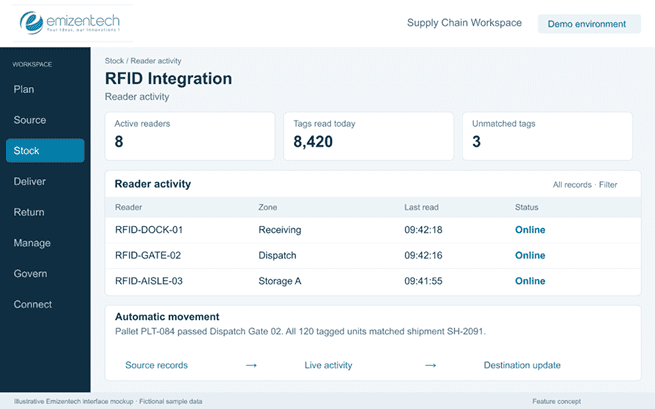
RFID Integration

The RFID integration feature enables a company to track items without scanning each one manually. Tags are read automatically as goods move through a door, a shelf, or a gate.

Key capabilities:

  • Automatic tag reading at receiving and dispatch.
  • Real-time item location tracking.
  • Faster stock counts across large areas.
  • Fewer manual errors in picking and shipping.
  • Support for RFID readers and tags from common vendors.
RFID Integration

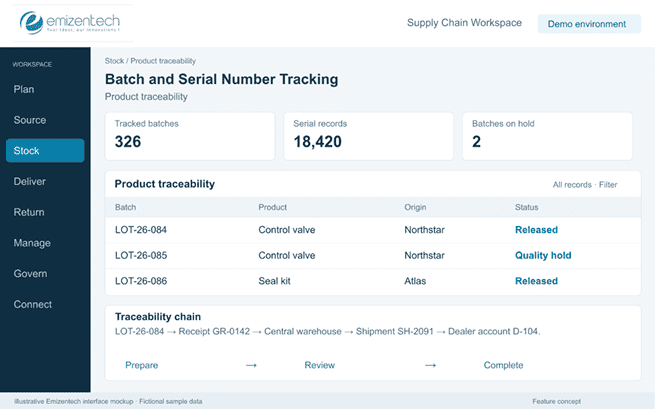
Batch and Serial Number Tracking

This feature records where every product came from and where it went. If a problem occurs, the company can quickly locate the affected units instead of removing all products from the shelf.

Key capabilities:

  • Batch and lot numbers assigned at receiving.
  • Serial number capture for individual items.
  • Forward and backward traceability.
  • Supplier-to-customer movement history.
  • Fast recall support when a batch has an issue.
Batch and Serial Number Tracking

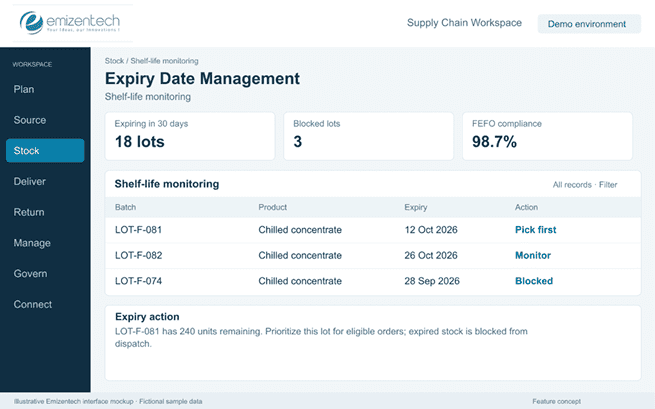
Expiry Date Management

Expiry date management is a must-have feature for food, pharmaceutical, and medical businesses. It makes sure older stock leaves the warehouse first and that expired goods never reach a customer.

Key capabilities:

  • Expiry date recorded by batch.
  • First expiry, first out (FEFO) picking rules.
  • Notification for stock nearing expiry.
  • Blocking of expired items from sales and dispatch.
  • Reports on expired and canceled stock.
Expiry Date Management

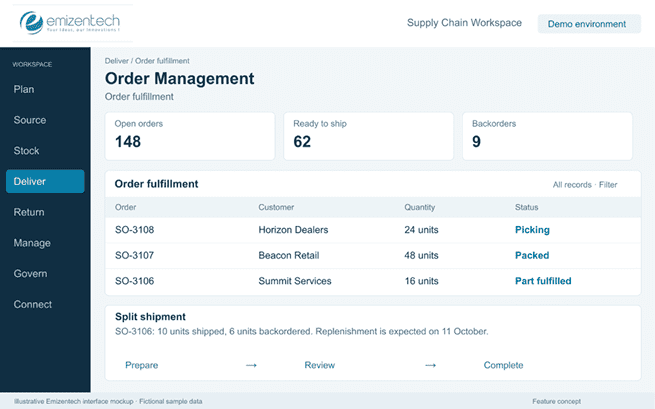
Order Management

This feature manages a customer order from the moment it is placed until it is delivered. It gives sales and support teams one view of what has shipped, what is pending, and what is delayed.

Key capabilities:

  • Sales order creation from any channel.
  • Backorder handling when stock is not available.
  • Partial fulfillment and split shipments.
  • Returns and exchanges linked to the original order.
  • Order status tracking for staff and customers.
Order Management

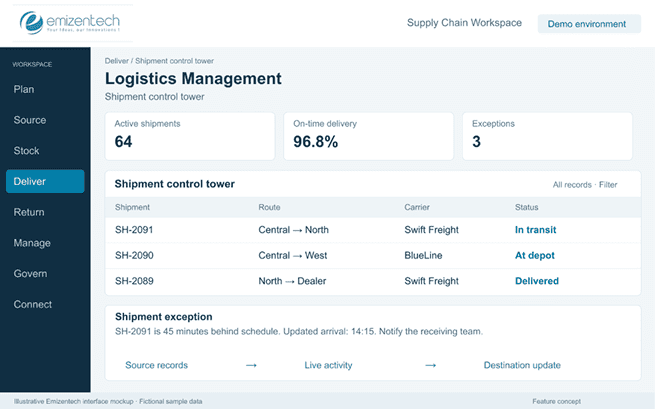
Logistics Management

This feature covers how goods travel from the warehouse to the customer. It helps teams choose the best carrier, plan the trip, and track the shipment until it arrives.

Key capabilities:

  • Shipment planning and consolidation.
  • Carrier selection based on cost, speed, and service level.
  • Route planning for single and multi-stop deliveries.
  • Delivery tracking with status updates.
  • Freight management, including rate and invoice checks.
Logistics Management

Transportation Management

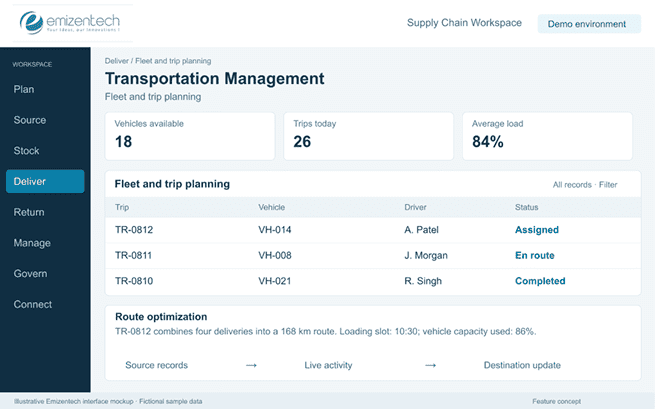
The transportation management feature’s main focus is on the vehicles, drivers, and trips that move goods. It helps companies with their own fleet or hired transporters keep costs under control and deliveries on time.

Key capabilities:

  • Vehicle and driver records with availability status.
  • Shipment allocation to vehicles.
  • Route optimization to save fuel and time.
  • Freight cost calculation per trip or per load.
  • Delivery scheduling with time slots.
Transportation Management

Customs and Import/Export Management

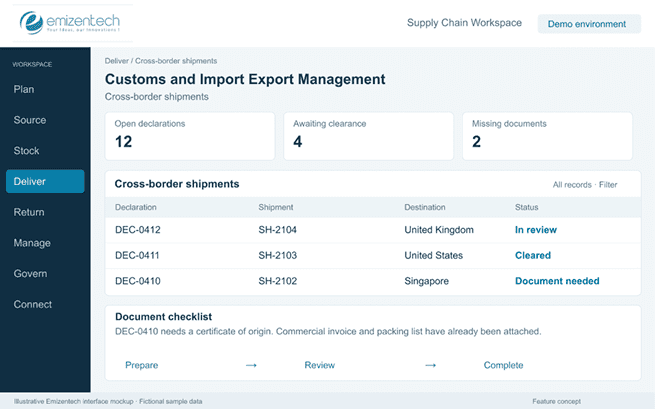
This feature simplifies cross-border trade. It manages the paperwork and calculations that usually slow down international shipments.

Key capabilities:

  • Shipment documentation like commercial invoices and packing lists.
  • Duty and tax calculation.
  • HS code management for each product.
  • Customs clearance status tracking.
  • Support for import and export licenses
Customs and Import/Export Management

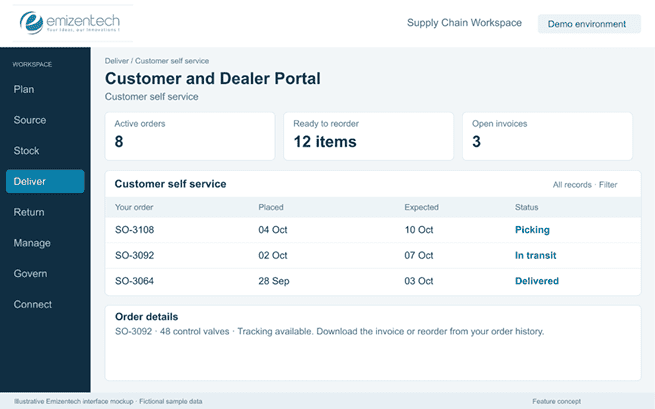
Customer/Dealer Portal

This portal feature allows customers and dealers to check information on their own instead of calling the sales team. It saves time for both sides and makes the buying experience smoother.

Key capabilities:

  • Order placement and order status tracking.
  • Live inventory availability.
  • Access to invoices, delivery notes, and other documents.
  • Delivery tracking and expected dates.
  • Order history and easy reordering.
Customer/Dealer Portal

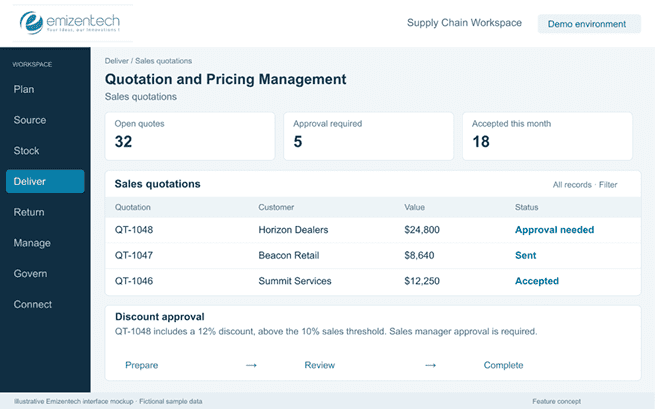
Quotation and Pricing Management

This feature helps sales teams create accurate quotes and keep pricing consistent. It also puts limits on discounts so margins are not overlooked.

Key capabilities:

  • Central price lists for products and services.
  • Discount rules by product, volume, or customer group.
  • Customer-specific rates and contract pricing.
  • Quotation creation with version history.
  • Approval steps for quotes above set limits.
Quotation and Pricing Management

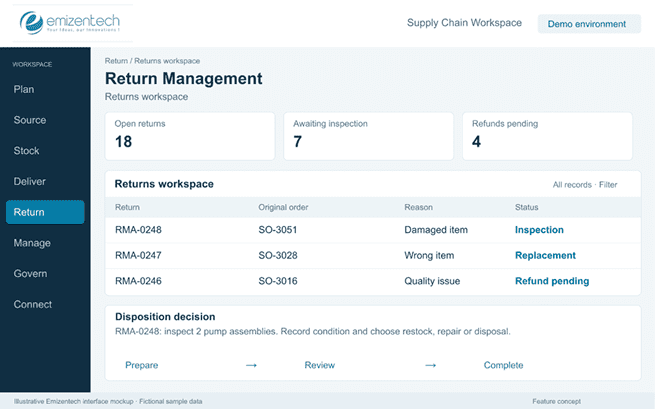
Return Management

The return management feature gives businesses a clear process for managing returned goods. It helps them decide what to do with each item and keeps the customer informed along the way.

Key capabilities:

  • Return request raised by a customer or staff.
  • Damaged goods records with photos and notes.
  • Replacement and refund processing.
  • Restocking, repair, or disposal decisions.
  • Reverse logistics like return picks and carrier tracking.
Return Management

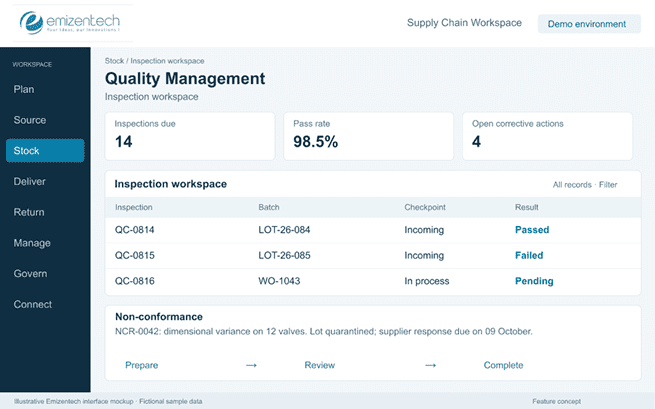
Quality Management

The quality management feature helps teams check goods at different stages and act when something is wrong. It keeps a complete record of every issue so the same problem does not repeat.

Key capabilities:

  • Quality reports by supplier, product, or batch.
  • Inspection plans for incoming, in-process, and finished goods.
  • Quality checks with pass or fail results.
  • Non-conformance reports with root cause notes.
  • Corrective and preventive action tracking.
Quality Management

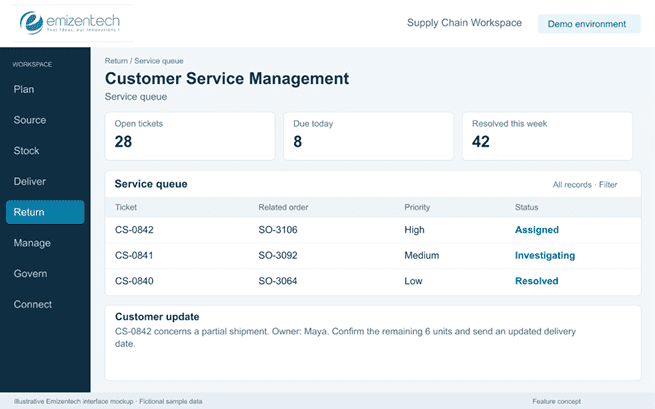
Customer Service Management

With the customer service management feature, teams can manage problems that come up after an order is placed. Every complaint is logged, assigned, and tracked until it is closed.

Key capabilities:

  • Complaint logging and tracking.
  • Order issues linked to the original order.
  • Delivery problem reporting.
  • Service requests with priority and due dates.
  • Resolution history for each customer.
Customer Service Management

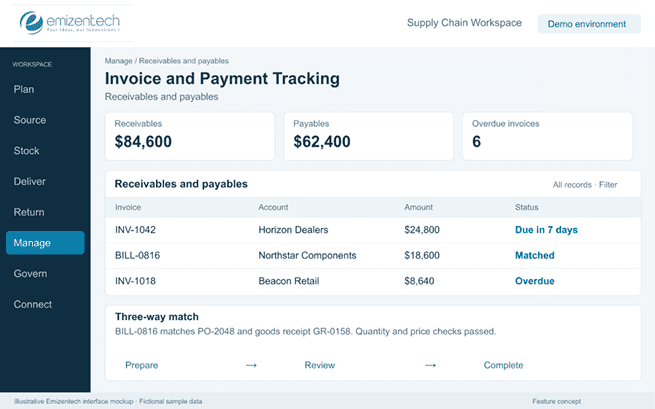
Invoice and Payment Tracking

This invoice and payment tracking feature tracks money flowing in and out. Finance teams can see what is owed, what is due, and what has already been paid.

Key capabilities:

  • Supplier invoices matched against purchase orders and receipts
  • Customer invoices generated from orders and deliveries
  • Payment terms and due date tracking
  • Outstanding balance views for suppliers and customers
  • Payment status updates and reminders
Invoice and Payment Tracking

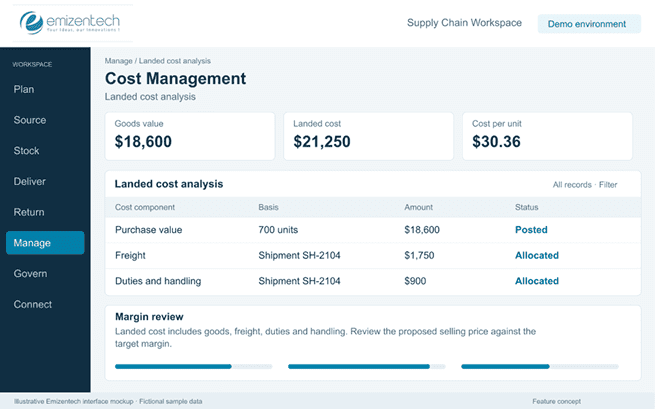
Cost Management

The cost management feature helps companies see what it really costs to buy, store, and move a product. With the full picture, businesses can price better and see which items or customers make money.

Key capabilities:

  • Landed cost calculation covers freight, duties, and handling.
  • Purchase cost tracking over time.
  • Warehouse and storage cost allocation.
  • Freight cost tracking by shipment.
  • Probability reports by product, customer, or channel.
Cost Management

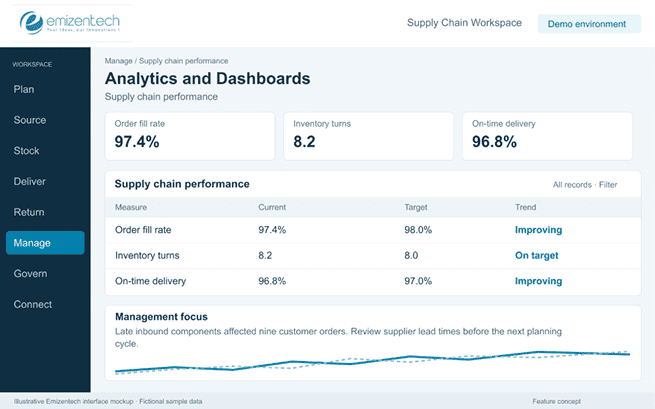
Analytics and Dashboards

The analytics and dashboards feature allows the company to turn raw supply chain data into something managers can read at a glance. They show what is working, what is slipping, and where to look first.

Key capabilities:

  • Inventory turnover and stock aging.
  • Supplier performance metrics.
  • Order fulfillment rates.
  • Delivery performance and on-time rates.
  • Purchasing trends and spend analysis.
Analytics and Dashboards

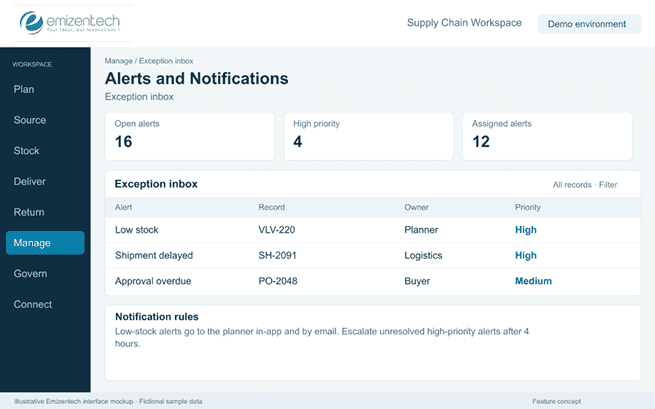
Alerts and Notifications

Alerts allow teams to react before a small issue turns into a big one. Instead of checking screens all day, staff get told when something needs attention.

Key capabilities:

  • Low stock and overstock alerts.
  • Delayed shipment warnings.
  • Overdue purchase order reminders.
  • Pending approval notices.
  • Delivery exception alerts by email, SMS, or in-app message.
Alerts and Notifications

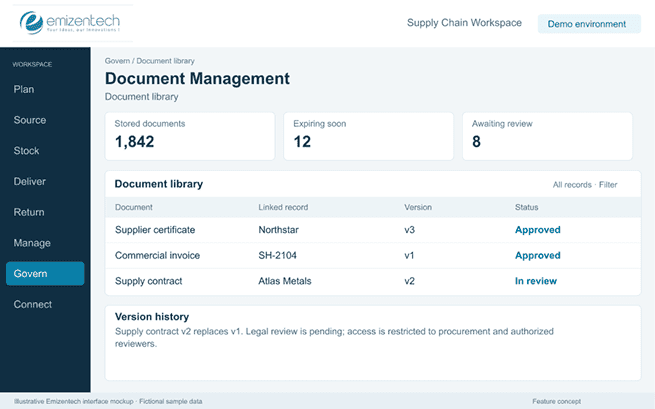
Document Management

This feature stores all supply chain documents in one searchable place. Teams no longer need to search inboxes or shared drives to find a contract or a delivery note.

Key capabilities:

  • Contracts, invoices, and purchase orders linked to records.
  • Delivery notes and shipping documents.
  • Certifications such as origin, safety, and quality.
  • Version control and expiry reminders.
  • Search and controlled access by role.
Document Management

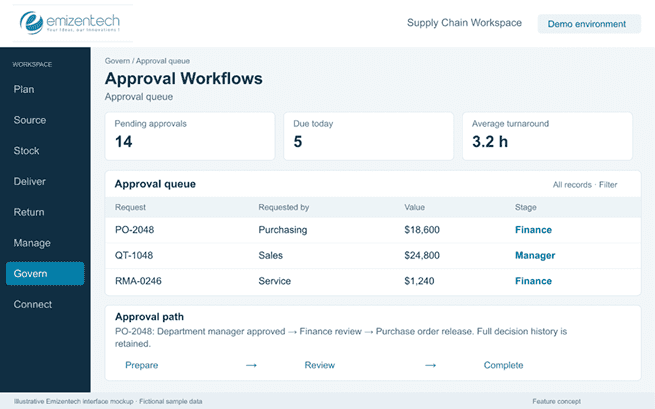
Approval Workflows

With the approval workflow feature, the company can send requests to the right person at the right time. They keep spending and exceptions under control without slowing down routine work.

Key capabilities:

  • Approval rules for purchases, discounts, vendors, and payments.
  • Multi-level approval chains based on value or department.
  • Exception handling for out-of-policy requests.
  • Approvals by email or mobile.
  • Full history of who approved what and when.
Approval Workflows

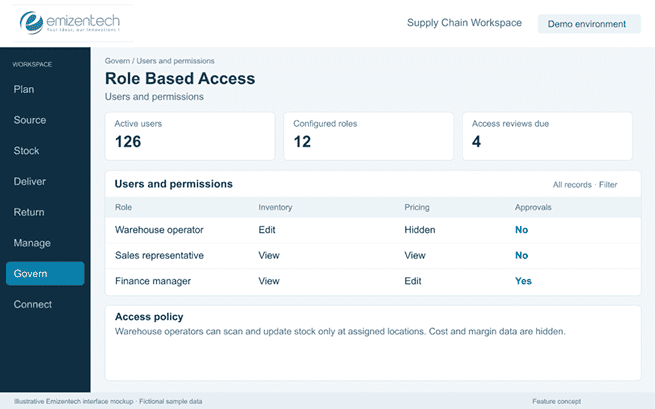
Role-Based Access

The role-based access feature ensures people see only what they need for their job. It protects sensitive data and reduces the chance of accidental changes.

Key capabilities:

  • Permissions by department, location, or job role
  • Separate view and edit rights
  • Restricted access to pricing and cost data
  • User groups for faster setup
  • Easy changes when someone moves roles or leaves
Role-Based Access

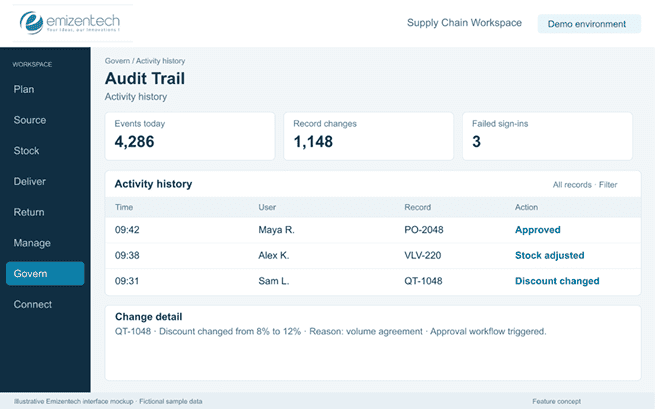
Audit Trail

An audit trail records every change made in the system. It is an automated chronological record that tracks every system change. For example, when something looks wrong, teams can trace it back to who did it and when.

Key capabilities:

  • Change history for orders, pricing, or inventory.
  • Approval history with user names and timestamps.
  • Before-and-after values for edited files.
  • Login and activity logs.
  • Exportable records for internal and external audits.
Audit Trail

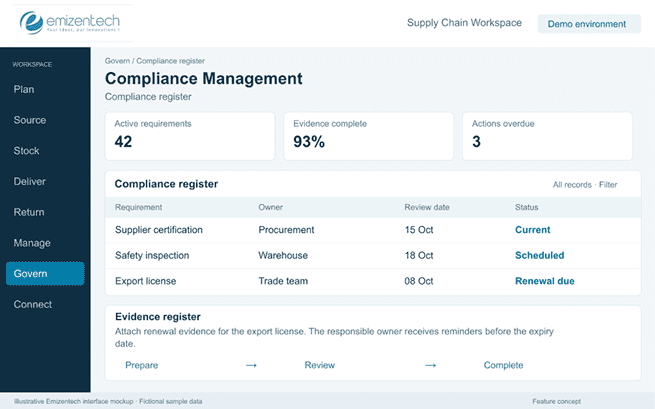
Compliance Management

The compliance management feature helps companies follow the rules that apply to their industry and region. It keeps records ready so audits do not turn into a scramble.

Key capabilities:

  • Regulatory requirement tracking.
  • Customs and tax compliance records.
  • Safety and industry-specific standards.
  • Certificate and license expiry reminders.
  • Compliance reports for audits and inspections.
Compliance Management

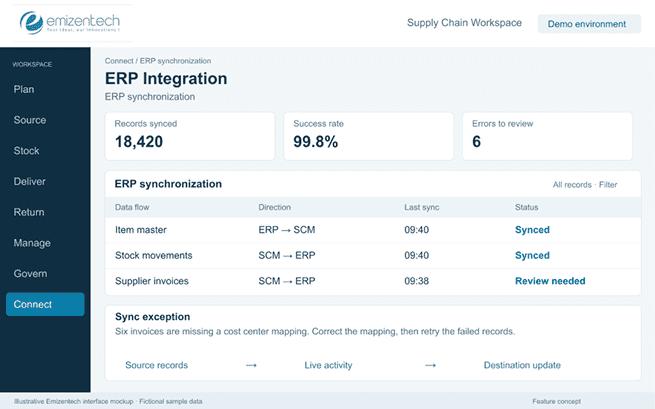
ERP Integration

This ERP integration feature connects the supply chain system with the core business system. Data flows both ways, so finance, production, and inventory all work from the same numbers.

Key capabilities:

  • Sync with finance and accounting modules.
  • Production and inventory data exchange
  • Automatic posting of invoices and payments
  • Shared master data for items, vendors, and customers
  • Support for popular ERP platforms like SAP, Oracle, and Microsoft Dynamics
ERP Integration

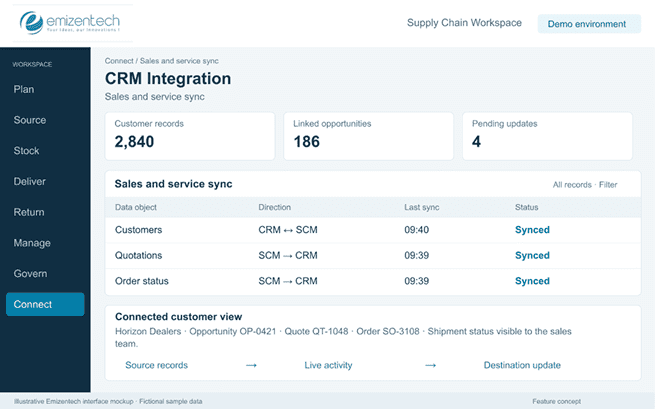
CRM Integration

This CRM integration feature gives sales and service teams a view of supply chain data inside the tools they already use. They can answer customer questions without switching between systems.

Key capabilities:

  • Customer records shared across systems.
  • Quotations linked to opportunities.
  • Order and delivery visibility inside the CRM.
  • Service request history tied to orders.
  • Support for platforms such as Salesforce and HubSpot
CRM Integration

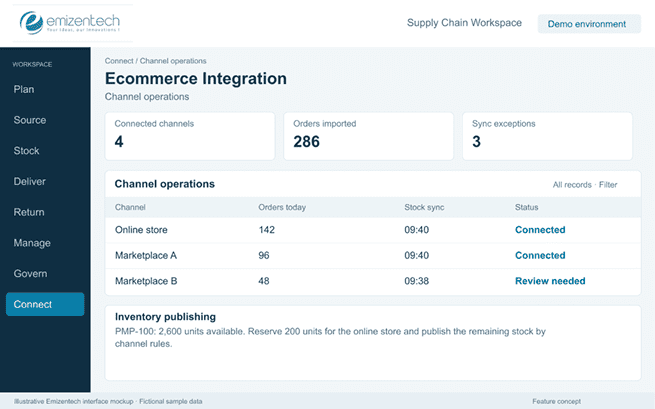
Ecommerce Integration

The eCommerce integration feature integrates online stores and marketplaces into the supply chain system. Orders come in automatically, and stock levels stay accurate on every channel.

Key capabilities:

  • Order sync from Shopify, Magento, and other stores.
  • Marketplace connections such as Amazon and eBay.
  • Real-time inventory updates to online channels.
  • Automatic order status and tracking updates.
  • Product and price sync across channels
Ecommerce Integration

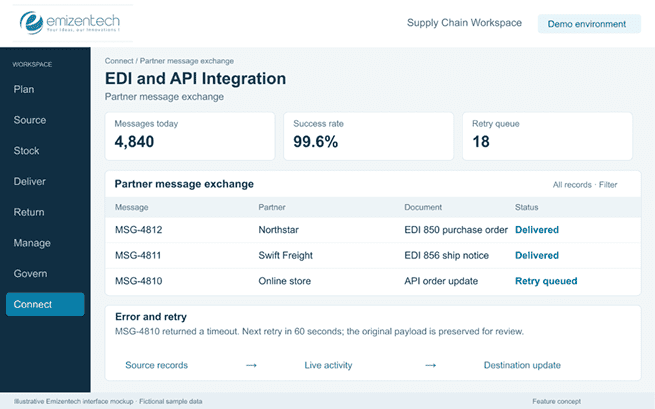
EDI / API Integration

EDI and API integration allow the system to communicate with partners without manual work. Suppliers, carriers, and other platforms can exchange data in a format both sides understand.

Key capabilities:

  • EDI support for purchase orders, invoices, and shipping notices.
  • REST APIs for custom connections.
  • Supplier and logistics provider connections.
  • Marketplace, ERP, and CRM connectivity.
  • Error logs and retry handling for failed transfers.
EDI / API Integration

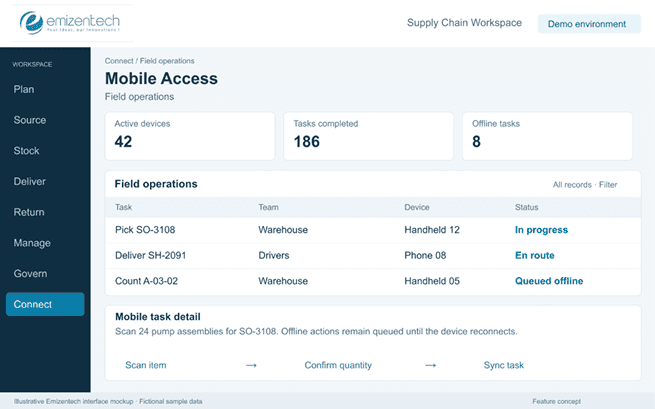
Mobile Access

With the mobile access feature, people work from wherever they are. Warehouse staff, sales representatives, and drivers can use a phone or tablet instead of going back to a desk.

Key capabilities:

  • Mobile scanning for receiving, picking, and counting
  • Order and stock lookup for sales teams
  • Delivery updates and proof of delivery from drivers
  • Approvals on the go.
  • Offline mode for areas with weak connectivity
Mobile Access
01 / 38

Industry-Wise Supply Chain Flows

Not every business needs a single all-in-one platform. Many companies run a mix of software that each covers one part of the supply chain or specific modules inside a larger ERP system. Here is an industry-wise supply chain list, especially useful if you are identifying companies for CRM, ERP, workflow automation, or supply-chain software opportunities.

Manufacturing Icon

Manufacturing

Manufacturing businesses manage everything from sourcing raw materials to running production lines, then pushing finished goods out through distributors and dealers. Since the chain has so many stages, SCM software in manufacturing needs to cover production planning, procurement, and multi-tier inventory in one place. Companies in this sector usually look for software when spreadsheets can no longer keep pace with the number of SKUs, plants, or dealers involved.

Typical Supply Chain Flow:

Raw Material Factory Distributor Dealer Customer

Common Business Types:

Industrial equipment Machinery Plastics Metal Electronics
Automotive Icon

Automotive

The automotive chain runs from parts suppliers through manufacturers and out to a dealer network that finally reaches the customer. SCM software for the automotive business focuses on parts tracking, warranty management, and keeping the dealer inventory in sync with demand. Since dealers are a visible, structured layer, it is often where software adoption starts before it moves upstream to suppliers.

Typical Supply Chain Flow:

Parts Suppliers Manufacturers Distributors Dealers Customers

Common Business Types:

Auto parts Tires Batteries Lubricants Vehicle components
Food and Beverage Icon

Food and Beverage

The food and beverage supply chains move from farm or producer through processing, distribution, and retail before reaching the consumer. Since so many items that move through this chain are perishable, SCM software for the food and beverage sector depends very much on batch tracking, expiry management, and cold-chain visibility. Processors and distributors want better tools because they have to pay for delays and spoilage.

Typical Supply Chain Flow:

Farm/Producer Processor Distributor Retailer Consumer

Common Business Types:

Food manufacturers Beverages Dairy Packaged foods
FMCG Icon

FMCG

The FMCG chain runs in high volume through manufacturers, distributors, wholesalers, and retailers before it reaches the consumer. Supply chain management software in this space focuses on fast, accurate order flow for many small, repeat transactions. Distributors and wholesalers are the layer most open to new order management software, since they handle most day-to-day order processing.

Typical Supply Chain Flow:

Manufacturer Distributor Wholesaler Retailer Consumer

Common Business Types:

Cosmetics Household products Personal care Packaged foods
Pharmaceutical Icon

Pharmaceutical

The pharma products move from the manufacturer to the distributor and then into pharmacies or hospitals before reaching the patient. Since the pharmaceutical industry is so tightly regulated, supply chain management software is built around batch traceability, expiry tracking, and audit-ready documentation. Distributors are the ones who manage the most complex compliance load, which makes them a natural target for inventory tracking software.

Typical Supply Chain Flow:

Manufacturer Distributor Pharmacy/Hospitals Patient

Common Business Types:

Medicines Medical supplies Healthcare products
Medical Devices Icon

Medical Devices

The medical devices supply chain runs from manufacturer to importer and then to distributor before reaching a hospital or clinic. The supply chain software here needs to track serial numbers, warranty status, and servicing history, not just stock counts. The importer and distributor carry most of the regulatory and logistics burden, so they usually review new systems.

Typical Supply Chain Flow:

Manufacturer Importer Distributer Hospital/Clinic

Common Business Types:

Medical equipment Diagnostic devices Surgical supplies
Construction Icon

Construction

The construction supply chains run from manufacturers or suppliers to contractors, then out to individual project sites and finally the client. Construction supply chain software focuses less on continuous inventory flow and more on matching material delivery to project timelines. Contractors are the ones looking for scheduling and procurement tools, since delays on-site directly cost them money.

Typical Supply Chain Flow:

Manufacturer/Supplier Contractor Project Site Client

Common Business Types:

Building materials MEP Steel Cement HVAC
Trading Companies Icon

Trading Companies

The trading company supply chain runs from manufacturer to importer or trader and then out to distributor and finally to the customer. The supply chain management software for trading companies usually needs to manage a wide and constantly shifting mix of products and suppliers, not one standard catalog. Since every trading company sources and sells differently, software here needs to be very flexible.

Typical Supply Chain Flow:

Manufacturer Importer/Trader Distributor Customer

Common Business Types:

General trading industrial trading B2B suppliers
Oil and Gas Icon

Oil and Gas

This industry’s supply chain flows from equipment manufacturers to suppliers, then EPC contractors, and finally the operator running the site. SCM software in the oil and gas industry is about asset tracking and maintenance scheduling, since equipment failure is very expensive and difficult to reverse. Engineering, procurement, and construction contractors (EPC) and operators are the ones who commit to long-term software agreements once a system has proven reliable.

Typical Supply Chain Flow:

Equipment manufacturer Suppliers EPC contractors Operators

Common Business Types:

Valves Pipes Industrial equipment Maintenance supplies
Chemical Industry Icon

Chemical Industry

The chemical industry’s supply chains run from producer to distributor and then to the manufacturer or industrial customer using them. The SCM software in the chemical industry centers on batch tracking, safety documentation, and hazard compliance alongside standard inventory management. Since producers and distributors are the ones most at risk from regulations, they want better tracking tools.

Typical Supply Chain Flow:

Producer Distributor Manufacturer/Industrial customer

Common Business Types:

Chemicals Paints Coatings Industrial raw materials
Electronics Icon

Electronics

The electronics industry’s supply chain moves from component supplier to manufacturer, then distributor and retailer. The supply chain management software in the electronics sector usually needs to manage procurement from many component suppliers at once, since a single product can depend on dozens of parts. Manufacturers are the ones under the most pressure to keep procurement and inventory carefully coordinated.

Typical Supply Chain Flow:

Component Supplier Manufacturer Distributor Retailer

Common Business Types:

Electronics Appliances Accessories Components
Consumer Electronics Icon

Consumer Electronics

This supply chain runs from manufacturer to regional distributor, then retailer, and on to the consumer. SCM software in consumer electronics supports regional distributors who need to move the same products consistently in different markets. Retailers are the most price-sensitive layer, so software adoption is likely to happen at the distributor level.

Typical Supply Chain Flow:

Manufacturer Regional Distributor Retailer Consumer

Common Business Types:

Mobile devices Computers Appliances
Textile and Apparel Icon

Textile and Apparel

Textile and apparel moves from raw material to fabric manufacturer, then garment manufacturer, distributor, and retailer. With this many production stages, SCM software here can support anything from raw material planning to finished-goods distribution. Garment manufacturers are usually the layer with the most complex, multi-supplier operations, making them a strong target for production tracking tools.
Typical Supply Chain Flow:

Raw Material Fabric manufacturer Garment manufacturer Distributor Retailer

Common Business Types:

Textile Fashion Uniforms Garments
Retail Icon

Retail

Retail runs from manufacturer to distributor, then warehouse, and on to the store or eCommerce channel before reaching the consumer. In the retail industry, SCM software is used to keep track of accurate stock levels in multiple stores or channels at the same time. Retailers are very comfortable with inventory and sales management software already, which makes this familiar.

Typical Supply Chain Flow:

Manufacturer Distributor Warehouse Store/eCommerce Consumer

Common Business Types:

Supermarkets Fashion Electronics Specialty retail
Food Ecommerce

Ecommerce

The ecommerce business supply chain goes from supplier to warehouse, then to fulfillment, courier, and finally the customer. SCM software in the e-commerce industry is completely about speed, tracking orders from the moment they are placed to the moment they are delivered. D2C brands and marketplaces are the most active buyers of this software, since fulfillment delays directly affect customer experience.

Typical Supply Chain Flow:

Supplier Warehouse Fulfillment Customer

Common Business Types:

D2C brands Marketplaces Online retailers
Logistics and Transportation Icon

Logistics and Transportation

The logistics and transportation supply chain moves from shipper to freight forwarder, then carrier, warehouse, and customer. SCM software for transportation businesses mostly exists to coordinate handoffs between multiple parties who do not share one internal system. Freight forwarders and carriers tend to be the ones pushing for tracking and communication tools, since delays anywhere in the chain fall back on them.

Typical Supply Chain Flow:

Shipper Freight forwarder Carrier Warehouse Customer

Common Business Types:

Freight Trucking Shipping Courier
Warehousing and Distribution Icon

Warehousing and Distribution

This industry’s supply chain runs from supplier to warehouse, then distributor, and on to the customer. SCM software in the warehousing sector is warehouse-management-first. Its main focus is on accurate stock location, picking, and outbound dispatch. Third-party logistics providers and fulfillment centers are the most software-driven part of this chain because their whole business depends on it.

Typical Supply Chain Flow:

Supplier Warehouse Distributor Customer

Common Business Types:

3PLs Fulfillment centers Distribution companies
Freight Forwarding Icon

Freight Forwarding

Freight forwarding goes from exporter to forwarder, then to customs, the carrier, and the importer. SCM software in this sector is heavily document-driven, built around customs paperwork, shipment tracking, and cross-border compliance. Forwarders and customs brokers are the ones managing the most paperwork, so they are the natural audience for workflow automation.
Typical Supply Chain Flow:

Exporter Forwarder Customs Carrier Importer

Common Business Types:

Air freight Sea freight Customs brokerage
Agriculture Icon

Agriculture

The agriculture business supply chain runs from farmers to aggregators, then to processors, distributors, and lastly to retailers. The supply chain management software in the agriculture industry enters at the aggregator or processor stage, where produce first gets tracked, categorized, and paid for in bulk. Since access and digital habits vary, farmers themselves are the hardest part of the chain to bring onto software.

Typical Supply Chain Flow:

Farmers Aggregators Processors Distributors Retailers

Common Business Types:

Agricultural products Fertilizers Seeds Farm equipment
Packaging Icon

Packaging

The packaging supply chain runs from raw materials to packaging manufacturers, then to product manufacturers and end distributors. Since packaging feeds into so many other industries, supply chain management software in packaging can connect with many potential customers. Packaging manufacturers are the ones evaluating software, since product manufacturers tend to treat packaging as a routine, low-attention input.

Typical Supply Chain Flow:

Raw material Packaging manufacturer Product Manufacturer Distributor

Common Business Types:

Cartons Bottles Labels Flexible packaging
Building Materials Icon

Building Materials

The building materials business supply chain runs from manufacturer to distributor, then contractor, and on to the project. The SCM software in building materials centers on distributors, who carry large and varied inventories in many product categories. Contractors, on the other hand, tend to buy based on relationships, so software has to fit around how they already work rather than replace it.

Typical Supply Chain Flow:

Manufacturer Distributor Contractor Project

Common Business Types:

Tiles Sanitary ware Electrical Plumbing Steel
Electrical Equipment Icon

Electrical Equipment

The electrical equipment supply chain flows from manufacturer to distributor, then contractor, and finally the end customer. The supply chain management software needs to manage fairly technical product catalogs alongside standard stock and order tracking. Contractors depend on distributors having reliable stock data, which keeps demand for inventory tools fairly steady.

Typical Supply Chain Flow:

Manufacturer Distributor Contractor End Customer

Common Business Types:

Switchgear Cables Lighting Electrical components
HVAC Icon

HVAC

This supply chain goes from manufacturer to distributor, then contractor, and on to the building owner. SCM software in HVAC often extends beyond the initial sale, since contractors also manage ongoing installation and servicing work. Demand for new software can be uneven, though, since the industry itself is seasonal in many regions.

Typical Supply Chain Flow:

Manufacturer Distributor Contractor Building Owner

Common Business Types:

AC systems Ventilation Cooling equipment
Industrial Equipment Icon

Industrial Equipment

Industrial equipment moves from manufacturer to distributor, then reseller, and on to the factory or customer. SCM software in industrial equipment is usually catalog and order-heavy, since resellers manage large, varied product ranges. Since equipment purchases do not happen often, software tied only to sales activity can see fairly light day-to-day use.

Typical Supply Chain Flow:

Manufacturer Distributor Reseller Factory/Customer

Common Business Types:

Machinery Tools Pumps Compressors
Spare Parts Icon

Spare Parts

This supply chain runs from manufacturer to importer, then distributor, and on to the workshop or customer. SCM software in the spare parts business is built around accurate stock data, since spare parts businesses live or die by knowing exactly what's on the shelf. The sheer number of individual SKUs, though, can make setting up and migrating data into a new system slow going.

Typical Supply Chain Flow:

Manufacturer Importer Distributor Workshop/Customer

Common Business Types:

Automotive Machinery Industrial spare parts
Furniture Icon

Furniture

The furniture business supply chain flows from raw material to manufacturer, then distributor, and on to the retailer or project. The supply chain management software for the furniture business needs to support project-based orders alongside regular retail stock. Custom or made-to-order pieces are the tricky part, since they do not always fit cleanly into standard inventory tracking.

Typical Supply Chain Flow:

Raw Material Manufacturer Distributor Retailer/Project

Common Business Types:

Office furniture Hotel furniture Home furniture
Hospitality Supply Icon

Hospitality Supply

This chain goes from manufacturer to distributor, then to a hotel or restaurant. SCM software for hospitality supply businesses usually supports recurring reorders, since hotels and restaurants restock supplies on a regular cycle. It is often a secondary priority for buyers, who prefer to invest first in user-friendly features before back-office software.

Typical Supply Chain Flow:

Manufacturer Distributor Hotel/Restaurant

Common Business Types:

Hotel supplies Kitchen equipment Linens
Restaurant/Food Service Icon

Restaurant/Food Service

The restaurant or food service supply chain runs from producer to distributor, then restaurant, and on to the consumer. The SCM software for restaurant businesses mostly manages frequent, recurring orders, which makes procurement and inventory tools an easy, ongoing value case. The problem is that restaurants often run with less staff, so whatever software they adopt needs to be simple enough to use without much training.

Typical Supply Chain Flow:

Producer Distributor Restaurant Consumer

Common Business Types:

Food suppliers Restaurant groups Catering
Jewelry Icon

Jewelry

The jewelry business supply chain moves from raw material to manufacturer, then wholesaler, and on to the retailer. Because inventory is high-value, SCM software in the jewelry business depends more on tracking and security features than in most other industries. The trade prefers to be traditional and relationship-based, so digital adoption can move more slowly than the value at stake would suggest.

Typical Supply Chain Flow:

Raw Material Manufacturer Wholesaler Retailer

Common Business Types:

Gold Diamonds Jewelry manufacturing
Mining Icon

Mining

The mining supply chain runs from equipment or material supplier to mining operator, then processor, and on to the distributor. The SCM software for mining business is mostly about asset tracking and maintenance, since heavy equipment downtime is expensive. Remote site locations can make rolling out and supporting new software more complicated than in most industries.

Typical Supply Chain Flow:

Equipment/Material Supplier Mining Operator Processor Distributor

Common Business Types:

Mining equipment minerals industrial materials
Renewable Energy Icon

Renewable Energy

This renewable energy supply chain flow goes from component manufacturer to distributor, then EPC, and on to the project owner. SCM software fits naturally alongside project and procurement management, since EPC contractors deliver most of the work on a project basis. The industry is still maturing in many regions, so processes and needs can look quite different from one company to the next.

Typical Supply Chain Flow:

Component Manufacturer Distributor EPC Project Owner

Common Business Types:

Solar panels Batteries Inverters
Telecom Icon

Telecom

The telecom equipment supply chain runs from manufacturer to distributor, then system integrator, and on to the telecom operator. SCM software for telecom business is most useful to system integrators, who must coordinate multi-vendor equipment into one working setup. Telecom operators themselves tend to already run large, established systems, so newer software vendors usually find more room further down the chain.

Typical Supply Chain Flow:

Equipment Manufacturer Distributor System Integrator Telecom Operator

Common Business Types:

Networking Telecom hardware Infrastructure
IT Hardware Icon

IT Hardware

This IT hardware supply chain runs from manufacturer to distributor, then reseller, and on to the business customer. SCM software for the IT hardware business mostly supports resellers, who manage constant stock movement across a wide range of hardware. Margins on hardware tend to be thin, so businesses need to justify any software cost fairly carefully.

Typical Supply Chain Flow:

Manufacturer Distributor Reseller Business Customer

Common Business Types:

Servers Computers Networking equipment
Security Systems Icon

Security Systems

This flow goes from manufacturer to distributor, then system integrator, and on to the customer. SCM software here often extends into service tracking, since installation and maintenance contracts keep integrators coming back after the initial sale. Because integrators tend to work project by project, though, software use can be inconsistent from one job to the next.

Typical Supply Chain Flow:

Manufacturer Distributor System Integrator Customer

Common Business Types:

CCTV Access control Fire safety
Marine Icon

Marine

The marine supply chain runs from equipment supply to the shipyard or operator and then to a maintenance company. SCM software for marine businesses largely centers on strict maintenance schedules, which keep demand for tracking tools fairly steady. The customer base is relatively small and specialized, which can limit the scalability of software businesses in this space.

Typical Supply Chain Flow:

Equipment Supplier Shipyard/Operator Maintenance Company

Common Business Types:

Marine equipment Spare parts Ship supplies
Aviation Icon

Aviation

The aviation supply chain runs from manufacturer to parts distributor, then MRO, and on to the airline. SCM software for the aviation business is designed almost entirely by strict maintenance and compliance requirements, which makes tracking tools close to essential. High entry barriers and certification requirements can slow approval for new software usage.

Typical Supply Chain Flow:

Manufacturer Parts Distributor MRO Airline

Common Business Types:

Aircraft parts Maintenance Aviation supplies

SCM Software in Practice

Top Supply Chain Management Platforms in the Market

With many SCM options available in the market, selecting the right software that will suit your business requirements can be quite challenging. Supply chain software usually sits across several categories that include ERP/SCM, procurement, inventory, warehouse, transportation, demand planning, and supplier management. If you want to start evaluating vendors, you should start with the ones that top industry analysts like Gartner have named as the best.

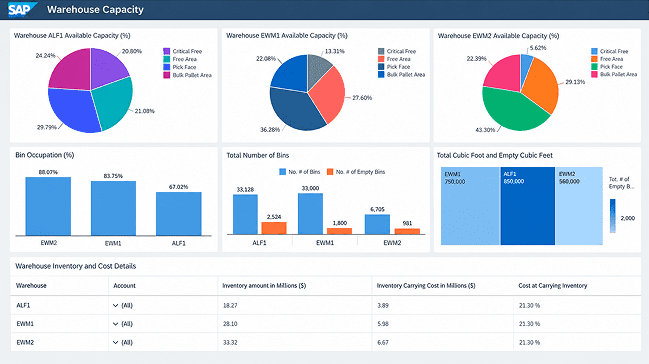
SAP SCM

The SAP supply chain management platform improves supply chain operations in many industries. It improves supply chain tools and performance and helps businesses operate at their best.

SAP SCM
Source: SAP | Extended warehouse management
Key Feature

Key Features:

  • Compliance and risk management
  • Return management
  • Collaboration tools
  • Production planning
  • Sustainability tracking
Key Feature

Key Pricing:

  • $403.00 per month
Key Feature

Key Limitations:

  • High implementation cost
  • Complex customization
  • Steep learning curve
  • Long deployment time
  • Heavy reliance on consultants/vendor support
Key Feature

Best for:

  • Large enterprises with complex, global supply chains already running SAP ERP.

Kinaxis Maestro

Kinaxis Maestro is an AI-driven supply chain orchestration platform that connects every step of a business supply chain, from strategic planning to delivery. It is a sub-segment of SCM. It helps large-scale businesses connect data, forecast issues, and make fast choices.

Key Feature

Key Features:

  • Scenario planning and simulation
  • AI-powered decision intelligence
  • End-to-end supply chain visibility
  • Automation and workflow optimization
  • Integrated analytics and dashboards
  • Collaboration across teams
  • Integration capabilities like ERP
Key Feature

Key Pricing:

  • CA$30000 per user per month
Key Feature

Key Limitations:

  • High cost
  • Complex implementation
  • Data dependency risks
  • User adoption challenges
Key Feature

Best for:

  • Manufacturers who manage layered, multiple-tier supply chains.

Blue Yonder Luminate

The Blue Yonder Luminate platform is an AI supply chain management platform that is designed to connect planning, execution, and commerce into a single, unified data environment. It offers AI-powered planning and execution in supply chain and retail operations.

SAP SCM
Source: Blue Yonder
Key Feature

Key Features:

  • Inventory optimization
  • Robotics and automation integration
  • Demand planning
  • Real-time data integration
  • Smart supply chain planning
Key Feature

Key Pricing:

  • Not publicly published
Key Feature

Key Limitations:

  • Long deployment time
  • Setup complexity
  • Customer support delays
  • High total cost
Key Feature

Best for:

  • Retail and consumer goods businesses that need demand and supply integration.
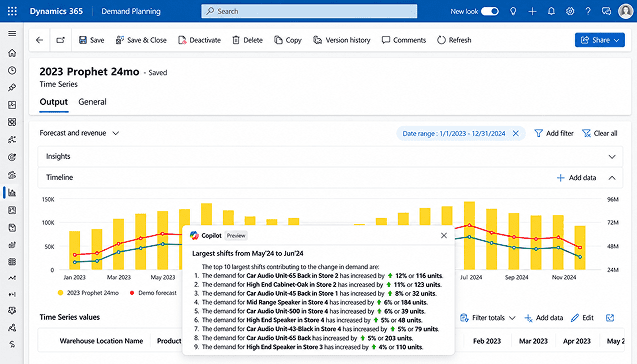
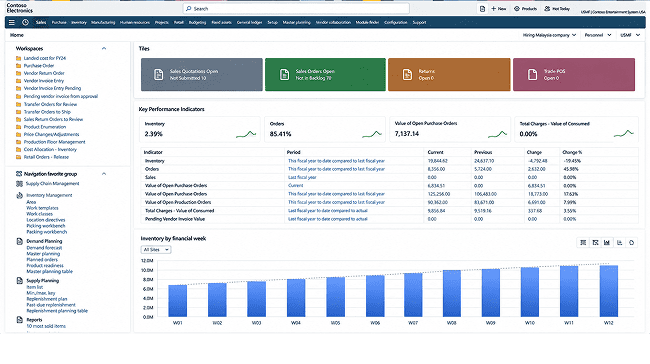
Dynamics 365 Supply Chain Management

The Microsoft Dynamics 365 supply chain management platform helps many organizations track, manage, and optimize their supply chain operations like inventory, manufacturing, warehousing, and logistics.

Key Feature

Key Features:

  • Improve demand planning
  • Eliminate stockouts
  • Procure with insights and automation
  • Optimize fulfillment for on-time deliveries
  • Manage order lifecycle
Key Feature

Key Pricing:

  • $210.00 user/month, paid yearly
Key Feature

Key Limitations:

  • Complex multi-site planning
  • High costs and expensive support
  • Integration complexity
  • Visibility and tracking gaps
Key Feature

Best for:

  • Mid-market to enterprise-level manufacturers and distributors.

Oracle SCM

Oracle Fusion Cloud Supply Chain Management is a full set of supply chain apps that work together to make the process smarter and more efficient. Businesses can leverage built-in AI and agentic apps to plan, make, and deliver better.

Key Feature

Key Features:

  • Built-in AI and agentic apps
  • Real-time visibility
  • Smart manufacturing operations
  • Omnichannel order management
  • Supply chain planning
Key Feature

Key Pricing:

  • $300,000 to $600,000/year
Key Feature

Key Limitations:

  • High cost and separate licensing
  • Implementation complexity
  • Mandatory quarterly updates
  • Integration and analytics constraints
Key Feature

Best for:

  • Large enterprises and global manufacturers that need an end-to-end cloud platform.

NetSuite ERP

The NetSuite supply chain management platform integrates and automates the whole process of a company's product, from finding raw materials to delivering the finished product. It helps businesses resolve supply chain issues quickly.

NetSuite ERP
Key Feature

Key Features:

  • Inventory management in multiple locations
  • Warehouse management and fulfillment
  • Demand planning and forecasting
  • Procurement and vendor management
  • Production planning and scheduling
Key Feature

Key Pricing:

  • Not publicly published
Key Feature

Key Limitations:

  • High overall and ongoing costs
  • Limited out-of-the-box vendor integration
  • Gaps in advanced analytics and planning
  • Challenges with data migration and quality
Key Feature

Best for:

  • Fast-growing companies that need cloud-based platforms to manage supply chain operations.

Infor Supply Chain Management

Infor Supply Chain Management covers planning, warehousing, and transportation. It runs on Infor's cloud platform. It helps businesses optimize, synchronize, and automate their end-to-end supply chain network using AI-powered tools.
Key Feature

Key Features:

  • Demand forecasting
  • Inventory optimization
  • Sales and operations planning
  • Warehouse management
  • Transportation management
Key Feature

Key Pricing:

  • Quote-based. Infor does not publish prices.
Key Feature

Key Limitations:

  • No public pricing
  • Long implementation
  • Setup often needs consultants
  • Hard to learn for small teams
  • Few public reviews to compare
Key Feature

Best for:

  • Mid-size to large manufacturers and distributors that want planning, warehouse, and transport tools in one system.

Epicor Kinetic

Epicor Kinetic is a cloud ERP for manufacturers and distributors. It has strong shop floor and production planning tools. It helps manufacturers and distributors control procurement, inventory, warehousing, and shipping within a single connected Epicor Kinetic platform.

Key Feature

Key Features:

  • Production planning and scheduling
  • Shop floor control (MES)
  • Purchasing and inventory
  • Quality management
  • Configure-to-order support
Key Feature

Key Pricing:

  • $125 per user per month. Implementation costs start at $50,000 (minimum).
Key Feature

Key Limitations:

  • High implementation cost
  • Customizations can make upgrades harder
  • Reporting relies on older SSRS tools
  • Financials are lighter than SAP or Oracle
Key Feature

Best for:

  • Mid-size manufacturers, especially make-to-order and engineer-to-order shops.

Acumatica

Acumatica is a cloud ERP with inventory, order, and purchasing tools. It does not charge per user. It helps supply chain management by unifying inventory, warehouse, procurement, and order management into a single connected platform.

Key Feature

Key Features:

  • Inventory management
  • Order management
  • Purchasing
  • Warehouse management
  • Manufacturing and MRP
Key Feature

Key Pricing:

  • Not disclosed publicly.
Key Feature

Key Limitations:

  • No public pricing
  • Must be bought through a partner
  • Cost rises with transaction volume
  • Basic HR and payroll
  • Smaller partner network than SAP or Microsoft
Key Feature

Best for:

  • Mid-size companies that want unlimited users and a cloud ERP.

Zoho Inventory

Zoho Inventory manages stock, orders, and warehouses for small businesses. It connects to sales channels like Amazon, eBay, and Shopify. It improves order processing, provides real-time stock visibility, and syncs sales channels from a single cloud platform.

Key Feature

Key Features:

  • Multichannel selling
  • Sales and purchase orders
  • Multi-warehouse tracking
  • Serial and batch tracking (Premium and above)
  • Backorders and dropshipping
Key Feature

Key Pricing:

  • Standard: $29 per month
  • premium: $79 per month
  • plus: $129 per month
  • enterprise: $249 per month
Key Feature

Key Limitations:

  • Order limits on every plan
  • User limits on every plan (3 to 10)
  • Serial and batch tracking not in Standard
  • Basic manufacturing support only
  • Advanced warehousing costs extra
Key Feature

Best for:

  • Small e-commerce and retail businesses that sell on several channels, especially those already using Zoho apps.

Cin7

Cin7 is an inventory and order management platform. It links sales channels, warehouses, and accounting tools. It helps businesses track stock, automate sales, and connect multiple sales channels in real time.

Key Feature

Key Features:

  • Multichannel order management
  • Multi-location inventory
  • Purchase order management
  • Manufacturing and MRP (Pro and above)
  • Accounting and e-commerce integrations
Key Feature

Key Pricing:

  • Standard: $349 per month
  • Pro: $599 per month
  • Advanced: $1,199 per month
Key Feature

Key Limitations:

  • No free plan
  • High price jumps between plans
  • Yearly order limits on each plan
  • User limits on each plan
  • Extra integrations cost more
Key Feature

Best for:

  • Small- to mid-size wholesalers, distributors, and online brands that sell on multiple channels.

Fishbowl

Fishbowl is inventory management, manufacturing, and warehouse control software. It is built to work closely with QuickBooks. It helps businesses track stock, manage warehouses, and automate workflows in real time.

Key Feature

Key Features:

  • Inventory tracking
  • Barcode scanning
  • Manufacturing and MRP
  • Order fulfillment
  • QuickBooks and Xero integration
Key Feature

Key Pricing:

  • Essentials: from $229 per month
  • Growth: $429 per month
  • Scale: $729 per month
Key Feature

Key Limitations:

  • No free plan
  • Some features, like MRP and EDI, require a higher plan
  • Support and training can add cost
  • Works best with QuickBooks
  • Costs rise as you add users and features
Key Feature

Best for:

  • Small- to mid-size manufacturers and distributors that use QuickBooks.

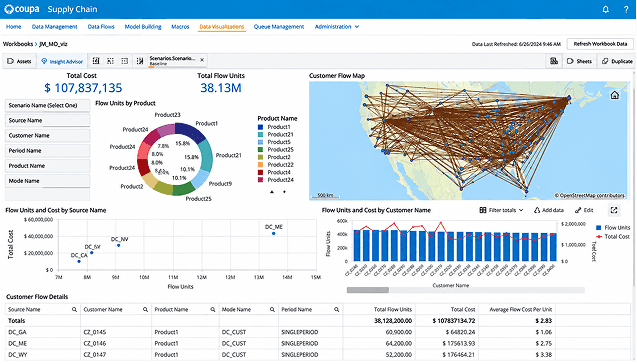
coupa

Coupa software for supply chain management is a cloud-native platform used to design, optimize, and simulate global supply chain networks. It helps businesses model complex logistics, test risk-mitigation scenarios, and connect strategic planning directly to procurement and spend management data.

coupa
Source: Coupa
Key Feature

Key Features:

  • Procurement
  • Supplier management
  • Sourcing and contracts
  • Invoicing and AP automation
  • Spend analytics
Key Feature

Key Pricing:

  • Quote-based and tied to spend under management.
Key Feature

Key Limitations:

  • No public pricing
  • High cost
  • Contracts run for one to three years and auto-renew
  • Annual price increases of about 5% are common
  • ERP integration takes work
Key Feature

Best for:

  • Mid-size to large companies that need tight control over spend and suppliers.

FourKites

FourKites is a supply chain visibility platform that tracks freight and shows where it is, rather than planning or running your warehouse. It gives businesses end-to-end, real-time supply chain visibility and automated execution in their global logistics networks.

Key Feature

Key Features:

  • Real-Time Global Tracking
  • Smarter warehouse and dock planning
  • Ecommerce integrations
  • Returns processing
  • Branded tracking pages
Key Feature

Key Pricing:

  • Not publicly disclosed.
Key Feature

Key Limitations:

  • Not a TMS replacement (it sits on top of your existing systems)
  • No public pricing or free trial
  • Data quality depends on carrier compliance
  • Can feel heavy for smaller shippers with simpler networks
Key Feature

Best for:

  • FourKites software is best for enterprise-level businesses who want real-time transportation visibility.

Extensiv

Extensiv is a software platform that manages and automates inventory, order fulfillment, and warehousing operations for e-commerce brands and third-party logistics (3PL) providers. It helps brands and third-party logistics providers automate fulfillment, reduce errors, and scale operations.

Key Feature

Key Features:

  • Multi-client, multi-warehouse management
  • Batch, lot, and serial tracking
  • Client billing
  • Customer portals
  • Carrier rate shopping
Key Feature

Key Pricing:

  • Quote-based. Extensiv does not publish rates.
Key Feature

Key Limitations:

  • Quote-based. Extensiv does not publish rates.
  • Built for 3PLs, less suited to other businesses
  • Setup can take about three months, per user reviews
  • Extra integrations and support can add cost
  • Mixed ratings on ease of use
Key Feature

Best for:

  • 3PL providers and brands that run warehouses for several clients.

How to Implement Supply Chain Management Software?

The supply chain management software implementation process follows a similar path no matter if you roll out a vendor platform, integrate a custom system to your existing ERP, or combine both. To help you plan the rollout, we have outlined the 7 stages of the SCM software implementation process.

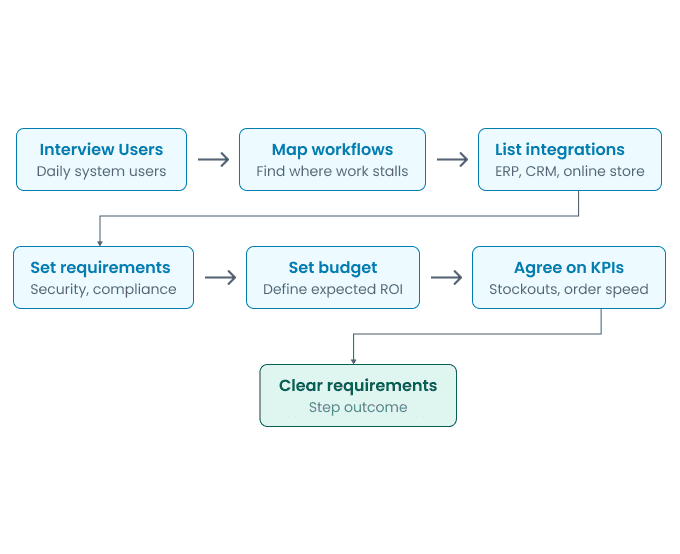
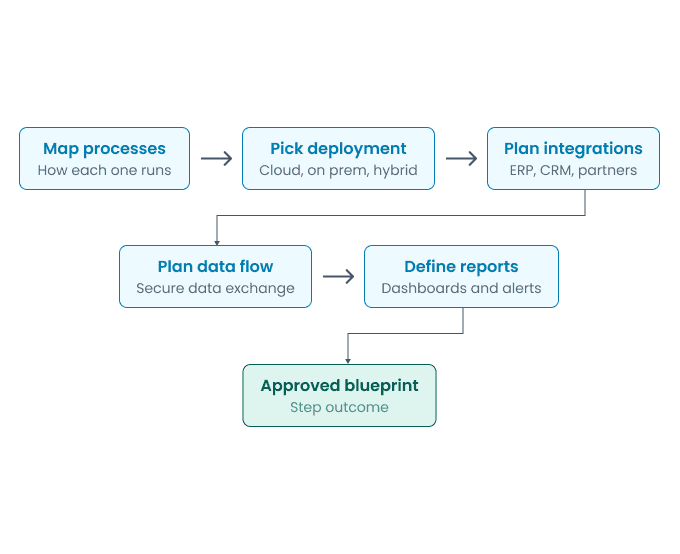
Discovery and Needs Assessment

First, the implementation team maps the current state of the supply chain, from the initial purchase request to final delivery, and identifies where the existing process slows or breaks down. The goal of this stage is to understand the real problems before anyone looks at software. During this stage, the team usually:
Discovery and Needs Assessment

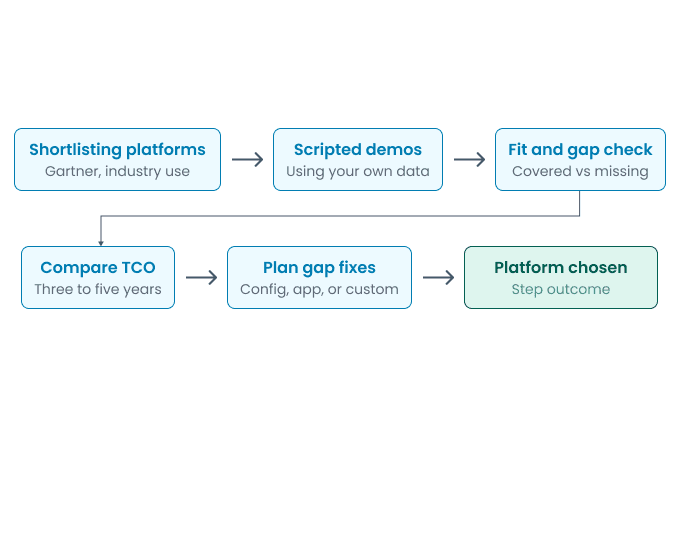
Platform Selection

With clear requirements in hand, the team compares platforms against those requirements instead of a vendor’s feature list. The goal is to find a platform that supports most of the business’s processes right away and requires only minor adjustments. This stage includes:

Platform Selection

Solution Design and Integration Planning

This stage is about designing the blueprint. A common way to structure this blueprint is the SCOR Digital Standard. It organizes the supply chain around seven management processes that include orchestrate, plan, order, source, transform, fulfill, and return. At this stage, the team determines:

The SCOR model (Supply Chain Operations Reference) is a standard framework used to evaluate, improve, and communicate complete supply chain processes and performance. ASCM released the SCOR Digital Standard in 2022, replacing the original structure of Plan, Source, Make, Deliver, Return, and Enable.

Solution Design and Integration Planning

Source: Wikipedia

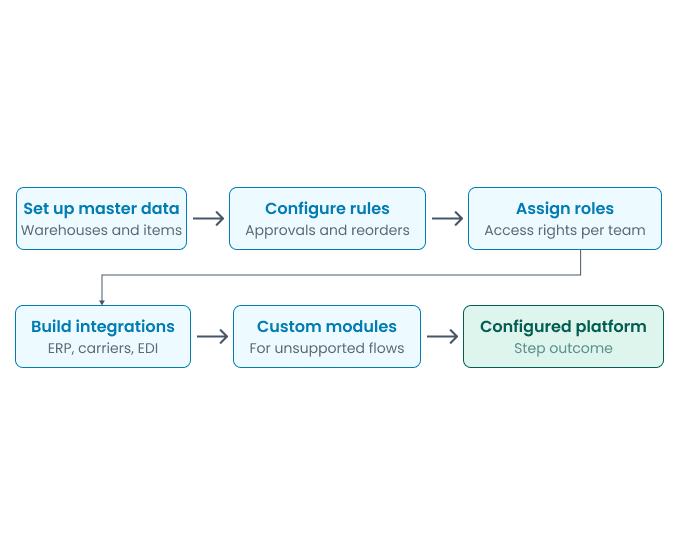
Configuration and Customization

Once the design is approved, the team sets up the platform to match the way the business actually works. Most of this work is configuration, like creating warehouse locations, approval rules, and user roles inside the platform. Where the platform cannot support a workflow, developers build a custom module or extension around it, so the business gets the process it needs instead of adapting to a vendor’s fixed process. This stage usually includes:

Configuration and Customization

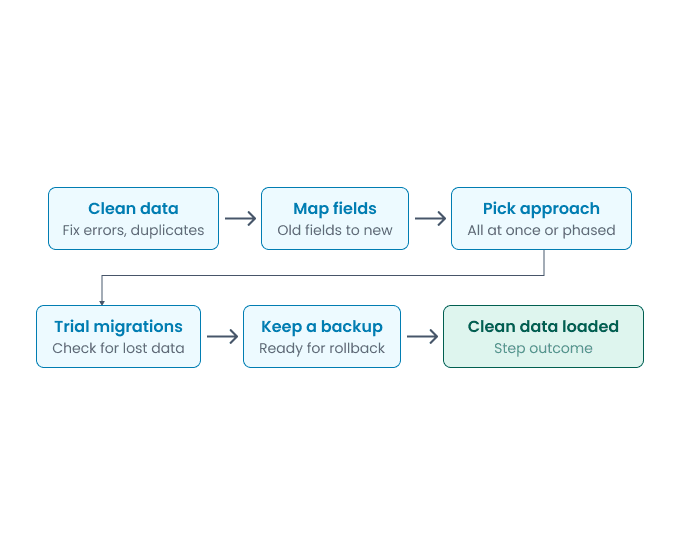
Data Migration

Now, existing inventory records, supplier data, and open orders move into the new platform. Data carried over from old spreadsheets or legacy systems without cleanup will give weak forecasts no matter how good the new platform is. Teams also often find that the same product has three different codes in three old systems. So, the implementation team will:

Data Migration

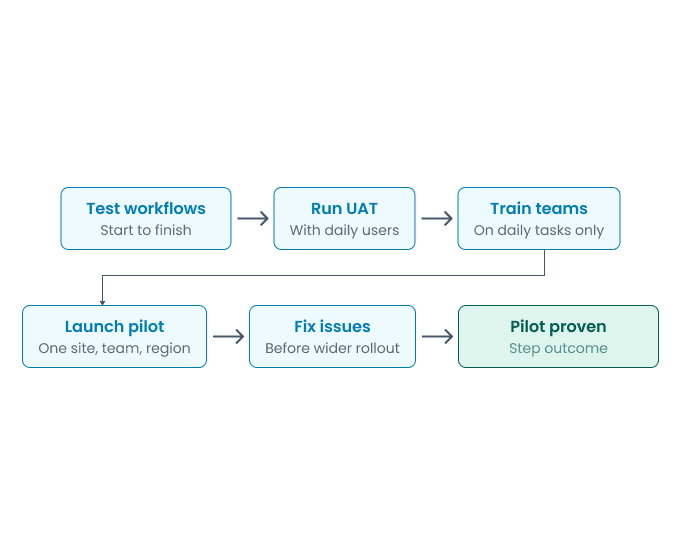
Testing, Training, and Pilot Rollout

Before a full launch, the platform runs with real processes for a short period, usually in one warehouse, product line, or region. This catches integration issues and workflow gaps while the old system remains available as a backup, and it gives employees time to adjust to the new way of working. This stage includes:

Testing, Training, and Pilot Rollout

Full Rollout and Ongoing Support

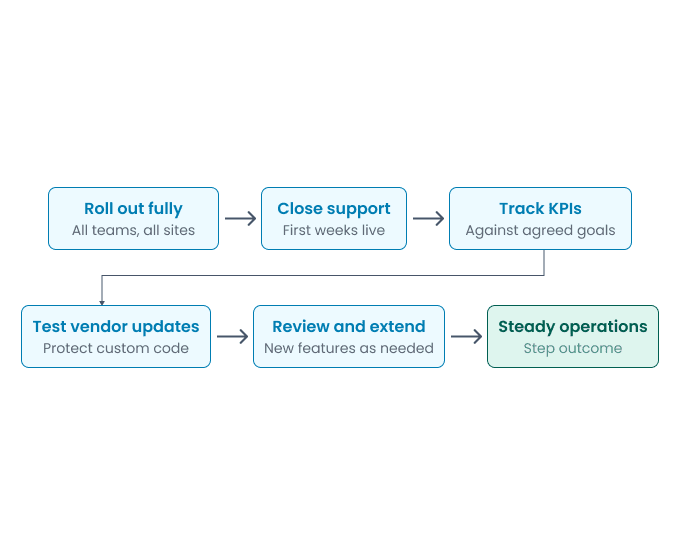
Once the pilot proves the platform works, the team rolls it out across every location, but launch is not the last stage. The first few weeks after rollout need close support, and the platform will keep needing updates, new integrations, and adjustments as the business grows. This final stage covers:

Full Rollout and Ongoing Support

Supply Chain Management System Implementation Cost

Since costs vary and vendors often keep pricing private, it can be difficult to budget for an SCM implementation without clear benchmarks. The license fee is only part of the total cost, and implementation is usually the highest first-year expense, often exceeding the software license fee itself. We share approximate supply chain management software implementation costs based on published Microsoft Dynamics 365 pricing and partner benchmarks so you can plan better.

From $126,000 to $315,000

Implementing a cloud SCM platform for a mid-size business with around 50 full users may cost from $126,000 to $315,000 in implementation services, on top of the software license. With Dynamics 365 Supply Chain Management at $210 per user per month, the 50-user license costs $126,000 a year, and mid-size implementation costs 1 to 2.5 times the first-year license spend. The final figure depends on the number of warehouses, the integrations involved, and the total amount of data that needs to move.

From $500,000 to $1,500,000

A larger rollout that covers finance and supply chain in multiple legal entities, with 50 to 200 users, may cost from $500,000 to $1,500,000 to implement and take 6 to 12 months, based on Microsoft partner statements of work from 2025 and 2026. Global rollouts in different countries cost more because each country adds its localization and compliance work.

Note: These are not EmizenTech’s official costs. They are rough estimates based on published Dynamics 365 pricing and partner benchmarks to help you understand. Costs for other platforms, or for a custom system integrated into your ERP, will differ.

What Does the Implementation Cost Include?

A realistic budget involves more than the license and the partner’s fee. These are the cost factors most companies need to plan for:

  • Software licenses like $210 per user per month for a full Dynamics 365 SCM user, $30 when added for a user who already holds another qualifying Dynamics 365 app, and $50 for activity users who only approve or view records.
  • Implementation partner fees for discovery, design, configuration, testing, and launch.
  • Integrations with ERP, e-commerce, carrier, and EDI systems, with midsize deployments needing 8 to 25 of them.
  • Data migration and cleanup, which grows with the volume and quality of historical data.
  • Industry extensions from independent software vendors, which often equal 15 to 30% of the base license bill in the Dynamics 365 ecosystem.
  • Custom modules for workflows the platform does not cover, priced by scope.
  • Training and change management, a budget line companies often underestimate.
  • Ongoing support, where premium support through Microsoft Unified Support alone runs 6 to 10% of annual license spend.

EmizenTech’s Services for Supply Chain Management

Consulting

We provide software consulting services to make sure you invest in the right software without costly mismatches. Our business consultants assess your business needs and recommend solutions built to track inventory, orders, and shipping accurately. We guide you through selection, implementation, and integration, ensuring every platform works together smoothly. Book a free consultation to discuss your requirements.

Implementation

We provide software implementation services to optimize your supply chain management. Our expert team configures modules for inventory management, demand forecasting, warehouse operations, and order management to integrate with your existing workflows. Every implementation involves data migration, integration with your ERP and logistics systems, and rigorous testing before launch. Contact us now!

Looking for an expert software implementation services provider?

FAQs

Benefits include lower inventory and logistics costs, more accurate demand forecasting, real-time visibility into orders and shipments, stronger supplier relationships, and faster response to disruptions.
SCM software works by connecting data, people, and processes in different organizations through key functional stages:
  • Plan
  • Source
  • Make
  • Deliver
  • Return
The features of SCM software are demand forecasting, supply planning, supplier management, vendor performance scorecards, manufacturing planning, procurement management, warehouse management, supplier portal, inventory management, barcode support, RFID integration, expiry data management, and many more.
The supply chain management software implementation process includes:
  • Discovery and needs assessment
  • Platform selection
  • Solution design and integration planning
  • Configuration and customization
  • Data migration
  • Testing, training, and pilot rollout
  • Full rollout and ongoing support
SAP SCM, Kinaxisa Maestro, Dynamics 365, Blue Yonder Luminate, Infor, Epicor, NetSuite ERP, Zoho Inventory, Cin7, Coupa, and Extensiv are some of the best SCM software.
Every industry moves goods through a different set of stages. A manufacturer ships through a distributor and dealer to the customer. A pharma company ships through a distributor to a pharmacy or hospital. These differences define what supply chain software needs to do. Food and pharma need batch and expiry tracking. Construction needs delivery matched to project timelines. Freight forwarding needs customs paperwork and shipment tracking. The right software depends on how your industry's supply chain works.
The SCM software cost depends on the deployment model, level of customization, number of integrations, user count, and data migration. There is no fixed price, since a small business connecting one warehouse to an existing ERP has very different needs than an enterprise running many distribution centers.