 Add us as a preferred source on Google
Choosing the right CRM features list is one of the most important decisions a business can make when investing in customer relationship management software. With so many platforms on the market, companies are often overwhelmed by long, generic lists of features, many of which sound impressive but deliver little real value.
According to Statista, the U.S. CRM software market alone is projected to reach $50.14 billion in revenue by 2026. As competition among vendors grows, so does the range of features to offer, making it increasingly difficult for businesses to separate genuine must-haves from optional extras.
The right combination of features can transform how a company manages its sales cycle, from the moment a prospect first enters the pipeline to the point they become a loyal, repeat customer. When chosen carefully, these features reduce operational delays, lower costs, and free up teams to focus on higher-value work.
This article outlines the top 25 CRM features that drive measurable business growth and efficiency.
25 CRM Features List: From Lead Capture to Customer Retention
There are several types of CRM software, and each has its own benefits and features. While some CRM features are distinct, others remain common across systems. Below is a list of 25 vital CRM features that you can adopt from the point a lead gets captured to ensuring customer retention.
1. Contact Management
Contact management is on the top of the must-have CRM features list. As the name suggests, you can maintain buyer personas or create profiles for your prospects, existing customers, and new customers.

Building such a profile means following a 360-degree approach. This gives you a complete overview of your sales pipeline, helps you manage customer relationships efficiently, and supports actionable steps to improve your marketing, sales, and customer service efforts.
Various CRMs offer profile templates. These templates let you collect all necessary contact information, such as users’ social media profile links, email addresses, phone numbers, and other relevant details.
2. Workflow Automation
CRM workflow automation can make your work much easier than you think. Look for software that lets you set up custom rules and automation capabilities across your existing tools. This helps you and your entire team stay productive. By including workflow automation systems, your CRM software can instinctively perform particular actions based on triggers or events such as

- When a prospect or lead completes an online form, the CRM software automatically routes the inquiry to the relevant department or sales representative.
- After the sales representative receives the form-filing message, the CRM software automatically sends a preset response to acknowledge it.
- Even after sending the message or proposal, you notice that your prospect or lead hasn’t responded. In that case, your potential lead will receive an automated follow-up message after a set time, such as within 48 hours or three business days. When your sales executive messages or calls the contact, the system records everything and logs hours, so you can track and monitor every communication in real time.
- Task completion information is reported directly to supervisors and higher authorities for performance reports because it is also part of the CRM system.
3. Marketing Automation
Marketing automation is among the core CRM features list. It simply means automating marketing tasks. It is a process where you launch attractive deals and coupons to reach a large pool of qualified leads, especially when they fill out your website forms and the CRM captures lead and client profile data in your systems.

With this data, the sales team can convert the most prospects into successful clients. You can also use this information to analyze the return on investment from marketing campaigns. This helps you plan future marketing goals.
4. Customizations
Customization helps you personalize the CRM workflows to your processes, rather than adapting to a rigid system. Since no two businesses are alike, they will always vary in one way or another. That’s where customization comes in.

Some CRM providers offer a standard package with a fixed set of features, while others let you select and customize the features you need. As your business grows and your processes become more complex, off-the-shelf customization may no longer keep pace; in that case, custom CRM software is built entirely around your specific workflows, ensuring the system scales with you rather than holding you back.
5. Artificial Intelligence (AI)
AI is becoming standard in modern CRM systems. It helps businesses serve their clients better by boosting productivity and offering actionable insights.

By integrating Generative AI into a CRM, you can create custom slides, emails, knowledge guides for service teams, and product descriptions with multilingual support and audience-specific marketing campaigns. If you’re exploring this option for your business, AI-powered CRM development can help you add these capabilities to your existing setup.
By leveraging agentic AI, which differs from generative AI in that it can take autonomous action rather than just generate content, you can let the system act on users’ behalf. Examples include scheduling meetings, updating records, and replying to routine inquiries.
To better understand the distinction, see our breakdown of agentic AI vs. generative AI. That said, AI success in CRM depends entirely on data quality.
6. Reports, Dashboards, and Analytics
Reports, analytics, and dashboards are all standard features of a CRM system. CRM reports and dashboards give you a complete view of relevant information and analytics, highlighting what you need to build better customer relationships and boost sales.

Advanced reporting and analytics features turn raw, unstructured data into actionable business insights through personalized dashboards and automated reports.
Pro Tip: Features alone won’t deliver results. Dashboards go empty, and forecasts turn to just words without someone owning data quality and adoption, which is why most teams that get real value from a CRM have a dedicated CRM manager.
7. Feature Elimination

Some CRM software packages offer an extensive range of features. However, you don’t need to use every single one of them. So, consider eliminating features you don’t use or that aren’t relevant to your business. This avoids unnecessary clutter, and you can surely focus on vital information.
8. Third-Party Integrations
Always invest in a CRM solution that offers no-code or low-code integrations. This improves connectivity between your most-used CRM tools and automated workflows. This means you avoid manual data entry, increase productivity, and reduce errors. Third-party integration involves:

- Email client integrations disperse messages between your contacts and company into your CRM platforms.
- Integrating your business phone systems helps you automatically capture and customize text and telephonic conversations.
- Connecting your CRM software with social media accounts helps you monitor online conversations.
9. Lead Management
Managing leads is a crucial task for any business. Generally, CRM comes with a basic lead management feature that lets you identify where your prospects are, and sales representatives can track their position in the sales funnel. Understanding and evaluating the sources helps you design improved marketing campaigns.

Advanced CRM lead management tools include lead scoring, automated follow-ups, and audience segmentation.
Pro Tip: A chatbot service lets your sales processes run even when your staff is offline.
10. Sales Process Task Management

CRM is designed to solve the challenges of managing and maintaining relationships in the sales pipeline. Task management is a key CRM feature that helps sales executives identify what needs to be done and when. Here, managers can assign tasks and view employee status, leads, or accounts. Combining these with automation tools means receiving alerts based on follow-up timelines.
11. Customer Segmentation
In the CRM features list, customer segmentation plays a crucial role. You can use filters and tags to group contacts by common similarities such as industry, geographic location, and industries served. This shows you are attentive to your potential customers and their needs.

With this type of enhancement, you can send relevant messages to a large pool of contacts without wasting time personalizing each message. For instance, you may want to offer a 20% discount to prospects you acquired through Facebook. You can filter by source and send an email describing the discount to all potential leads you received via Facebook within a few clicks.
12. Centralized Dashboard

Both CRM systems and CRM software offer a centralized workspace, making it one of the most unique features of CRM. All information is available in a single, unified platform. This means you can manage contacts, communicate with customers, manage activities and tasks, and advance deals from one place.
13. Mobile CRM

You are not always at your desktop or laptop, especially when you are traveling or attending a social gathering, and what if, at that moment, you need to monitor your business’s progress? Obviously, you cannot rush back to your workspace. This is where mobile-based CRMs play a pivotal role.
Related Blog: CRM App Development
Having a CRM application on your mobile avoids unnecessary fuss; no matter where you are, you can monitor your business performance with a single tap. Such solutions work across all your devices, including iOS and Android. Mobile CRMs let you set up alerts to stay on top of campaigns by receiving valuable information as it comes in. Alerts can also notify you of new customer interactions so your team can provide necessary support as quickly as possible.
14. Data Storage and Security

CRM data contains sensitive information such as customer details, sales data, financial information, and company statements. That’s why data storage and security should be a top priority on your CRM features list. Look for a provider that offers strong encryption, role-based access controls, and the ability to restrict data access at the user or team level. This ensures sensitive information is only visible to the people who need it, reducing the risk of internal misuse and external breaches.
15. Customer Service
Offering great customer service is one of the clearest drivers of long-term business growth, and it’s a core function every strong CRM features list should include. With the right CRM, you’ll receive the following functionalities to help your team serve customers better at every touchpoint:

- Gaining a comprehensive 360-degree overall customer view, with everything you need to know from the first point of contact onward.
- Automatically monitor everything from lead capture to customer retention.
- Logging all events such as website visits, purchase histories, and other relevant activities for future reference and to keep all executives on the same page.
- Using customers’ first names to customize all correspondence.
- Generating unique reference numbers for each account, customer, and help issue.
- Sending timely acknowledgments to customers for their queries and messages so they don’t feel they are overlooked.
- Creating pre-generated call scripts and email campaigns to answer generic questions.
16. Testing Environments

In the CRM features list, priority is given to testing environments, which customized CRM solutions offer. They provide an isolated space, like a sandbox. Here you can make tweaks and adjustments to the systems before implementation. A sandbox helps your developers make changes without fear of harming your data.
17. Chat Integration

Chats are among the core features of a CRM system. This lets team members and departments share what is necessary and relevant with the right person on time or even communicate with the client over chat to resolve concerns without moving their chair here and there.
18. Email Features
CRM email features let you track emails through the traditional process where you keep flipping to your inbox again and again to retrieve a single message. That is not only irritating, but it can also get overwhelming and confusing, especially with sales emails. Not responding to sales emails on time results in a lost lead and a missed opportunity.

CRM features maintain productivity, and calendar integration helps schedule appointments and engage leads and clients.
19. Easy-to-Use Interface
A clean, intuitive design attracts more CRM buyers. If a CRM is easy to use, has a structured design, includes only required tabs, uses precise fonts, and fulfills the essential CRM features list, then half the battle is already won.
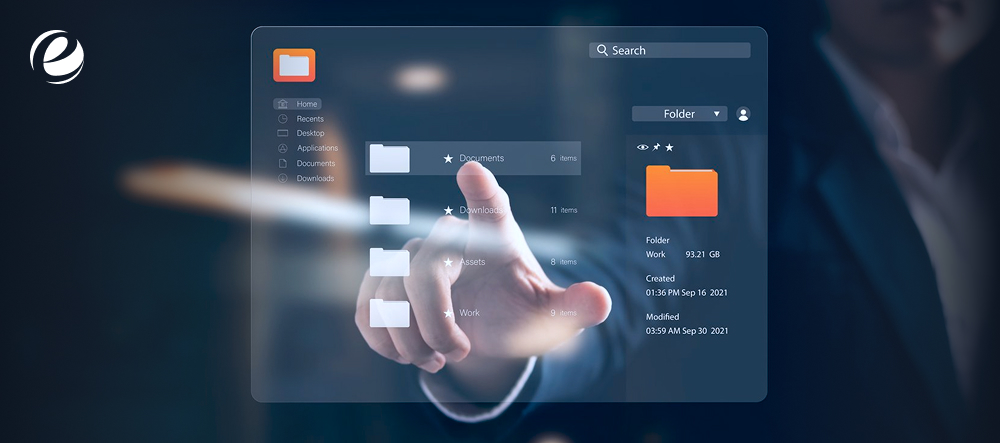
Always try to provide a design users already know; it reduces ambiguity, and they will become pros at navigating the dashboard in no time. For example, some CRMs have a Gmail-like interface and contact pages that look a lot like social media profiles.
Read Also: Best CRM Tools for Startups 2026
20. Teamwork and Collaboration
Analyze how many users will use the CRM. If you have multiple users, ensure the CRM’s features support teamwork and collaboration. Without these features, you can expect duplicated work and wasted time.

Teamwork and collaboration features let you assign contacts, deals, and tasks to co-workers, such as leaving notes for things that require attention. Also, there are many CRMs that facilitate external collaboration outside your company, especially when you work with contractual or gig-based workers.
21. Deal Management
The deal management feature helps advance sales opportunities by enabling upselling.
Generally, customer relationship management software includes a dedicated deals page where you can monitor deal information and its current stage. This includes tracking the pipeline, value, closing date, and any related upcoming opportunities.

Some CRMs offer a product and service catalog on this page. It saves you a lot of time during the sales process. All you have to do is select the right items.
22. Employee Tracking
The biggest asset in CRM software is employee tracking.
You cannot watch your employees all the time to see what they are doing from the moment they check in to the office. It’s not practically possible. The best way to do it is to install software with personalized accounts that track hours completed, projects, goals, meetings, attendance, and payroll.

For employers, it also acts as a dashboard to review employees’ performance. Based on this, employers can decide incentives, reward strong employees, identify those who are struggling, and address areas of improvement.
23. Real-Time Data
Real-time data gives you accurate insights into what’s happening in your company’s environment. Pulling up your real-time data means:

- You can make informed decisions about bidding price and online ad placement.
- You get an immediate snapshot of market demand, giving you marketing insights that help you achieve better results.
- You can identify the areas driving the most revenue and those draining it. It generates an online calendar
24. Appointment Scheduling
With the help of the appointment scheduling feature in a CRM, you can set up and schedule all your meetings within a few seconds. Also, it generates an online calendar that shows days that are occupied, vacant, or when you are on leave. It can be a prerequisite feature in the CRM features list if you are handling multiple calls in a single day and have back-to-back meetings.

It’s also feasible if you are managing multiple contacts and want them to automatically sync into your CRM.
25. Free API

While looking at a must-have CRM features list, there also come free APIs; some companies demand the functionality of this feature in their CRMs. An application programming interface (API) integrates your existing software systems with apps that aren’t available in the built-in integrations list. You need this feature if you use numerous tools to run your business and want them all to sync with your CRM.
Benefits of Using CRM Features to Work Smarter
Now that we’ve covered the most important CRM features, let’s look at how they help organizations work smarter. There are various aspects of it, such as:
- Understanding your customers better through consolidated data
- Segmenting audiences for smarter engagement.
- Improving retention rates via consistency and timely follow-up
- Anticipating customer needs before they demand
- Enabling seamless and better communication
- Strengthening your data privacy and compliance norms
- Acting as a single source of truth across teams
How to Select the Right CRM Features List for Your Business Needs
Let’s come straight to the point: the CRM features list is broad, and it’s not necessary to integrate all of them.
To choose the right features that align with your business processes, partner with a reliable CRM development company like Emizentech, which consistently emphasizes that CRM should evolve with business needs.
Instead of focusing only on CRM implementation, businesses should focus on continuous improvement, user adoption, and adapting to changing customer needs. Efficient CRM strategies should be based on business goals. System upgrades, automation, analysis, and simple integration with other tools can give businesses more insight into their clients and make their strategies more effective.
Conclusion
Now that you know the top 25 features on this CRM features list, you’re in a far stronger position to choose software that actually works for your business, not just software that looks impressive on a features page.
You don’t need to go here and there to understand the different features; use this information as a reference and decide which characteristics and attributes are relevant to your business, which you want to integrate, and which you can avoid.
Note: You don’t need all the features; it depends on your business level, team size, and the complexity your organization deals with.
FAQs
What are the most important features of a CRM?
The most important features of a CRM are as follows:
- Sales and Pipeline Management
- Contact Management
- Reporting and Analytics
- Third-Party Integrations
- Artificial Intelligence (AI)
How do you measure ROI from your CRM?
For calculating ROI from CRM systems, apply the formula: [(Total Financial Gain – Total Cost) / Total Cost] x 100.
What CRM features does a small business need vs. an enterprise?
Small-business CRM needs simple, affordable features, with an emphasis on sales tracking, contact management, and visual pipelines. Enterprise CRM features include granular permissions, integrations, and custom objects and schema.
Which CRM features do teams actually use daily after implementation?
Sales and support teams use core features such as contact management, activity tracking, and pipeline dashboards.
What should you look for in CRM reporting and analytics?
The core metrics to track in CRM reporting and analytics are as follows:
- Pipeline Health
- Conversion Performance
- Activity Volume
- Real-Time Updates
- Revenue Forecasting



 +1 (989) 535-9295
 info@emizentech.com
 emizentech


