
 Add us as a preferred source on Google
Most sales teams don’t lose deals because they’re bad at selling. They lose deals because the information they needed was stored in someone else’s inbox, a spreadsheet from three weeks ago, or a support ticket nobody thought to check before the call. That gap between “what we know about this customer” and “what we could have known” is surprisingly expensive, and it’s the exact problem CRM app development exists to solve.
The market has noticed. The global CRM software market hit $128 billion in 2024, growing 13.4% in a single year, according to Gartner, and money doesn’t move toward a category that fast until it’s actually working. A well-built CRM app integrates unorganized customer data into one system built around how a business really operates, so teams manage leads, track the full customer journey, automate follow-ups, and make calls based on real history instead of memory.
This guide explains everything you need to know before starting a CRM project. It covers why a custom CRM can be a good choice, the important features to include, the best technology options, the complete development process, and realistic cost estimates.
Why Businesses Need a Custom CRM App?
CRM app development means develooping a software application that helps a business manage its customer relationships. It includes lead generation, conversation tracking, deal flow through a pipeline, and post-purchase support. This process is different from simply subscribing to Salesforce or Zoho. A subscription is CRM adoption, which works well for many companies. Development means a team builds the software itself, shaped around one specific business instead of a general template that everyone else uses as well.
Most organizations don’t plan on building custom software. It usually happens after spreadsheets, disconnected tools, and manual tracking start costing them time and money without anyone noticing right away. Five problems come up again and again.

1. Centralized Customer Data Management
Consider a typical mid-sized company. Customer emails live in Outlook, lead lists are stored in three different spreadsheets, campaign data lives in a marketing tool, and support history exists in a helpdesk platform. When a salesperson calls a customer, they often see only about 20% of the information they require.
A custom CRM app fixes this by creating one profile for every customer, containing contact details, complete purchase history, every email and call record, defined preferences, and behavioral signals from your website or app. If you’re comparing this to a customer data platform, this guide on CRM vs CDP breaks down which one fits your situation.
2. Personalized Customer Experiences
Customers notice when a business remembers them. They also notice when it doesn’t. A custom CRM app gives teams the context to make that happen. Representatives can send product recommendations based on real purchase behavior. Campaigns can be targeted at the right categories, not just everyone at once. Support fixes issues faster, and agents have the complete history when a ticket arrives. And follow-ups are not general; they are about actual conversations that happened, not predictions.
AI adds even more here. Microsoft highlights these features in its Dynamics 365 CRM products, where AI integrates customer data and surfaces sales insights that would take a human hours to find manually.
3. Sales Automation and Lead Management
Ask any sales employee what consumes their day, and admin work usually goes above selling. A custom CRM app handles that for them. Leads get recorded the moment someone fills out a form or clicks an ad, instead of sitting in an inbox unnoticed.
Lead scoring indicates which prospects are actually worth following, so representatives stop giving equal effort to a favorable lead and someone just browsing. The pipeline stays visible at a glance, follow-ups go out on schedule without depending on memory, and forecasts are built from real deal data instead of a guess about how the month is going.
4. Better Decision-Making Through Analytics
A manager may feel a region is performing poorly but not know why, or think a representative is doing very well because they appear busy. With custom CRM apps, you don’t have to make assumptions. Real-time dashboards show you what products are selling where, which representatives require coaching, and which deals are going cold. No waiting for manual reports or delayed updates. The right insights are available in real time, allowing teams to take action when it matters most.
5. Mobile Accessibility for Remote Teams
Sales doesn’t happen at a desk anymore. CRM mobile app development matters because field support staff, on-site engineers, and traveling managers need customer information in their pocket. A staff member reviewing a client’s full history before a meeting often changes how that meeting goes.
Custom CRM App vs Off-the-Shelf CRM Software
The choice between a custom CRM app and off-the-shelf software depends on three factors: how unique your workflows are, how quickly you need to launch, and how per-user costs change as your team grows. Get the answer wrong in either direction, and you pay for it, either in software your team fights against or in a build your business never needed. Here’s how the two paths compare.
| Factor | Custom CRM App | Off-the-Shelf CRM |
| Customization | Every process built to match how your team sells | You adapt to the vendor’s way of working |
| Features | Only what you need, nothing you don’t | Big feature list, but much of it goes unused |
| Integration | Connects to any tool with an API, on your schedule | Limited to what the vendor chose to support |
| Scalability | Grows in whatever direction your business does | Growth means upgrading to pricier plans |
| Data Ownership | Your data sits on your servers | Data lives in the vendor’s cloud, on their terms |
| Cost | Bigger upfront spend | Low entry cost, but subscription fees never stop |
When to Build a Custom CRM App
A custom CRM is built around your exact sales process, and you own the code, the data, and the roadmap. Three signals say it’s time to build.
- Your process doesn’t fit a template: A hospital, a real estate agency, and a manufacturer selling through dealer networks all sell in entirely different ways. That last one is the exact challenge a CRM for the manufacturing industry solves, and no generic template handles all three well.
- Per-seat fees keep climbing: Subscription platforms charge for every new hire and the full feature bundle, even when your team uses a third of it. Custom means paying once for what you need.
- Deep integrations are non-negotiable: A custom CRM connects to your ERP, payment gateway, and AI tools on your schedule, not the vendor’s roadmap.
When to Buy an Off-the-Shelf CRM
Off-the-shelf platforms like Salesforce, HubSpot, and Zoho are pre-built for standard sales operations, and that is their strength. Choose ready-made when speed matters more than fit: you need a live system in days, your process is fairly standard, or you’re still testing how your team sells. For teams in that position, the real decision is HubSpot vs. Salesforce.
Advanced CRM App Features with AI Capabilities
Feature selection decides both the cost and the value of a CRM project. The practical way to plan it is in two categories: standard features that every CRM requires to function and advanced AI capabilities that separate a modern design from a basic database. Get the standard layer stable first, then add AI where it produces measurable results. Here’s how the two categories break down in a typical custom build.
| Standard CRM Features | Advanced AI-Powered Features |
| Contact and account management | Agentic AI for autonomous task execution |
| Lead and opportunity management | Predictive lead and deal scoring |
| Sales pipeline tracking | Generative AI assistants (copilots) |
| Email and calendar integration | Customer flow prediction |
| Task and activity management | Sentiment analysis |
| Reporting and analytics dashboards | Automated data cleaning and enrichment |
| Mobile access | Conversational AI and voice interfaces |
| Role-based access control | Next-best-action recommendations |
| Third-party integrations (API) | Dynamic pricing optimization |
| Customer segmentation | Omnichannel support integration |
The advanced column isn’t optional anymore. Salesforce’s State of Sales research found that 87% of sales organizations already use AI for tasks like prospecting, forecasting, lead scoring, and drafting emails. So the real question for a new CRM project isn’t whether to include AI. It’s which capabilities fit your sales process and data maturity. Teams working through that decision can look into dedicated AI development services to get the architecture right from day one. Here are the capabilities worth evaluating first.
1. Agentic AI: Earlier CRM AI stopped at recommendations, and a human still executed every step. AI agent development closes that gap, enabling systems to run multi-step operations automatically: prospect research, lead qualification, and support ticket routing. Instead of working by hand, the team reviews the work done.
2. Generative AI assistants (copilots): Most of a rep’s writing is repetitive: call summaries, follow-ups, and reports. A copilot inside the CRM drafts all of it using customer data already in the system, so the drafts have real context, and the representative just reviews and sends.
3. Predictive lead and deal scoring: Ask a representative which deals will close, and you’ll get confident answers that are often wrong. Scoring models have seen every deal the company ever executed, so they rank the pipeline by realistic conversion probability. Representatives chase winnable deals, and forecasts hold up.
4. Customer retention and sentiment analysis: Customers decide to leave weeks before they say so. Replies slow down, emails get shorter, and support calls go down. Sentiment models track these trends across every account and recognize the ones moving away while there’s still time to act.
5. Automated data cleaning and enrichment: No sales team can keep its database clean by hand, and the results are clear. AI takes the job over completely. It extracts contact details out of emails and call notes, catches duplicate records, and fills empty fields with company-specific data as it goes. The result is a database that keeps itself accurate.
6. Conversational AI and voice interfaces: Users can directly query the CRM using natural language processing. Type or say “which deals went quiet this month?” and get an answer instead of building a filter. Voice input extends the same capability to field representatives working from their phones.
7. Next-best-action recommendations: Every closed deal teaches the system something. It leverages those patterns to recommend the next move for each open deal: a particular offer, a price adjustment, or a follow-up at just the right time. Representatives spend less time figuring out what to do and more time doing it.
CRM App Development Process: A Step-by-Step Guide
Knowing what to build is a major part of the challenge. The other half is building it in the right order, because ignored steps early in a project turn into expensive rework later. Here is how a professional CRM app development process runs from first meeting to launch.
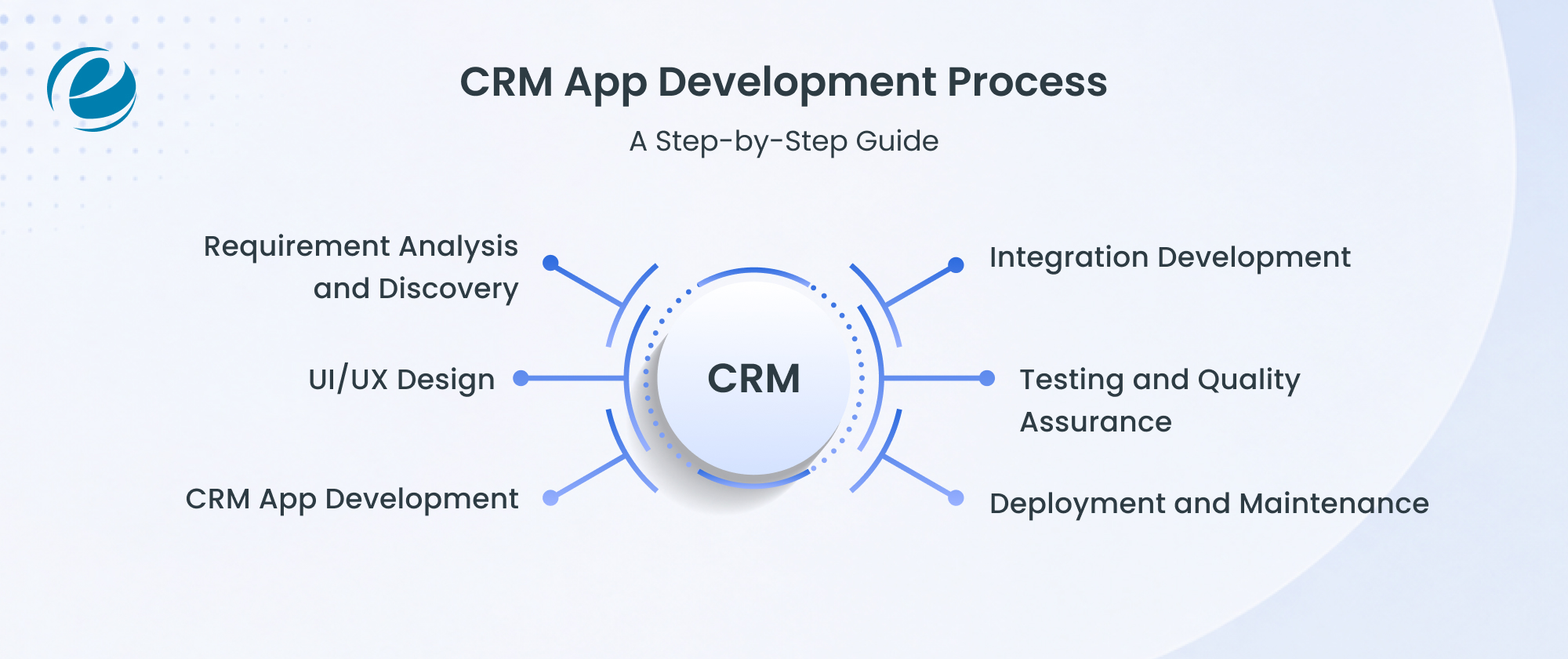
Step 1: Requirement Analysis and Discovery
It starts with knowledge of the business. The development team determines business objectives, defines user roles, lists needed features, and researches existing systems that the CRM should integrate with. This step produces three deliverables: a project scope document, a prioritized feature list, and detailed technical requirements. Skipping this step is the single most common reason for failed CRM projects.
Step 2: UI/UX Design
Design determines adoption. If the sales team finds the CRM confusing, they will quietly go back to spreadsheets. Designers map user journeys for each role, build wireframes, create clickable prototypes, and follow mobile-first principles since so much CRM usage now happens on phones.
Step 3: CRM App Development
Now the actual coding starts, and it runs on two tracks at once. One team works on what users see: the screens, dashboards, and mobile interface that people will open every morning. The other team works in the background, building the database and APIs along with the logic that makes automation and reporting actually function. Neither track is more important. A beautiful app on a weak backend fails just as fast as a powerful backend nobody can figure out how to use.
Step 4: Integration Development
A CRM that can’t talk to your other tools creates more work than it removes. That’s why this phase exists. The team connects the app to whatever the business already runs, which usually means the ERP, a payment gateway, marketing tools, and email or SMS providers. When the team does it right, you’ll know, because data moves between systems on its own and nobody exports another CSV file again.
Step 5: Testing and Quality Assurance
QA starts with whether every feature works as it should, then looks into the harder ones. Can the system handle a real Monday morning load? Is customer data secure at every point it travels? The final test is the one that matters most: putting the app in front of the actual people who will use it daily and watching what confuses them.
Step 6: Deployment and Maintenance
Launch is a beginning, not an ending. After the app goes live, the team monitors performance, fixes issues quickly, releases updates, and adds feature improvements based on how real users work with the system. A CRM should change with the business it serves.
Best Tech Stack for CRM App Development
Technology choices made in week one of a project follow the business around for years. Select well, and the app scales quietly in the background. Select wrongly, and every new feature turns into an issue with the codebase. There is no single correct answer here, but experienced teams keep reaching for the same proven combinations, and the table below shows why.
| Layer | Top Choices | Best Pick When |
| Mobile Frontend | Flutter, React Native, Swift, Kotlin | Flutter or React Native for both platforms on one budget; Swift and Kotlin when native performance is non-negotiable |
| Backend | Node.js, Java Spring Boot, .NET, Python, Django | Node.js for fast APIs, Spring Boot for large enterprises, .NET for Microsoft shops, and Django when AI features are coming |
| Database | PostgreSQL, MySQL, MongoDB | PostgreSQL for complex relational data, MySQL for familiar reliability, MongoDB for structures that keep changing |
| Cloud | AWS, Microsoft Azure, Google Cloud | Usually decided by existing vendor contracts and compliance needs, not raw features |
| AI Layer | ML models, NLP, generative AI APIs, recommendation engines | Scoring, transcript analysis, drafting, and next-best-action features |
The map is given in a table, but a few of these choices deserve honest analysis.
Frontend: The Cross-Platform Question
The biggest frontend decision is native versus cross-platform, and for most CRM mobile app development projects, cross-platform wins. Flutter app development and React Native development allow a single codebase to serve both iOS and Android, which roughly divides the mobile budget.
Native Swift and Kotlin still earn their place when an app requires heavy offline work or reduces every drop of device performance, but that describes a minority of CRM projects. Sales staff members checking pipelines and logging calls do not need console-game frame rates.
Backend: Where the Real Work Happens
Users never see the backend, yet it decides how fast the app feels and how far it extends. Node.js has become the default for API-heavy CRM builds because it handles thousands of parallel connections without slowing down.
Java Spring Boot remains the safe bet for enterprises with strict standards and large teams. Companies already deep in the Microsoft world save time with .NET. And Python Django requires a special mention: since Python dominates the machine learning ecosystem, a Django backend makes it much easier to add AI features later.
Databases
Database selection rarely gets much attention, and that’s exactly the point. PostgreSQL handles complex relational data with a reliability record that has made it the quiet favorite of engineers everywhere. MySQL does similar work with an amazing support community behind it. MongoDB fits projects where the data structure keeps changing, though CRM data is relational by nature, so document databases usually play a supporting role instead of the lead.
Cloud and AI: The Practical Layers
On the cloud, the honest advice is unexciting: AWS, Azure, and Google Cloud all run CRM workloads without complaint, so the decision usually follows existing contracts, regional compliance rules, and which platform the team already knows. The AI layer is where things get interesting.
Modern CRM builds combine machine learning models for lead scoring, natural language processing for reading emails and call transcripts, generative AI APIs for drafting summaries and messages, and recommendation engines that tell salespeople what to do next. Plan for this layer from the architecture stage, because implementing AI onto a system that never expected it gets expensive quickly.
Ask five agencies what a CRM costs, and the answers will range from ten thousand dollars to half a million, which helps nobody. The truth is that custom CRM development cost behaves like construction cost: the price of a building depends entirely on what goes inside it. No agency can quote an exact figure without knowing your requirements, but broad estimate ranges still help with planning. Here are three typical categories, what each one usually includes, and who each one fits.
| Basic CRM App | Medium Complexity | Enterprise CRM App | |
| Cost Range | $25,000 to $50,000 | $50,000 to $150,000 | $150,000 to $300,000+ |
| Timeline | 3 to 4 months | 4 to 8 months | 8 to 12+ months |
| What’s Included | Contact management, basic dashboard, lead tracking | Workflow automation, mobile app, integrations, analytics | AI features, advanced analytics, enterprise security, complex integrations |
| Best For | Small teams replacing spreadsheets | Growing businesses with real sales processes | Large organizations, regulated industries, thousands of users |
Basic CRM App: From Spreadsheets to a Real CRM
A basic CRM app is for businesses that have been running sales out of Google Sheets and can now admit the sheets have hit their limit. Contact management, a clean dashboard, and lead tracking cover the essentials. Nothing fancy happens here, and nothing fancy needs to. A small team gets its first real system, spends between $25,000 and $50,000, and sees it live in three to four months.
Medium Complexity CRM: Automation for Growing Teams
This is the ideal spot, and it is where the majority of custom CRM app development projects settle. The budget of $50,000 to $150,000 buys workflow automation that fires follow-ups on its own, a dedicated mobile app for the field team, integrations with the tools the company already pays for, and analytics that actually answer questions. Timelines stretch to between four and eight months because integrations always take longer than anyone predicts.
Enterprise CRM App: Built for Scale and Complexity
Above $150,000, the conversation changes. Enterprise projects involve AI-driven scoring and prediction, security that satisfies auditors in banking and healthcare, and integrations woven through a dozen internal systems. These builds run eight to twelve months or longer, and rushing them is how companies end up rebuilding two years later. Organizations at this level should view these figures as a starting point, not a fixed limit.
What Actually Moves the Price
Levels provide the overall framework, but five specific factors determine where within that framework a project falls.
- Feature complexity sits at the top of the list. AI recommendations, automation engines, and predictive analytics each require serious engineering hours, and adding every advanced feature to the scope increases the total.
- Platform choice matters next. An iOS-only build, an Android-only build, a cross-platform app, and a web CRM all carry different prices. When both mobile platforms matter, cross-platform frameworks are usually the most cost-effective option.
- Integration requirements are generally underestimated. Each connection to an ERP, payment system, or marketing platform looks small on paper and then eats development and testing time on both ends of the pipe.
- Security requirements hit hardest in healthcare, banking, and finance, where regulatory compliance adds real engineering and testing depth. As painful as that line item looks, a data breach costs far, far more.
- Development team location rounds out the list. Hourly rates vary widely by region, which is why so many organizations partner with teams in regions that combine strong technical talent with sensible rates.
Since these five factors interact differently for every project, the fastest way to see where yours might land is to run your requirements through an app cost calculator and get a rough estimate.
CRM App Development for Different Industries
A CRM built for a real estate agency would frustrate a hospital, and a banking CRM would confuse a factory sales team. Industry context shapes everything from features to compliance requirements. Here is how the best CRM app development varies across four major industries.
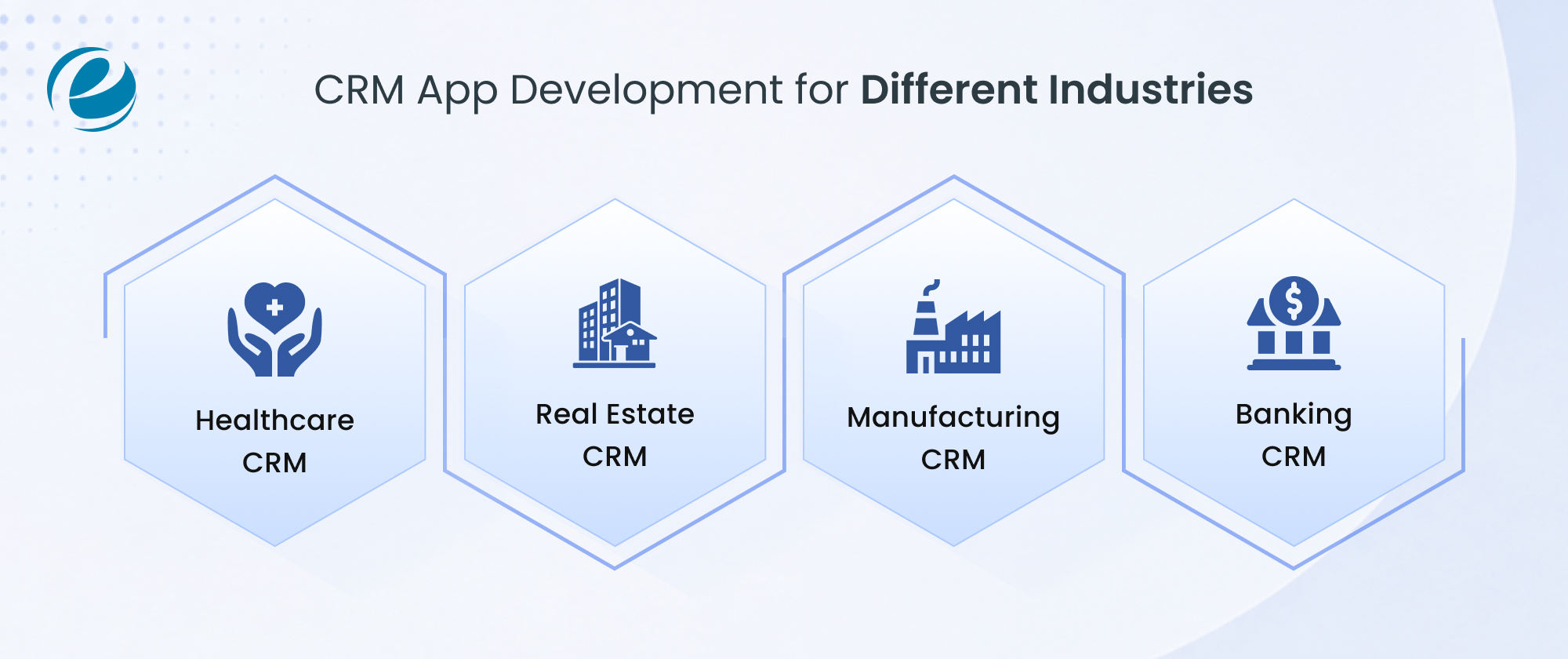
Healthcare CRM
The role of CRM in the healthcare industry centers on patient communication, appointment management, and secure messaging that fulfills privacy regulations. Patient trust depends on data protection, so security sits at the center of every design decision.
Real Estate CRM
Real estate teams depend on their follow-up speed, which is why CRM in the real estate industry revolves around property management, lead tracking from listing portals, and automated follow-ups that keep buyers engaged through long decision cycles.
Manufacturing CRM
Manufacturers rarely sell to the end customer directly. Deals flow through dealers and distributors, so the CRM has to manage those partner relationships first. Add B2B sales cycles that stretch across months and constant coordination with the supply chain, and the priorities look nothing like a typical sales CRM.
Banking CRM
Serious security defines CRM in the banking industry. These systems automate financial service workflows, manage regulated customer communication, and maintain audit records that keep compliance teams satisfied.
Why Choose EmizenTech for CRM App Development?
As an experienced CRM development company, EmizenTech has delivered custom CRMs across hundreds of client projects, and that history shows up in the work. The team knows the workflow specifics of healthcare, real estate, manufacturing, and banking well enough to skip the learning process most agencies charge you for.
AI features like lead scoring, chatbots, and predictive analytics are part of the standard core capabilities now, not an add-on. And because every project sits on scalable architecture, the same system that serves a ten-person team keeps working when there are thousands of users on it.
The engagement covers the whole journey too, from the first inquiry session through integration with your ERP, payment, and marketing platforms, all the way to support after launch. The goal is simple: build CRM software that teams actually want to use, and that keeps paying for itself years after launch.
Final Thought
CRM app development has become a strategic decision, not an IT purchase. Businesses that build custom CRM solutions get software shaped around their real workflows, complete ownership of their customer data, and flexibility that no subscription product can match.
AI is accelerating this shift quickly. What used to be a digital filing cabinet for customer records is turning into an intelligent platform that scores leads, predicts activity, drafts communication, and tells sales teams where to focus next. The businesses that win with CRM are the ones that treat it seriously: clear requirements, honest budgeting, the right tech stack, and a development partner with proven experience. Get those four things right, and the investment returns itself many times over.
FAQs
What is CRM app development?
CRM app development means a team builds customer management software specifically for your business. You get an app designed around your actual sales process, which is the main difference from buying a subscription to a ready-made tool where you adjust to the software instead.
How much does CRM app development cost?
There's no fixed price, because the cost depends on what goes into the build. As rough estimates, basic apps tend to fall in the $25,000 to $50,000 range, mid-level builds usually run $50,000 to $150,000, and enterprise projects generally start around $150,000. Features, integrations, and AI requirements decide where your project lands.
How to build a CRM app?
Start by defining requirements clearly, because this step decides everything after it. From there, the work moves through design, development, and integration with your existing tools, followed by thorough testing before launch. Plan for ongoing maintenance too. A CRM is never really finished; it evolves with the business.
What is the difference between a CRM and an app?
Think of the CRM as the whole system: your customer data, sales processes, and strategy combined. The app is simply the doorway into it, the interface your team opens on a phone or browser to actually use that system day to day.



 +1 (989) 535-9295
 info@emizentech.com
 emizentech


