
 Add us as a preferred source on Google
 Key Takeaways:
- Software development is the full process of designing, building, testing, and maintaining software.
- Software has four major types: system software, programming software, application software, and embedded software.
- The SDLC has seven phases: planning, feasibility, design, coding, testing, deployment, and maintenance.
- Methodologies like Agile, Scrum, Kanban, Spiral, and Waterfall are different ways to manage the SDLC. There is no single best one. The right choice depends on the project.
- Software development falls into many types, including web, mobile, desktop, cloud/SaaS, embedded, and AI-driven software.
- The best practices for software development are to use version control, implement agile methodology, set up CI/CD pipelines, write clean and modular code, do code reviews, practice comprehensive testing, build security from the start, and monitor the software after launch.
Every app you open, every website you scroll, every system you quietly run in the background at a bank or hospital, someone built it. That’s what software development is. It is the process of turning an idea into working software.
It is not just writing lines of code. It includes planning what the software should do, designing how it looks and feels, building it, testing it for bugs, and updating it over time.
A small business app and banking software both go through this same basic process, only at different scales. This work is more important than most people think.
Its popularity continues to rise, and so does the demand for custom software development tailored to a specific business. According to Global Market Insights, the global market for custom software development is forecasted to rise from $50.6 billion in 2026 to $213.4 billion in 2035.
That growth is not random. Businesses need software that fits how they actually work, not generic tools that force them to change their process. If you run a business, you have already faced this choice, whether to buy existing software or build custom software for your exact needs.
This guide explains what is software development, the choice between building custom software and buying off-the-shelf, Software development life cycle methodologies, and best practices for developing software.
What is Software Development?
Software development is a complete process of designing, coding, testing, and maintaining a software application. The goal of software is to fulfill end users’ needs and business objectives in an effective manner.
The software development team creates a software application in a step-by-step process called the software development lifecycle, or SDLC. Today, dedicated development teams widely use AI-driven tools to speed up software development projects.
The process is more comprehensive than programming or coding because it covers conceptualizing the idea, analyzing project requirements, coding, testing, and maintenance.
Types of Software
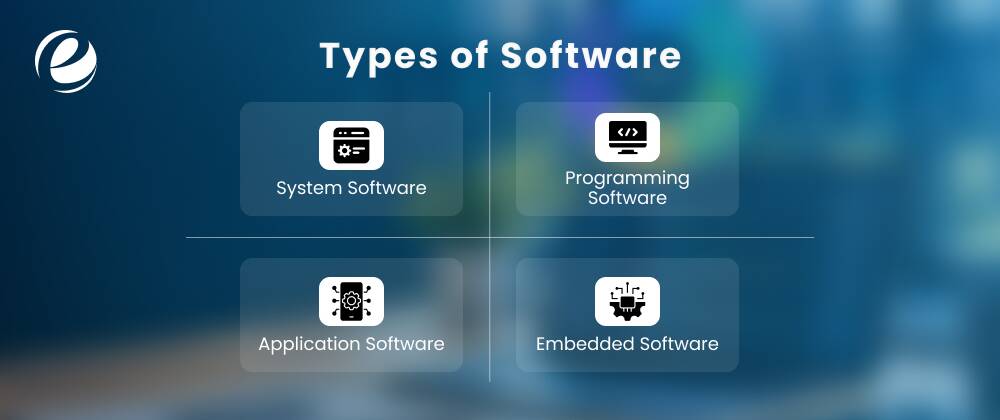
Software is divided into four major parts, and they are:
- System Software
System software handles and controls computer hardware. It is simply a bridge between the user apps and the hardware. Common examples of system software are operating systems, disk drivers, and utility software.
- Programming Software
Programming software is a complete set of tools that helps developers write, test, and debug software. It includes source code editors, integrated development environments, debuggers, and compilers and interpreters.
- Application Software
Application software is a program or group of programs designed to help end users do specific tasks like writing documents and browsing the web. This type of software includes productivity tools, media and design software, entertainment and streaming software, and mobile apps.
-
Embedded Software
Embedded software is specialized software that is made to control hardware devices. A few examples of embedded software are home appliances, automotive systems, and more.
Software Development vs. Programming vs. Coding vs. Software Engineering
These four terms get used interchangeably, but they mean different things. Programming and coding are very similar. Software development is the larger process that includes programming as one of its steps. Software engineering applies engineering principles, structured design, testing standards, and scalability planning to that larger process. The table below can help you differentiate between software development vs. programming vs. coding vs. software engineering.
| Term | What It Means | Scope |
| Coding | Developers write lines of code in a programming language. | Narrowest |
| Programming | They write and organize code to perform tasks. | Narrow |
| Software Development | It includes planning, building, testing, and maintaining software. | Broad |
| Software Engineering | It means applying engineering discipline to the development process | Broadest |
If coding is one brick, software development for startups is the whole house, plans, materials, labor, and inspection included. Software engineering is the discipline that makes sure the house does not fall down.
These distinctions matter more than they might seem. A programmer job posting usually points to a narrower, hands-on-keyboard role. A software development job or project scope usually implies planning, testing, and long-term ownership too.
Understanding the difference helps when you are writing a job description, scoping a project with a vendor, or trying to understand what a specific role involves.
What is Software Development Life Cycle?
A software development life cycle is a structured process that helps software development teams plan, build, test, and maintain high-quality software. From planning and coding to testing and deployment, it breaks the work into defined phases. There are goals and deliverables for each phase that help the team move on to the next one.
Remember that the SDLC is a framework, not a methodology. A methodology like Agile or Waterfall is how a team chooses to execute these phases, in strict order, in short repeated cycles, or some other way.
7 Phases of the Software Development Life Cycle
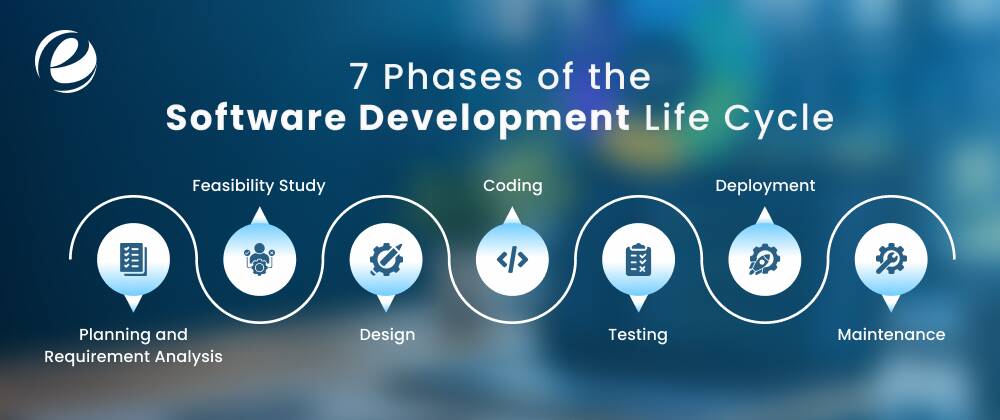
The software development life cycle has 7 different phases that include:
- Planning and Requirement Analysis
- Feasibility Study
- Design
- Implementation / Coding
- Testing
- Deployment
- Maintenance
Each phase has different tasks and goals. This provides a complete roadmap to build high-quality software.
1. Planning and Requirement Analysis
This planning and requirements phase answers one of your questions: what the software needs to do. Business analysts and the product owner communicate with the client, gather requirements, and define the project’s scope, goal, budget, and timeline.
Additionally, they also identify who the end users are and what problem the software needs to solve for them. It is a crucial stage, so do not skip it because skipping or rushing this phase is a common reason most projects fail later.
In the planning phase, the development team creates an SRS, or software requirements specification document. It is a complete document that has all the details of the software development.
2. Feasibility Study
Planning sets the direction. Analysis fills in the detail. The team looks into user requirements, runs feasibility checks, and pulls in whatever data is available. For instance, past project performance, customer feedback, security requirements, and what IT resources are available.
Additionally, they also do assessment tests to see if the proposed project is realistic and likely to succeed or not. It simply means looking at:
- Technical feasibility: Can this project be built with the available tools and skills?
- Financial feasibility: Does the budget support it?
- Operational feasibility: Will the organization actually use and maintain it?
Besides, experts will also check legal and regulatory feasibility, and this is very common in industries like healthcare or finance. This feasibility study phase can stop a failed project before the client spends money on software development.
3. Design
Now, during this design phase, the requirements are transformed into a blueprint. UI/UX designers and senior developers select the system architecture, database structure, user interface layout, and how different components will talk to each other.
Teams often produce two levels of design: a high-level architecture overview and a detailed design that developers can code directly from. Good design decisions at this stage prevent expensive rewrites later. This phase usually produces a design document that developers use as a reference throughout coding.
A lot of modern software uses a microservices setup. It means instead of one large program, the application is broken into smaller, independent pieces that can develop, update, and deploy on their own.
This phase usually produces a working prototype and a software design document or SDD that developers use as their development guide.
4. Coding
This is the phase most people visualize when they hear software development. In the coding phase, the software development team writes the code, following the design document and requirements laid out earlier.
They choose a tech stack that fits the project requirement. Additionally, they also build out any APIs like REST APIs, or interfaces the software needs. They generally split the work by module or feature, use version control to track changes, and follow coding standards to keep the codebase consistent.
Now, the team runs code reviews during the coding phase itself, rather than waiting until testing, so they can catch bugs in this phase. The coding phase usually takes the longest of the seven, since it is where the software actually gets developed.
5. Testing
Once there is a working version of software, the team goes for the software testing phase. This is not just one type of test. It includes unit testing to check individual pieces and integration testing to check that the pieces work together.
Besides, QA also does system testing to check the whole thing and acceptance testing to check it against what the business actually asked for.
Testers also look specifically for security gaps and document anything they find. Bugs go back to developers, get fixed, and the software gets tested again. This back-and-forth repeats until the software is fully error-free.
This testing phase costs more than any other phase. If you reduce expenses now, you are not actually reducing that cost; you are just delaying it. You will have to pay for it in the end, but it will be through an expensive system crash, angry customers, or a stressful fix at 2 a.m.
6. Deployment
Once testing passes, the software goes live. Depending on the project, this might mean a full public launch, a staged rollout to a subset of users, or an internal release inside a company.
But getting it into users’ hands is only part of the job. The bigger goal is making sure people can actually use it without their workflow breaking.
Many teams do not make the change for everyone at once. They run a beta release first. It is a smaller group that tests the software in real-time before it goes to everyone. Training sessions, user manuals, and support during the first few days after launch are all part of this phase too.
7. Maintenance
The software development life cycle does not end after the software launches. Maintenance covers bug fixes, security patches, performance updates, and new features added after release.
Users find bugs the testing team did not catch. New feature requests come in. Browsers and operating systems update, and the software must be maintained regularly. Maintenance covers all of it like fixes, updates, and handling situations nobody planned for at the start.
In some setups, like DevOps, maintenance stops being a separate phase entirely. Code gets written, tested, and deployed continuously, so fixing and improving the software becomes part of the everyday workflow instead of something that happens after the fact.
Knowing this SDLC also helps if you are not writing the code yourself. When you are working with a development team, it can be easier to ask the right questions and find problems before they cost huge money.
Read Also: What is Agile Software Development?
Why Does the Software Development Life Cycle Matter?
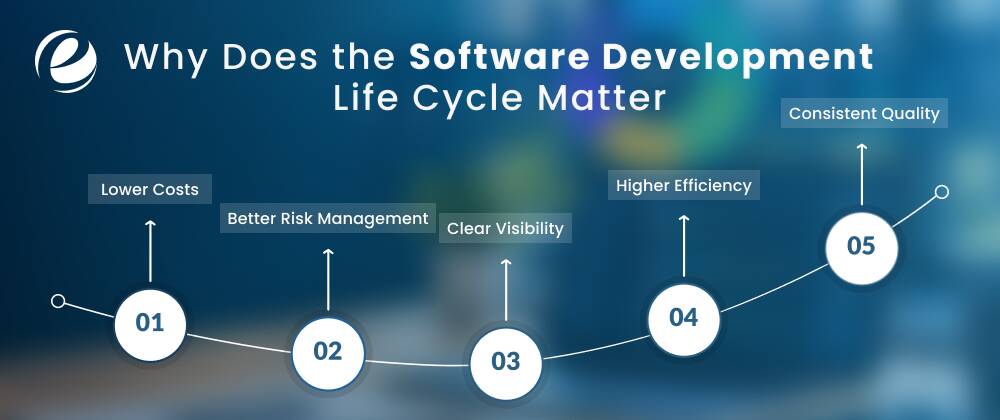
The software development life cycle matters because it provides a clear, structured roadmap to help teams build high-quality software within budget and time. Here are the benefits of the software development life cycle.
1. Lower Costs
Fixing an error or bug after software launch can cost more than catching it early. When software development teams follow a proper SDLC approach, they test and review things at every stage. That means far fewer errors and much less money wasted fixing things after the fact.
2. Better Risk Management
Every project has risks. For example, a feature that does not work as expected, a security gap, or a missed deadline. The software development lifecycle forces teams to consider what could go wrong at each step. Instead of worrying about it only after the product is live. Those early considerations prevent many problems later.
3. Clear Visibility
When everyone follows the same structured process, it is easy to see where a project stands. Is it in the design phase? Testing phase? About to launch? Nobody has to make assumptions. This kind of clear visibility keeps clients, managers, and developers aligned.
4. Higher Efficiency
Without a defined software development process, teams do repetitive work, miscommunicate, or build things nobody asked for. An SDLC approach gives everyone clear roles and a clear sequence of steps, so they do not waste time going back and forth. Things just move faster when everyone knows what is next.
5. Consistent Quality
Quality is not something you check for once at the end. Teams need to build it in at every stage. The SDLC includes testing and reviews throughout, so the final product actually works the way it is supposed to.
What is Software Development Methodology?
A software development methodology is the specific approach a development team uses to move through the SDLC phases. The SDLC tells you what needs to happen. Some methodologies move through the phases once, in a straight line. Others repeat them in short cycles and adjust in the next phase. So, teams must choose the software development methodology that aligns with their project requirements. If you have a question to ask, “what is software development life cycle models?” Check out the methodologies below.
1. Waterfall
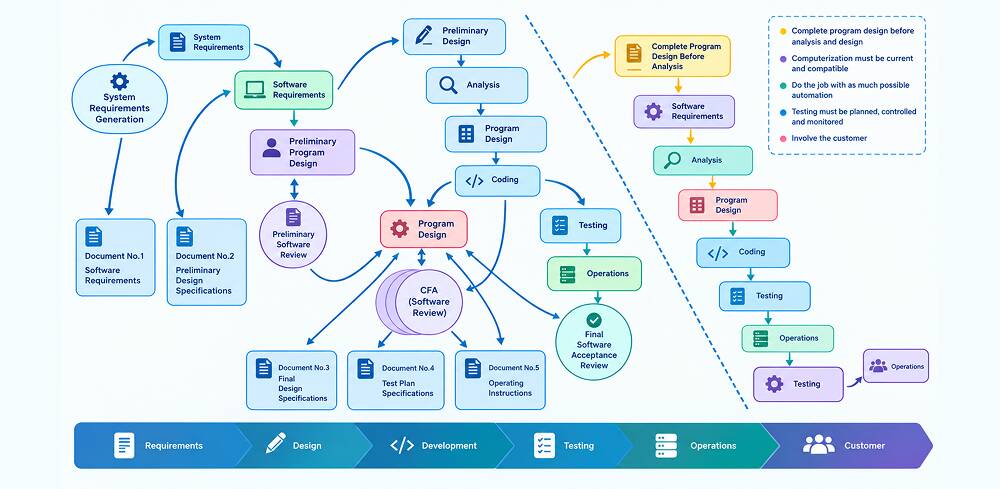
The waterfall methodology runs through the SDLC phases in strict order, one after another, with each phase finishing before the next starts. When the development process begins, clients are not allowed to make any changes or extensions to the project scope.
It is allowed to make changes during the planning stage. It works best for projects with well-understood and fixed requirements and scope, like regulated industries or hardware-dependent systems.
Suitable for:
- Waterfall suits projects where the project scope will not change much once it is set.
- This methodology suits projects with fixed budgets and timelines.
- Documentation and predictability matter more than iteration speed.
2. Agile
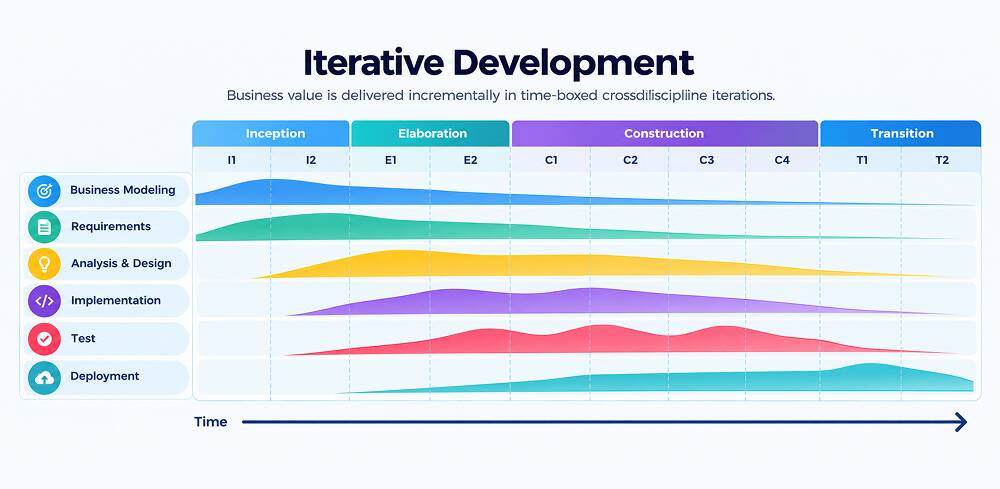
Agile is a software development methodology that breaks the project into small, repeatable cycles called sprints instead of one long sequence. The team develops, tests, and collects feedback in small sprints, then adjusts based on what they learn.
This makes Agile the best fit for projects where requirements are likely to change, which is most modern software. Agile software development methodology is not a fixed process. It is a set of principles laid out in the Agile Manifesto that other methodologies put into practice.
Suitable for:
- Dynamic projects where requirements are not fixed and change based on end-user feedback.
3. Scrum
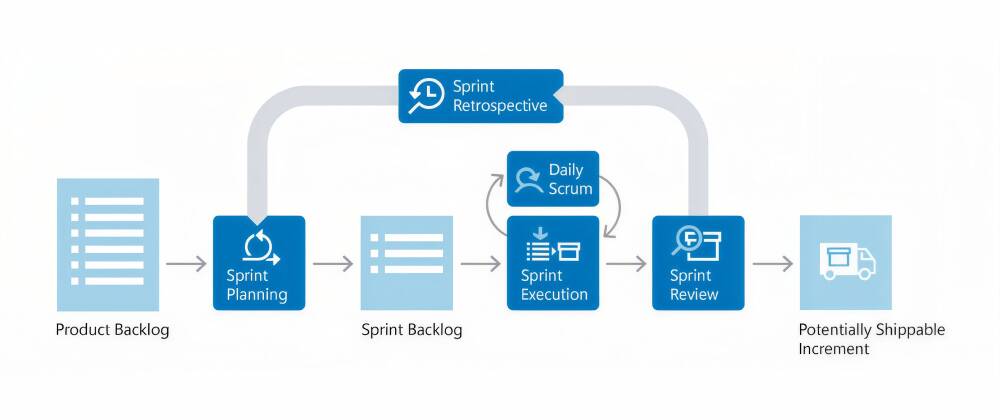
Scrum is a specific way of running Agile, or an Agile framework. In this iterative methodology, the work is organized into fixed-length cycles called sprints with a defined set of objectives for each sprint. A single sprint usually takes two to four weeks.
The software development teams hold short daily check-ins, review progress at the end of each sprint, and adjust the plan for the next sprint. Roles like Scrum Master and Product Owner give the process clear ownership.
Suitability:
- Scrum is good for teams that want the flexibility of Agile but need more structure in managing their work.
4. Kanban
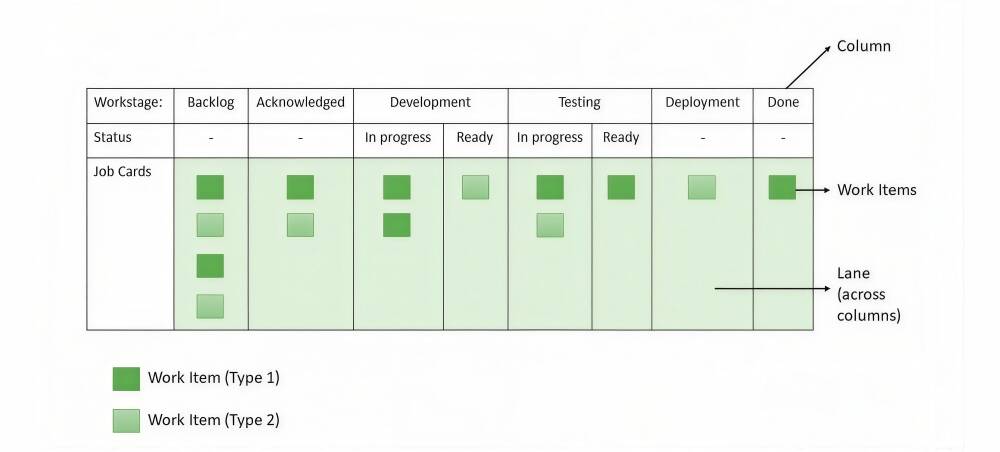
Kanban is a software development methodology that visualizes activities on a virtual board to ensure the entire project is visible and the developers’ workload is as good as it can be. Developers can use Kanban with Scrum and Waterfall.
It manages work visually using a board with columns like To Do, In Progress, and Done. Instead of fixed sprints, tasks move continuously on the board as they are completed. Then development teams set limits on how much work can sit in progress at once to avoid delays.
Suitability:
- Kanban is a good fit for teams with a constant flow of incoming work, like support or maintenance teams.
5. DevOps
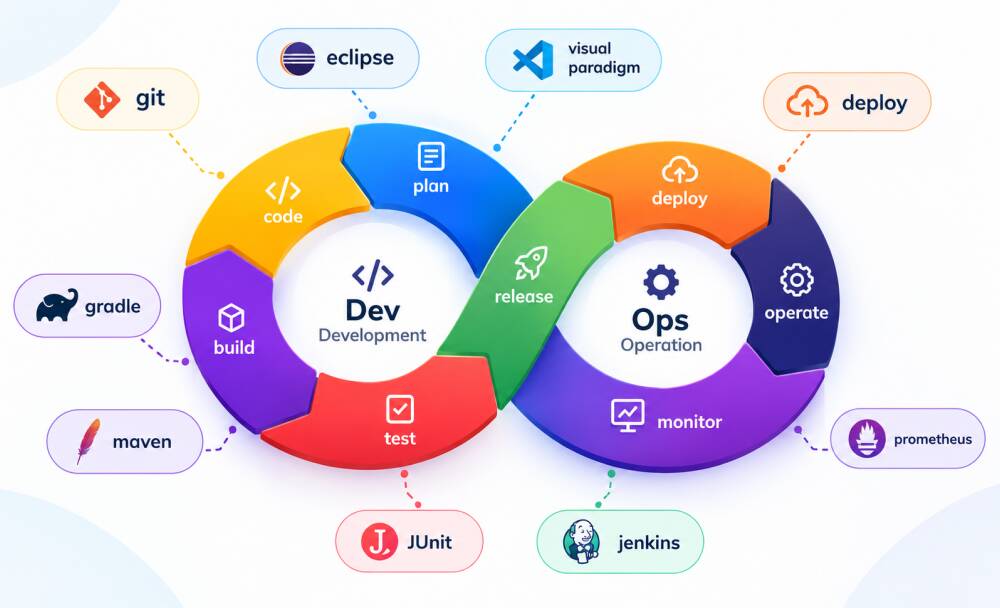
DevOps merges development and IT operations into one continuous process with heavy use of automation for testing, deployment, and monitoring. The goal is to release updates faster and more reliably.
The goal is to release updates faster and more reliably, without the traditional handoff delays between development and operations teams.
Continuous integration and continuous delivery (CI/CD) pipelines are a major part of the DevOps team’s work. DevOps works alongside Agile more often than it replaces it.
Suitable for:
- SaaS-like projects that are highly scalable and need to release new software often.
6. Spiral
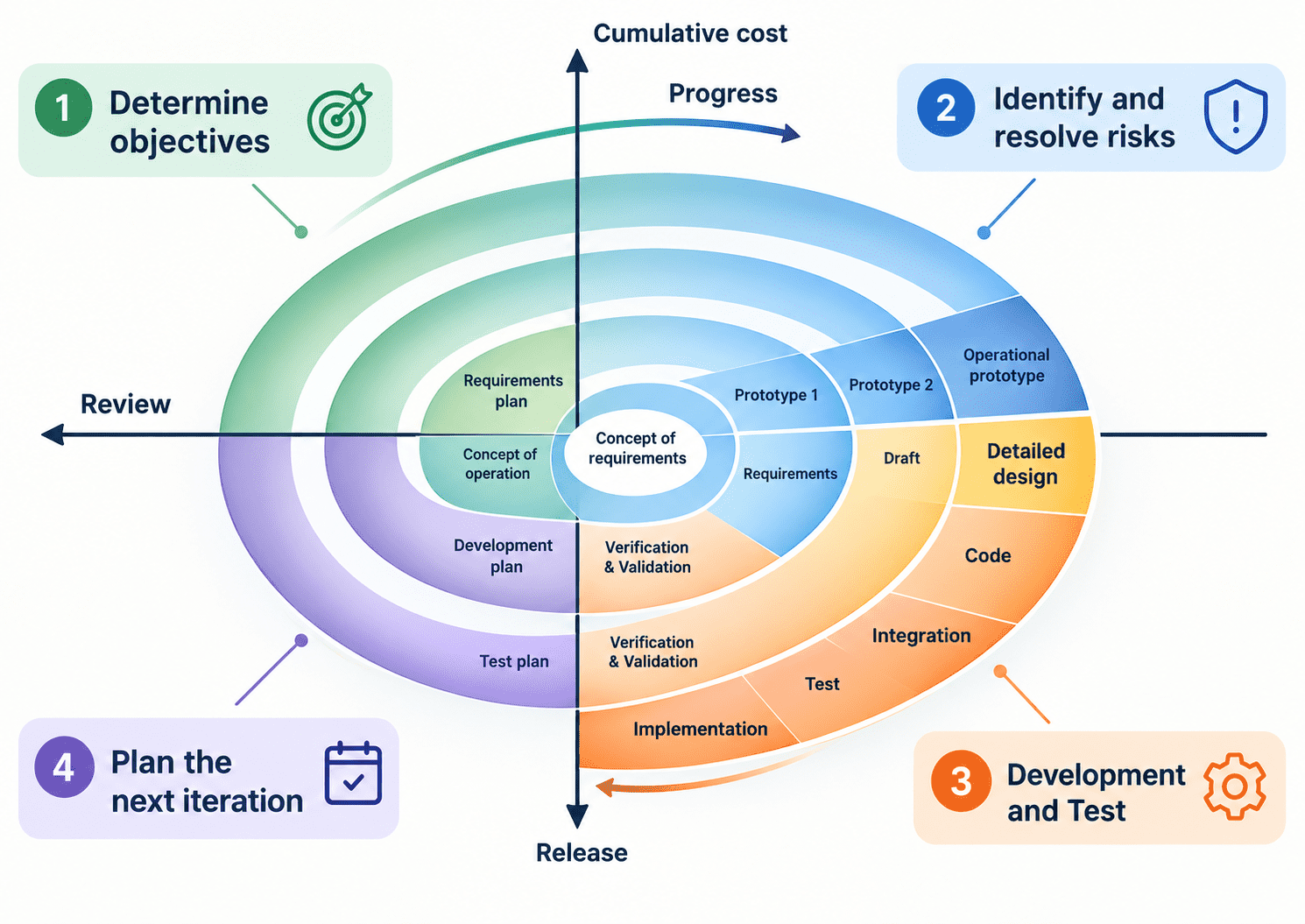
Spiral methodology combines elements of Waterfall with a strong focus on risk analysis. It repeats through the planning, design, build, and evaluation phases in expanding loops.
Each loop reviews the risk before going ahead, and the project only advances once that loop’s risks are addressed. It suits large, complex, high-risk projects, such as government or enterprise systems, where the cost of failure justifies the extra planning overhead.
Suitable for:
- High-risk, large, and complex projects where requirements are not clear or could change.
7. Lean
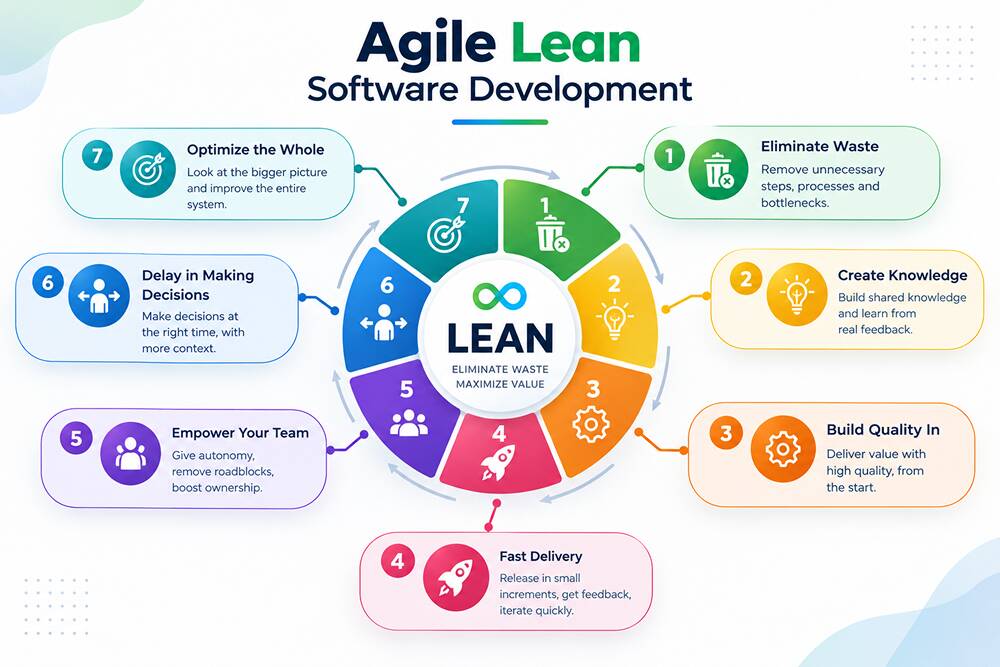
Lean development methodology is a project management approach that increases end-user value and reduces waste. Its objective is to develop a cost-efficient and adaptable product while removing non-value-added work for the end users.
Additionally, it borrows from lean manufacturing principles and concentrates on fast delivery and continuous improvement. Also, it reduces unnecessary work like excess documentation. The lean approach pairs well with Agile and works best for teams whose focus is on efficient, iterative delivery.
Suitable for:
- MVP development and projects that have limited budget and timeline.
8. V-Model
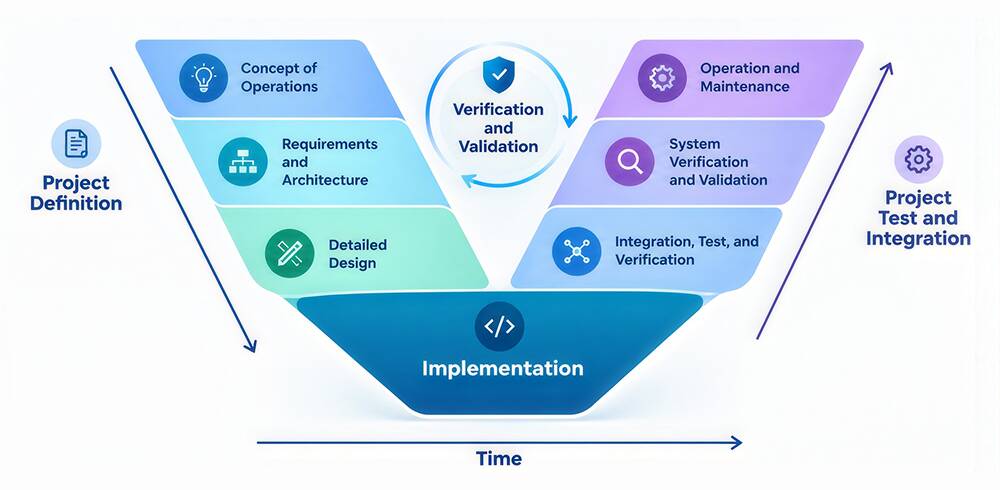
The next methodology is the V-Model. In this software development methodology, the V-Model extends Waterfall by pairing each development phase with a related testing phase. This is drawn as a V-shape when mapped out.
For every software design decision, there is a matching test planned from the start, rather than testing at the very end. The teams that also use an adaptive software development methodology sometimes combine their risk-driven planning with V-Model style verification for complex development.
Suitable for:
- Projects like medical or safety-critical software where verification matters at every step.
Types of Software Development
Software development takes many forms that include:
- Cloud-native development
- Mobile app development
- AI-assisted development
- Web development
- Embedded System Development
- Desktop Software Development
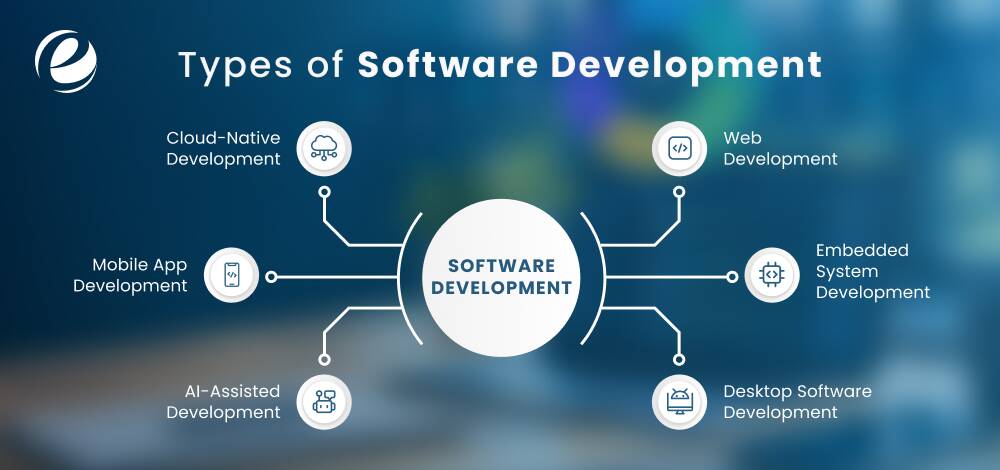
But software development is not one thing. It takes different forms depending on where it runs, who uses it, and what it is built to do. Knowing the main types helps businesses decide what kind of team, budget, and timeline a project needs.
1. Cloud-Native Development
Cloud-native development builds applications hosted on remote servers, known as the cloud, through a subscription. Users do not install or maintain the software themselves. The cloud provider manages the updates, hosting, and infrastructure.
Cloud-based development has become the default for most new business software largely because it removes the maintenance burden from the customer’s side.
2. Mobile App Development
Another approach is mobile app development. It builds software for mobile phones and tablets, either as native apps or cross-platform apps. Native apps are likely to do better and use device features more fully.
But cross-platform applications save huge development time and cost by sharing most of the code between platforms. It means developing a single codebase for both platforms.
3. AI-Assisted Development
AI-assisted development is a method to create software that learns from data. It covers everything from recommendation engines and chatbots to predictive analytics and computer vision systems.
It is one of the most popular categories in software, and it increasingly overlaps with other types, like enterprise and mobile software. Most new products now develop some AI-driven feature directly into the core product.
4. Web Development
Web development is an approach to creating applications and sites that run in a browser and require no installation. It divides into front-end, which means what users see and interact with, and back-end, which means the server, database, and logic behind the scenes.
Most business websites, e-commerce platforms, and web-based systems fall into this category, and updates roll out instantly to every user since there’s nothing to download.
5. Embedded System Development
Embedded software runs on dedicated hardware developed for a particular function. For example, car dashboards, medical devices, or smart appliances. It is not like other general software.
Basically, developers write the low-level code that runs on hardware devices. Programming languages like C or C++ are used and have tighter performance and reliability requirements. This is because there is often no easy way to fix it after deployment.
6. Desktop Software Development
Desktop software development is another approach to building native software that runs directly on a computer’s operating system like Windows, macOS, or Linux. It does not run in a web browser.
Additionally, it is common for software that needs deep system access or heavy processing power, like design tools, accounting software, or engineering applications. It is less common for new consumer products, since cloud and web options generally reach more users.
Software Development Tools and Technologies
No matter if you are developing ERP-integrated software or CRM software development, here is a categorized overview of common software development tools and technologies that are common. Let’s look at the table below.
| Category | Tools and Technologies | Purpose |
| IDEs & Code Editors | VS Code, IntelliJ IDEA, PyCharm, Eclipse, Xcode | They help developers write, debug, and navigate code. |
| Version Control | Git, GitHub, GitLab, Bitbucket | Developers use these to track code changes and enable collaboration. |
| Programming Languages | Python, JavaScript/TypeScript, Java, C#, Go, Rust | Core languages for building applications |
| Frontend Frameworks | React, Angular, Vue.js, Svelte | Developers use these frameworks to build user interfaces |
| Backend Frameworks | Node.js/Express, Django, Spring Boot, .NET, Laravel | Server-side application logic |
| Databases | MySQL, PostgreSQL, MongoDB, Redis, SQLite | Data storage and retrieval |
| Cloud Platforms | AWS, Microsoft Azure, Google Cloud Platform | Used for hosting, scaling, and managing infrastructure. |
| CI/CD Tools | Jenkins, GitHub Actions, GitLab CI, CircleCI | These automate development, test, and deployment pipelines. |
| API Development and Testing | Postman, Swagger/OpenAPI, Insomnia | These technologies help design, test, and document APIs. |
| Project Management | Jira, Trello, Asana, Azure DevOps | It tracks time, sprints, and issues. |
| Testing Frameworks | Selenium, Jest, JUnit, Cypress, PyTest | QA uses these tools for automated and unit testing. |
| AI/ML Tools | TensorFlow, PyTorch, Hugging Face, LangChain | It is used for building AI-powered features and models |
What Are the Software Development Best Practices?
Software development best practices are proven approaches and standards that help teams write clean code, work together, and deliver reliable projects. Good software development tools do not save a project by themselves. What a team does with them, day after day, decides if the software holds up under real use or falls apart within a year of launch. So, we have jotted down the software development best practices teams must consider.
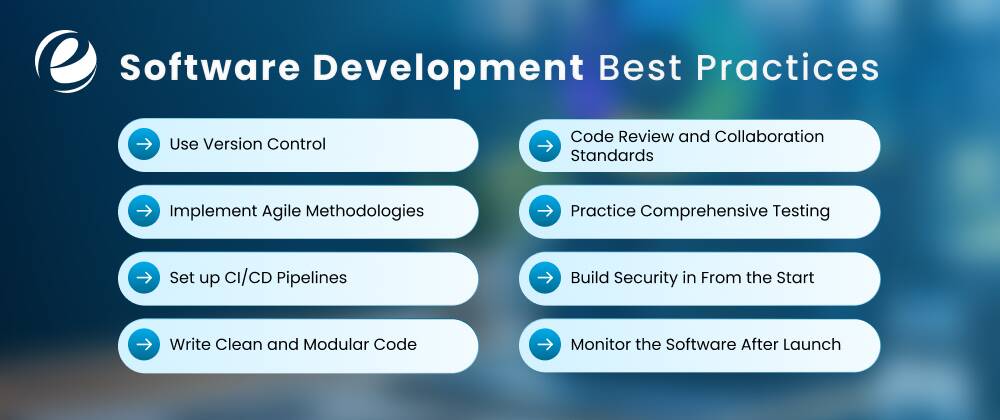
1. Use Version Control
Version control is the most important aspect of the software development workflow. Some tools enable developers to continuously track, manage codebase changes, and revert to an earlier version if needed.
Developers must track every change to the codebase with a tracking system like Git. Also, write clear messages that explain the reasoning behind code changes. You must maintain safety nets that allow teams to roll back errors and communicate easily.
2. Implement Agile Methodologies
Agile approaches, developing in small cycles or iterations and collecting feedback, catch misunderstandings about project requirements in the early stage. Implementing such practices can save huge months of work that would have gone in the wrong direction.
This matters more than which particular framework, Scrum, Kanban, Scrumban, or something in between, a team follows. It improves visibility into the team’s progress and resource use.
3. Set up CI/CD Pipelines
Manual deployments are very slow, inconsistent, and easy to get wrong under time pressure. A continuous integration and continuous delivery (CI/CD) pipeline runs the test suite and pushes updates automatically once code passes.
You must set up CI/CD pipelines to build, test, and deploy code changes. This approach allows teams to release more frequently and with less risk for each release. It also reduces manual errors and speeds up software launches.
4. Write Clean and Modular Code
The next most effective best practice of software development is to write clean and modular code. This makes the software very easy to maintain and scale.
Clean code minimizes technical debt, improves readability, and makes sure you can update future implementations very smoothly. Also, make sure to break large systems into small, independent, and reusable modules.
5. Code Review and Collaboration Standards
A second person catches bugs, security gaps, and bad assumptions that the original author missed simply because they were too close to the problem. Review also spreads knowledge of the system across the team, so the project does not depend on one person’s memory.
Teams can automatically create, share knowledge, and stick to coding standards with the help of peer reviews and clear collaboration standards.
6. Practice Comprehensive Testing
Unit tests check small pieces of code in isolation. But integration tests check that those pieces work correctly together. End-to-End tests check the whole flow the way a real user would experience it. If the team skips any of these layers, it will leave a gap that tends to show up later.
It is usually after the software has already been released. Besides, developers must implement TDD (test-driven development) by writing tests before implementing the actual code. After that, they regularly retest fixes to ensure stability on many devices.
7. Build Security in From the Start
Security is the most crucial thing for any development project. Do not treat it as an afterthought. It means checking third-party dependencies for known bugs, validating anything a user submits, encrypting sensitive data, and giving users and systems only the required access.
But if you add security at the end of a project, once the architecture is already set, the cost is far more than designing for it from day one.
8. Monitor the Software After Launch
Monitoring the software after the launch is one of the most crucial software development best practices. Logging, error tracking, and performance monitoring tell a team when something breaks in production. If you treat software launch as the last stage instead of the start of an ongoing process, it can surpass your budget.
How is AI Used in Software Development?
AI provides tools that increase efficiency and improve the software development process. Gen AI is driving key advancements by automating tasks and increasing productivity. Let’s take a look at the major areas where software development uses AI.
1. Code Generation
AI tools help software developers by providing code or generating features based on human queries. This speeds up development by automating repetitive tasks. Some AI tools like GitHub Copilot, Claude Code, and Tabnine help developers write code faster.
2. Bug Detection and Fixing
Generative AI tools can identify errors and bugs in the codebase. They can examine large databases. So, they simply examine patterns within the codebase and offer quick fixes. It also shows how software is working right now and identifies errors that might happen in the future.
3. Autocompletion
Gen AI can examine the written software code and recommend the next line of code to developers who are actually working on it. If developers find this suggestion accurate and reliable, they can accept it.
AI tools really save a lot of developers’ time. Besides, it is quite helpful for those developers who are new to different coding languages or have not worked on this type of work.
4. Deployment
Gen AI assists software development teams in optimizing the CI/CD pipeline. It allows developers to frequently connect code changes to a central repository and accelerates the delivery of regular code updates. Also, it assists teams in running quality checks and maintaining code quality, while AI improves all elements of this process.
How Can EmizenTech Help Build Custom Software?
EmizenTech is a trusted ERP software development services provider that creates custom software and digital solutions with ERP integrations. But ERP software development services are just one aspect of what EmizenTech offers when building custom software.
Founded in 2013, we have spent more than a decade working with businesses in multiple industries like fintech, healthcare, real estate, and manufacturing. We help them turn specific operational challenges into working software. Here are some of the projects we have delivered for different industry clients:
- Transportation Management Software – US Midwest
- Custom ERP SCM Software – USA
With 200+ professionals and over 1,200 completed projects, we have built a track record of delivering software that fits the business it serves.
Our expert team starts by understanding the business’s operational workflow, then designs and develops software around that. From ERP systems to custom CRM, a cloud-based platform to full-scale enterprise apps, EmizenTech has expertise in developing every type of solution.
Our software developers also adapt to modern technologies like AI, IoT, and ML, so the end product is not just functional but built to scale. Thus, if you are planning to build a custom ERP solution, book a free consultation with us now!
Conclusion
Software development today runs on a mix of tools that change fast and practices that do not. Frameworks, cloud platforms, and AI assistants will keep shifting year to year, and the specific list in this guide will look different in five years.
Testing, code review, security built in from the start, and clear documentation stay useful no matter which stack a team uses. Since teams widely use AI in software development, it speeds up routine tasks like writing code over and over, testing first drafts, and writing documentation.
It has not changed the need for people who understand what they are building, why it needs to work that way, and where the choices are made. The trust gap in AI-generated code is a reminder of this, not a reason to avoid these tools.
If you now understand what is software development but are not sure where to start, it is best to consult an experienced software development company that can help you avoid common errors and build something that lasts.
FAQs
What is software development?
Software development is a complete process of planning, designing, coding, testing, and maintaining software applications to meet user needs and business objectives.
Which SDLC is the best for developing high-quality software?
Agile is considered the best methodology for developing software. However, it depends on the project requirements. Agile suits projects with changing requirements, while Waterfall suits projects with a fixed, well-defined scope.
What is the software development life cycle?
SDLC is a framework or standard that helps to build reliable and high-quality software. It includes 7 stages: planning and requirements analysis, feasibility study, design, coding, testing, deployment, and maintenance.
How much does software development cost?
The cost of software development starts at $30,000 and goes up to $300,000+, depending on software complexity, features, development team size, and timeline. Book a free consultation to get an exact cost quotation for your project.
What is the difference between SDLC and Agile?
The SDLC is the set of phases every software project moves through: planning, design, coding, testing, deployment, and maintenance. Agile is one way to move through those phases in short, repeated cycles. SDLC is the what, and Agile is one option for the how.
What is the future of software development?
The future of software development is AI tools that help developers write code and avoid repetitive tasks. They can help developers with system architecture design, systems thinking, and problem-solving.
Should a business build software in-house or outsource it?
It depends on the project's scope, budget, and how central the software is to the business long-term. In-house suits core products that need tight, ongoing ownership, while outsourcing suits one-off projects, tighter budgets, or specialized skills not available locally.
What are the benefits of modern software development?
The benefits of software development are faster time to market, fewer bugs and downtime, flexible development options, better scalability, lower operational costs, full ownership, and better security.




 +1 (989) 535-9295
 info@emizentech.com
 emizentech


